Pick Shotcut if your computer is an Intel Mac, an older Windows PC or a Linux box with 8 GB of memory, or if you want free speech-to-text captions. Pick DaVinci Resolve when the machine meets its requirements and the job needs a real color grade, cleaned-up dialogue, layered effects or faster GPU exports. Both editors are free, so the computer decides first and the job second.
The requirements are far apart. Resolve 21.1.2 needs an Apple silicon Mac on macOS 15 or later, 16 GB of memory and a 4 GB graphics card on Windows, or 32 GB on Linux. Shotcut 26.9.27 runs on macOS 12 or later, Windows 10 and 11, and most 64-bit Linux systems, with 8 GB recommended for HD. Export speed follows the hardware. In the published timings pooled further down, Resolve's exports took a median 0.58 times the timeline length, Shotcut came in at 1.10x with no filters, and projects with a resize filter pushed Shotcut to a median 4.5x.
My default is Resolve on any machine that clears its requirements, because a grade built from nodes, Fairlight's dialogue tools and Fusion's compositing go further than Shotcut's per-clip filter stack. I'd still keep Shotcut installed next to it. Its Speech to Text builds captions for free, and the SRT file it exports drops into the free edition of Resolve, which can't generate captions itself.
DaVinci Resolve vs Shotcut at a glance
The Shotcut column describes Shotcut 26.9.27 unless a row says otherwise. The Resolve column describes the free edition of DaVinci Resolve 21.1.2.
| Question | Shotcut | DaVinci Resolve (Free) |
|---|---|---|
| Price | Free and open source (GPLv3); an optional $11.49 Microsoft Store build | Free; Studio is a $295 one-time license |
| Runs on | Windows 10 and 11, macOS 12 or later on Intel and Apple silicon, 64-bit Linux; Intel, AMD and 64-bit ARM chips | Apple silicon Macs on macOS 15 or later, Windows 10 or later (plus Windows 11 on Snapdragon X Elite), Rocky Linux 8.6; a separate free iPad app |
| Memory | 4 GB for SD, 8 GB for HD, 16 GB for 4K | 8 GB on a Mac (16 GB with Fusion), 16 GB on Windows (32 GB with Fusion), 32 GB on Linux |
| Graphics | Direct3D 11 on Windows, OpenGL 2.0 on Linux | A GPU with at least 4 GB of memory on Windows and Linux |
| Intel Macs | Supported by the current version | Last version is 20.3.2, on macOS 14 Sonoma |
| Highest output | 4K and 8K, with 10-bit processing | Ultra HD (3840 x 2160); larger frames need Studio |
| Color | 3-way color wheels and a 3D LUT filter, stacked per clip | Color page, where a grade is a tree of separate corrections called nodes |
| Audio | Audio filters including Reduce Noise: Audio; automatic ducking on a track | Fairlight page: EQ, dynamics, up to six insert effects per track, Noise Reduction and De-Esser; Voice Isolation is Studio |
| Effects | Chroma key, Motion Tracker, Stabilize, Time Remap, 360 filters, keyframes with easing | Fusion page for node-based 2D and 3D compositing and motion graphics |
| Captions and AI | Speech to Text with a Whisper model on the computer; Text to Speech through Docker | Imports SRT subtitles; Create Subtitles from Audio and transcription need Studio |
| HDR | HDR preview and HDR10 export since 26.6.25, with conditions | SDR delivery; the HDR features need Studio |
| H.264 and AAC on Linux | Yes, through FFmpeg | No AAC in any edition; H.264 and H.265 need Studio |
| Moving projects | EDL export (CMX 3600) with cuts and dissolves | Imports EDL, XML, AAF and OpenTimelineIO |
| Watermark | None | None on work made with free tools |
Price and licensing
Shotcut is open source under the GPLv3 license, and the Shotcut FAQ says commercial use is allowed. The same FAQ answers the privacy question plainly: "The Shotcut software does not collect, store, or share any personal information." The one exception it names is the Microsoft Store build.
That Store build is the only paid version of Shotcut. The Microsoft Store listing charges $11.49 after a one-week trial and says there are no limits on resolution, time or features and no watermark, with output up to 8K and commercial work permitted. Buying it supports the developers and brings automatic updates. The same full editor is a free download from the Shotcut download page.
Resolve's free edition is a free download from Blackmagic Design. The DaVinci Resolve 21.1.2 readme says it has the same image processing as Studio and opens media of any resolution, but masters and outputs at Ultra HD or lower and uses a single GPU on Windows and Linux. DaVinci Resolve Studio costs $295 once, and the Studio readme lists what it adds: output above Ultra HD, multiple GPUs, motion blur, temporal and spatial noise reduction, most of the AI tools, HDR tools and Voice Isolation. The Free vs Studio comparison goes through that list in detail.
The DaVinci Resolve for iPad app is free too, with Studio as a separate $94.99 in-app purchase, and the Resolve for iPad guide covers what it can do. Shotcut is a desktop editor only. Neither editor watermarks your exports. The one catch sits in Resolve: Studio-only effects can be tried in the free edition, but they render with a watermark, and the free version features guide lists what the free edition includes.
Versions and system requirements
Resolve asks for much more hardware. The 21.1.2 readme lists macOS 15 Sequoia or later on an Apple silicon Mac with 8 GB of memory, or 16 GB with Fusion. Windows 10 Creators Update or later needs 16 GB (32 GB with Fusion) and a graphics card with at least 4 GB of memory. Windows 11 on Arm is supported on Snapdragon X Elite and NVIDIA RTX Spark machines with 16 GB, and the Linux build targets Rocky Linux 8.6 with 32 GB and a discrete 4 GB GPU. The system requirements guide explains each line, and the Windows x86 vs Arm page covers Snapdragon laptops.
Intel Macs are outside Resolve 21. The same readme names 20.3.2 from February 12, 2026, as the last release for them, and it needs macOS 14 Sonoma and a Metal GPU. The project library stays readable in 20.3.2, but any project created or opened in 21.1.2 won't open there. The old versions page covers getting 20.3.2, and the Resolve for Mac guide shows how About This Mac tells an Intel Mac from an Apple silicon one.
Shotcut's FAQ sets a much lower bar: 64-bit Windows 10 (version 1809) to 11, macOS 12 to 27, or 64-bit Linux with glibc 2.35 or newer, on Intel, AMD or 64-bit ARM chips, including Apple silicon and Snapdragon X. It asks for one 2 GHz core for SD, 4 cores for HD and 8 for 4K, with 4, 8 and 16 GB of memory, plus Direct3D 11 on Windows or OpenGL 2.0 on Linux. On a slow machine, Preview Scaling and proxy editing keep playback usable.
Older systems still have a Shotcut build. The download page keeps 22.12.21 for Windows 7 and 8, 24.11.17 for macOS 11, and 24.01.31 for macOS 10.14 and 10.15. Macs from 2013 or earlier can show a preview color problem since Shotcut moved to Metal, and the page points them to 22.12.21. Linux users get a portable tar file, an AppImage, a snap and a Flatpak.
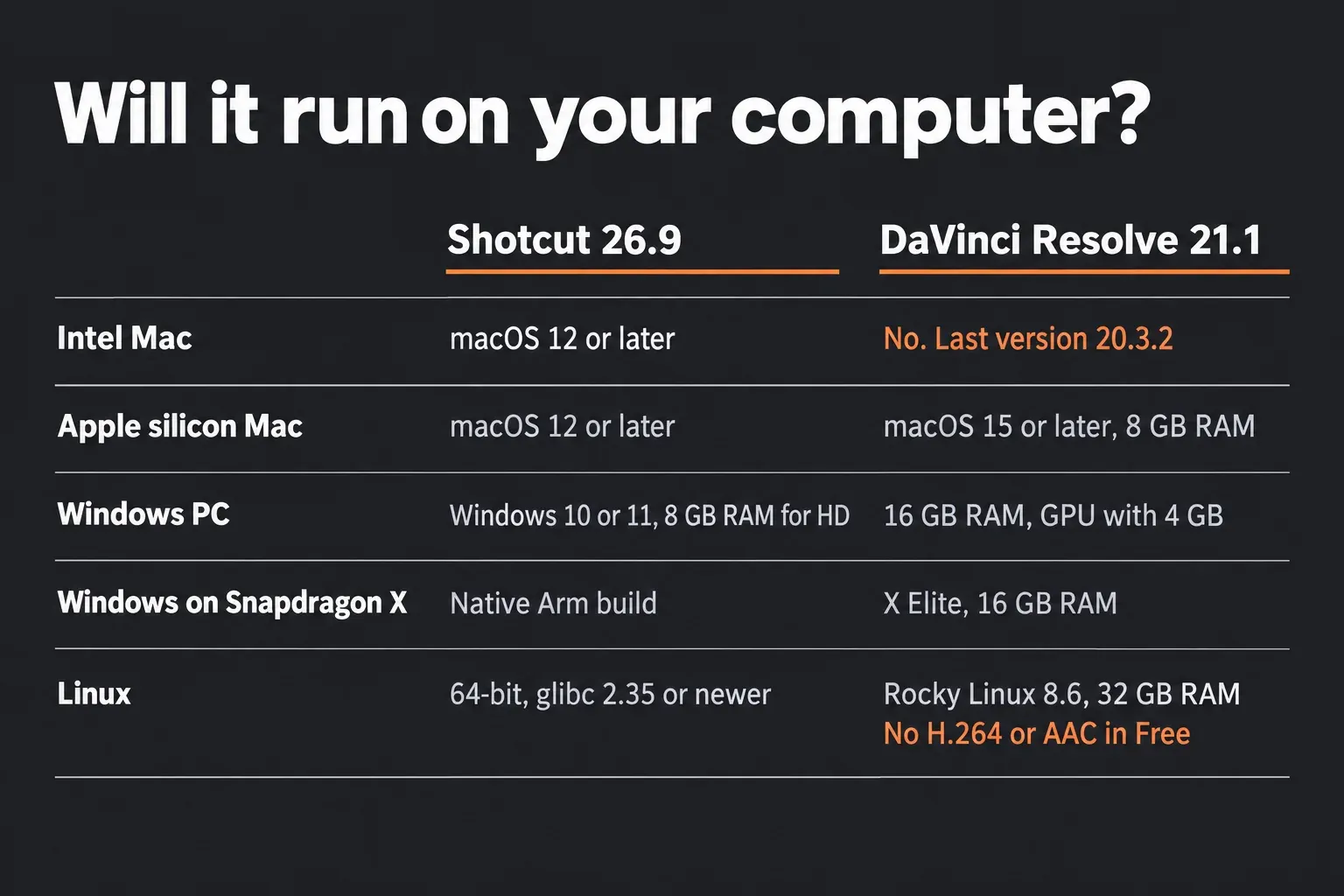
Memory and the graphics card settle most cases before features come into it. A Windows laptop with 8 GB of memory, or with integrated graphics that can't reserve 4 GB, falls below Resolve's listed minimum, and Shotcut is the editor that will run well there.
Captions and AI tools
Shotcut is the one with free AI captions. Speech to Text arrived in Shotcut 24.10 under Subtitles > Speech to Text, and runs OpenAI's Whisper model on the computer through whisper.cpp. The 24.10 notes mention one quirk: subtitle items sometimes start earlier than expected, so check the first line of each caption against the waveform. Since Shotcut 25.07 the model downloads from within the dialog, and Shotcut 26.4 added Vulkan GPU acceleration on Windows and Linux with a Use GPU checkbox; Macs already used Metal. Shotcut 26.9.27 fixed security flaws in the Whisper and upgrade downloads, so update before you rely on it.
Shotcut 25.10 added Text to Speech as well. It runs through Docker with the Kokorodoki engine and the Kokoro model, which the release notes say aren't made by the Shotcut team, and it isn't available in the Flatpak. The subtitle tools themselves are complete: the Shotcut features page lists SRT, VTT, ASS and SSA import, and Shotcut can create, export, render and burn in subtitles.
In Resolve, the same jobs belong to Studio. Blackmagic's Reference Manual marks Timeline > Create Subtitles from Audio as Studio Version Only, and Audio Transcription and Text-Based Editing carry the same label. Studio transcribes 14 languages, from Danish to Swedish, and exports transcripts as SRT. The transcription guide covers that workflow, and the Resolve 21 AI tools page lists the rest.
The free edition can still use captions it didn't generate. Right-click in the Media Pool, choose Import Subtitle, then drag the file to the timeline or right-click it and choose Insert Selected Subtitles to Timeline Using Timecode, as the subtitle import section describes. That makes a free caption pipeline: Speech to Text in Shotcut, Export Subtitles To File as SRT, then Import Subtitle in Resolve. AutoSubs is the other free route, a plugin that runs inside Resolve. Finished subtitles leave Resolve through File > Export Subtitle as SRT or WebVTT, and the subtitles and captions guide covers styling and burn-in.
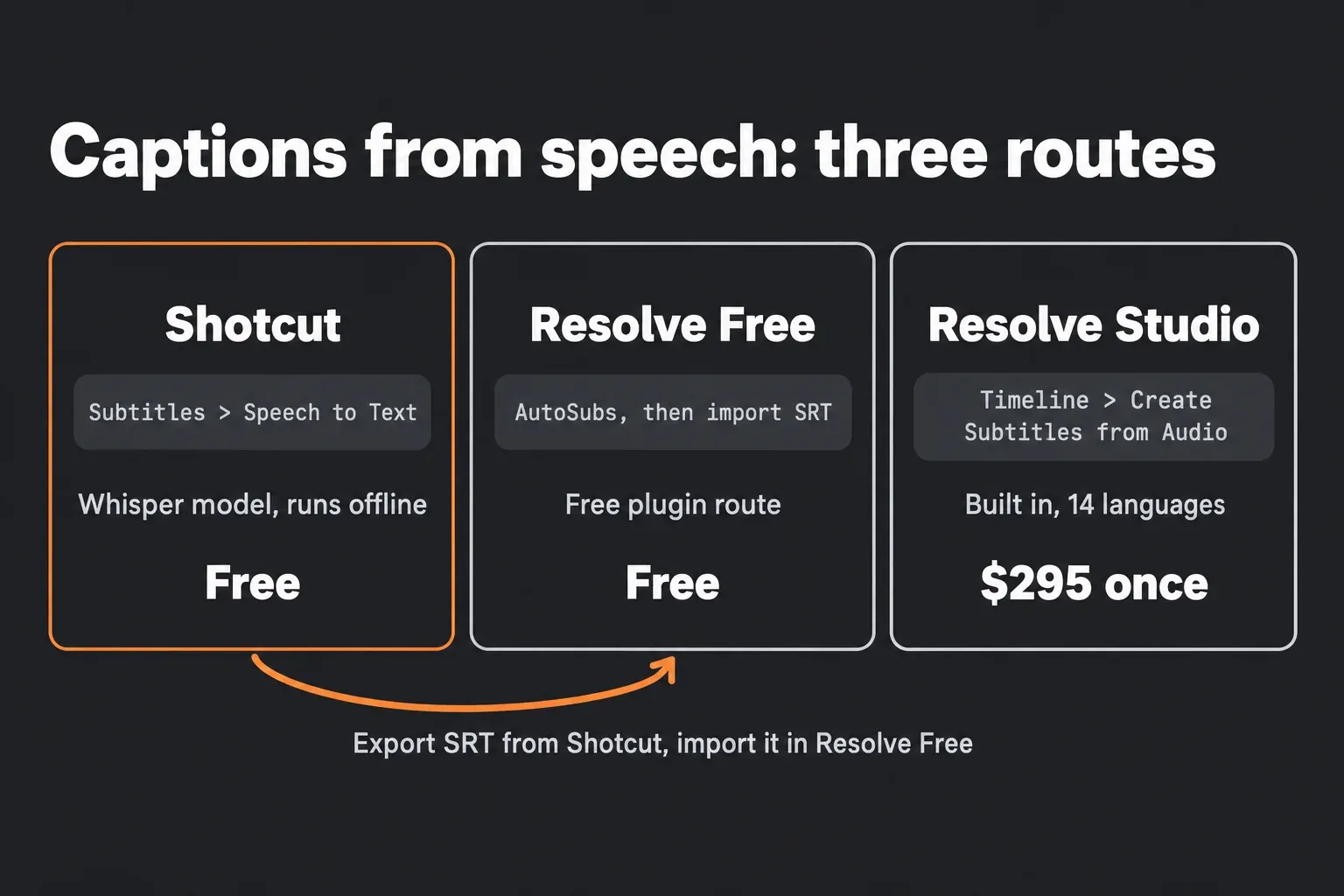
I'd use the Shotcut route for an occasional video and AutoSubs for a channel that needs captions every week, because AutoSubs keeps the whole job inside the editor where the cut is finished.
Color, audio and effects
Shotcut builds everything as a stack of filters on each clip. Resolve splits the same work across dedicated pages, and most of the difference in depth comes from that.
- Color. Shotcut has 3-way color wheels and a 3D LUT filter, and Shotcut 26.4.30 added a LUT setting to the Properties panel. Resolve's Node Editor builds a grade from separate corrections chained into a tree, so a white-balance fix, a contrast curve and a skin-tone window each stay adjustable on their own. The beginner color-grading order keeps that tree small, and the LUT guide shows where a LUT belongs in it.
- Audio. Shotcut offers audio filters such as Reduce Noise: Audio, based on RNNoise, and 26.9.27 added Auto Ducking plus a volume control and level meter for each track. On Resolve's Fairlight page, every channel strip carries up to six insert effects, Dynamics and a 6-band EQ, and Noise Reduction and De-Esser come with the free edition. The background noise guide walks through a dialogue cleanup, and the noise reduction guide covers video noise.
- Effects and compositing. Shotcut has Chroma Key filters in Simple and Advanced versions, a Motion Tracker, Time Remap, 360 filters, keyframes with easing and, since 26.9.27, an Adjustment Clip. Resolve's Fusion page does node-based 2D and 3D compositing and motion graphics, and the Fusion tutorial starts from the basics. For animation on the Edit page, the keyframes and curve editor guide covers easing.
- Stabilization. Shotcut has a Stabilize filter. Resolve stabilizes on the Edit and Color pages with a choice of correction models, covered in the stabilization guide.
- Plugins. Shotcut's features page lists VST2, LV2 and OpenFX support as work in progress, and 26.9.27 added an Allow External Plugins setting that's off by default.
For a talking-head video from one clean source, Shotcut's filters are enough. I'd move to Resolve once shots have to match each other or a voice needs real repair, because a node tree and a channel strip keep each fix separate and easy to revisit, while a long filter stack gets hard to untangle.
HDR footage
Shotcut added HDR in version 26.6.25, and the 26.6.25 release notes spell out the conditions. The HDR preview window needs an HDR display, the Native 10-bit CPU or Linear 10-bit GPU/CPU processing mode, and only filters tagged #gpu or #10bit, and the notes say it "does not appear to work on Linux". Switching between PQ and HLG takes a restart, Log-to-HDR works only in GPU mode with HLG, and HDR formats can't be mixed or converted on one timeline. HDR10 metadata is written only with the libx265 and libsvtav1 encoders, so hardware encoders are out for an HDR10 master, and Convert has no 10-bit option yet. Tone mapping HDR down to SDR is supported.
Resolve's free edition handles SDR delivery, and Blackmagic's Reference Manual says the HDR features "are only available in DaVinci Resolve Studio". The HDR export guide covers PQ, HLG and the SDR version for Studio users.
For a phone HDR clip headed to an SDR upload, either editor does the job. An HDR master is where the choice narrows: Shotcut can make one for free once every condition in its list holds, with its HDR preview limited to an HDR display on Windows or a Mac, and Resolve needs Studio.
H.264 and AAC on Linux
This is the sharpest difference for Linux users. Blackmagic's Supported Codec List shows H.264 and H.265 decoding on Rocky Linux as Studio only, and encoding as Studio with NVIDIA graphics. AAC audio isn't supported on Linux in either edition, for decoding or encoding. Phone and camera MP4 files usually carry exactly that pair, so the free Linux build often can't open them as shot.
The limits are Linux-specific. On a Mac, the same codec list gives the free edition GPU-accelerated H.264 and H.265 decoding and encoding, and on Windows the H.264 section covers the profiles the operating system supports, with more profiles and GPU acceleration in Studio. The Resolve for Linux guide covers the Linux build and its codec rules, and the MP4 import fix and MP3 and AAC fix deal with the same errors on other systems. The supported codecs guide has the full picture.
Shotcut decodes and encodes through FFmpeg, which version 26.9.27 moved to FFmpeg 9.0, so H.264, H.265 and AAC work in its free Linux builds as they do on Windows and macOS. I'd cut phone footage on Linux in Shotcut unless the job needs Resolve's color or audio tools, because converting every clip to an intermediate codec first adds a step and fills the drive.
Export speed: what the test results show
No published test times both editors on the same machine with the same project, so the composite below puts every timing on one scale: export time divided by timeline length. A result of 0.5x means a two-minute timeline rendered in one minute, and anything under 1.0x is faster than real time.
Resolve's figures come from six runs in three sources: a Japanese GPU encoding test that exported the same two-minute 4K timeline in Resolve 18.6 Free on four NVIDIA cards, a note.com export log from an M1 MacBook Air running Resolve 19.1 Free on a 29-minute 1080p project, and a Shotcut forum post where a 21-minute output from four 1080p files took just over 15 minutes. The median is 0.58x and the range runs from 0.41x to 0.71x. Shotcut's figures come from two forum threads. In a thread comparing Shotcut with CapCut and VSDC, five runs without filters on two laptops landed between 0.47x and 1.33x, a median of 1.10x. Projects with a resize filter came in at 3.5x (the median of four runs), 4.52x and 12.8x on three machines, a median of 4.5x. A 3.5-hour project on a Ryzen 9 5950X with an RTX 3090 Ti took 9 hours, or 2.57x.
| Editor | Source and machine | Timeline and export | Export time | Time ÷ length |
|---|---|---|---|---|
| Resolve | nunogameblog, 2025; RTX 3060 | 2-minute 4K timeline to H.264, Resolve 18.6 Free | 70 s | 0.58x |
| Resolve | nunogameblog, 2025; RTX 4060 Ti | Same timeline | 69 s | 0.57x |
| Resolve | nunogameblog, 2025; RTX 4070 | Same timeline | 70 s | 0.58x |
| Resolve | nunogameblog, 2025; RTX 4070 Ti SUPER | Same timeline | 71 s | 0.59x |
| Resolve | note.com, 2024; MacBook Air M1 | 29:42 1080p project at 23.976 fps with LUTs, three VST effects and titles, Resolve 19.1 Free | 732 s | 0.41x |
| Resolve | Shotcut forum, 2022; Core i7-5820K, 32 GB, Windows 11 | Four 1080p files merged into a 21-minute output at half the frame rate; edition not stated | just over 15 min | about 0.71x |
| Shotcut | Shotcut forum, 2023; Ryzen 5 4500U, integrated Radeon | 1-minute clip, no filters; hardware and software encoding at 12.8 Mbps average bitrate or 55% quality, parallel processing on | 28, 47, 70 and 80 s | 0.47x to 1.33x |
| Shotcut | Shotcut forum, 2023; Core i5-8300H, 32 GB, GTX 1050 Ti, Windows 10 | 30-second 4K 60 fps clip, no filters, NVIDIA encoder and parallel processing | 33 s | 1.10x |
| Shotcut | Shotcut forum, 2023; Ryzen 5 4500U, integrated Radeon | Same 1-minute clip with a 110% Size, Position & Rotate filter; default preset at 55% quality, hardware and software encoding, with and without parallel processing | 180 to 240 s | 3.0x to 4.0x |
| Shotcut | Shotcut forum, 2023; Core i5, 16 GB, Windows 10 | 3:06 film, 7 clips, 4 text filters, 110% enlargement, one slow-motion clip, 5 Mbps hardware encoding, Shotcut 22.12.21 | 840 s | 4.52x |
| Shotcut | Shotcut forum, 2023; Core i5-8300H, 32 GB, GTX 1050 Ti | Same 30-second 4K clip scaled to 120% | 384 s | 12.8x |
| Shotcut | Shotcut forum, 2023; Ryzen 9 5950X, RTX 3090 Ti, 48 GB | 3.5-hour project to MKV with NVENC HEVC and Opus audio, about 50 GB | 9 h | 2.57x |
The gap is real, but the hardware differs. Four of the six Resolve runs used recent NVIDIA cards, and the times barely moved, from 69 to 71 seconds between an RTX 3060 and an RTX 4070 Ti SUPER, because GPU encoding on Windows is a Studio feature. Studio finished the same tests in 36 to 52 seconds on those machines and in 287 seconds on the M1 MacBook Air. Most of Shotcut's runs came from laptops, and in the same thread CapCut exported each project in 16 to 45 seconds.
That flat line doesn't mean the free edition ignores the graphics card. The readme limits Free to one GPU on Windows and Linux, and the codec list gives it GPU encoding of H.264 and H.265 on a Mac. What Free lacks is a second GPU and GPU encoding on Windows. The GPU guide and the laptop guide cover hardware if Resolve is the editor you're keeping.
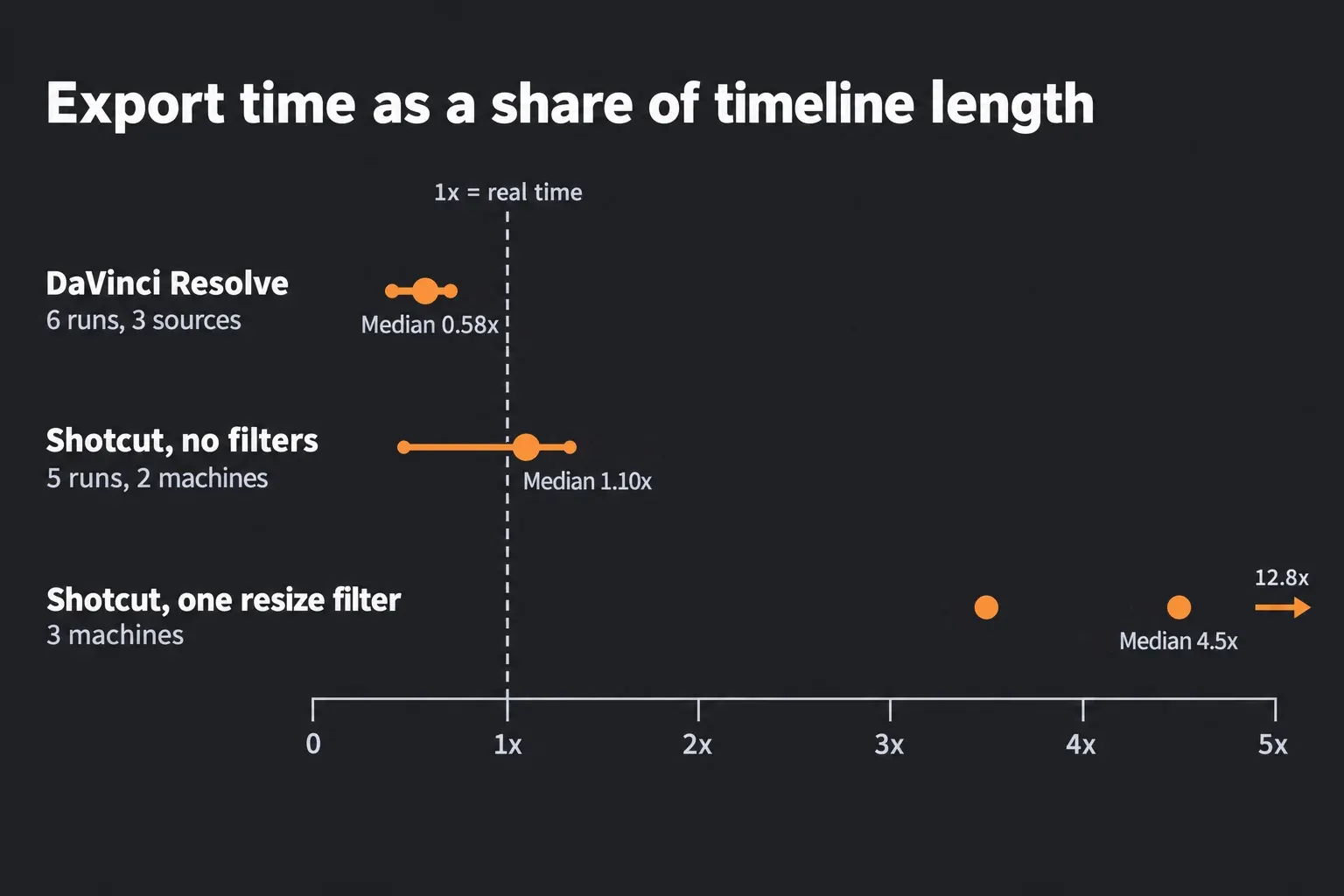
Shotcut slows down for a specific reason. In the CapCut and VSDC thread, the developer's reply says a 110% enlargement "requires a lot of CPU in Shotcut, and turning on Export > Video > Parallel processing usually helps." Another poster timed the filter by itself at 150 seconds in Shotcut against 2 seconds in CapCut, and the thread notes that Shotcut's GPU-based filters were disabled. The Shotcut FAQ sets the same expectation: in the default processing modes, scaling, filters, transitions and compositing run on the CPU, and "you cannot expect Shotcut to use close to 0% CPU and much of the GPU when exporting using the hardware encoder".
A task manager can also mislead. In a forum thread about CPU use during rendering, a user saw Resolve hold all eight cores at 98 to 99% while Shotcut stayed low. The replies explain that not every Shotcut filter is multi-threaded, and that with a hardware encoder Shotcut can build frames quickly and then wait on the GPU encoder, which doesn't show up as CPU load.
Before blaming the hardware, try the fixes the Shotcut forum keeps coming back to:
- Bilinear interpolation. In the Export panel, open Advanced, then the Video tab, and set Interpolation to Bilinear (good) in place of Bicubic (better). A 2021 forum test measured that change alone at about twice as fast.
- Filter order. Move Size, Position & Rotate to the top of the clip's filter list. The same test measured it 15% faster with Bicubic and twice as fast with Bilinear, about four times faster with both changes together.
- Parallel processing and the hardware encoder. Turn on Parallel processing and Use hardware encoder in the Export panel's advanced settings, as the developer suggests above.
- Preview Scaling and proxies. Settings > Preview Scaling and Settings > Proxy > Use Proxy make editing smoother on a slow machine.
I'd try Bilinear and the filter order before spending anything on hardware for Shotcut, because the forum test got a fourfold speedup from two settings that cost nothing. In Resolve, the equivalent levers are the render cache and the fixes in the slow playback guide.
Moving a Shotcut project into DaVinci Resolve
Shotcut can't export XML, AAF or OpenTimelineIO, so the one bridge is an EDL. Shotcut writes a CMX 3600 edit list from File > Export > EDL..., and Resolve imports it. An EDL carries cuts, source timecode and dissolves. It doesn't carry filters, text, keyframes or speed changes, so the move suits a cut that still needs its color and sound done in Resolve.
Shotcut's EDL exporter has two habits that shape the steps below. It writes every track into one file, each under its own heading line such as "=== playlist0 ===", while a Resolve EDL holds a single video track. It also counts source timecode from the first frame of each file and ignores camera timecode, with the reel name cut to the first 8 characters of the file name and the full name in a "FROM CLIP NAME" comment.
- In Shotcut, check which mode is ticked under Settings > Video Mode, then choose File > Export > EDL... and save the file.
- Open the .edl file in a text editor and copy each video track's section into its own file, such as V1.edl and V2.edl. Keep the numbered event lines and their FROM CLIP NAME comments, and leave out the heading lines.
- In Resolve, create a project and set Project Settings > Master Settings > Timeline frame rate to the Shotcut mode's frame rate before importing any media, as the EDL import section requires. The project settings guide explains the rest of that page.
- In Project Settings > General Options > Conform Options, set Use Timecode to From the source clip frame count, turn on Assist using reel names from the and choose Source clip filename, then turn on Extract reel names from EDL comments. The Conform Options section covers each setting.
- On the Media page, add the source files to the Media Pool. If they sit in one folder, right-click it and choose Add Folder Based on EDLs into Media Pool to bring in only the clips the EDL uses.
- Choose File > Import Timeline (Shift-Command-I on a Mac), pick V1.edl and click OK in the Load EDL window. Clips that didn't link show red thumbnails.
- For each extra track, right-click the new timeline in the Media Pool and choose Timelines > Import > EDL to New Track, then pick the next file.
- Play the timeline next to a Shotcut export. Every transition arrives as a cross dissolve of identical duration, and filters, titles, keyframes and speed changes need rebuilding.
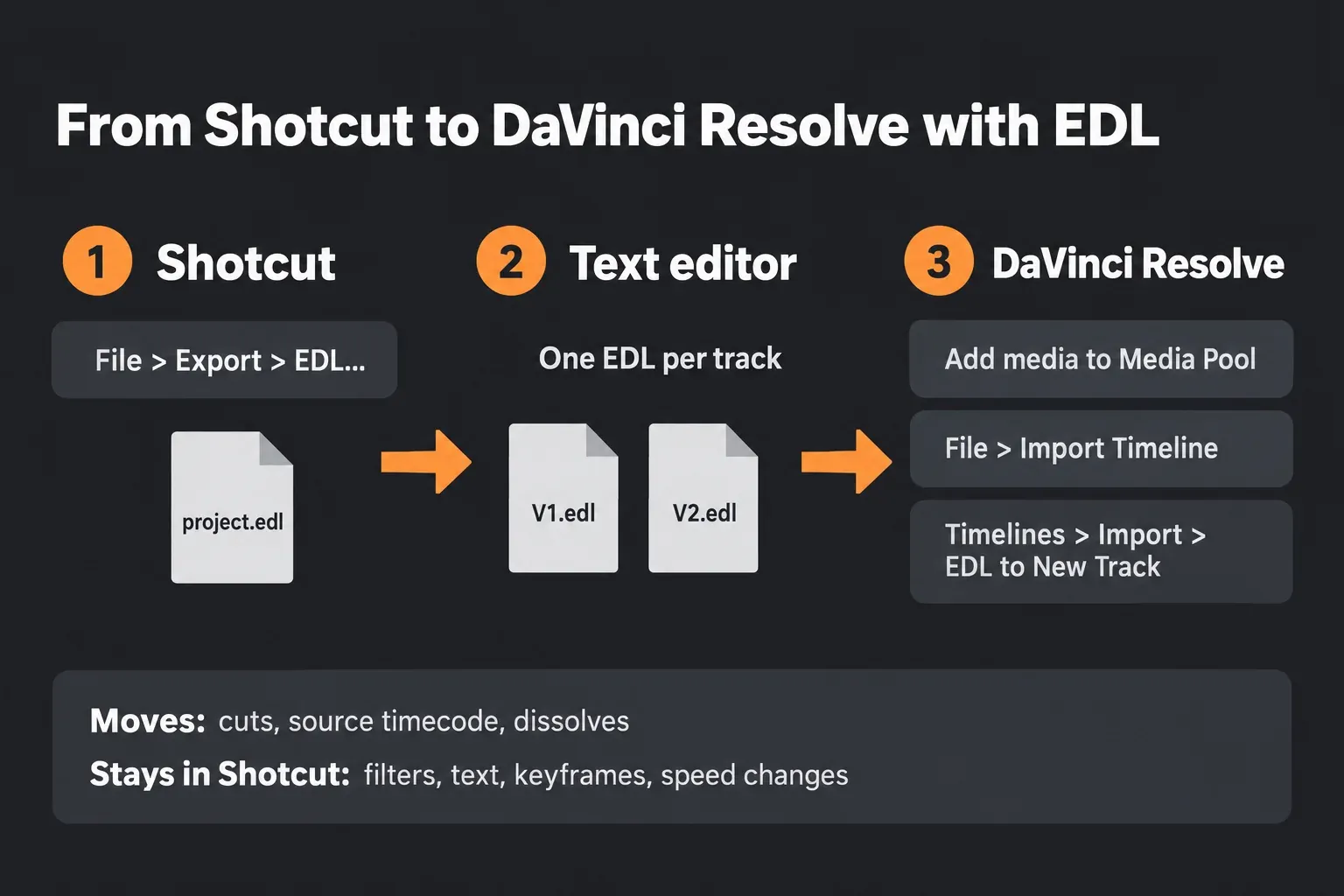
Audio needs its own plan. In a Shotcut forum thread about EDL timecode, one reply says Resolve doesn't import the audio from these EDLs and another poster saw mixed results, and a thread about EDL export warns to expect manual cleanup. For a project that only needs a grade, export the finished mix from Shotcut with the WAV preset and place it at the start of an audio track in Resolve. For dialogue work in Fairlight, lay the dialogue clips again from the original files so each one can be treated separately. Captions travel as SRT, exported from Shotcut's Subtitles panel and imported the way the captions section describes.
I'd finish an effects-heavy Shotcut project in Shotcut and start the next one in Resolve, because rebuilding every filter, title and speed ramp by hand usually costs more time than the move saves.
Which editor should you use?
Pick Shotcut if
- your computer is an Intel Mac, a Windows PC with less than 16 GB of memory or no 4 GB graphics card, or an older system Resolve 21 doesn't support
- you edit on Linux and your footage is H.264 or H.265 with AAC audio
- you want speech-to-text captions without paying
- your edits are cuts, titles, simple color and music
- you want an open-source editor that collects no usage data
Pick DaVinci Resolve if
- your machine meets its requirements and shots need matching, or a look built from separate corrections
- dialogue needs EQ, dynamics, noise reduction and de-essing
- a project needs keying, compositing or motion graphics in Fusion
- exports with scaling and filters take too long in Shotcut
- you may move to Studio later for HDR, output above Ultra HD or the AI tools
Use both if
- you want free captions in Resolve: Speech to Text in Shotcut, then the SRT into Resolve
- you cut phone footage on a Linux machine and grade on a Mac or Windows PC
- you're switching with unfinished Shotcut projects that are heavy on filters
Questions about DaVinci Resolve and Shotcut
Is Shotcut free for commercial work?
Yes. Shotcut is open source under GPLv3, and its FAQ allows commercial use. The $11.49 Microsoft Store build also permits commercial work and has no feature limits; buying it supports the developers and adds automatic updates.
Does Shotcut or DaVinci Resolve add a watermark?
No. Shotcut never adds one. Resolve Free has no watermark on work made with free tools, and only Studio-only effects tried in the free edition render with one. The free version features guide lists what the free edition includes.
Will DaVinci Resolve run on my old PC or Intel Mac?
Not on every machine. Resolve 21.1.2 needs 16 GB of memory and a graphics card with at least 4 GB on Windows, and Intel Macs stop at version 20.3.2 on macOS 14 Sonoma. Shotcut 26.9.27 runs on Windows 10 and 11 with 8 GB for HD and on macOS 12 or later, and its download page keeps builds for older systems. The requirements guide explains how to check a machine.
Does Shotcut have AI features?
Yes. Speech to Text, added in version 24.10, turns speech into subtitles with a Whisper model that runs on the computer, and Text to Speech works through Docker. Resolve's own Create Subtitles from Audio is a Studio feature.
Does DaVinci Resolve Free use the GPU?
Yes. The free edition processes on one GPU on Windows and Linux and encodes H.264 and H.265 on the GPU on a Mac. Studio adds more GPUs and GPU encoding on Windows, which is why the free-edition export times above barely changed between NVIDIA cards.
Which is better on Linux?
Shotcut, for most footage. Resolve's free Linux build targets Rocky Linux 8.6 with 32 GB of memory and a 4 GB GPU, and it can't decode H.264 or H.265 without Studio or handle AAC in any edition. Shotcut runs on 64-bit distributions with glibc 2.35 or newer and handles those formats through FFmpeg. The Resolve for Linux guide covers the Blackmagic build.
Can I move a Shotcut project to DaVinci Resolve?
Yes, as an EDL. File > Export > EDL... in Shotcut writes the cut, and Resolve imports one video track per EDL. Filters, text, keyframes and speed changes stay behind, and audio is easiest to bring over as a separate mix.
Is DaVinci Resolve harder to learn than Shotcut?
Yes. Shotcut works in one window with docked panels, while Resolve spreads the job across pages for editing, color, effects, audio and export. A first project only needs the Edit page, and the beginner tutorial builds a short video step by step.
Verdict: which free editor to keep
Shotcut is the better pick for a machine Resolve 21 leaves behind, for Linux users with phone footage, and for anyone who wants captions without paying. Resolve is the better editor once the hardware allows it, for grading, dialogue repair, effects and faster exports. Neither costs anything, so keep both if captions matter, since Shotcut's SRT goes straight onto a Resolve timeline. If CapCut or Filmora is also in the running, the Resolve vs CapCut and Resolve vs Filmora comparisons cover them. The comparisons hub has the other head-to-heads if Resolve isn't the only editor on your list.