
Quick answer: if Windows says 64-bit operating system, x64-based processor, download Windows x86 from Blackmagic Design. Despite the name, that's the normal 64-bit Resolve build for modern Intel and AMD PCs. Choose Windows ARM only when System type shows an ARM-based processor and the computer meets Blackmagic's current Windows ARM requirements.
The label trips people up because x86 often means 32-bit software elsewhere. In Blackmagic's picker it simply identifies the Intel and AMD family. Blackmagic staff confirmed that both Windows downloads are 64-bit, so there's no current 32-bit Resolve package hiding behind the x86 button.
Requirements checked October 5, 2026: the figures below come from Blackmagic's Resolve 21.1 readme, updated September 8, and the 21.1.1 readme posted October 2 repeats them unchanged. If you're downloading a different version, read its own notes. An older tutorial or a laptop's marketing page can't tell you whether a newer release supports that machine.
Choose the Build in 30 Seconds
| What Windows reports | Resolve download | Typical hardware |
|---|---|---|
| 64-bit operating system, x64-based processor | Windows x86 | Intel Core, Intel Core Ultra, AMD Ryzen and AMD Threadripper PCs |
| 64-bit operating system, ARM-based processor | Windows ARM, after checking the current supported baseline | Supported Windows-on-ARM PCs with a Qualcomm Snapdragon X Elite or NVIDIA RTX Spark processor |
| 32-bit operating system | Neither current build | Unsupported operating-system architecture for current Resolve |
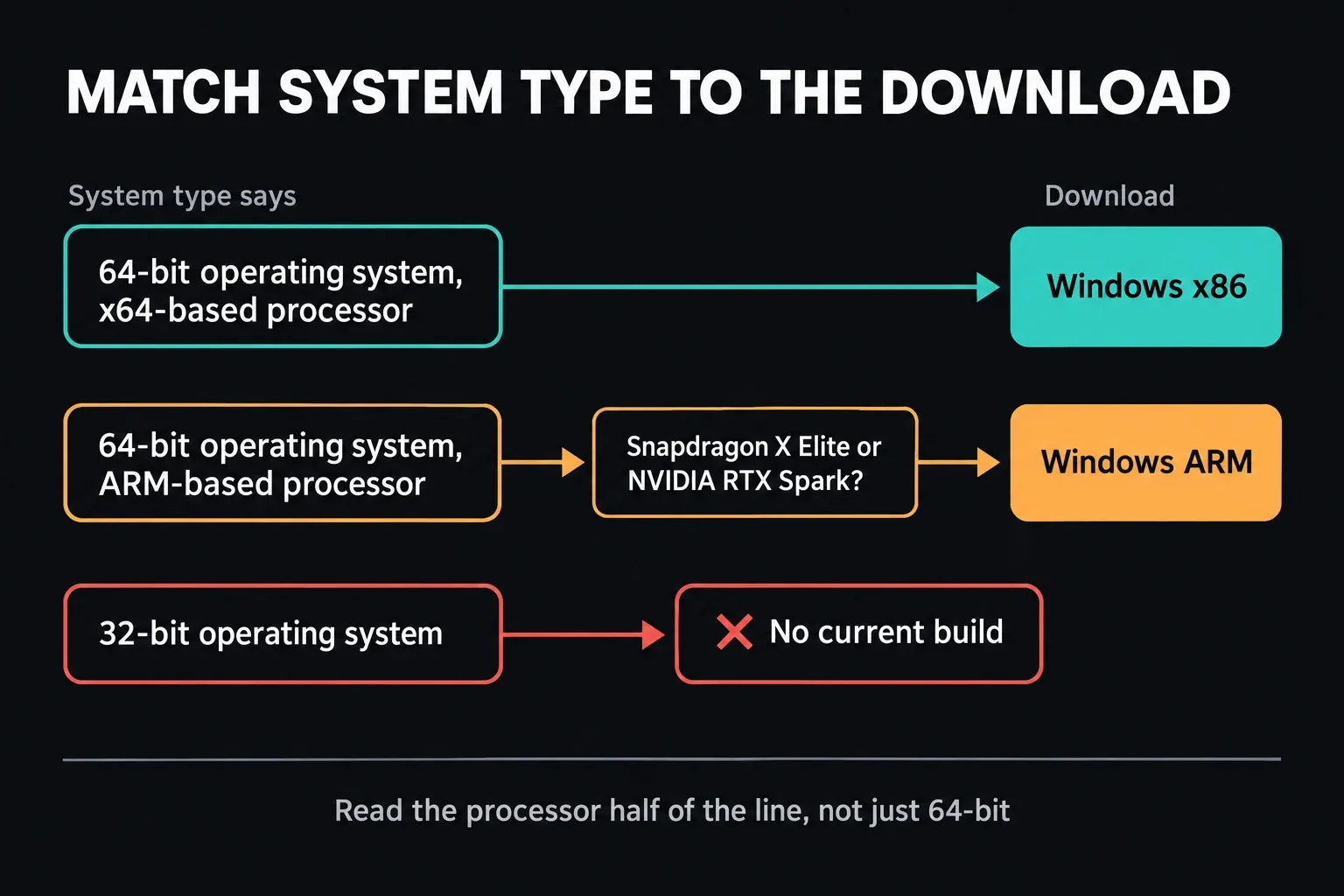
The words “64-bit” alone don't settle the choice, because both families are 64-bit. What decides it is the processor architecture: x64-based versus ARM-based. A product name such as Surface, Galaxy Book or Copilot+ PC isn't enough either; those families can span different processors and generations.
How to Check x64 or ARM in Windows
- Open Settings.
- Select System, then About.
- Find System type under Device specifications.
- Match the exact wording to the table above.
Microsoft's System type instructions separate the operating-system type from the processor type, and the processor half of that line is the part you need. Depending on your Settings version, the section is called Device specifications or Device info; either way, System type sits inside it.
Don't infer the processor from a Program Files (x86) folder: Microsoft documents that folder on Windows ARM too, where it holds x86 apps. If you're buying a computer, check its exact processor on the manufacturer's specification page. “Windows 11, 64-bit” alone doesn't tell you which Resolve package it needs.
If the machine is a conventional Intel or AMD PC and you want the full installation steps, carry on with the Windows download and installation guide. For the other operating systems, the Resolve download hub keeps the official Windows, Mac, Studio and older-version choices in one place.
Why Does Blackmagic Call the Intel and AMD Build x86?
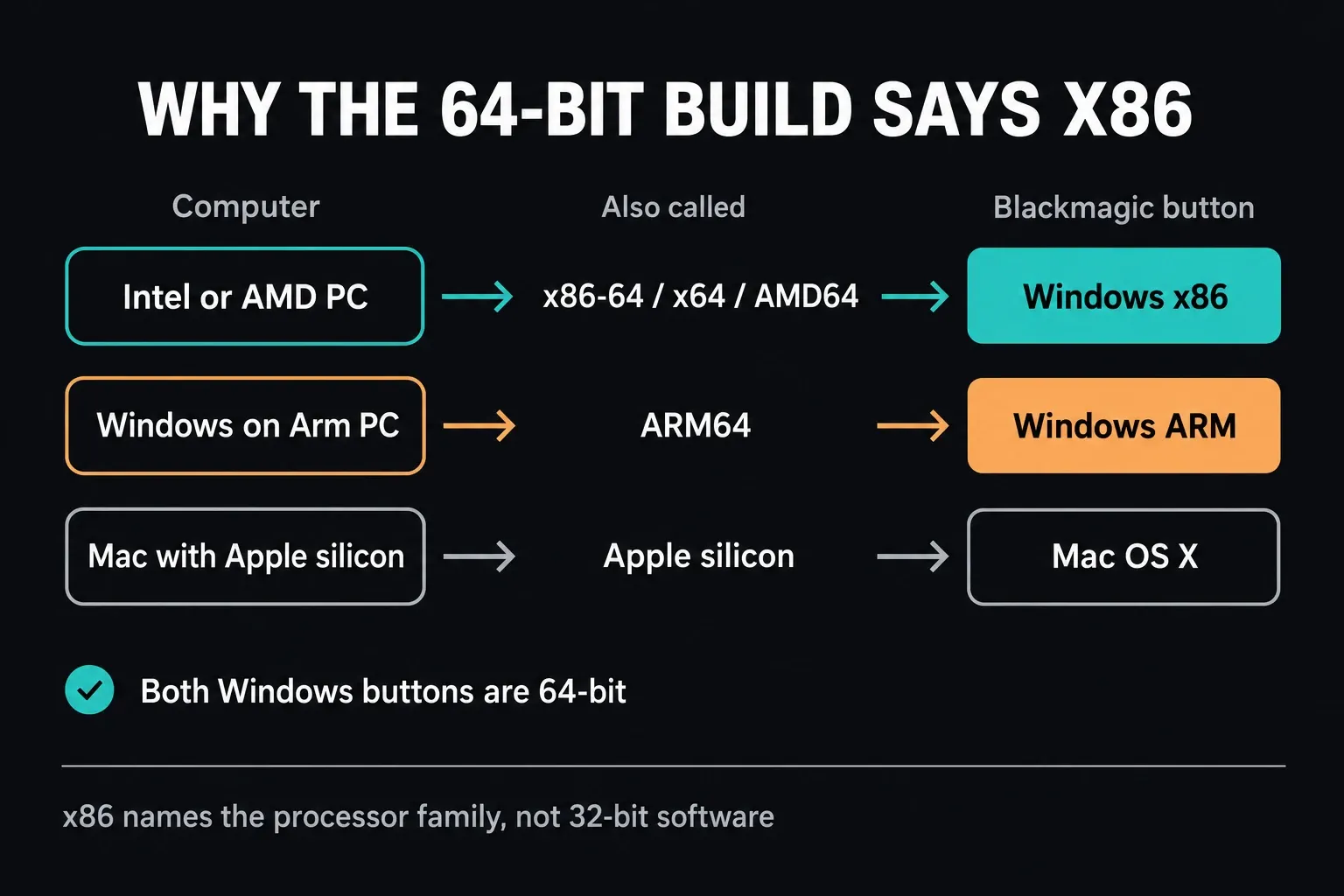
x86 names the processor family that grew out of Intel's early x86 instruction set. Modern Intel and AMD Windows PCs normally run its 64-bit extension, which you'll see called x86-64, x64 or AMD64. Download pages don't all label that family the same way, which is where most of the confusion starts.
Blackmagic's support explanation of the download buttons maps Windows x86 to standard Intel and AMD PCs. Windows ARM is the separate ARM64 package. Choose by the operating system and processor together:
- Intel or AMD Windows PC: Windows x86.
- Supported ARM-based Windows PC: Windows ARM.
- Mac with Apple silicon: Mac OS, not Windows ARM.
Get it from Blackmagic Design's official Resolve page or its support center. We don't host or repackage either installer here.
Current Resolve 21 Windows Requirements
The two minimums aren't identical. The values below combine Blackmagic's Resolve 21.1 readme with Blackmagic support's x86-for-Intel-and-AMD build distinction:
| Requirement | Windows x86 | Windows ARM |
|---|---|---|
| Operating system | Windows 10 Creators Update (the readme’s listed minimum) | Windows 11 for ARM |
| Processor baseline | Intel or AMD x64 family | Qualcomm Snapdragon X Elite or NVIDIA RTX Spark |
| System memory | 16GB; 32GB when using Fusion | 16GB; 32GB with 4K or Fusion |
| Graphics | Integrated or discrete GPU with at least 4GB VRAM; OpenCL 1.2 or CUDA 12.8 | No separate GPU or VRAM minimum is stated in the ARM section; use the supported platform and its required drivers. |
| Driver requirement | Official AMD/Intel GPU drivers; NVIDIA Studio 581.57 or newer when using NVIDIA | NVIDIA Studio Driver 616.0 or newer for RTX Spark; no separate driver floor is listed for Snapdragon X Elite. Check the PC and peripheral vendors for Windows ARM support. |
Blackmagic's Windows 10 compatibility floor isn't a recommendation to run an unmaintained OS. Standard Windows 10 support ended October 14, 2025, so check your update coverage separately. The x86 readme also asks for Desktop Video 12.9 or later when using Blackmagic monitoring hardware, not for every laptop installation.
These are compatibility floors, not promises of smooth playback. For GPU choices and memory planning, use the complete Resolve system requirements guide. Our PC compatibility checker is a first filter that works from the details you type in. It doesn't scan your hardware, and it doesn't replace testing your own footage.
“Snapdragon X Elite” doesn't mean every Snapdragon or every Copilot+ PC. The 21.1 readme names two ARM processor lines, Qualcomm Snapdragon X Elite and NVIDIA RTX Spark, and adds that RTX Spark systems need NVIDIA Studio Driver 616.0 or newer. A Snapdragon X Plus, for example, isn't named. If your processor or ARM vendor is missing from that list, check the latest readme and Blackmagic support material before you assume it's supported.
Why Use the Native ARM Build Instead of x86 Emulation?
Microsoft's Windows on Arm FAQ explains that Windows 11 on ARM can run many x86 and x64 applications through emulation. That doesn't make the x86 Resolve installer the best default when Blackmagic ships a native ARM build for the supported machine.
A native package skips translating the application's processor instructions at runtime. Microsoft says native ARM apps give the best performance, responsiveness and battery life on ARM devices. I'd treat that as a platform principle, not proof that every Resolve operation will be faster on every ARM laptop.
Resolve performance still depends on the source codec, GPU path, memory, thermal limits, effects, plugins and export format. Compare a real timeline, because two architecture labels won't settle it. A fair comparison uses the same media, timeline, effects, playback settings and output preset on both machines.
The Real ARM Risk Is the Dependency Chain
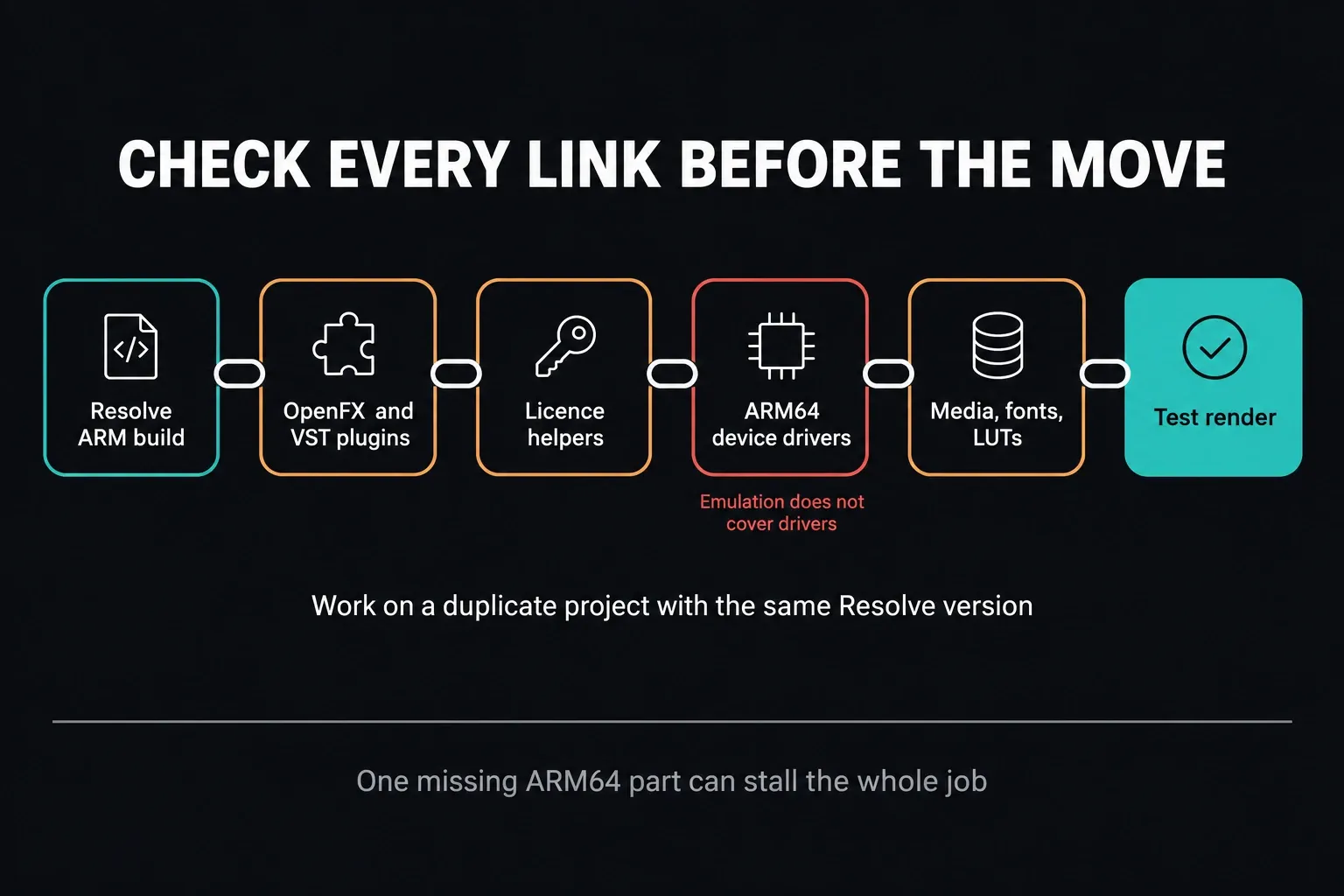
The application can be native while one critical part of the editing system isn't. Before you move paid work to Windows ARM, list everything that touches the project:
- OpenFX video plugins and their licensing managers.
- VST audio plugins used on tracks, buses or the Fairlight page.
- Control surfaces, capture devices, card readers and video I/O hardware.
- Camera utilities, codec components and media-management tools.
- Shared-storage, backup and cloud-sync clients.
- Font managers, subtitle tools and delivery quality-control software.
Microsoft's current emulation documentation says emulation supports user-mode code but not drivers; kernel-mode components have to be built for ARM64. Its platform FAQ also warns that an x86 or x64 setup program can't install an ARM64 driver.
That's where audio interfaces, video I/O, dongles and other peripherals get caught out. The control app may launch fine under emulation while the device itself fails, because the driver it needs doesn't exist for ARM64.
Check the exact plugin version and its license helper rather than trusting a blanket claim that all plugins work, or that none do. Look for explicit Windows ARM or ARM64 support from the vendor. “Windows 11,” “64-bit,” or Apple silicon support on macOS doesn't establish compatibility with Resolve on Windows ARM.
Free, Studio and Architecture Are Separate Choices
Choose the edition first: DaVinci Resolve Free or DaVinci Resolve Studio. Then choose the architecture: Windows x86 or Windows ARM. A Studio license doesn't turn one installer architecture into the other, and downloading the Studio package doesn't give you a paid entitlement.
If you're still deciding between editions, use the Free versus Studio comparison. If you already own Studio, download the Studio row that follows the same System type rule, and keep the license or activation details handy before you replace a working production installation.
Move a Resolve Project Between x86 and ARM Safely
A Resolve project can move between computers, but the project file isn't a copy of the whole workstation. Media paths, plugins, fonts, LUTs, audio tools and hardware may all need attention. Run the first transfer test with the same Resolve version on both machines, the edition you need and dependencies that are supported.
Keep a pre-update backup. Blackmagic's 21.1 readme warns that an individual project created or opened in 21.1 will no longer open in 20.3.2, even though the library can stay accessible. Reinstalling the older app doesn't undo that project change. If you're combining a computer move with a Resolve upgrade, go through the safe update and backup workflow first. The figure below shows the dependency chain I'd check on the duplicate.
- Back up the project library and export the important project separately.
- Duplicate the project so the first ARM test is disposable.
- Record every required plugin, font, LUT, control surface and media utility.
- Install only the versions their vendors support on Windows ARM.
- Relink media and check clips from every camera or capture source.
- Open Fusion compositions and Fairlight buses that depend on external tools.
- Render a representative section and compare the output outside Resolve.
A lightweight H.264 sample proves very little when the real project uses 10-bit HEVC, RAW, multicam, noise reduction or Fusion. Test the hardest normal section of the actual job. If one source format behaves differently, compare it with the Resolve codec and format guide before you blame the CPU architecture.
If You Downloaded the Wrong Build
Recheck System type and go back to Blackmagic's official picker before changing drivers or deleting preferences. If the download is incomplete, throw away only that installer file and get the correct package. If Resolve is already installed, back up active projects before you uninstall or replace it, and leave project libraries and source media alone.
Keep the diagnosis narrow:
- Installer will not run: verify the package architecture and current OS requirement.
- Resolve opens but a device is absent: verify the device's ARM64 driver as well as its control app.
- A plugin is missing: verify its exact Windows ARM build and licensing component.
- Media is offline or slow: separate file paths, codec support, storage and GPU behavior from the installer choice.
- A project changes appearance: compare fonts, LUTs, plugins and color-management settings on both systems.
Make one reversible change at a time. Delete several settings folders at once and you won't know which one caused the fault. If the correct package still won't install, take the exact message and your processor details to the installation-errors guide.
Frequently Asked Questions
Should a 64-bit x64 PC download DaVinci Resolve Windows x86?
Yes. If Windows reports a 64-bit operating system and an x64-based processor, choose Blackmagic's Windows x86 download. It's the current standard package for modern Intel and AMD Windows PCs.
Is the DaVinci Resolve Windows x86 download 32-bit?
No. Blackmagic support has confirmed that the current Windows x86 and Windows ARM Resolve packages are both 64-bit. The x86 label identifies the Intel and AMD processor family in Blackmagic's picker; it doesn't mean Resolve is a 32-bit application.
Can I install the Windows x86 build on a Snapdragon PC?
Windows 11 on ARM can emulate many x86 and x64 user applications, but Blackmagic ships a native Windows ARM build for its supported ARM baseline. Use the native ARM package when the machine meets the current requirement, then check plugins, drivers, media and export behavior.
Does DaVinci Resolve ARM work on every Snapdragon processor?
Don't assume it does. Blackmagic's Resolve 21.1 readme names Windows 11 for ARM with a Qualcomm Snapdragon X Elite or NVIDIA RTX Spark processor. A Snapdragon model outside that line isn't covered by the listed baseline, so check the current release notes and Blackmagic support before relying on it.
Will my Resolve plugins work on Windows ARM?
It depends on each plugin and its licensing components. Check the vendor's current page for the exact version and explicit Windows ARM or ARM64 support. “Windows 11” or “64-bit” alone doesn't prove native ARM compatibility.
Do x86 device drivers work through Windows ARM emulation?
No. Microsoft says emulation covers user-mode application code, not kernel-mode drivers. Hardware that needs a driver requires an ARM64 driver, even when its companion app can run under emulation.
Can the same Resolve project open on x86 and ARM computers?
A project can move, but use matching Resolve versions for the first test and check the edition you need. Back it up and duplicate it, then verify media, codecs, fonts, LUTs, plugins, audio and a representative export. A project opened in a newer Resolve release may not reopen in an older one; the 21.1 readme specifically warns about 20.3.2.
