
Quick answer: get old DaVinci Resolve versions from Blackmagic Design's official Resolve and Fusion support archive. The page is long, so let it finish loading, find the exact release under Latest Downloads, then match the Free or Studio edition and only the platform buttons that card actually shows.
Don't uninstall the working version yet. An old installer swaps the application; it doesn't roll back the project history. A project created or opened in a newer Resolve release may not open in an older one, so back up the full project library, export active projects separately and prove the backup works before you count on a rollback.
Archive checked October 5, 2026: Blackmagic's official catalog lists separate Free and Studio entries for every release in the table below. The current build is 21.1.1 from October 2, so 21.1 from September 8 now sits with the older releases. Being listed means you can download it. It doesn't mean the old release is still maintained or that it suits your computer.
Use the Official Blackmagic Archive
The support archive is long because it mixes DaVinci Resolve Free, DaVinci Resolve Studio, Fusion Studio, Project Server, manuals and support notes on one page. It's clumsy to scroll, but it preserves the publisher and the release context together, which is exactly what a mirror throws away.
Haven't settled on Windows, Mac, Free or Studio yet? Start with the Resolve download hub. This guide picks up once the current release is no longer the right fit.
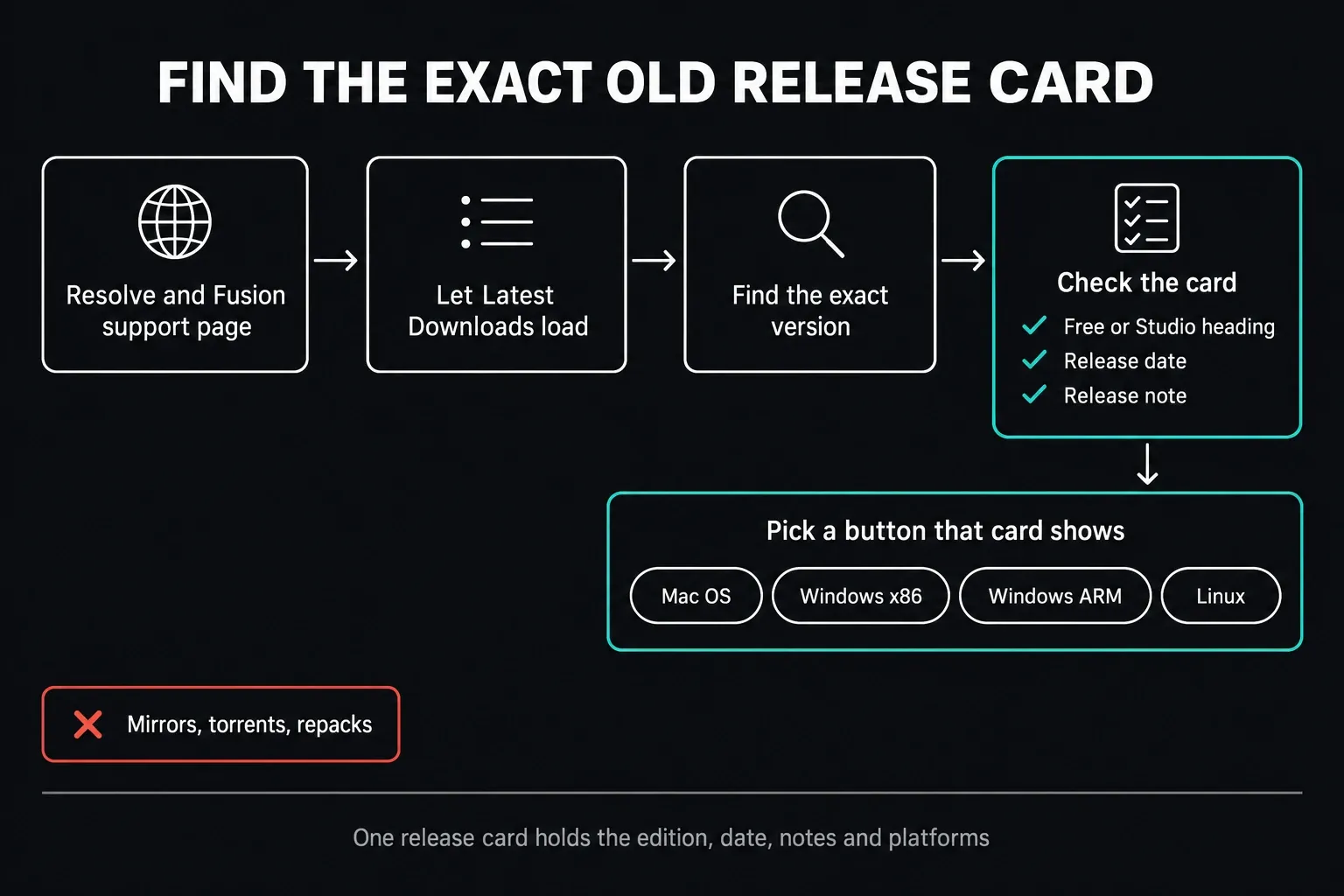
- Open Blackmagic's Resolve and Fusion support family page.
- Wait until the Latest Downloads column has filled in.
- Scroll to the version you need. Once the list has loaded, browser Find speeds this up.
- Tell DaVinci Resolve apart from DaVinci Resolve Studio.
- Read the card's date and release note before you pick a platform.
- Choose only a platform button that this exact card offers.
- Save the installer somewhere the version and platform stay visible, in the filename or in your own archive record.
| Release to find | Archive date | Listed platform categories |
|---|---|---|
| 21.1 | September 8, 2026 | Mac, Windows, Linux, Windows ARM |
| 21.0.4 | August 5, 2026 | Mac, Windows, Linux, Windows ARM |
| 20.3.3 | May 13, 2026 | Mac, Windows, Linux, Windows ARM |
| 19.1.4 | March 21, 2025 | Mac, Windows, Linux, Windows ARM |
| 18.6.6 | March 20, 2024 | Mac, Windows, Linux |
| 17.4.6 | March 29, 2022 | Mac, Windows, Linux |
| 16.2.8 | November 25, 2020 | Mac, Windows, Linux |
| 15.3.1 | April 5, 2019 | Mac, Windows, Linux |
Search for the version number in Latest Downloads, then pick the edition and platform on that card. A listed installer isn't a hardware recommendation; the readme for that release tells you which operating system and processor it needs.
Skip software mirrors, torrents, shared drives and “portable” repacks. A convincing filename doesn't carry the publisher trail with it, and the package could be modified, incomplete or mislabeled. We don't host old Resolve installers on this site.
Choose the Old Version From the Reason You Need It
“Older” isn't a technical requirement. The right release is the one that matches a constraint you can name:
| Why you need an old version | What should determine the release |
|---|---|
| Open a pre-existing backup | Match the Resolve version that created or last safely opened that backup. |
| Recover from a bad update or regression | Use the last build you personally tested with the same project, media and driver stack. |
| Run Resolve on an older OS or computer | Match the archived release notes and system requirements to that exact OS, CPU and GPU. |
| Keep a critical plugin or device working | Match the plugin or hardware vendor's supported Resolve, OS and driver versions. |
| Join another editor or shared library | Match the agreed Resolve and Project Server workflow across the team. |
| Use an existing Studio licence | Choose the Studio entry for the required release and a supported licence channel. |
Start with the release that last worked with the project, plugins and hardware you need. A later patch in the same branch might fix your problem, but read its notes before you choose it. If a facility or plugin vendor requires a specific point release, follow that; a tidier version number is no reason to ignore it.
Older doesn't automatically mean faster. Try the candidate with the same footage and export settings before you commit. For today's release, check the current Resolve system requirements; for an archived build, read that build’s own requirements, not the current version's minimums.
Back Up Before You Replace Resolve
A rollback plan needs two different backups:
- Full project-library backup: protects the database or library that holds the projects.
- Individual project exports: gives each critical project its own portable copy.
A project backup isn't a copy of the whole editing workstation. Keep source media and the fonts, LUTs, plugins, license tools and scripts you rely on available separately. Export options differ, so check what your chosen backup includes, and don't assume a plain project export carries the footage.
- Work out the library type first. For a local library, use its library-backup control in Project Manager; for a shared network library, arrange the backup with whoever administers the Project Server. Cloud libraries use the separate web controls described below.
- Export each critical project as its own .drp file: in Project Manager, right-click its thumbnail and choose Export Project. Treat that dated export as a snapshot, because later edits don't get written into it.
- Copy the project backups off the cache and working-media drive.
- Write down Resolve Free or Studio, the complete build number, the OS version, the GPU driver and the Project Server version if you use one.
- List the OpenFX and VST plugins, fonts, LUTs, panels and capture devices the job depends on.
- Test a copy of the backup in a separate library or test environment, using the version that created it. Never test by replacing your only working library.
Our safe Resolve update workflow covers the same protection from the forward-update side. If you need to find where local projects and libraries live, the Resolve project storage guide shows you. Leave the library files themselves alone.
If Your Library Is in Blackmagic Cloud
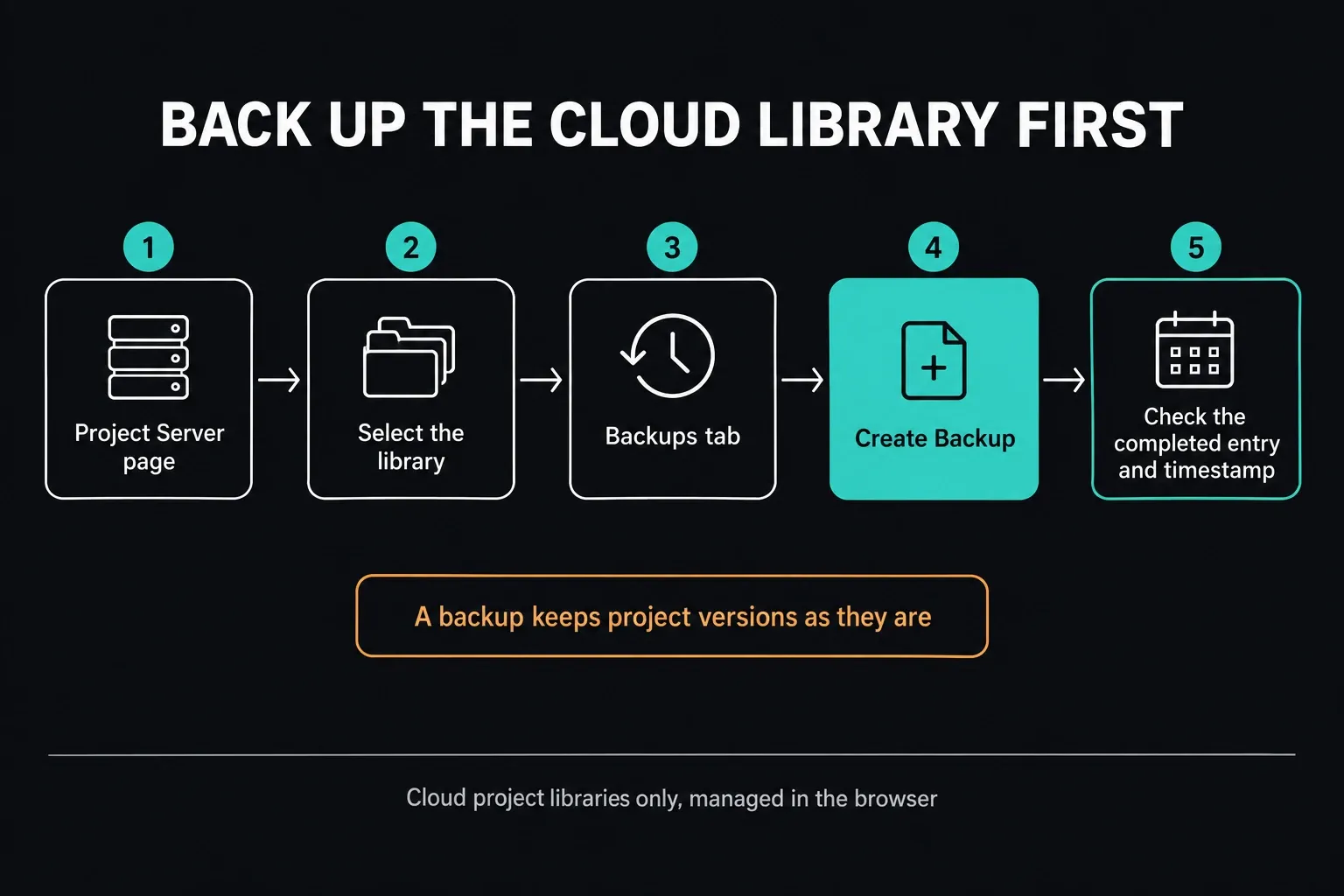
For a Blackmagic Cloud library, open its Project Server page, select the library and go to Backups. Click Create Backup, then check that the completed entry and its timestamp appear. Blackmagic's Cloud backup instructions describe these web controls, which are separate from the local Project Manager interface.
A Newer Project May Not Open in an Older Resolve
Backward compatibility is release-specific. There's no safe shortcut like “minor versions are fine” or “the previous major always opens it.” Read the release notes for both exact versions you're dealing with.
Blackmagic's current Resolve 21.1.1 readme gives a concrete example. Blackmagic says it made an effort to keep 21.1.1 project libraries compatible with 20.3.2, but projects created or opened in 21.1.1 are no longer accessible in 20.3.2. The same note tells you to make a full project-library backup and individual project backups before opening projects in 21.1.1.
That statement covers those two named releases and nothing else. Don't stretch it into a promise about Resolve 18, 19, 20.3.3, 21.0.4, 21.1 or a future build; the note doesn't say whether a 21.1.1 project opens in 21.1, for example. The safe assumption is narrower: once a newer Resolve changes a project, an older Resolve may reject it or lose newer features.
Decide Whether Rollback Is Still Possible
If You Have a Tested Pre-Update Backup
- Confirm the old Resolve edition, version and platform that match the backup.
- If you can, preserve the current system with a second test machine, boot volume or rollback image.
- Install the official archived package in that controlled test environment.
- Restore a copy of the pre-update backup, never the only original.
- Relink representative media and check the critical plugins, fonts and LUTs.
- Play the hardest timeline you normally cut and make a short test export.
- Move production over only after the old environment passes.
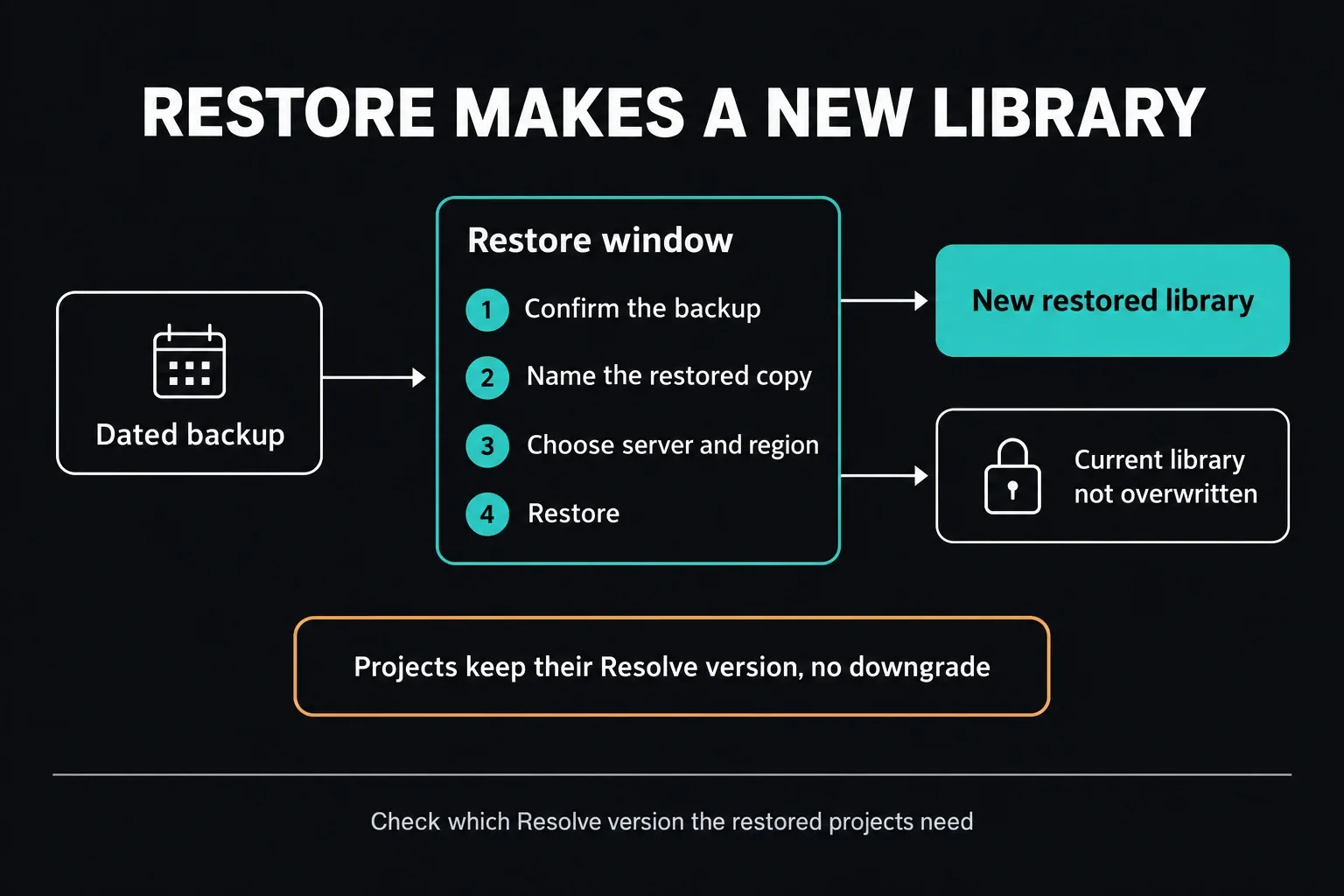
For a Cloud backup, select its dated entry and choose Restore. Confirm the backup, give the restored copy a distinct name, pick its server and region, then restore it. You get a new cloud library, and the current one isn't overwritten. It does not convert newer projects for an older Resolve release, so verify which Resolve version it needs before relying on it for rollback.
If You Do Not Have a Compatible Backup
A newer Resolve that still opens the project is worth protecting, so keep that installation intact. Preserve the current system first. Then export what you'd need to finish or rebuild the job: project backups, rendered masters, audio stems, graphics, subtitles and supported interchange files where you know the receiving workflow.
An XML, AAF or EDL isn't a full Resolve project downgrade. Complex grades, Fusion work, Fairlight routing, plugins and newer features may not make it across. Use interchange as a reconstruction aid, and verify it in the destination version before you remove the source environment.
If the project won't open even in the current version, stop changing the library. Contact Blackmagic support or the forum with the exact Resolve version, OS, library type, error text and backup history.
Preserve the Evidence Before Troubleshooting
Save the current installer if you still have it, note the full Resolve build number and capture the exact error before you change anything. Preserve the library, the individual exports, the source media and any existing system backup. Don't delete preferences, caches, plugin folders and the library in one go; you'd lose your recovery options and a useful comparison at the same time.
Write down each change and test after it. If the problem started with one Resolve update, compare the release note, GPU driver, plugin versions and one duplicate project first. A rollback should answer a specific failure, not turn into a second uncontrolled migration.
Match Free, Studio, Platform and Architecture
Every archive choice has several parts:
- Edition: Resolve Free or Resolve Studio.
- Platform: Mac, Windows or Linux, when that release card offers it.
- Architecture: Windows x86 or Windows ARM, only where the card gives you that choice.
- Licence: Studio still needs a valid, supported licence path.
The 18.6.6 archive entries in the table don't offer a Windows ARM package; 19.1.4, 20.3.3, 21.0.4 and 21.1 do. If the Windows labels are confusing, the x86 versus ARM download guide sorts them out. A Mac button on its own doesn't establish Intel compatibility, so check the exact archived readme, operating system and hardware before installing.
Not sure whether the project needs Studio? Compare the features in our DaVinci Resolve Free versus Studio guide before downloading. Installing the wrong edition just adds a license problem to the rollback.
Test the Old Version With the Real Job
A successful launch proves very little. Use a duplicate project and check:
- one clip from every important camera or screen-capture source;
- timeline frame rate, resolution and color-management settings;
- OpenFX, VST, fonts, LUTs and Fusion compositions;
- audio device, video I/O, control panel and shared storage;
- rendered output in the exact required codec, resolution and audio layout;
- the exported file in a separate player or quality-control tool.
Leave the original backup alone. If the test fails, it should cost you only the duplicate and the test environment, not the production library.
Frequently Asked Questions
Where can I download old DaVinci Resolve versions?
Use Blackmagic Design's official Resolve and Fusion support archive. Scroll through Latest Downloads, find the exact release, tell Free apart from Studio and pick only a platform button shown on that release card.
Can I download DaVinci Resolve 20, 19, 18 or 17 from Blackmagic?
Yes. When I checked on October 5, 2026, Blackmagic's official catalogue still listed 21.1, 21.0.4, 20.3.3, 19.1.4, 18.6.6 and 17.4.6 in separate Free and Studio entries. Platform availability differs, so go by the exact release card and its readme rather than an old direct download link.
Can an older Resolve version open a newer project?
Not safely by default. Compatibility is version-specific, and a project created or opened in a newer release may be inaccessible in an older one. Use a tested pre-update project or library backup that matches the old version.
How do I downgrade DaVinci Resolve without losing projects?
Before you replace Resolve, back up the library with the controls that fit its type, local, network or Cloud, and export critical projects separately. Preserve the working setup. Test a copy of a compatible pre-update backup with the matching official old release before you move production work.
Is an older DaVinci Resolve version faster?
Not universally. Performance depends on the OS, GPU driver, codec, hardware acceleration, plugins, effects and project. Test the same representative timeline and export preset instead of assuming an older version will run better.
Can I use a third-party site for an old Resolve installer?
Use Blackmagic's archive instead. A mirror strips out dependable publisher provenance and can hand you a modified, incomplete or mislabelled package. The official archive also shows the edition, date, release note and platform choices together.
Do I need the old Free or Studio installer?
Match the edition the project and licence workflow use. Free and Studio are separate archive entries. Studio still needs a valid, supported licence, and downloading a Studio package doesn't create an entitlement.
