Quick answer: install DaVinci Resolve for iPad from Apple’s App Store. When I rechecked the US listing on October 5, 2026, it offered version 21.1.1 as a free download, dated October 2. Apple's install floor is iPadOS 18.0 or later on an A12 Bionic chip or newer, while Blackmagic recommends an iPad Pro with M1 or newer and at least 8GB of RAM. Getting the app onto the tablet doesn't mean your footage will edit smoothly on it.
Before you buy an iPad or move a desktop project over, test three things the store badge can't tell you: whether your source files play with audio, whether the device has enough working storage, and whether the project opens in the desktop Resolve version you plan to use. A tablet can be compatible with the app and still be the wrong machine for a heavy camera format or a long-form timeline.
This page is about the dedicated iPad app. For Windows, macOS, Linux, Studio and older builds, start at the Download & Install hub. An iPhone or Android phone is a separate availability question; the iPad listing won't install on those devices.
Use the Real App Store Listing
The real app is called DaVinci Resolve for iPad and its developer is Blackmagic Design Inc. It isn't an APK, a configuration profile, a remote-control wrapper or a “mobile Resolve” download from a file site. If the developer name doesn't match, stop there.
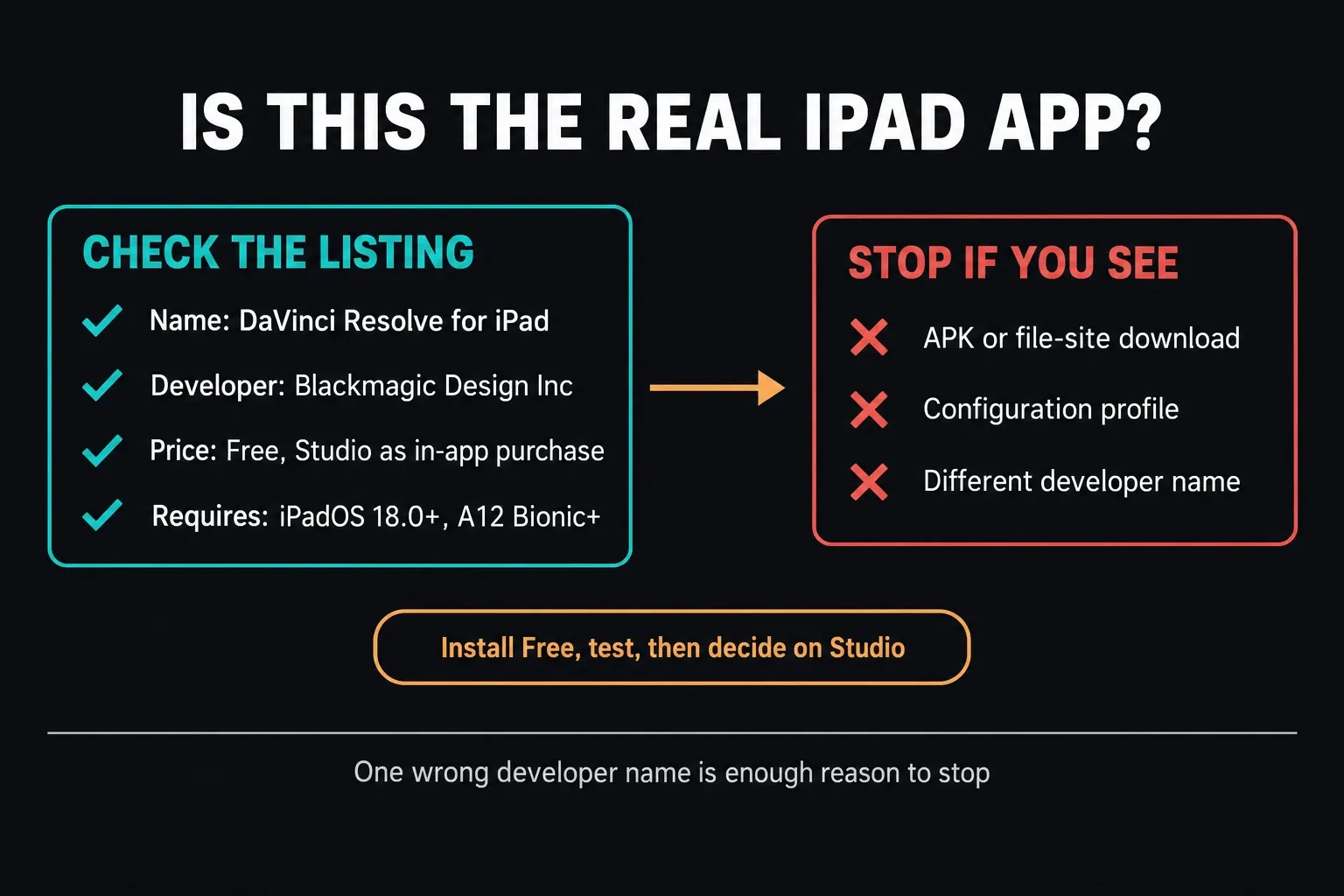
- Open the App Store on the iPad.
- Search for DaVinci Resolve for iPad.
- Confirm the developer is Blackmagic Design Inc.
- Read the current Compatibility section before you tap Get.
- Install the free app first, and decide on Studio after you've tested a real workflow.
On October 5 the listing showed an app size of about 3.8GB. That's Apple's listed app size for the app itself, not a storage budget for an editing project. Source clips, working files, backups and finished exports all need room of their own, so check what's actually free on the device instead of assuming 3.8GB spare will cover it.
Compatible Does Not Mean Comfortable
Apple's installation floor is iPadOS 18.0 with an A12 Bionic chip or later. Blackmagic's own description sets a higher bar: an iPad Pro with M1 or newer and at least 8GB of RAM. It also warns that earlier models may be limited to HD and that memory limits can restrict some features. Blackmagic's September 2026 features sheet adds that recent A-series iPads, including A14, A15 and A16 models, have some features such as ProRes support and certain Resolve and Fusion effects disabled or limited, with or without Studio.
| Question | What the current listing says | How to use it |
|---|---|---|
| Can the app install? | iPadOS 18.0+ and A12 Bionic+ | Hard compatibility gate from Apple |
| What does Blackmagic recommend? | iPad Pro with M1 or newer and at least 8GB RAM | Better floor for buying specifically for Resolve |
| Will an older iPad behave like a desktop? | Earlier models may be HD-limited or lose features under memory pressure | Test before committing a project |
| Is the listed app size enough free space? | No; it describes the app, not working media | Budget for sources, cache and exports |
If you already own the iPad, install Free and run the acceptance test below. If you're shopping, buy for the heaviest footage and timeline you expect, not the lightest demo that launches. Our Resolve system requirements guide explains the gap between a minimum and a comfortable editing target, though its desktop GPU advice doesn't translate directly to iPad silicon.
Plan Storage Before You Import Media
Leave room for the originals you keep locally, the working files the project creates and the finished export. A drive with space for the source clips alone can still fill up mid-job, so before importing a big folder, decide where those files and their backup will live.
- Keep the original media on a known volume, with a backup.
- Use a fast external SSD when the project is too big for internal storage.
- In Files, tap Browse and look under Locations for the external drive, then confirm Resolve can reach its media.
- Leave room for cache and the final export at the same time.
- Only disconnect the drive once imports, playback and exports from it have finished.
Apple's external-storage requirements for iPad call for a single data partition and a supported format such as APFS, exFAT or FAT32, and Apple notes that external hard drives often need their own power source. If a drive doesn't show up in Files, check its format, cable, adapter and power before blaming Resolve. Do not erase or reformat the only copy of your media. Seeing the drive in Files is only the first check; test playback and export over that same connection.
An external SSD can make a small internal drive workable, but keep the media folders easy to identify and backed up. Moving originals between folders after import can leave clips offline, so confirm the project still opens with its media before you head out to a shoot or hand it to another editor.
Import a Real Clip and Learn the iPad Interface
The current listing names H.264, H.265, Apple ProRes and Blackmagic RAW. That doesn't mean every profile, bit depth, frame rate, audio track and storage path behaves the same on every iPad; Blackmagic's features sheet says recent A-series models may have ProRes support limited. Import one file from the camera or phone you actually shoot with.
- Create a throwaway project.
- Import a representative clip from internal or external storage.
- Check that both picture and audio come in.
- Scrub, trim and play the clip at the timeline frame rate you plan to use.
- Add one title or transition and one basic color correction.
- Export a short section and play it outside Resolve.
The listing says the app supports Apple Pencil and Magic Keyboard. Both give you finer control, but neither fixes a codec, memory or storage bottleneck, so buy accessories for a workflow you've already tested.
Color Tools Are Real, but Feature Parity Is Not Automatic
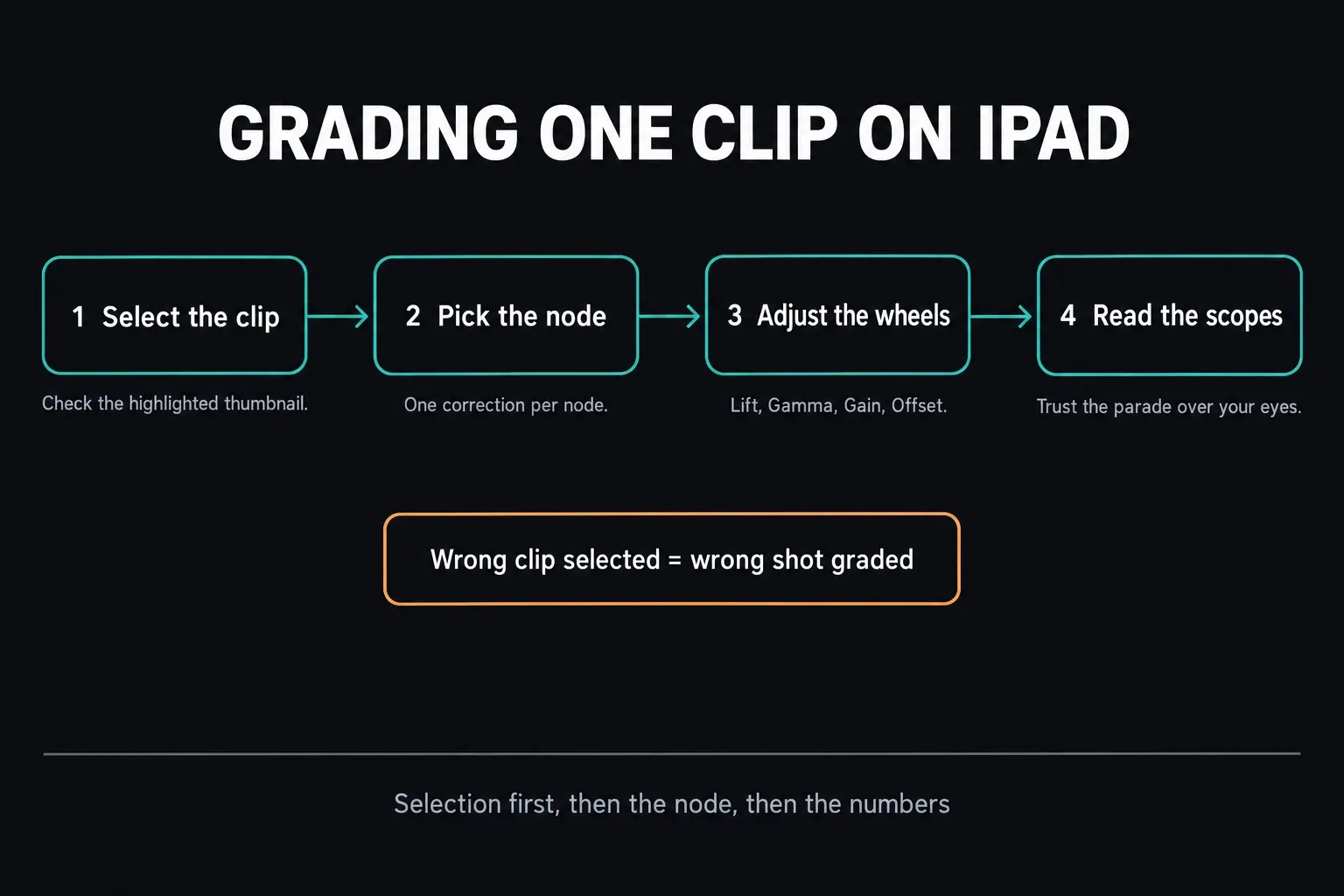
Start with one clip on the Color page. The viewer, color wheels, scopes and node graph let you look at a correction without judging the whole timeline at once. The figure below shows the order I'd use: confirm which clip is selected, pick the node you mean to change, then adjust and read the scopes. Checking the selection first saves you from grading the wrong shot.
Older tutorials describe only the Cut and Color pages, and that's no longer the whole app. The iPad release history shows Deliver-page support arriving in 20.1 and the Photo page in 21, and Blackmagic's current features sheet lists Photo, Cut, Color and Deliver for iPad. Work with the pages your installed release supports; a keyboard trick that exposes another page doesn't prove full desktop feature support.
Blackmagic's Resolve 21.1 Studio and iPad features sheet, dated September 2026, splits iPads with M-series chips from A-series models, and the columns differ more than you might expect. Magic Mask, UltraNR and timelines above UHD are marked unavailable on A-series iPads, and Relight needs an iPad Pro with 16GB of RAM. Blackmagic calls the sheet a general indication, so check the feature on your own model before buying Studio for it, and don't assume a desktop effect is available just because a shared project contains it.
Free or Studio on iPad
Install Free first. When I checked on October 5, 2026, the US App Store listing showed a $94.99 DaVinci Resolve Studio in-app purchase. Prices vary by country and can change, so check the amount on the Apple Account that will pay for the upgrade.
The iPad upgrade is a separate Apple in-app purchase, not a desktop Studio activation key. Blackmagic's licensing explanation separates it from desktop licences, so owning Studio for Windows, Linux or a direct Mac install doesn't unlock the iPad upgrade on its own.
Already paid on this Apple Account? Look for the app's restore-purchases option before you pay again. Apple's purchase-restoration guidance says to sign in with the same account and allow in-app purchases. If restoring still fails, restart the device and contact the developer or Apple with the purchase record.
Our Free versus Studio guide covers the broader feature decision, and the Resolve cost guide separates the purchase channels. On the iPad, I'd only buy when the feature you need is both Studio-only and supported on your model, not just because the desktop edition has it.
Move Projects Between iPad and Desktop Safely
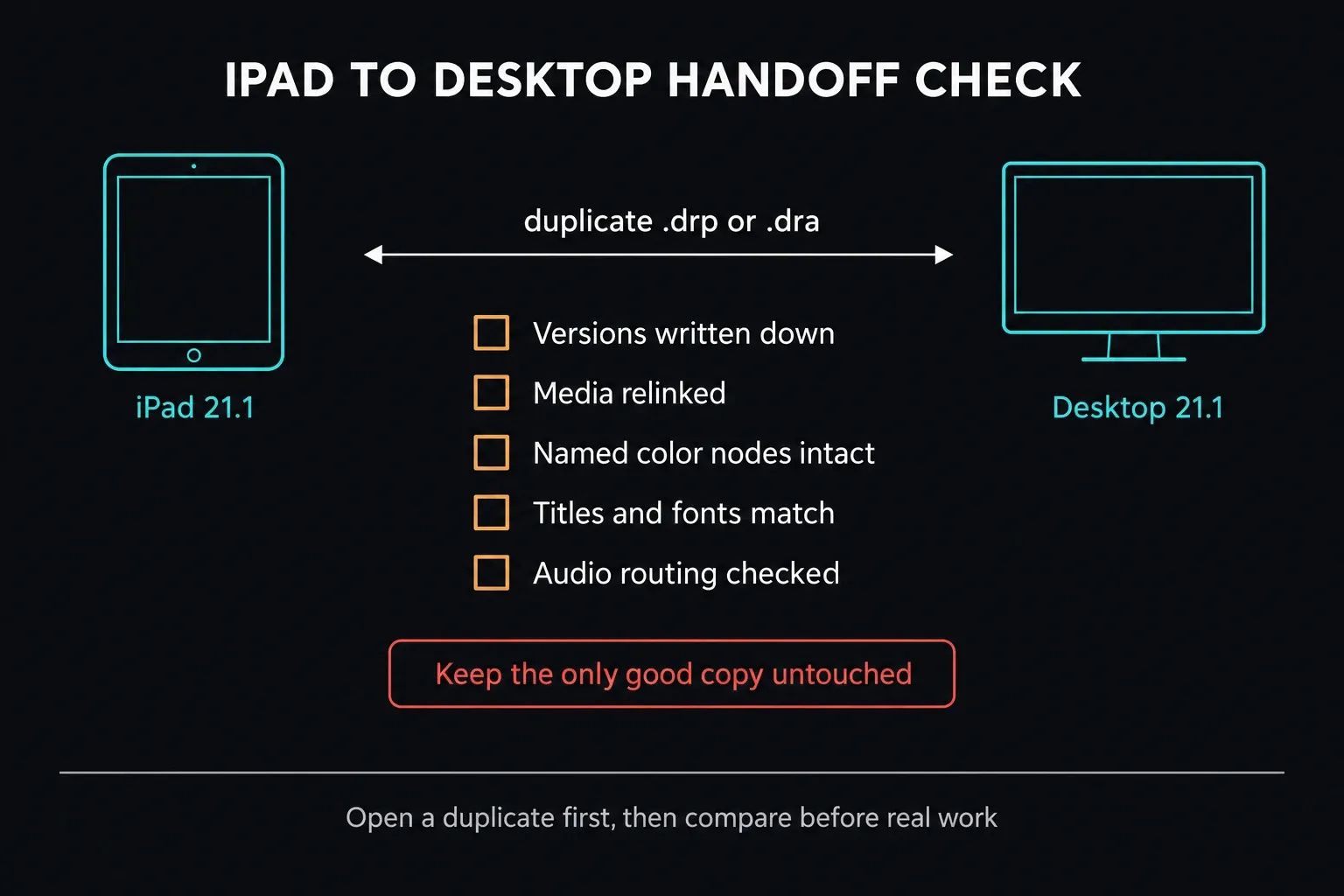
Write down the versions on both devices before moving work. When checked on October 17, 2026, the iPad listing and Blackmagic desktop download both showed 21.1.1, posted October 2. The US Mac App Store also carried 21.1.1 in its Free and Studio listings, dated October 8 and October 6 respectively. A shared version number is not a round-trip guarantee: the iPad store description still names Resolve 20 for desktop project exchange. Check a duplicate with its media before either app touches your only working project.
A .drp is a project export, not a backup of your source footage. A .dra is a project archive; check which media it includes before you rely on it, and keep the originals backed up separately. The safe-update guide explains why reinstalling an older app isn't the same as recovering a compatible project.
- Write down the Resolve version on both devices.
- Export a separate project or project-archive backup.
- Move a duplicate project first.
- Check that every media path relinks on the destination.
- Look over titles, effects, fonts, audio routing and color before you carry on.
- Don't overwrite the only known-good copy until the round trip has worked.
A Blackmagic Cloud project library can cut down on manual project-file transfers, but you still need to verify the media on the destination. With media syncing, check what has actually finished syncing; if you move files on a drive, check those paths instead. A project that opens isn't proof that every source clip, font or effect made it across. The handoff checklist below is the order I'd go through, named color nodes included.
If the App Will Not Install or a Project Will Not Open
| Symptom | First check |
|---|---|
| The App Store says the iPad is incompatible | Check iPadOS version and exact iPad model; do not sideload an imitation app. |
| The download stalls | Check free internal storage, network stability and App Store account status. |
| The clip has no picture or no audio | Identify the video and audio codecs, then test a short native file copied to internal storage. |
| An external drive appears in Files but media goes offline | Confirm the same volume and folder remain mounted and accessible to Resolve. |
| A desktop project warns about its version | Stop and preserve the original. Record both versions and test a duplicate; do not let either device upgrade the only copy. |
| The interface or effect differs from desktop | Check current iPad release notes and the exact feature on your model; Blackmagic's 21.1 features sheet lists M-series and A-series iPads separately. |
Don't erase the project, uninstall the app or delete cache as a first move. Keep the error, note the app and iPadOS versions, and test with a throwaway project. That stops a storage problem from turning into a data-loss problem.
Frequently Asked Questions
Is DaVinci Resolve free on iPad?
Yes. Blackmagic Design publishes DaVinci Resolve for iPad as a free App Store download, and the optional Studio features come through a separate in-app purchase. Start with Free and test your real media, timeline and export before deciding to upgrade.
Which iPads can install DaVinci Resolve?
When I checked the Apple listing on October 5, 2026, it required iPadOS 18.0 or later and an A12 Bionic chip or newer. Blackmagic recommends an iPad Pro with M1 or newer and at least 8GB of RAM. An older iPad that qualifies may still run into HD, memory or feature limits.
How much storage does DaVinci Resolve need on iPad?
The US App Store listed about 3.8GB for the app on October 5, 2026. Source media, working files, backups and exports need extra space on top of that, so size up your actual project; the listed app size isn't a free-space recommendation.
Does DaVinci Resolve for iPad work with an external SSD?
Yes, with compatible storage and media. Apple requires a single data partition and a supported file system, and some drives need external power. Check the drive in Files, then test the exact cable, power connection and clips in Resolve. Back up the media before you change the drive's format.
Can iPad Resolve projects open on desktop?
Project exchange is supported, but check both app versions and test a duplicate with its media before moving real work. As of October 17, 2026, the iPad, direct desktop and both US Mac App Store editions all listed 21.1.1. The iPad store description still names Resolve 20 for desktop interchange. None of that proves every newer-version round trip is safe.
Does a desktop Studio license unlock Studio on iPad?
No. Studio on iPad is a separate Apple in-app purchase, not a desktop activation-key unlock. If you bought the iPad upgrade before, sign in with the same Apple Account and try restoring the purchase before paying again.
Is DaVinci Resolve available on iPhone?
This App Store listing is for the iPad editor, not an iPhone version. Blackmagic's other mobile apps do different jobs and don't replace the Resolve editing app. Steer clear of third-party downloads that borrow the name.
