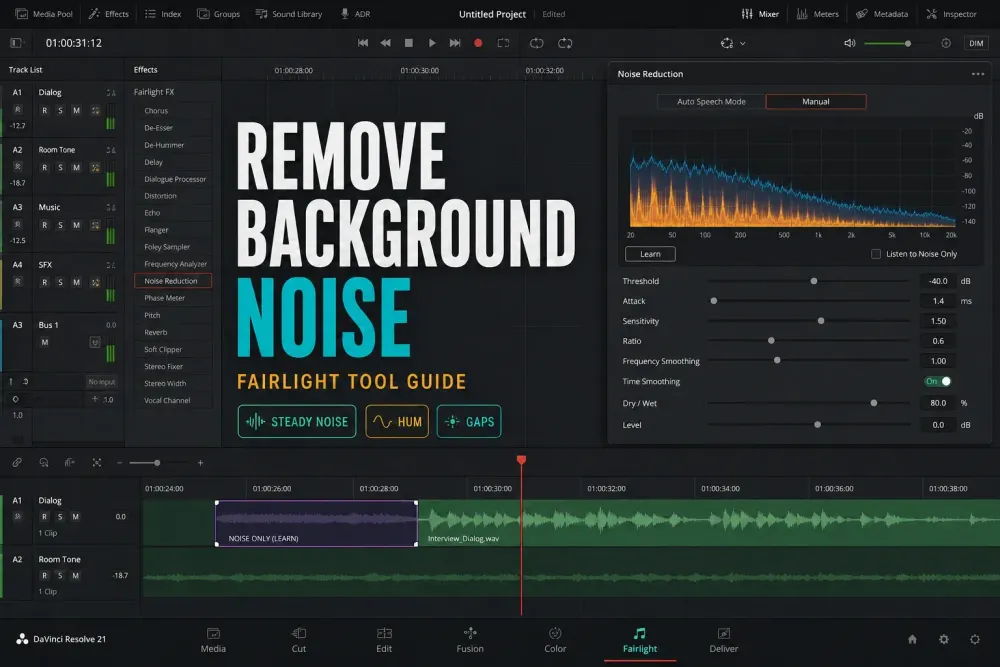
Quick answer: figure out what kind of noise you have before you pick a processor. Fairlight Noise Reduction handles steady broadband hiss, fan noise or room tone. De-Hummer is built for a narrow 50/60 Hz fundamental and its harmonics. A Gate or a clip edit deals with noise that mostly sits between phrases, and Studio's Voice Isolation is the one I'd try on a changing background around recorded speech.
I first checked this guide against the Resolve 21 Reference Manual on September 14, 2026, and rechecked it against the 21.1 manual on October 2, 2026.
A constant refrigerator compressor, fan, HVAC bed or preamp hiss suits a learned noise profile, because the unwanted sound stays fairly consistent. Variable traffic, wind, crowd noise and competing voices need a different test. Room reverberation is a separate problem altogether: pulling the noise floor down won't remove reflections that are already baked into the voice.
Blackmagic's current Fairlight overview sets out what the product includes, and the steps below name the controls that actually fix each case.
Which DaVinci Resolve Noise Removal Tool Should You Use?
Start here before you touch a single control. "Background noise" can describe five different failures, and each one reacts to processing in its own way.
- Steady broadband hiss, fan or room tone: test Noise Reduction in Manual or Auto Speech mode.
- Narrow mains hum or buzz: start with De-Hummer and verify the fundamental plus harmonics.
- Noise mainly between words: use the channel Gate, a short fade or manual clip gain. None of them removes noise under speech.
- A changing background around recorded dialogue: test Voice Isolation in Studio and listen for separation artifacts.
- Dialogue that's only uneven in level: use Dialogue Leveler or compression after restoration. Leveling isn't noise removal.
| Problem | Use this first | Why |
|---|---|---|
| Steady hiss, fan, fridge, HVAC | Noise Reduction FX in Manual + Learn | It can learn a constant noise print and reduce matching noise. |
| Traffic, wind, crowd, mixed background | Voice Isolation in Studio | A useful first test for changing sound; listen for speech damage. |
| Noise only between words | Gate in Dynamics | A gate lowers gaps. It doesn't remove noise under speech. |
| 50/60 Hz electrical hum | De-Hummer | Hum sits at predictable power-line frequencies and their harmonics. |
| Low-end rumble | High-pass EQ below the useful voice | Raise the cutoff only until rumble improves without thinning speech. |
DaVinci Resolve Noise Reduction FX for Free-Version Background Noise Cleanup
The tool is called Noise Reduction, and it lives among the Fairlight FX. On the Edit page, open the Effects Library, go to Audio FX, search for Noise Reduction and drag it onto the clip. On the Fairlight page you can add the same plugin as a clip effect, or put it in a track's Effects insert when every clip on that track shares the same noise.
Clip processing is the safer choice when recordings came from different rooms or microphones. Track processing only saves time when the problem really is identical on every clip.
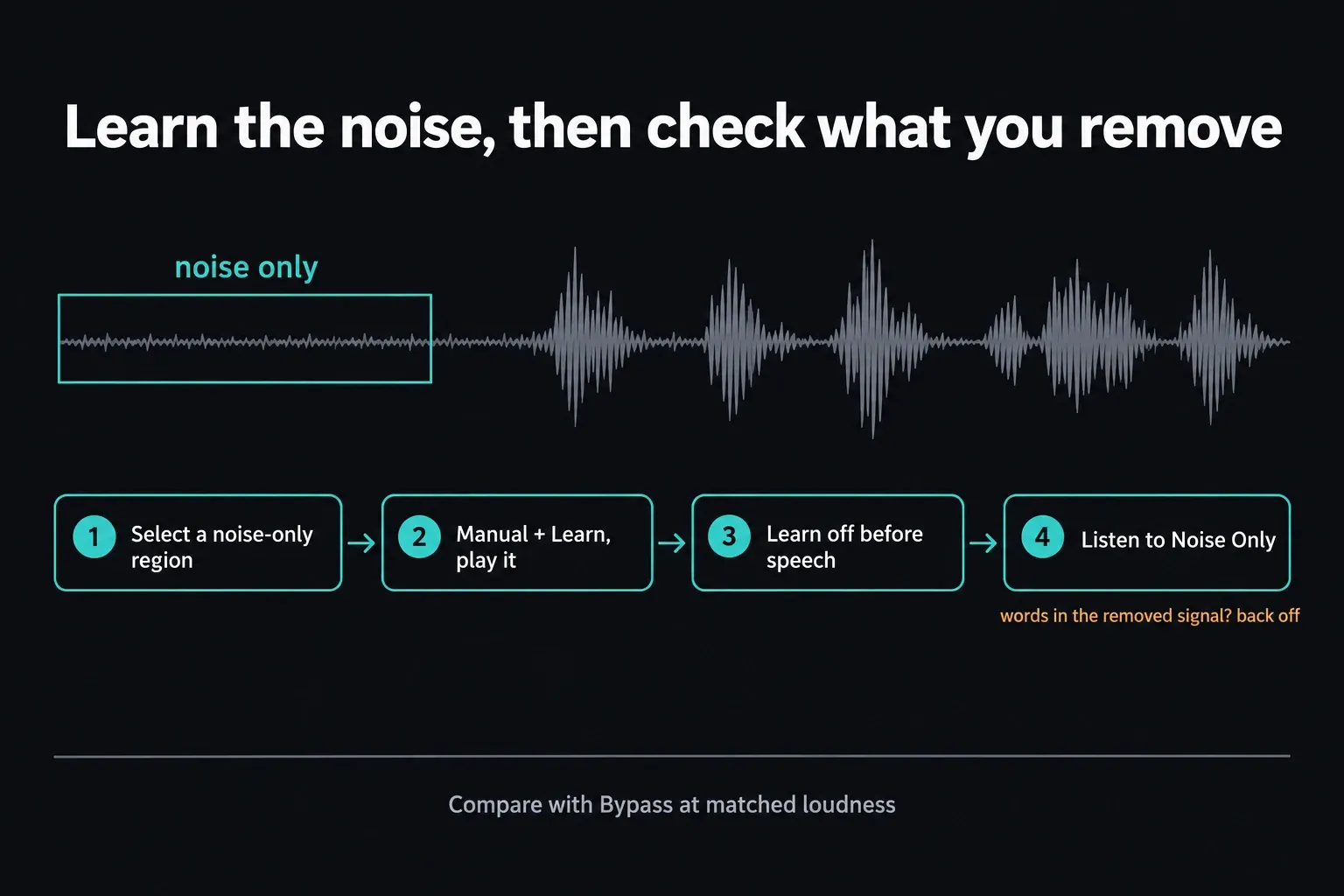
Noise Reduction gives you two workflows, Auto Speech Mode and Manual. Auto Speech adapts its noise profile during playback with no Learn pass. For a repeatable Manual pass, find a region that contains only the unwanted sound, enable Manual and Learn, then play that region. Turn Learn off before the speech starts so the voice you want stays out of the profile. Then replay a complete phrase, because the gap you sampled on its own tells you very little.
Switch on Listen to Noise Only while you adjust. If intelligible consonants or words show up in the removed signal, back the processing off. Then turn Listen to Noise Only off to hear the cleaned recording and compare it with Bypass at matched loudness. Don't leave the noise-only monitor on for final playback.
Threshold relates the processing to the source signal-to-noise ratio. In Auto Speech, Attack controls how quickly the detected noise profile updates; Sensitivity exaggerates that profile and can eat into wanted dialogue. Ratio trades transient preservation against profile accuracy. Frequency and Time Smoothing deal with ringing and temporal artifacts. Dry/Wet blends the processed and original signal, and Level only compensates for output loss; it does nothing for the reduction itself.
The De-Hiss, De-Rumble and combined presets are starting configurations. They aren't noise profiles captured from your recording. Compare bypassed and processed playback at matched loudness, because a louder result can sound clearer even when it carries more artifacts.
DaVinci Resolve Voice Isolation for Studio-Only AI Background Noise Removal
Voice Isolation uses the DaVinci Neural Engine to separate recorded human voice from competing sound, and it remains a DaVinci Resolve Studio feature. Blackmagic's current Studio page and the manual agree on that; the Free version doesn't expose it. The Resolve 21 AI tools guide sorts it apart from Dialogue Separator, Music Remixer and the other Neural Engine features.
In Resolve 21 Studio, you can use Voice Isolation from the clip controls or from the Fairlight track-effects area. For a full dialogue track, open the three-dot Mixer menu and make sure Track FX is visible. The Amount control blends the original and the isolated voice.
The current manual says values between 70 and 80 tend to keep a natural result while still isolating strongly. I'd use that as a listening reference and still judge each recording by ear.
Reach for Voice Isolation when the background changes over time or overlaps the voice: traffic, fans that ramp up, crowd ambience or music. For steady noise you can sample, manual Noise Reduction is the better first test. Neither tool can promise a clean result when another voice or a sharp transient lands on the same frequencies at the same moment as the dialogue you want.
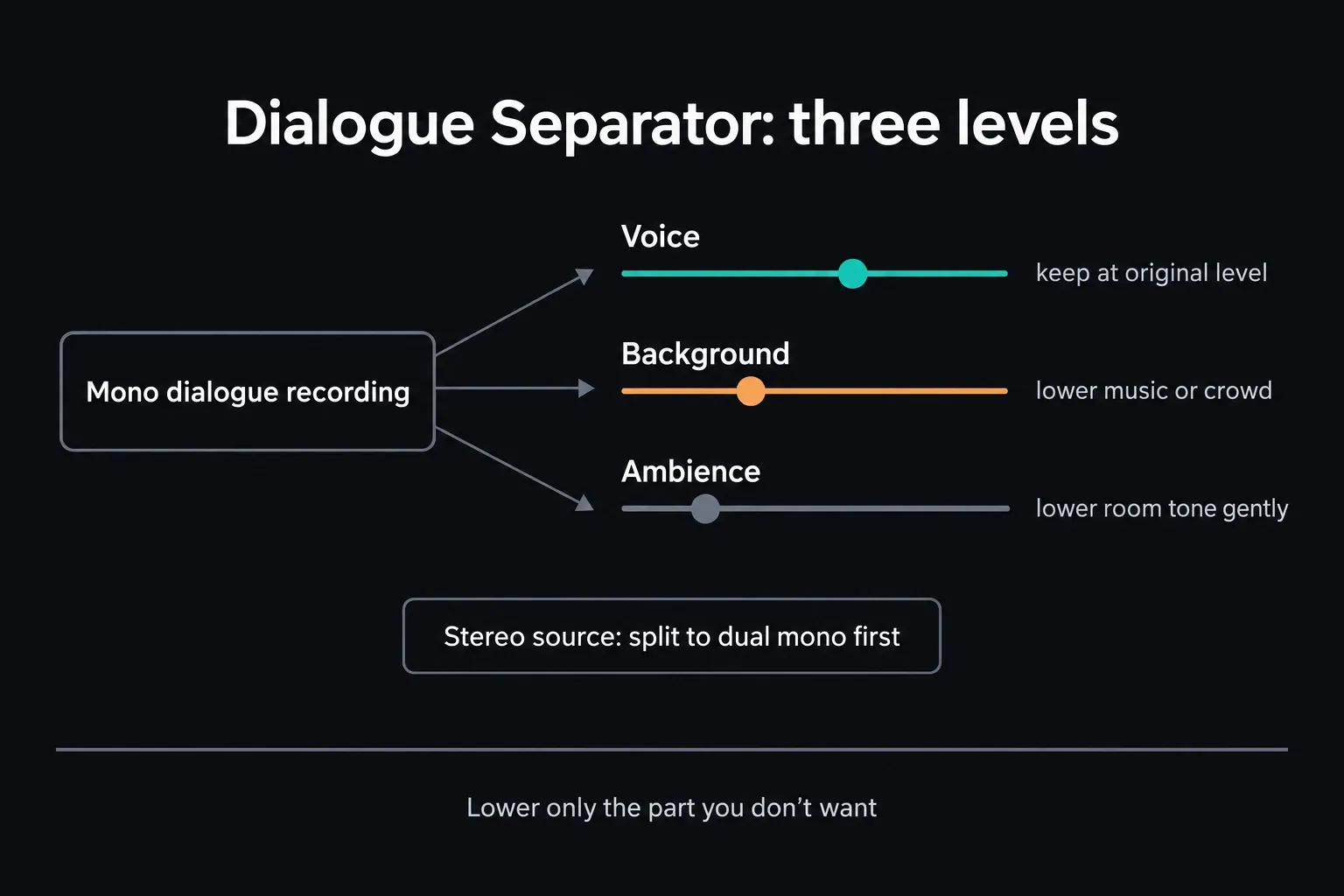
Dialogue Separator is another Studio option, useful when you want to keep the room sound while lowering crowd noise or music. It gives you separate level controls for Voice, Background and Ambience in place of a single isolation blend. Start from the original balance and lower only the unwanted component. The Resolve 21 manual documents it as mono-only, so stereo material has to be split and processed as separate mono tracks; don't expect it to behave like stereo Voice Isolation. These controls rebalance the recording; they don't guarantee clean separate stems. Blackmagic’s Dialogue Separator documentation spells out the channel-format restriction.
Voice Isolation vs Dialogue Leveler
Dialogue Leveler mainly rides louder dialogue down and softer dialogue up. Its Background Reduction option also gently reduces background noise according to the selected preset, so it would be misleading to say it can't reduce noise at all. It still uses a different process from Voice Isolation, and it won't stand in for targeted hum or broadband repair. Level only if the restored speech still needs it. The Voice Isolation vs Dialogue Leveler comparison covers the full controls and the desktop Free/Studio distinction.
DaVinci Resolve Noise Gate Method for Removing Noise Between Words
A gate doesn't remove noise underneath speech. It turns the level down whenever the signal falls below its threshold, so it can hide room tone in the pauses. In the Fairlight Mixer, open the channel's Dynamics panel and enable Gate.
Set the threshold just above the noise floor and below the quietest syllables, then adjust attack, hold and release so the gate opens before words and closes without clipping breaths or word endings.
Take this route when the noise is acceptable under speech but distracting in the gaps. An aggressive threshold can snap shut mid-breath, or chatter open and closed around quiet words. If that happens, lower the threshold or reduce the gate range and accept a little room tone; consistent room tone often sounds more natural than gaps that are obviously edited.
DaVinci Resolve EQ and De-Hummer Fixes for Hiss and Hum
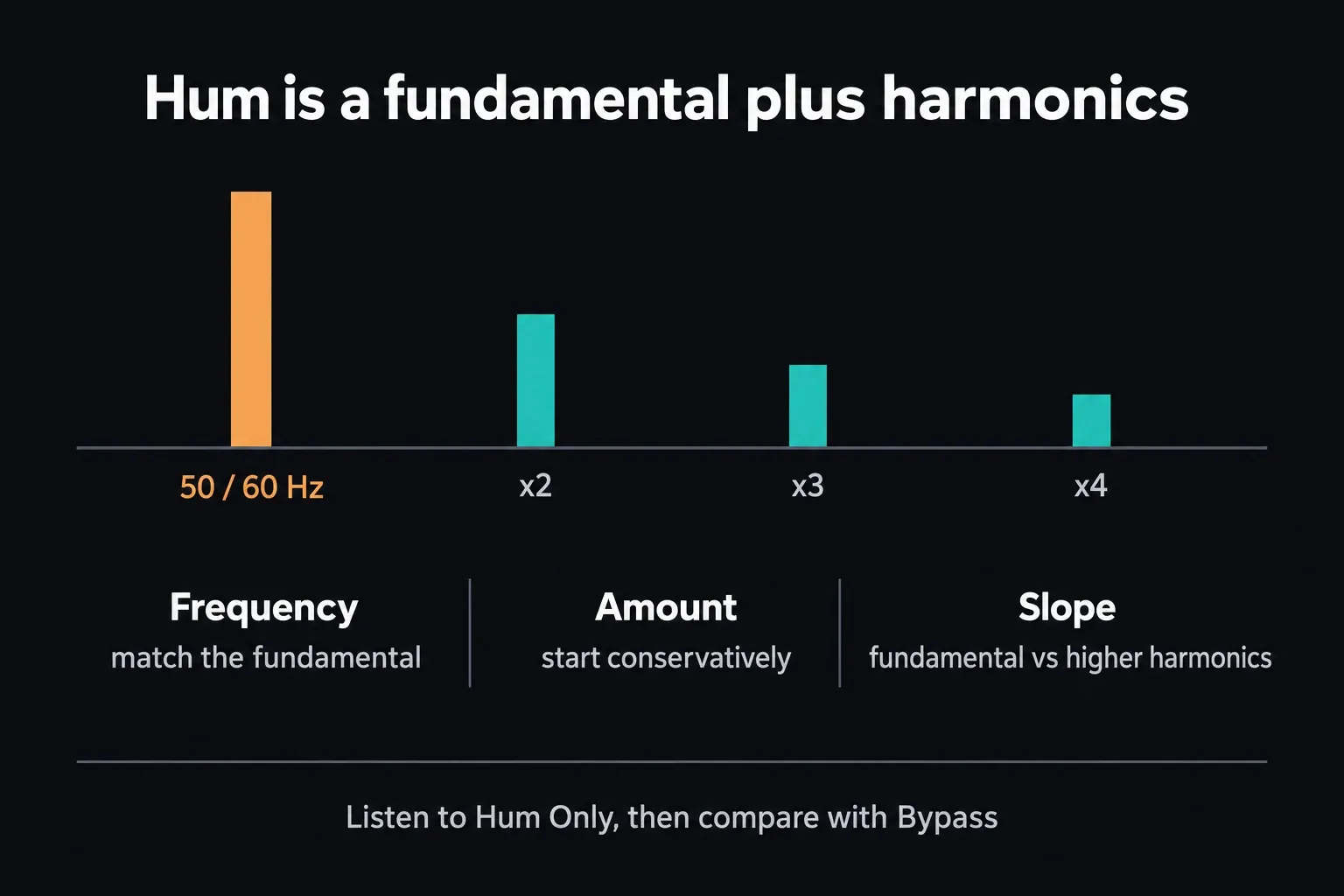
Power-line hum is usually built on a 50 or 60 Hz fundamental plus harmonics. Add De-Hummer to the affected clip or track, choose the matching Frequency option, and use Listen to Hum Only to hear what's being removed. Adjust Amount conservatively; Slope shifts the balance between the fundamental and the higher harmonics. If wanted vocal tone shows up in that monitor, back off. Turn hum-only monitoring off and compare against Bypass before you continue. Diagnose the recording itself, because the country you shot in doesn't prove the frequency.
For low-frequency rumble, Fairlight channel EQ makes a controlled first pass. Start the high-pass filter below the lowest useful part of the voice, then raise it while listening in context. There's no universal 80 Hz cutoff; back down as soon as vowels lose body.
Broadband hiss overlaps speech consonants, so a low-pass filter is a blunt instrument here. Use gentle EQ only when the unwanted band sits clearly outside the useful dialogue, and leave the remaining broadband component to Noise Reduction.
With wind noise, separate the low rumble from the bursts that mask words. Try a conservative high-pass filter for the low component, then audition Studio Voice Isolation if changing wind still overlaps speech. A noise print captured from one gust may not represent the next. If the microphone recording is distorted or a gust wipes out a syllable, heavier filtering won't bring it back: use an alternate microphone, take or ADR. For the next recording, deal with wind at the microphone, since cleanup can only do so much. The Fairlight dialogue EQ guide explains how to keep the body of the voice while cutting rumble.
Why DaVinci Resolve Background Noise Removal Sometimes Makes Voices Sound Robotic
Metallic, muffled or watery dialogue usually means useful speech is leaving along with the noise. The usual culprits are too much Sensitivity or wet mix, an inaccurate Learn sample, or several cleanup processes stacked on top of each other. Use Listen to Noise Only, compare at matched loudness, and stop the moment consonants, breaths or vocal texture turn up in the removed signal. The goal is a background that no longer distracts, and dead digital silence usually sounds worse.
A loud transient sitting directly on top of a word may simply be unrecoverable from the mixed recording.
If it falls between words, cut or reduce it and bridge the gap with room tone from the same setup; the clip splitting and mute guide covers that edit. If it covers dialogue, look for another microphone, an alternate take or ADR before you force more separation. Voice Isolation is worth a try, but it can't rebuild speech that was never captured cleanly.
Before delivery, play the full sentence in the real mix, bypass the restoration at matched loudness, and listen on both headphones and speakers. The Resolve export guide takes over after that approval, because no export setting can repair a damaged dialogue chain.
Frequently Asked Questions
Is DaVinci Resolve's noise reduction free?
Yes. Noise Reduction, De-Hummer, channel EQ and the Expander/Gate cover basic cleanup in Resolve Free. Voice Isolation is a Studio-only Neural Engine feature, so check the current Free-versus-Studio boundary if you specifically need that separation tool.
Why did Voice Isolation disappear from my Fairlight Mixer?
Open the Mixer's three-dot menu and confirm that Track FX is visible. When the Track FX section is hidden, Voice Isolation and the other dedicated track effects disappear from that Mixer view. Voice Isolation also requires Resolve Studio.
Why does noise reduction make my voice sound muffled or robotic?
An inaccurate noise profile or too much processing may be taking useful speech with it. Relearn from noise only, use Listen to Noise Only, reduce Sensitivity or Dry/Wet, and bypass any stacked restoration. Switch noise-only monitoring off again and compare at matched loudness; louder doesn't automatically mean clearer.
Can I remove background noise from a whole track instead of one clip at a time?
Yes. Add Noise Reduction or De-Hummer to a Fairlight track insert when every clip on that track shares the same problem. Use clip processing when rooms, microphones or noise profiles change. The Gate lives in the channel Dynamics panel.
Does Noise Reduction work on music or only on dialogue?
Noise Reduction can process other audio, but Auto Speech Mode is designed for speech. For music or ambience, Manual mode with a representative noise-only region is the safer starting test, followed by a bypassed, level-matched comparison.
What if the background noise happens at the same time as someone talking?
No tool guarantees clean separation when noise overlaps wanted speech. Voice Isolation in Studio is worth testing on a changing background, but a sharp event over a word may call for another microphone, an alternate take or ADR. Events between words can be edited out and bridged with matching room tone. For damage beyond Resolve's own processors, a dedicated repair editor can be round-tripped from Fairlight with External Audio Process.
Should I use Noise Reduction or Voice Isolation?
Use Noise Reduction for steady broadband sound you can sample, such as hiss, fan or HVAC. Use Studio Voice Isolation when a changing background overlaps recorded speech. For a narrow mains fundamental and its harmonics, De-Hummer is the right first choice over both.
Is a noise gate the same as noise reduction?
No. A Gate reduces the signal below its threshold, so it controls pauses and leaves noise under speech untouched. Noise Reduction targets a detected noise profile while dialogue is present. Set the Gate threshold, range, attack, hold and release so quiet syllables and word endings stay intact.
