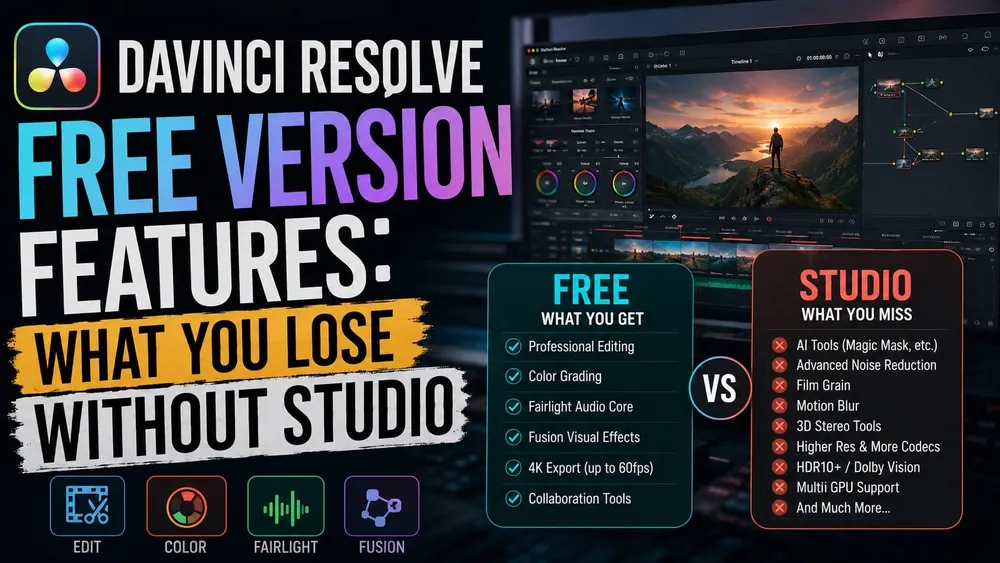
DaVinci Resolve 21 Free can take a project from organizing footage through editing, color, Fusion effects, Fairlight audio and export. The limits matter when your job needs a particular codec, paid effect or output format, not when you reach some arbitrary professional skill level. Here is what to check before you build a project around the free edition.
Blackmagic's current Resolve product page gives Free a clear headline ceiling: virtually all 8-bit video formats, up to 60 fps, at resolutions as high as Ultra HD 3840 x 2160. That sentence is a product summary, not a substitute for the platform-specific codec table. A 10-bit source, an H.265 export or a camera format must be checked by operating system, container, codec, profile and direction.
Studio is listed at $295 on Blackmagic’s US website. This guide inventories the Free edition’s features and restrictions; use the Free versus Studio comparison for the wider buying decision. The checks below include the scripting change introduced in Resolve 21.1.
What DaVinci Resolve 21 Free Actually Includes
Free is a separate edition, not a time-limited Studio trial. Normal work built only with Free-supported tools has no general application watermark. Blackmagic’s Resolve 20 beginner guide documents the important exception: Studio-only Resolve FX can be previewed in Free with a DaVinci Resolve Studio watermark. Remove the paid effect or use a licensed Studio installation; third-party trial effects have their own rules. That differs from CapCut's watermark rules, which depend on the plan and the assets used.
Free includes the core page workflow: Media for organizing sources, Cut and Edit for building timelines, Fusion for compositing and motion graphics, Color for grading, Fairlight for audio, Deliver for output and, in Resolve 21, the Photo page for still-image work.
- Editing: Cut and Edit pages, tracks, trimming, transitions, titles, keyframes and the normal timeline workflow.
- Color: node-based grading, primary and secondary corrections, curves, qualifiers, Power Windows, tracking, scopes and LUT workflows, without claiming every Studio control is included.
- Fusion: the integrated node-based compositor for titles, tracking, keying and visual-effects work, while some advanced tools and Resolve FX remain paid.
- Fairlight: editing, mixing, EQ, dynamics, automation and standard audio post tools; Studio adds named AI and immersive capabilities.
- Photo: Resolve 21's still-image workspace, with the Free edition's output ceiling still relevant to large finished photographs.
- Collaboration and HDR: Blackmagic explicitly includes multi-user collaboration and HDR grading in Free.
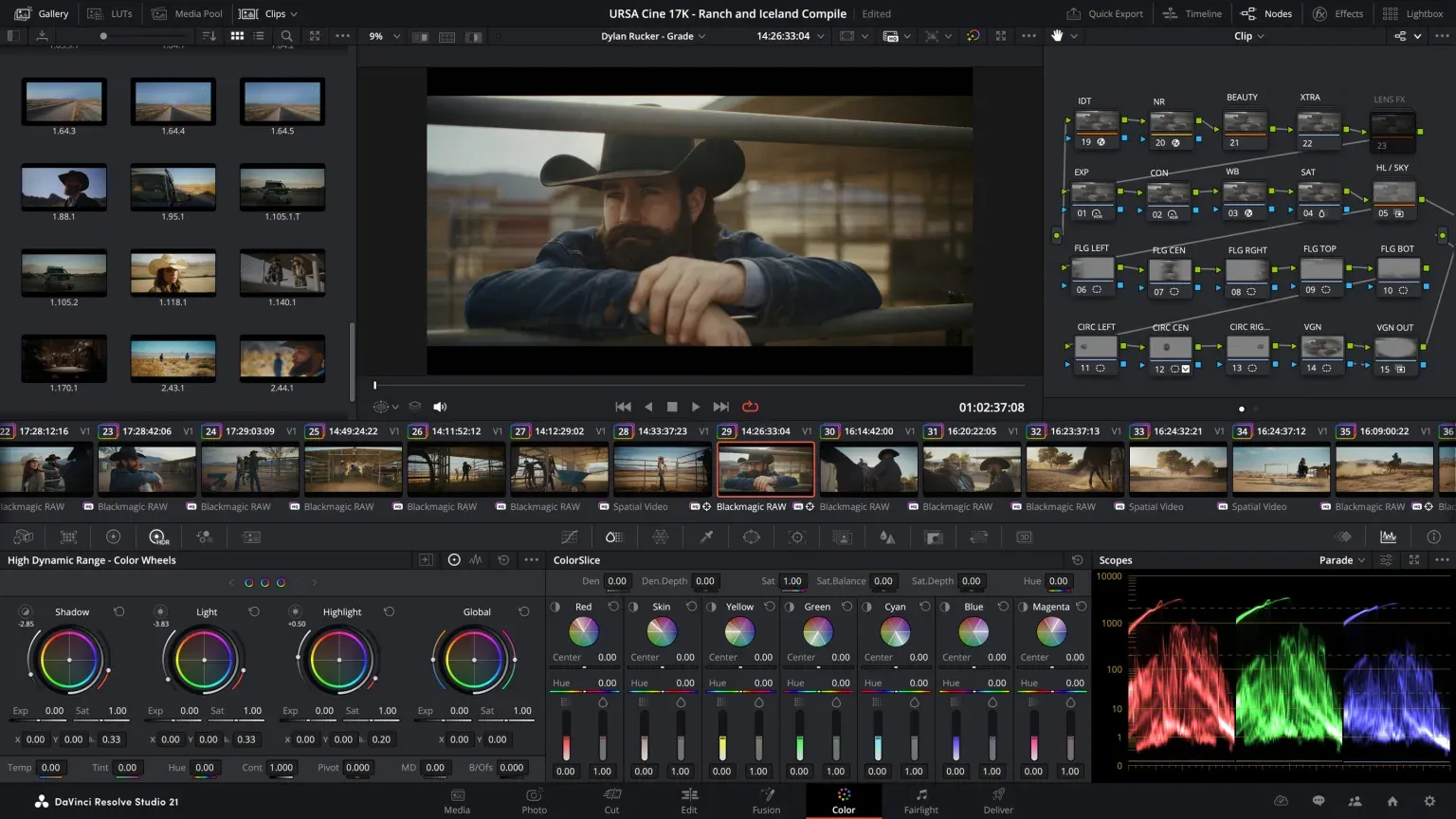
For a first project, pair this inventory with the beginner project walkthrough and the current Resolve 21 system requirements. Edition and performance are separate questions: a feature can exist in Free and still run poorly on a particular codec, GPU or storage setup.
The Resolution and Frame-Rate Boundary
Free can master and output Ultra HD 3840 x 2160 at up to 60 fps. That covers common 2160p deliveries at 24, 25, 30, 50 or 60 fps. It doesn't mean every format labelled 4K fits. DCI 4K is 4096 x 2160, so its width already exceeds the documented Ultra HD ceiling.
That is an output limit, not a ban on importing larger source files. Blackmagic’s 21.1 Free release notes say it can handle unlimited-resolution media while limiting mastering and output to Ultra HD or below. Whether a particular file opens and plays smoothly still depends on its codec and your computer.
Studio supports resolutions beyond 4K, and Blackmagic's Studio page currently states up to 32K at 120 fps. Those numbers are capability ceilings, not recommended defaults. A platform upload, broadcast specification, cinema package or client master should determine the timeline and output, not the largest option in the menu.
The Photo page needs a separate check. In a May 2026 beta test, PetaPixel reported a 4K-or-below Free export limit for both Photo and Deliver and said Blackmagic confirmed it. That is dated testing, not a new measurement of 21.1. The current Free release notes still state an Ultra HD-or-lower output limit but do not separately define every Photo export option. Before moving a catalog, export a sample and inspect its pixel dimensions. The Resolve 21 Photo page guide covers the full still-photo workflow.
Why 10-Bit and Codec Claims Need a Platform Check
The sentence `Free is 8-bit only` is too broad. Blackmagic's product page says Free works with virtually all 8-bit video formats, but the maintained supported-codec table is organized by macOS, Windows and Linux, then by container, codec, profile, decode and encode. Those columns are the evidence that matters for a real file.
Separate three questions. Can Resolve open the source? Can it play that source at a usable rate on this machine? Can it encode the required master? A file may decode but lack the desired encoder, or it may be technically supported yet too heavy for smooth playback. Bit depth by itself can't answer all three.
Inspect the file with MediaInfo or another reliable stream inspector. Record the container, video codec, chroma sampling, bit depth, profile, frame size and frame rate. Then consult Blackmagic’s supported-codec table. On September 12, 2026, its support catalog still listed the July 2025 Resolve 20 matrix as the newest codec table. Read its OS-specific rows alongside the release notes for your installed build; it is not a newly issued Resolve 21 matrix.
The matrix shows why a single “10-bit supported” answer is misleading. Its Windows H.264 rows list 8-bit OS-supported profiles; Windows H.265 rows include 8/10-bit OS-supported profiles, with more profiles and GPU acceleration in Studio. macOS lists accelerated H.264/H.265 paths without a Studio-only label. The Rocky Linux H.264/H.265 rows require Studio. These are the published matrix’s distinctions, not a guarantee for every camera profile or GPU.
For specific containers and audio streams, use the supported codecs and formats guide. A MOV or MP4 extension tells you the container, not whether every stream inside it is supported.
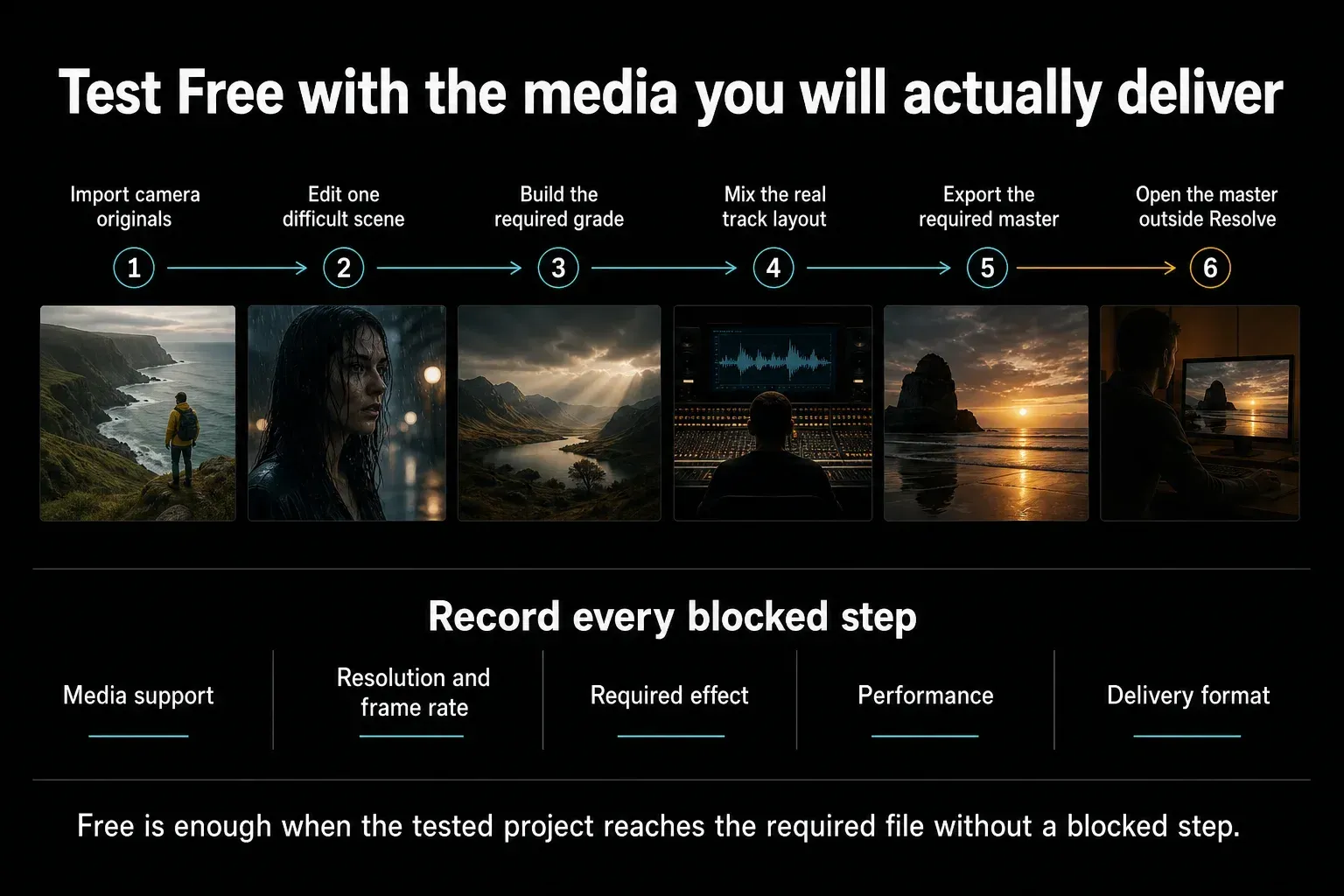
Run this test before buying or promising a workflow. Import camera originals, edit the difficult section, build the required grade and audio layout, export the actual master, then open that file outside Resolve. Record the first blocked step. A spec sheet can't reveal a broken plugin, an unusual stream profile or a system bottleneck by itself.
Studio AI Tools and the DaVinci Neural Engine
Studio includes the DaVinci AI Neural Engine. Blackmagic’s Studio feature page names Magic Mask, Super Scale, Speed Warp, Smart Reframe, object removal and facial-recognition workflows. The Resolve 21 manual also labels audio transcription and text-based editing Studio-only. Use the Resolve 21 AI tools guide for individual tool and edition checks, including newer features.
Do not read “AI” as a reliable edition label by itself. Check the named command: a tutorial using Magic Mask or text-based editing needs Studio, while ordinary masks, tracking and manual captions are different workflows.
Free still offers manual and non-Neural alternatives for many tasks: Power Windows, qualifiers, standard tracking, Fusion masks, ordinary reframing and non-Speed-Warp retiming. Those alternatives aren't identical replacements, but neither are they absent. The buying question is whether the paid tool removes a repeated, measured bottleneck in the work you actually do.
Video Noise Reduction and Extra Resolve FX
Temporal video noise reduction, AI spatial video noise reduction and UltraNR are Studio features. Free doesn't provide those Color-page video-noise-reduction controls. This is one of the clearest edition boundaries for footage that must be denoised inside Resolve.
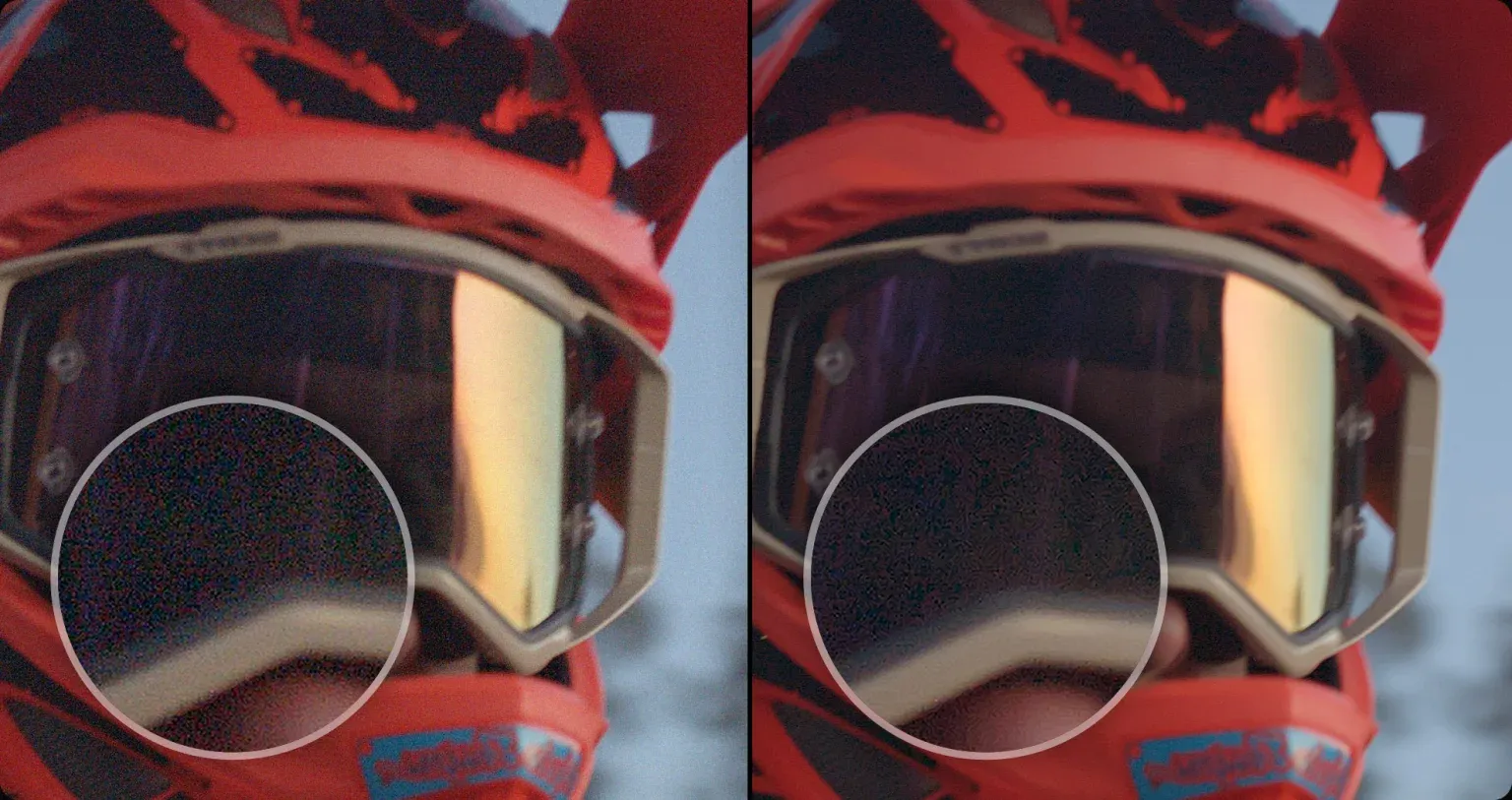
Temporal processing compares information across frames; spatial processing works within a frame. Either can soften detail or create artifacts when pushed too far. The official comparison illustrates the intended problem, but it does not prove that every noisy clip will become clean. Test representative motion, fine texture, skin and shadow detail before treating Studio as an automatic repair.
Keep video and audio noise separate. Fairlight includes audio cleanup and mixing tools, while Studio adds named AI audio tools such as Voice Isolation, Music Remixer and Dialogue Separator. A page or plugin called noise reduction may be solving an entirely different signal problem.
Studio also adds Film Look Creator, Patch Replacer and clip lens-distortion correction. Free retains many effects and the core grading, Fusion and Fairlight tools. Check the exact effect name in your version, particularly when importing a template. Third-party OpenFX plug-ins have their own licenses and may add their own watermarks.
GPU Acceleration and Performance
Free uses the GPU too. Do not confuse GPU image processing with a codec’s hardware decoder or encoder. Blackmagic’s 21.1 Free release notes specify one processing GPU on Windows and Linux; they do not state that as a universal macOS restriction. Studio supports multiple GPUs, but that alone does not promise a faster result on your machine.
Hardware H.264/H.265 acceleration is also platform-dependent. Supported macOS hardware paths are not universally Studio-only. On Windows, the codec matrix distinguishes OS-supported profiles from the additional profiles and GPU acceleration offered in Studio. Check both the stream profile and your hardware rather than buying an upgrade solely because someone said Free runs on the CPU.
Performance depends on the source codec, bit depth, effects, temporal processing, timeline resolution, cache, storage and available GPU memory. A second GPU helps only when the operating system, hardware, workload and feature can use it. Apple Silicon also uses unified memory, so a discrete-GPU buying rule from Windows cannot be copied directly to a Mac.
If Free stutters, first test a short source clip without effects. Then compare proxy, optimized-media or cache behavior, and inspect whether the bottleneck is decode, effects, storage or GPU memory. Buying Studio can unlock a supported hardware path, but it will not restore a missing source or repair a corrupt file. Use the slow-playback diagnostic to find the bottleneck before deciding whether an upgrade would help.
Python Scripts and Automation Changed in 21.1
If a Python-based tool worked in Free before an update, check this first: Blackmagic’s 21.1 release notes move Python scripting to Studio and say advanced scripting now requires Studio. This is not a claim that every Fusion macro, title template or plug-in has become paid. Check how the particular tool integrates with Resolve and which builds its developer supports.
One concrete example is PugetBench for DaVinci Resolve: its developer says Free 21.1 is no longer supported because of the scripting change, while its published Free compatibility range is 20.0–21.0. That is a benchmark compatibility limit, not a statement that normal editing stops working. Back up projects and project libraries before changing versions to recover an automation workflow.
HDR, Cinema Delivery, Audio and Collaboration
Free includes HDR grading and multi-user collaboration according to the current product page. Those inclusions are often lost in simplified comparison tables. They don't make every HDR or collaboration requirement free, because delivery metadata, monitoring, cloud services and facility workflows can add separate constraints.
Studio adds advanced Dolby Vision and HDR10+ workflows, immersive audio and additional cinema-delivery capabilities. Do not turn that into “every IMF or DCP operation needs Studio”: the codec matrix distinguishes native decoding, encoding formats, resolution thresholds and licensed options. Check the exact deliverable rather than the acronym alone.
Studio also does not include every third-party license. Blackmagic says advanced Dolby Vision trim controls need a separate Dolby license, and encrypted DCP support needs a separate EasyDCP license. Confirm the platform, required renderer and licensing before accepting the job; the codec matrix also lists separate licensing for rendering Dolby Atmos formats.
For ordinary web delivery, use the platform's current requirements and test the result after upload. The maintained YouTube export settings cover that specific master. Don't buy Studio for a broadcast or cinema acronym that never appears in the brief.
Free Edition Limits at a Glance
| Requirement | Free | Studio adds | What to verify |
|---|---|---|---|
| Maximum output | Ultra HD 3840 x 2160 at up to 60 fps | Up to 32K and 120 fps | Confirm the actual master dimensions and frame rate |
| Common video formats | Blackmagic says virtually all 8-bit video formats | Broader 10-bit and professional format support | Check OS, container, codec, profile, decode and encode separately |
| H.264 and H.265 acceleration | Platform-dependent; macOS has supported hardware paths | Additional supported profiles and hardware paths, depending on OS | Test the exact source profile and delivery preset |
| AI and text tools | Core non-Studio workflows remain available | Neural Engine, text-based editing, Magic Mask and named AI tools | Confirm the exact tool in the current Studio page |
| Video noise reduction | No Color-page temporal or AI spatial NR | Temporal NR, AI spatial NR and UltraNR | Test representative noisy motion, not one still frame |
| GPU scaling | One processing GPU on Windows and Linux in 21.1 | Multiple-GPU support | Check workload, OS and supported hardware |
| HDR and cinema delivery | HDR grading | Advanced Dolby Vision/HDR10+ and additional cinema-delivery capabilities | Check exact format, resolution, platform and separate licenses |
| Audio | Core Fairlight editing and mixing | Immersive tools plus Voice Isolation, Music Remixer and Dialogue Separator | Define the mix and delivery format first |
| Python scripting in 21.1 | Requires Studio | Python scripting and advanced automation | Check the tool developer’s supported builds |
Use this table to find the restriction that affects your job. For codec or delivery questions, check the OS-specific row and your installed build before treating a feature name as a yes-or-no answer.
When Free Is Enough and When Studio Is Justified
Free is enough when the actual source opens, the timeline performs acceptably, the needed effect exists, and the required master stays within the documented Free boundaries. That can cover beginner work, YouTube videos, many corporate edits, short films and client jobs, but the project specification decides, not the category label.
Studio is justified when a confirmed requirement blocks the tested workflow: output above Ultra HD or 60 fps, an unavailable codec profile or hardware path, temporal or AI spatial video noise reduction, a named Neural Engine tool, Python scripting in 21.1, or a required advanced delivery feature. Verify the specific limitation and any additional license before paying.
- Write the required source formats and master specification before opening the project.
- Test the longest or most difficult source, not a convenient sample.
- Name the missing Studio capability and confirm it on the current page.
- Measure the blocked time or failed deliverable instead of guessing at a speed benefit.
- Check the current Resolve price and license details before purchasing or assuming future upgrade terms.
If every part of the test works in Free, keep editing. If one part fails, name the missing capability first. That gives you a useful upgrade decision instead of a list of impressive features you may never use.
DaVinci Resolve Free Version FAQ
What features are missing from the free version of DaVinci Resolve?
Studio adds named Neural Engine tools, text-based editing, temporal and AI spatial video noise reduction, extra effects, output beyond Ultra HD or 60 fps, broader professional-format support and advanced delivery features. Python scripting also requires Studio in 21.1. GPU limits depend on the OS: do not assume Free lacks every hardware-accelerated codec path.
Can DaVinci Resolve Free export 4K?
It can master and output Ultra HD 3840 x 2160 at up to 60 fps. That's the consumer format commonly called 4K UHD. DCI 4K is 4096 x 2160, which exceeds the documented Free ceiling, as do higher resolutions and frame rates above 60 fps.
Can DaVinci Resolve Free edit or export 10-bit video?
There's no safe universal yes-or-no answer based only on bit depth. Support varies by operating system, container, codec, profile and whether Resolve is decoding or encoding. Inspect the exact file with a media-information tool and check the current supported-codec table for that platform and direction.
Does DaVinci Resolve Free have a watermark or time limit?
Blackmagic distributes Free as a separate free edition, not a time-limited Studio trial. Normal work built only with Free-supported tools has no general application watermark. However, Studio-only Resolve FX can be previewed in Free with a DaVinci Resolve Studio watermark; remove the paid effect or open the project in Studio to clear it. Third-party trial plugins can impose their own marks or license limits.
Is DaVinci Resolve Free enough for YouTube or client work?
Yes when the source media decodes correctly, the needed effects exist in Free, the system can process the timeline, and the required master stays within Free's format, Ultra HD and 60 fps boundaries. Test the actual camera file and delivery preset before promising a client workflow.
Does DaVinci Resolve 21 Free include the Photo page?
Yes. Resolve 21 includes the Photo page. PetaPixel’s May 2026 beta test reported Free Photo and Deliver exports limited to 4K or below; that is not a fresh 21.1 measurement. The current Free notes still specify Ultra HD-or-lower output. Export a sample and check its pixel dimensions before relying on Free for full-resolution photographs.
This guide belongs to the DaVinci Resolve Comparisons hub. Start there to move between Free versus Studio, current cost, competing editors and other edition or buying decisions.