DaVinci Resolve and CapCut are both free to start, but “free video editor” is almost the only clean overlap. CapCut is built around fast creation across phone, web and desktop, with captions, templates and social delivery close to the edit.
Resolve is a desktop post-production suite that expects you to make more decisions but gives you much deeper control over the timeline, color, effects, audio and final file.
Quick verdict: use CapCut when the job is same-day Shorts, Reels, TikTok videos or another caption-heavy social format and speed matters more than a controlled finishing pipeline. Use Resolve when the project is longer, the source media needs careful organization, or color, sound, VFX, collaboration and delivery specifications matter.
Don't pay for CapCut Pro or Resolve Studio until one named limit stops a real project. For the CapCut side of that call, see Is CapCut Pro worth it on CapCut Guide.
The choice starts with publishing rhythm
| Your recurring job | Better first test | Why |
|---|---|---|
| Daily vertical clips from a phone | CapCut | Mobile capture, templates, captions and social formats stay close together |
| Weekly long-form YouTube episodes | Resolve | Stronger media organization, audio, color and repeatable delivery |
| Trend-led edits with animated text | CapCut | Fast preset and template route with less manual construction |
| Client work with mixed cameras and defined masters | Resolve | Deeper codec, color-management, audio and export control |
| Editing on a phone, browser and laptop | CapCut | Cross-device creation is part of the product's core workflow |
| One project moving through edit, grade, VFX and mix | Resolve | Color, Fusion and Fairlight live inside the same project |
That table deliberately avoids a universal winner. A fifteen-second product clip can take longer in Resolve because you're building what CapCut already packages. A twenty-minute interview can become harder in CapCut because the quick tools don't replace a deliberate media, color and audio workflow. Pick the application that matches what you publish every week.
Free does not mean the same thing
Prices and plan terms below were checked on September 5, 2026. Blackmagic publishes a stable desktop split: DaVinci Resolve 21 is free and Resolve Studio 21 is listed at $295.
Free includes the core Edit, Cut, Color, Fusion, Fairlight and Deliver pages. Studio adds specific AI, effects, codec, performance and high-end delivery capabilities. The Free vs Studio decision guide identifies the actual blockers instead of treating paid as automatically better.
CapCut's cost needs a different answer. CapCut's own help center says Pro pricing varies by region, device and available promotion, and instructs users to check the current price inside the web, desktop or mobile account.
That makes a fixed global price copied into an article unreliable, even if it was correct for one account on one day.
CapCut Standard and Pro also differ by platform; a feature count alone misses that boundary. CapCut says Standard benefits are primarily designed for mobile, while premium access on PC requires Pro.
Its multi-device guidance also says Standard premium benefits don't extend to desktop or web. If you edit on more than a phone, confirm the entitlement on every device before paying.
CapCut also separates plan access from usage credits. Standard and Pro are subscriptions, while some advanced AI actions consume AI credits. The formal CapCut Credits Rules say credits cannot buy Pro or Space plans, move to another account or be exchanged for cash.
A Pro subscription can include credits, but that doesn't make every AI action unlimited. Before upgrading, capture four things from your own checkout and export panel:
- the renewal price after any introductory promotion;
- whether the plan works on every device you use;
- which export resolution and premium assets are unlocked;
- how many credits the specific AI action consumes.
Don't rely on a universal CapCut cloud storage number. CapCut's own current help pages conflict: its Standard-vs-Pro comparison says around 100GB for Standard and up to 1TB for Pro, while its separate Pro storage guidance says 100GB.
CapCut also says new free Web spaces may have 0GB, displayed as a 1KB placeholder. Treat the signed-in Space and checkout screens for your platform, region and account as authoritative, then keep source media outside the service as a separate backup.
On Resolve, use the Resolve pricing guide to separate the permanent desktop license from organization-managed options.
Run one vertical video through both
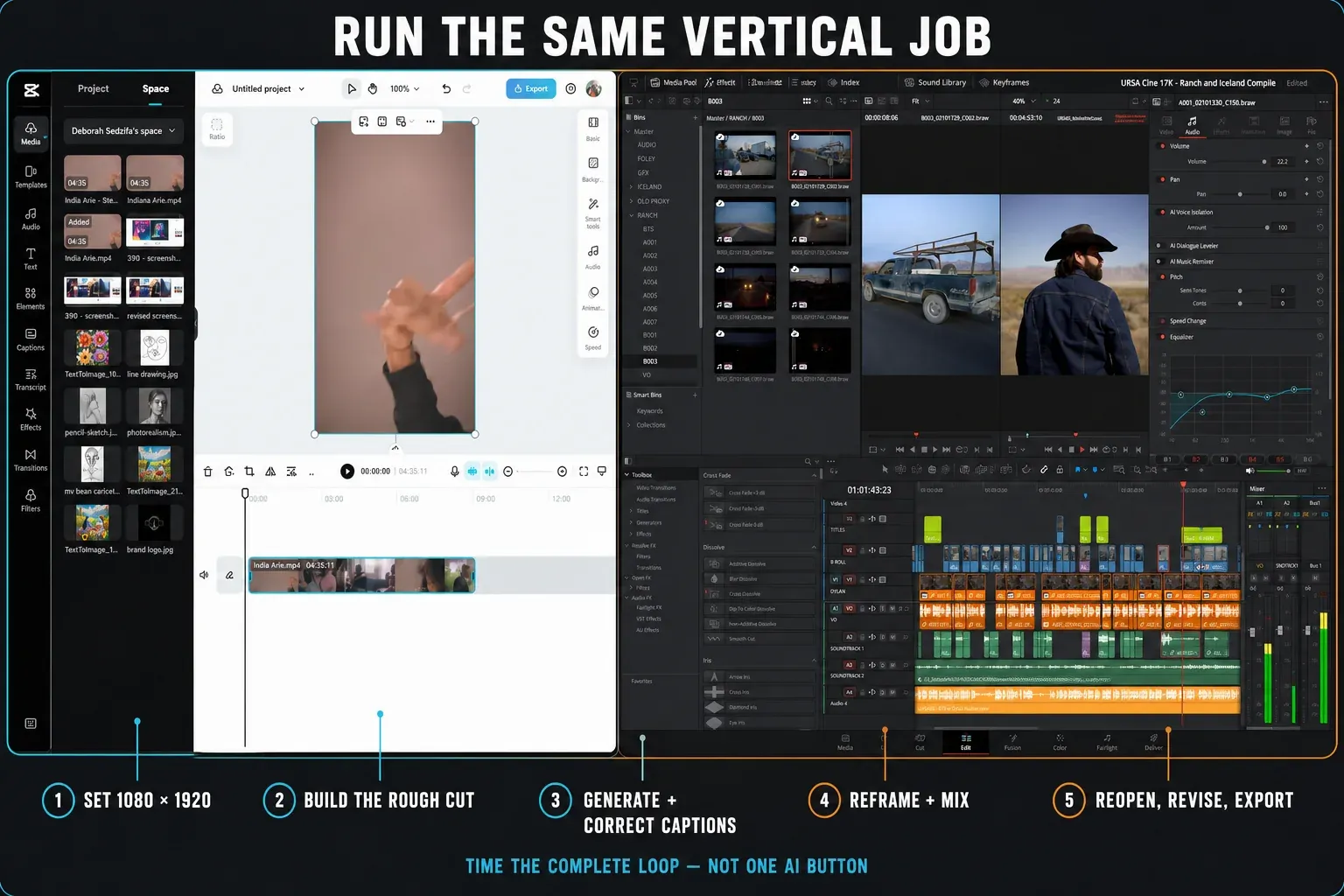
A fair test isn't a cinema trailer in Resolve versus a template in CapCut. Build the same 45-second vertical video in both applications using the same phone clips, voice recording and delivery target.
The test should include one bad take, one reframed landscape shot, captions, music ducking, a brand color, a speed change and a final 1080 × 1920 export. If 4K delivery matters, repeat the export on the actual device, account and plan you intend to use.
| Checkpoint | What to record | Decision impact |
|---|---|---|
| Start | Time to import and set a vertical canvas | Measures project friction before creative work |
| Rough cut | Time to remove the bad take and reshape pacing | Tests the timeline, not the effect library |
| Captions | Correction time after transcription | Generation speed is irrelevant if cleanup is slow |
| Reframe | Time to keep the subject inside the vertical frame | Tests one of the most common social tasks |
| Audio | Time to make speech clear without pumping music | Exposes the difference between a preset and a mix |
| Revision | Time to change the opening, caption style and logo color | Client notes reveal whether the structure stays editable |
| Export | Settings used and whether the uploaded file passes inspection | A fast render is not useful if the platform result is wrong |
The winner is the application that completes the whole loop with fewer manual repairs. Save the project, reopen it the next day and make one change. That final step catches cloud-sync, missing-asset and organization problems that a speed run misses.
CapCut is faster when the template is the workflow
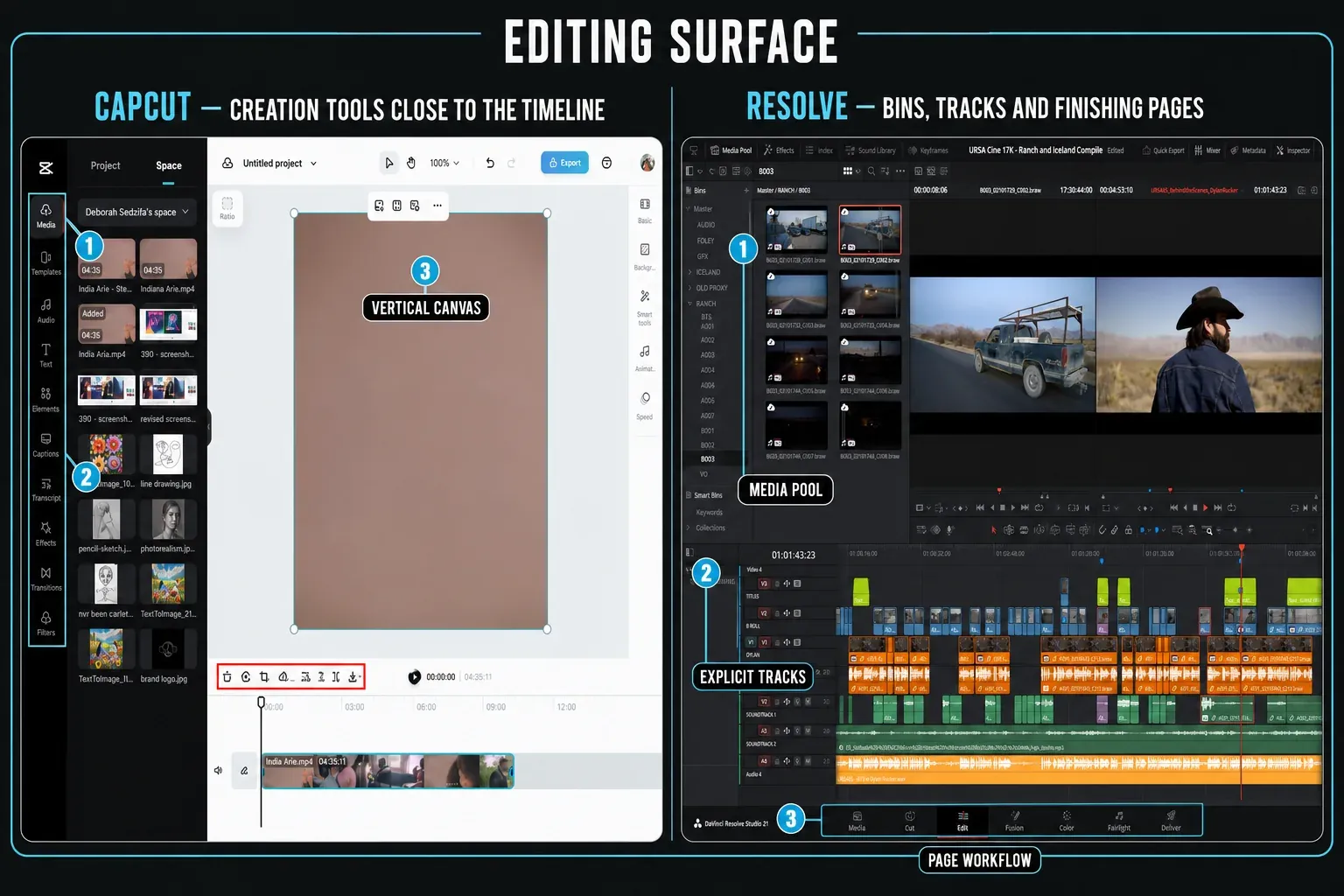
CapCut's advantage is product design, not a lack of seriousness. It puts animated text, automatic captions, social effects, reframing, background tools, stock assets and platform-shaped outputs close to the timeline. When the desired result resembles a current social format, starting from that format can be faster than constructing every element.
That's especially useful for a solo creator who records, edits and publishes on the same device. CapCut spans mobile, web and desktop, while desktop Resolve is designed around a workstation and a more deliberate project library.
But cross-device availability is not the same as cross-device paid entitlement: CapCut Pro covers mobile, desktop and web, while Standard premium benefits are mobile-only in CapCut's current guidance. A creator working between a phone and an ordinary laptop may still finish more consistently in CapCut, but should test the exact plan on both devices.
The trade-off arrives during revision. A template can hide which layer, animation, font or asset created the result. Before committing to it for a client series, change the brand color, replace the opening shot, extend a caption and create a second aspect ratio.
If those routine changes fight the template, the initial speed was borrowed from the revision stage.
Resolve is stronger when the project must survive finishing
Resolve asks for more setup because it is solving a wider problem.
The Edit and Cut pages handle the timeline; the Color page handles grading and color management; Fusion handles compositing and motion graphics; Fairlight handles repair, routing and mixing; Deliver handles controlled output. The Resolve learning hub routes beginners by task so they do not attempt to learn every page before making a cut.
For long-form YouTube, courses, interviews, events and paid client work, that media management structure becomes useful when footage multiplies. Bins, smart bins, metadata, multiple timelines, proxies, scopes, buses and render queues give each problem a defined place. Resolve doesn't automatically make the story better. It makes a complicated project easier to inspect.
Vertical delivery isn't a reason to avoid Resolve.
Set the vertical timeline before reframing and validate the safe areas and captions on a phone. Our vertical aspect-ratio workflow covers the canvas and reframing steps, while the export hub handles the final file. The difference is that Resolve expects you to choose those settings rather than infer them from a social template.
Captions, AI and credits need separate decisions
CapCut's AI pitch is immediacy. Auto captions, avatars, background tools, tracking and generative features are presented close to the creator workflow. Resolve's AI tools sit across media search, editing, color, restoration, masking and speech generation. Many Resolve Neural Engine features require Studio; some CapCut actions require Pro, credits or both.
Don't compare the number of AI buttons. Compare the unit of work:
- For captions, measure correction and restyling time, not transcription time alone.
- For background removal, inspect hair, motion blur and hand edges on the final frame size.
- For auto reframing, test a subject who crosses the frame instead of a centered talking head.
- For generative tools, record the credits consumed by rejected attempts as well as the accepted result.
- For a client project, confirm whether the input, generated output and included asset are cleared for the intended commercial use.
The Resolve transcription guide covers editable transcripts and subtitles; the Resolve 21 AI breakdown separates confirmed tools and edition limits. On the CapCut side, check the live plan and credit screens rather than assuming that a Pro badge makes every AI action unlimited.
Color, audio and VFX are not equal categories
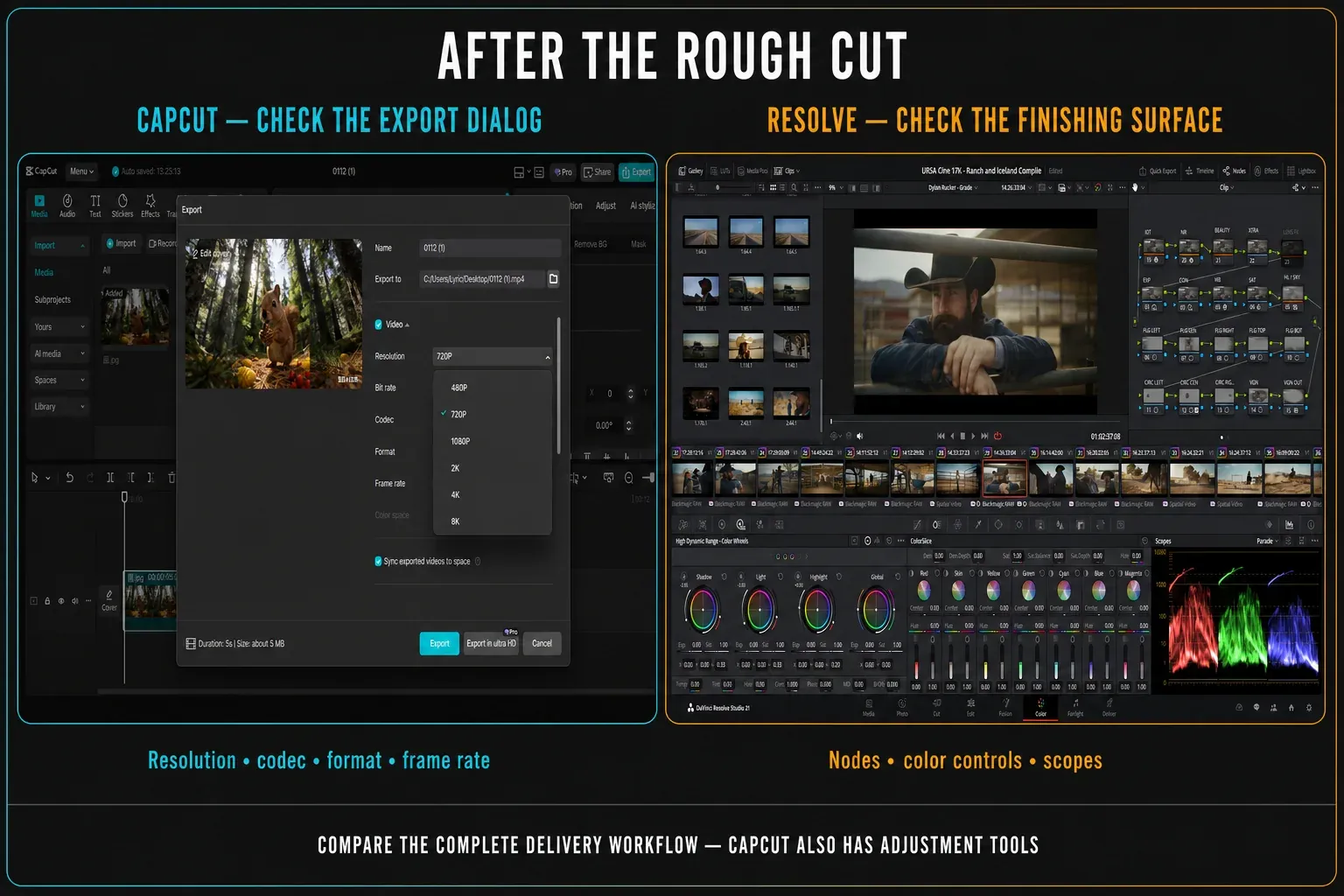
CapCut can make footage look and sound better quickly. Filters, adjustments, effects, denoise and loudness tools cover ordinary social work, and that can be exactly enough.
Resolve becomes meaningfully different when you need repeatability: one color-managed path for mixed cameras, scopes that show the signal, tracked corrections, reusable node structures, dialogue repair, buses, automation and deliverable-specific audio.
Use the color grading workflow map if shots must match rather than merely share a filter. Use the Fairlight hub if dialogue, music and effects need separate control. Use the Fusion hub when a motion element must stay editable beyond a template's exposed controls.
There's no prize for using the deeper tool on a simple clip. If a CapCut adjustment produces the approved result and the project remains editable, it solved the job. Resolve earns its extra complexity when you need to diagnose, reproduce or hand off the result.
Client work adds rights, backup and handoff
Trending music, premium templates and stock elements aren't automatically cleared for every brand, platform, country or paid campaign. The current CapCut Materials License Agreement distinguishes personal-only materials from items specifically marked for limited commercial use, and the permitted term and territory can vary by asset.
A Pro badge alone isn't a rights record. Save the asset-specific license details with the job and replace anything the client can't document.
Cloud convenience is also not a backup policy. CapCut's current Terms of Service say the company does not guarantee permanent availability of user content and advises regular backups of anything you value.
Resolve can use local project libraries, exported DRP projects, DRA archives and Blackmagic Cloud, but the editor still needs a separate copy of project data and source media.
For either application, hand a collaborator a duplicate test project before the deadline. Confirm that fonts, music, templates, effects, captions and source media open under the collaborator's account and plan. A share link that opens isn't proof that every asset remains editable or licensed.
How to move from CapCut to Resolve without rebuilding everything
Do not switch editors in the middle of a healthy recurring series just because Resolve is more powerful. Start the next episode in Resolve and keep the last CapCut project available as a visual reference.
Export brand assets, fonts, logos, music licenses, caption text and a clean high-quality master from CapCut. Rebuild only the reusable structure you need.
- Create the Resolve timeline at the final aspect ratio and frame rate.
- Import camera originals rather than a compressed social export whenever possible.
- Rebuild one title style and one caption style, then save them before making variants.
- Set up dialogue, music and effects tracks before the first full edit.
- Use Proxy Media if the source codec overwhelms the workstation.
- Export a short test, upload it privately and compare captions, color and audio on a phone.
Keep CapCut for the jobs it finishes well. A mixed workflow is sensible: quick reactive clips in CapCut, longer or specification-heavy work in Resolve. The mistake isn't using two tools. It is moving a project between them without an interchange plan.
For a wider shortlist, use the DaVinci Resolve vs Premiere Pro comparison to separate price, platform, handoff and finishing requirements before testing another application. Browse the DaVinci Resolve comparisons hub when the choice includes another editor or the Free-versus-Studio edition split.
Frequently asked questions
Is CapCut better than DaVinci Resolve for beginners?
CapCut usually gives a beginner a gentler learning curve because templates, captions and platform formats are close to the edit. Resolve takes longer to learn but gives the beginner a more transferable timeline, color, audio and delivery workflow. The better start depends on the work you plan to repeat.
Is CapCut really free?
CapCut has a free starting tier, but plan, export, premium asset and AI availability can vary by platform and account. CapCut says current Pro pricing must be checked inside your own account. Standard benefits are primarily mobile, while premium PC and web access requires Pro. Some AI actions use credits separately from the subscription.
Does DaVinci Resolve add a watermark?
Normal editing and export from Resolve Free don't add a general watermark. Applying a Studio-only effect in the free edition can place a watermark on that effect's output, so check the Inspector before delivery.
Which is better for YouTube, CapCut or Resolve?
CapCut is efficient for Shorts and fast caption-led videos. Resolve is usually the stronger base for long-form episodes, mixed cameras, detailed audio, consistent color and controlled exports. Many channels can reasonably use CapCut for reactive short-form work and Resolve for the main program.
Can CapCut projects open in DaVinci Resolve?
Don't assume a complete editable project transfer. Preserve camera originals, captions, fonts, brand assets and a high-quality reference export, then rebuild the reusable structure in Resolve. Test any available interchange route on a duplicate rather than risking the active project.
Should I pay for CapCut Pro or Resolve Studio?
Pay for CapCut Pro when a verified plan feature, asset or cross-device workflow repeatedly saves more than its renewal and credit cost. Buy Resolve Studio when a named codec, AI, effect, performance or delivery limit blocks paid work. Neither upgrade is required just because the free tier exists.
CapCut isn't merely Resolve with fewer controls, and Resolve isn't CapCut for professionals. They optimize different production rhythms. Choose CapCut when publishing speed is the product. Choose Resolve when the project must remain controllable after the first export.
