Pick Kdenlive when the computer can't run Resolve 21: an Intel Mac, a Windows PC with under 16 GB of memory or without a 4 GB graphics card, or a Linux machine that has to open phone footage. It's also the free way to get AI captions and background removal. Pick DaVinci Resolve once the machine clears its requirements and the project calls for a proper grade, dialogue repair, compositing or exports with effects that finish on time. Neither editor costs anything, so check the hardware before you compare features.
The hardware gap is wide. Resolve 21.1.2 wants an Apple silicon Mac running macOS 15 or later; on Windows it asks for 16 GB of memory and a graphics card with 4 GB, and on Linux for 32 GB. Kdenlive 26.08.2 ships Intel and Apple silicon builds for macOS 13 or later and runs on Windows 10 (1809 or later) and 64-bit Linux, with 8 GB of memory for HD. The published export timings pooled further down split along the same line: Resolve's runs took a median 0.58 times the timeline length, plain Kdenlive exports a median 0.8x, and Kdenlive projects with effects about 4.5x, because Kdenlive renders effects on the CPU.
On hardware that meets Resolve's requirements, my default is Resolve, because its node grade, Fairlight channel strips and Fusion page reach further than Kdenlive's effects, and Resolve runs that work on the graphics card while Kdenlive renders every effect on the CPU. Kdenlive still earns a place beside it. Its Whisper speech recognition writes an SRT file that Resolve's free edition imports, and its Object Mask removes a background at no cost, a job Resolve reserves for Studio's Magic Mask v2.
DaVinci Resolve vs Kdenlive at a glance
The Kdenlive column describes Kdenlive 26.08.2, released October 13, 2026. The Resolve column covers the free edition of DaVinci Resolve 21.1.2.
| Question | Kdenlive | DaVinci Resolve (Free) |
|---|---|---|
| Price | Free Software under the GNU GPL, with no paid tier | Free; Studio is a $295 one-time license |
| Runs on | Windows 10 (1809 or later), macOS 13 Ventura or later on Intel and Apple silicon, 64-bit Linux as an AppImage or Flatpak | Apple silicon Macs on macOS 15 or later, Windows 10 or later plus Windows 11 on Snapdragon X Elite, Rocky Linux 8.6; a separate free iPad app |
| Memory | 4 GB for SD, 8 GB for HD, 16 GB for 4K | 8 GB on a Mac (16 GB with Fusion), 16 GB on Windows (32 GB with Fusion), 32 GB on Linux |
| Graphics | A GPU with working OpenGL 2.0, or DirectX 9 or 11 drivers on Windows | A GPU with at least 4 GB of memory on Windows and Linux |
| Intel Macs | Supported on macOS 13 or later | Last version is 20.3.2, on macOS 14 Sonoma |
| Color | Lift/Gamma/Gain, curves, Apply LUT and scopes, as effects on each clip | Color page, where a grade is a tree of separate corrections called nodes, processed in 32-bit float |
| Audio | Compressor, De-Esser, Limiter, Normalize and LADSPA plugins | Fairlight page with EQ, dynamics, up to six insert effects per track, Noise Reduction and De-Esser; Voice Isolation is Studio |
| Effects | Chroma key, compositions with blend modes, Motion Tracker; Glaxnimate for vector animation | Fusion page for node-based 2D and 3D compositing and motion graphics |
| Captions and AI | Speech to Text with Whisper or VOSK, a Speech Editor for cutting by text, Object Mask with SAM2 | Imports SRT subtitles; Create Subtitles from Audio, transcription and Magic Mask v2 need Studio |
| Video noise reduction | HQ 3D, 3D FFT, Wavelet and Chroma Noise Reduction effects | Temporal and spatial noise reduction need Studio |
| HDR and 10-bit | 10-bit render presets; full color range doesn't work with effects yet | SDR delivery; the HDR features need Studio |
| H.264 and AAC on Linux | Yes, through MLT and FFmpeg | No AAC in any edition; H.264 and H.265 need Studio |
| GPU in exports | Encoding only, through NVENC, VAAPI, VideoToolbox or AMF; effects render on the CPU | Processing on one GPU; GPU encoding on Windows needs Studio |
| Moving projects | OpenTimelineIO import and export from the File menu | Imports and exports OpenTimelineIO, plus EDL, XML and AAF |
| Watermark | None | None on work made with free tools |
Price and licensing
Kdenlive is Free Software under the GNU GPL, and its About page spells out what that means: "There are no license fees to pay, no registrations or subscriptions, and no premium features that require payment to be unlocked." The project is part of KDE, with KDE e.V., a German non-profit, as its legal home, so every build on the download page is the complete editor. The current release is Kdenlive 26.08.2, a bug-fix update from October 13, 2026.
The team behind it is small. The State of Kdenlive 2026 report counts 8 active core members, 2 of them developers, and 38 people who contributed code in 2025. It also says work on the Windows build is "allowing us to ship Kdenlive in the Microsoft Store soon", and new major versions arrive three times a year, in April, August and December.
Blackmagic Design offers DaVinci Resolve as a free download. Its 21.1.2 readme says the free edition processes images exactly as Studio does and opens media at any resolution, while mastering and output stop at Ultra HD and Windows and Linux machines get a single GPU. Studio is a $295 one-time purchase, and its readme lists the extras: output above Ultra HD, more than one GPU, motion blur, temporal and spatial noise reduction, most AI tools, HDR tools and Voice Isolation. The Free vs Studio comparison weighs each one against the price.
On a tablet, the DaVinci Resolve for iPad app costs nothing as well, with Studio sold inside it for $94.99, and the iPad guide sets out its limits. Kdenlive's downloads cover Windows, macOS and Linux. Ordinary exports from either editor carry no watermark. Resolve has one trap: the free edition lets you try Studio-only effects, but anything rendered with them gets a watermark, and the free version features guide shows which tools are safe to use.
Versions and system requirements
Resolve's minimum is far higher. Per the 21.1.2 readme, a Mac needs Apple silicon, macOS 15 Sequoia or later and 8 GB of memory, or 16 GB if you use Fusion. A Windows PC needs Windows 10 Creators Update or later, 16 GB of memory (32 GB with Fusion) and a graphics card with no less than 4 GB of its own memory. Snapdragon X Elite and NVIDIA RTX Spark machines running Windows 11 on Arm are supported with 16 GB, and on Linux the target is Rocky Linux 8.6 with 32 GB and a discrete GPU with 4 GB. Each line is explained in the system requirements guide, and Snapdragon laptops get their own Windows x86 vs Arm page.
Resolve 21 dropped Intel Macs. The readme lists 20.3.2, released February 12, 2026, as their final version, with macOS 14 Sonoma and a Metal GPU as its floor. Version 20.3.2 can still read the project library, but projects created or opened in 21.1.2 no longer open in it. Getting 20.3.2 is covered on the old versions page, and the Resolve for Mac guide shows where About This Mac reveals which chip a Mac has.
Kdenlive's installation guide asks for far less: 64-bit Windows 10 (1809 or later), macOS 13 Ventura or later, or 64-bit Linux, with one 2 GHz core for SD video, four cores for HD and eight for 4K, and 4, 8 or 16 GB of memory for the same three tiers. The graphics card only needs OpenGL 2.0 that works correctly, or good DirectX 9 or 11 drivers on Windows, and the download page has separate builds for Intel and Apple silicon Macs. Editing leans on the processor, since the guide says "timeline playback uses the CPU" even though several render profiles use the GPU. It adds: "More and better GPU support is on the near-term roadmap." On a slower machine, the guide points to Preview Resolution, proxy clips and Timeline Preview Rendering to keep playback smooth.
The packages differ by system. On Windows, the installer needs administrator rights and the standalone version doesn't, which helps on a work or school PC. Macs get the installer only. On Linux, Kdenlive maintains AppImage and Flatpak packages, and the PPA has been unsupported since 24.02. Older systems still have a route, because the attic keeps Kdenlive 23.08.5 for Windows 7 and macOS 10.13, and 24.08.1 for macOS 11.
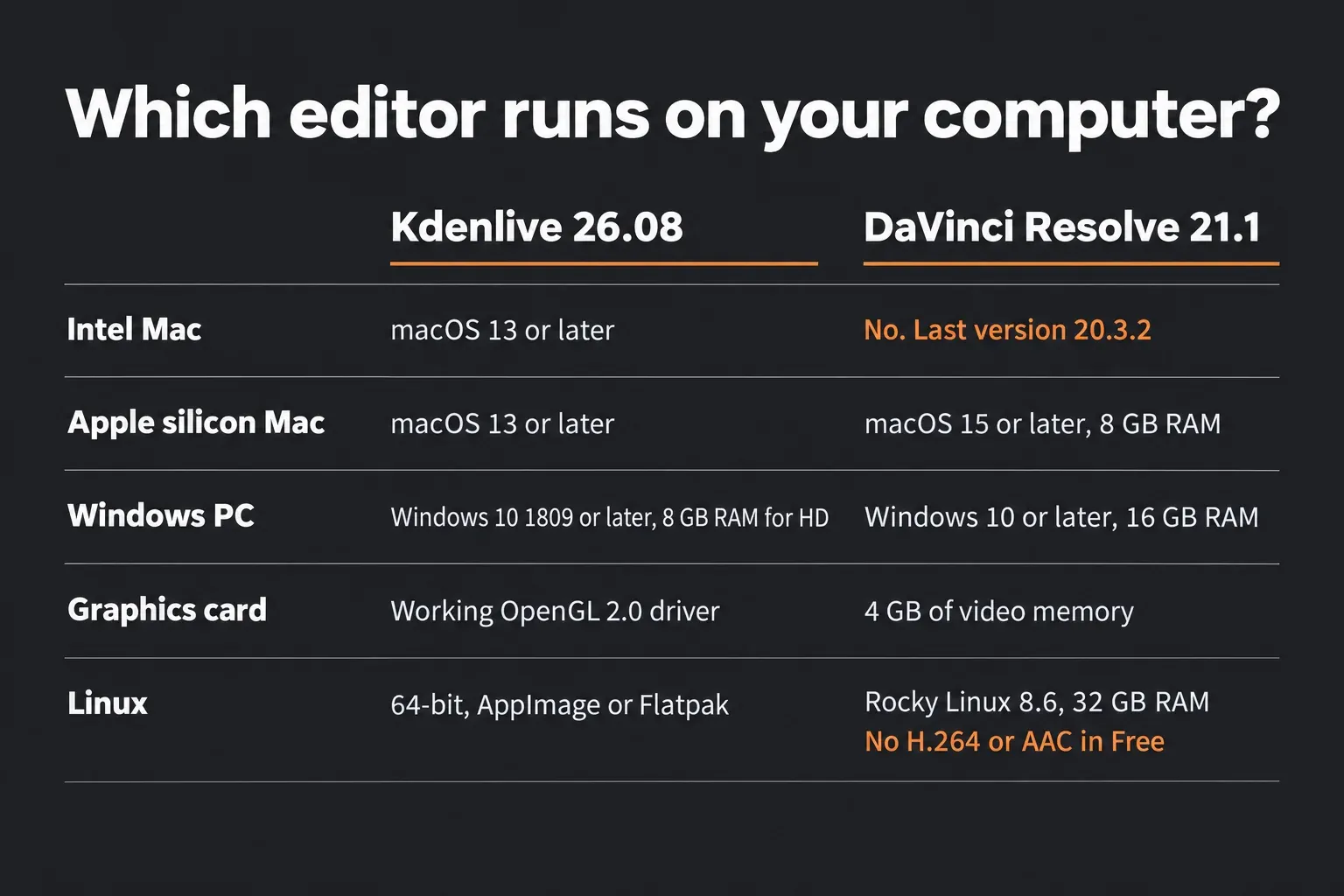
Those numbers settle many cases before features come up. An Intel Mac on macOS 13 can't run even Resolve 20.3.2, which needs Sonoma, and an 8 GB Windows laptop or a PC whose graphics card has less than 4 GB of memory falls below Resolve 21's minimum. Kdenlive runs on all of them.
Captions and AI tools
Kdenlive's AI features are free and built in. Its Speech to Text tools use Whisper or VOSK models. To caption a timeline, click the Edit Subtitle Tool icon in the timeline toolbar, choose Speech recognition, then pick the zone and the model in the Automatic Subtitling dialog and click Process. Whisper detects the language by default and can translate to English. A second translation model, enabled under Settings > Configure Kdenlive > Speech to Text, translates between an input and an output language you pick, and the guide warns that its 9 GB download takes about 12 minutes at 100 MB/s.
Subtitles get their own track. Project > Subtitle > Add Subtitle (Shift+S) starts one by hand, Sequence > Subtitles > Import Subtitle File reads ASS, SRT, VTT and SBV, and Export Subtitle File writes ASS or SRT. The Speech Editor, under View > Speech Editor, transcribes a Project Bin clip so you can select lines of text and either build a new sequence from them or insert the selection at the playhead, and Remove non speech zones deletes every "No speech" entry at once. Kdenlive 26.08 added a notification when speech recognition finishes, and 26.04 made its speech and translation plugins easier to install.
Background removal is the other free AI tool. Object Mask uses Meta's SAM2 segmentation model to isolate an object, much like rotoscoping. Add the clip to the Project Bin, set in and out points in the Clip Monitor, then click Create an Object mask in the effect stack (or Remove Background when the built-in effects are on) and Create New Mask. Drag a rectangle around the object or click it, Shift-click to add a part or Ctrl-click to exclude one, then click Generate Mask and Apply Mask. The effect works in 8-bit and only on clips in the bin, and its models install through Configure Object Detection.
Resolve keeps these jobs behind Studio. Its Reference Manual labels Timeline > Create Subtitles from Audio as a Studio Version Only feature, gives Audio Transcription and Text-Based Editing the same label, and does the same for Magic Mask v2, the tool Resolve uses to isolate objects. Transcription has its own guide, and the Resolve 21 AI tools page covers the others.
Resolve Free can import captions made elsewhere, though. As the subtitle import section explains, right-click in the Media Pool and choose Import Subtitle, then drag the file onto the timeline, or right-click it and use Insert Selected Subtitles to Timeline Using Timecode. Put the two editors together and captions cost nothing: run Speech recognition in Kdenlive, save the result with Sequence > Subtitles > Export Subtitle File as SRT, and bring that file into Resolve with Import Subtitle. A second free option is AutoSubs, a plugin that works inside Resolve. Resolve exports finished subtitles as SRT or WebVTT from File > Export Subtitle, and styling and burn-in are in the subtitles and captions guide.
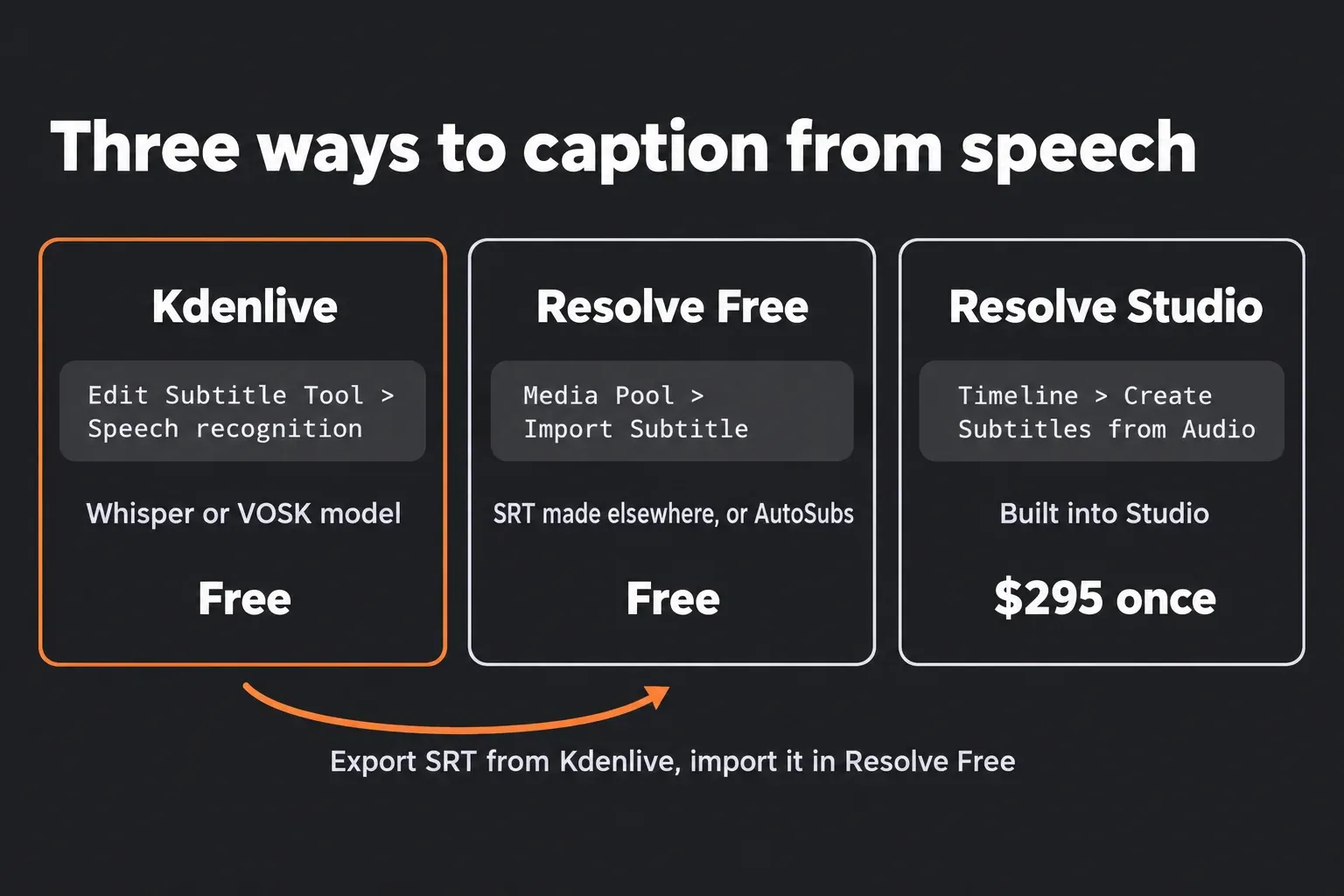
For a one-off video cut in Resolve, I'd export the mix, caption it in Kdenlive and bring the SRT back, because that costs nothing and needs no plugin. A channel that captions every week is better served by AutoSubs, since it keeps the job inside Resolve.
Color, audio and effects
Kdenlive does this work with effects on each clip, and its workspace layouts (Logging, Editing, Audio, Effects and Color) rearrange the panels for each task. Resolve gives color, sound and compositing a page each, with tools built for that one job.
- Color. Kdenlive offers Lift/Gamma/Gain with keyframes, curves, an Apply LUT effect that reads .cube, .3dl, .dat and .m3d files, and color scopes that include a histogram, waveform, RGB parade and vectorscope. Resolve's Node Editor builds a grade from separate corrections chained into a tree, and the Color page processes it in 32-bit float. The beginner color-grading order keeps that tree small, and the LUT guide shows where a LUT fits in it.
- Audio. Kdenlive's volume and dynamics effects include Compressor/Expander, De-Esser, Gain, Limiter, Normalize and a two-pass Normalize, alongside LADSPA plugin sets such as SWH, TAP and CMT. On Resolve's Fairlight page, every channel strip holds up to six insert effects, Dynamics and a 6-band EQ, and Noise Reduction and De-Esser come with the free edition. The background noise guide walks through a dialogue cleanup.
- Video noise. Kdenlive's denoisers are free: HQ 3D, 3D FFT, Wavelet and Chroma Noise Reduction. Resolve's temporal and spatial noise reduction are Studio features, and the noise reduction guide covers them.
- Effects and compositing. Kdenlive has Chroma Key in Basic and Advanced versions, compositions such as Composite and Transform with blend modes and wipes, and Glaxnimate, a vector animation program installed separately. On Resolve's side, the Fusion page handles node-based 2D and 3D compositing and motion graphics, and the Fusion tutorial starts at zero. The keyframes and curve editor guide covers animation on the Edit page.
- Tracking and stabilization. Kdenlive's Motion Tracker follows an object with OpenCV trackers, KCF by default, and writes the result as position keyframes for a Transform effect. Resolve stabilizes on the Edit and Color pages, covered in the stabilization guide.
Kdenlive's limits show up in finishing work. The render guide says the Render full color range option for 10-bit output "does not work with effects (yet)", and Object Mask and Motion Tracker both run in 8-bit. Keyframes are coarse too. The 2026 report says that "once you add a keyframe to an effect, it is applied to all parameters by default", and a dopesheet now in development brings per-parameter keyframing. The same report lists "10/12 bit color support, playback optimizations (decoding), and OpenFX support" among the upcoming features.
People who run both editors draw a similar line. On the KDE forum, a user who works in Kdenlive, Resolve and Shotcut calls Resolve "superb when it comes to colour grading" but says it needs "obscene amounts of memory". For digitized film and tape with a limited color range, the same user writes: "This is where Kdenlive's great colour tools shine and where DaVinci is still overkill." They also miss Resolve's way of building a LUT from a clip, which Kdenlive users work around with GIMP or Krita and G'MIC. In Resolve that's a right-click away with Generate LUT.
I'd grade in Resolve whenever footage from two cameras has to match, because a node tree keeps each correction separate in 32-bit float, while Kdenlive's full color range render doesn't work with effects yet.
HDR and 10-bit output
For HDR the answer is short. The free edition of Resolve delivers SDR, and the Reference Manual states that the HDR features "are only available in DaVinci Resolve Studio". Studio users can follow the HDR export guide for PQ, HLG and a matching SDR version.
Kdenlive's render presets include a 10-bit group (AV1, DNxHR-HQ, ProRes 422, ProRes 444, ProRes HQ, SVT-AV1 and x265-main10) and an NVENC H265 ABR 10 bit preset. A footnote sets the condition: "It renders only the 10 bit pipeline if you choose 10 bit effects or compositing avfilter only". Put together with the full color range caveat, a 10-bit export keeps its 10-bit pipeline only when every effect and composition in the project is one of those.
H.264 and AAC on Linux
Resolve's free Linux build is where the codec gap hurts most. In Blackmagic's Supported Codec List, decoding H.264 and H.265 on Rocky Linux is marked Studio only, and encoding them needs Studio plus NVIDIA graphics. AAC audio is missing on Linux in both editions, whether decoding or encoding. That's the usual pair inside an MP4 from a phone or camera, so the free Linux build often refuses those files until they're converted.
None of this applies on other systems. The codec list's Mac section lets the free edition decode and encode H.264 and H.265 on the GPU, and on Windows the H.264 entries follow the profiles the operating system supports, with Studio adding more profiles and GPU acceleration. The Resolve for Linux guide explains the Linux build's codec rules, the MP4 import fix and the MP3 and AAC fix handle similar import errors on any system, and the supported codecs guide lists everything.
Kdenlive has no such split. Its engine, MLT, "relies on FFmpeg to decode and encode almost all the video and audio formats that are available today", as the About page puts it, and the render presets include MP4-H264/AAC and MP4-H265 (HEVC) on Linux as on any other system. The hardware-accelerated presets cover NVENC and VAAPI on Linux and VideoToolbox on a Mac, and Kdenlive 26.04 added an AMF profile for AMD graphics on Windows.
On Linux I'd keep a phone-footage edit in Kdenlive from start to finish, because Resolve's free build would need every clip transcoded first, and only a job that truly needs Resolve's grade or Fairlight justifies that extra pass and the larger files it leaves on the drive.
Export speed: what the test results show
No published test times Resolve and Kdenlive on one machine with one project, so the composite below puts each timing on a common scale: export time divided by timeline length. At 0.5x, a ten-minute timeline renders in five minutes, and anything below 1.0x beats real time.
Three sources supply six Resolve runs. A Japanese GPU encoding test exported one two-minute 4K timeline from Resolve 18.6 Free on four NVIDIA cards, a note.com export log covers a 29-minute 1080p project on an M1 MacBook Air in Resolve 19.1 Free, and in a Shotcut forum post four 1080p files merged into a 21-minute output took a little over 15 minutes. Those runs span 0.41x to 0.71x, with a median of 0.58x.
Kdenlive's figures come from five KDE forum threads and one Shotcut forum thread. People mostly post there when an export feels slow, so the sample leans that way. Without effects, seven runs on five machines landed between 0.25x and 1.88x, and the median across the five machines is 0.8x. A Windows 10 PC with NVIDIA graphics exported a 9-minute 4K clip in 4:57, a Ryzen 9 5900X with an RX 6800 went from 32 to 60 fps once its thread settings were raised, and a desktop with a "decent graphics card" rendered 1080p30 at 120 fps. With effects, seven runs on four machines ranged from 0.85x to 13.35x. The per-machine medians were 0.92x, 1.45x, 7.5x and 13.35x, which puts the overall median at about 4.5x. On a Fedora 36 PC, the same 200% zoom took anywhere from 4:15 to over 20 minutes depending on the effect used. The slowest cases were an 8-minute, three-track project on an i9-9900KF that took over an hour and a 17-minute DJI Osmo 6 project that took 3 hours 47 minutes. Two 4K60 runs from the thread with the RX 6800 test, a CPU encode on the Ryzen 9 5900X and a 14-minute project on an RTX 4090 machine whose times barely moved with hardware encoding, came in at 5.7x to 10x.
| Editor | Source and machine | Timeline and export | Export time | Time ÷ length |
|---|---|---|---|---|
| Resolve | nunogameblog, 2025; RTX 3060 | 2-minute 4K timeline to H.264, Resolve 18.6 Free | 70 s | 0.58x |
| Resolve | nunogameblog, 2025; RTX 4060 Ti | Same timeline | 69 s | 0.57x |
| Resolve | nunogameblog, 2025; RTX 4070 | Same timeline | 70 s | 0.58x |
| Resolve | nunogameblog, 2025; RTX 4070 Ti SUPER | Same timeline | 71 s | 0.59x |
| Resolve | note.com, 2024; MacBook Air M1 | 29:42 1080p project at 23.976 fps with LUTs, three VST effects and titles, Resolve 19.1 Free | 732 s | 0.41x |
| Resolve | Shotcut forum, 2022; Core i7-5820K, 32 GB, Windows 11 | Four 1080p files merged into a 21-minute output at half the frame rate; edition not stated | just over 15 min | about 0.71x |
| Kdenlive, no effects | discuss.kde.org, 2025; Windows 10 PC with NVIDIA graphics | 9-minute 4K30 clip to H.264 NVENC with parallel processing, Kdenlive 24.12.1 | 4:57 | 0.55x |
| Kdenlive, no effects | discuss.kde.org, 2024; Ryzen 9 5900X, RX 6800 | 1-minute 4K60 video to H.264 VAAPI, default threads, then 8 to 12 threads | 32 fps, then 60 fps | 1.88x, then 1.0x |
| Kdenlive, no effects | discuss.kde.org, 2024; Ryzen 7 7800X3D, RX 7900 XTX, Fedora Kinoite | 1080p60 video to AV1 VAAPI, 16 encoding threads and 8 parallel | 70 to 80 fps | about 0.8x |
| Kdenlive, no effects | discuss.kde.org, 2024; desktop with an SSD and a "decent graphics card" | 1080p30 render; 1080p60 render | 120 fps; "about realtime" | 0.25x; 1.0x |
| Kdenlive, no effects | discuss.kde.org, 2024; machine not stated | One picture with a 10-minute audio file | about 10 min | 1.0x |
| Kdenlive, effects | discuss.kde.org, 2025; same Windows 10 PC | Same 4K clip with saturation at 200% | 13:05 | 1.45x |
| Kdenlive, effects | Shotcut forum, 2022; Fedora 36 PC, CPU only | 5-minute gameplay clip zoomed to 200%: first run, then Transform, Crop, Scale and Tilt, and Position and Zoom | 4:49; 4:23; 4:15; 20+ min | 0.96x; 0.88x; 0.85x; 4.0x+ |
| Kdenlive, effects | discuss.kde.org, 2026; i9-9900KF, RX 9070, 32 GB, Linux Mint 22.3 | 8-minute project, three video tracks with Transform and Edge Crop on each clip, VAAPI H.264 with 16 threads | 60+ min | 7.5x+ |
| Kdenlive, effects | discuss.kde.org, 2026; i9-10980HK, RTX 2080 Super Max-Q, 32 GB, Windows 10 | 17-minute 4K DJI Osmo 6 project with several clips, text overlays and photos, Kdenlive 25.12.2 | 3 h 47 min | 13.35x |
| Kdenlive, 4K60 projects | discuss.kde.org, 2024; Ryzen 9 5900X | 4K60 video with CPU encoding | 4 to 8 fps | about 10x |
| Kdenlive, 4K60 projects | discuss.kde.org, 2024; i7-13700KF, RTX 4090, 64 GB | 14-minute 4K60 project, Kdenlive 23.08.5: 9:16 version with position and scale moves; 16:9 version with no effect | 1 h 20 min; 1 h 30 min | 5.71x; 6.43x |
The Resolve runs cluster tightly, and the encoder explains it. Four of them came from recent NVIDIA cards, and all four landed between 69 and 71 seconds, from an RTX 3060 up to an RTX 4070 Ti SUPER, because the free edition leaves GPU encoding on Windows to Studio. With Studio, the same tests took 36 to 52 seconds on those cards and 287 seconds on the M1 MacBook Air.
The closest thing to a head-to-head in the sample pits Kdenlive against Shotcut. On the Windows 10 PC in the first Kdenlive row, the same 4K clip took 4:57 in Kdenlive and 4:41 in Shotcut, and 13:05 against 11:20 with saturation raised to 200%. The Resolve vs Shotcut comparison pools Shotcut's own timings against Resolve's.
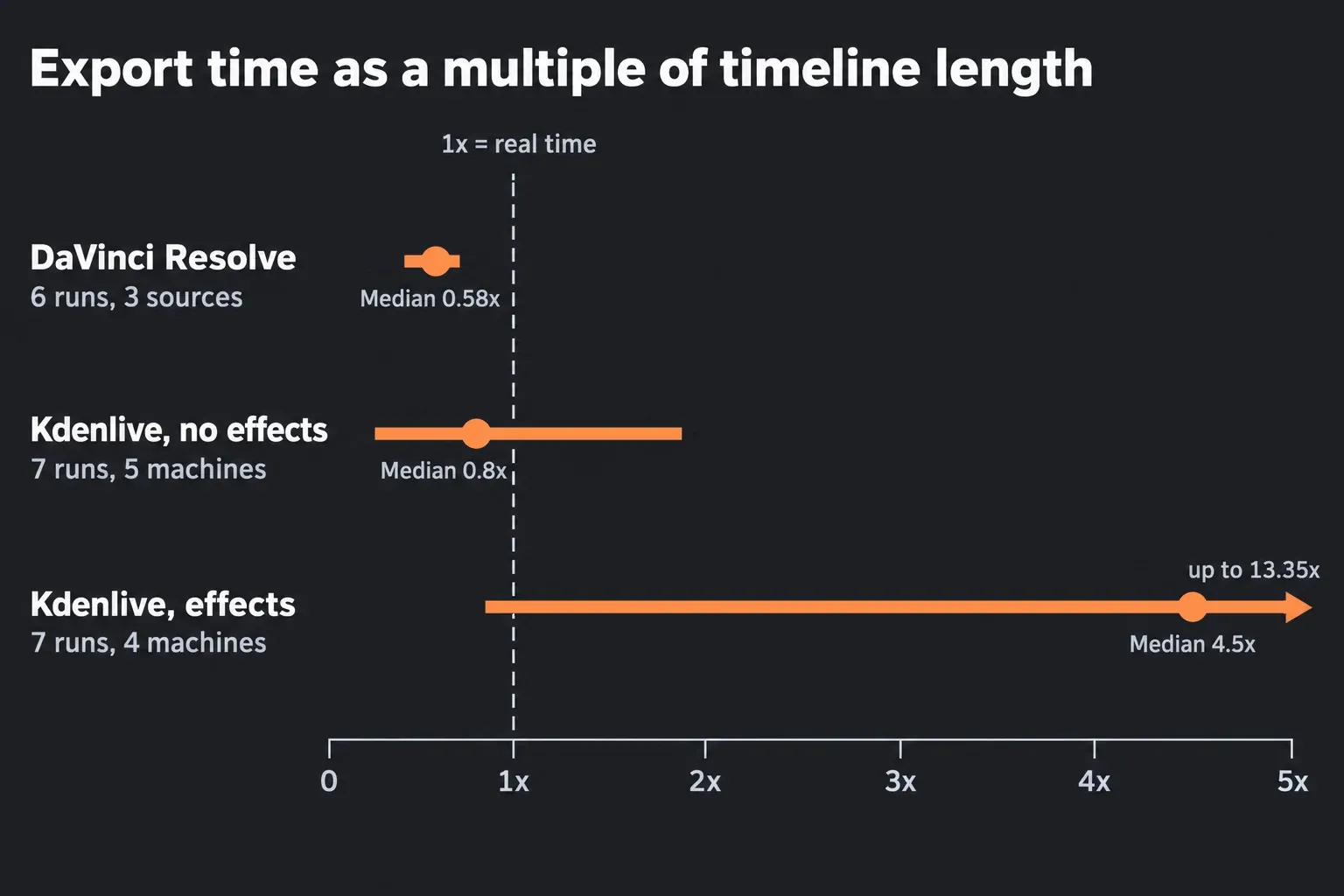
The effects gap has a known cause. A reply in the low rendering speed thread explains: "Only the encoding part is currently using GPU support via the corresponding encoder (NVENC or VAAPI). The MLT part does not use the GPU at all, but is where the heavy lifting need to be done." A 2026 reply in the hardware acceleration thread says "effects/filters, transitions and all compositing" are "currently done by the CPU only", adds that the older Movit GPU library had to be disabled, and describes the team as "very small". Asked about GPU effects in another thread, a reply said there is "No ETA yet". Settings still matter on the encoding side: the RTX 4090 machine sat at 5 to 10% CPU and GPU load, and the RX 6800 doubled its encode speed after its thread counts went up.
Resolve's free edition does lean on the graphics card. It processes on one GPU under Windows and Linux, and on a Mac it also encodes H.264 and H.265 on the GPU. Studio adds the second GPU and GPU encoding on Windows. If Resolve is the editor you're keeping, the GPU guide and the laptop guide cover hardware.
Before buying hardware for Kdenlive, try the fixes the forum threads keep returning to:
- Transform for zooms. In the Fedora 36 test, Transform zoomed the clip in 4:23 and Crop, Scale and Tilt in 4:15, while Position and Zoom needed more than 20 minutes for the same job.
- Parallel processing. Turn on Parallel Processing in the render dialog and set the thread count. The render guide suggests "50% of what your CPU's number of possible threads is" and warns that it "may result in rendering artifacts, crashes during render or other unwanted effects". In a 2026 thread about long renders, a reply put the gain at no more than 30 to 40%.
- Hardware-accelerated presets. The NVENC, VAAPI, VideoToolbox and AMF presets move encoding to the GPU, so check the file afterwards. One poster in the same 2026 thread found the "final file was around 3 times smaller and had lower fidelity, as if using much higher CRF". Kdenlive 26.08.2 also fixed an "incorrect proxy param breaking nvidia encoding", so update before testing NVENC.
- Proxies and previews. Proxy clips, Preview Resolution and Timeline Preview Rendering speed up editing, and the render dialog's Render at Preview Resolution and Use Proxy Clips options are "Useful for quick renderings" of drafts.
I'd swap Position and Zoom for Transform before touching any other setting, because in that test the one change took the same zoom from over 20 minutes to under five. Resolve's own levers for a slow timeline are the render cache and the settings in the slow playback guide.
Moving a Kdenlive project into DaVinci Resolve
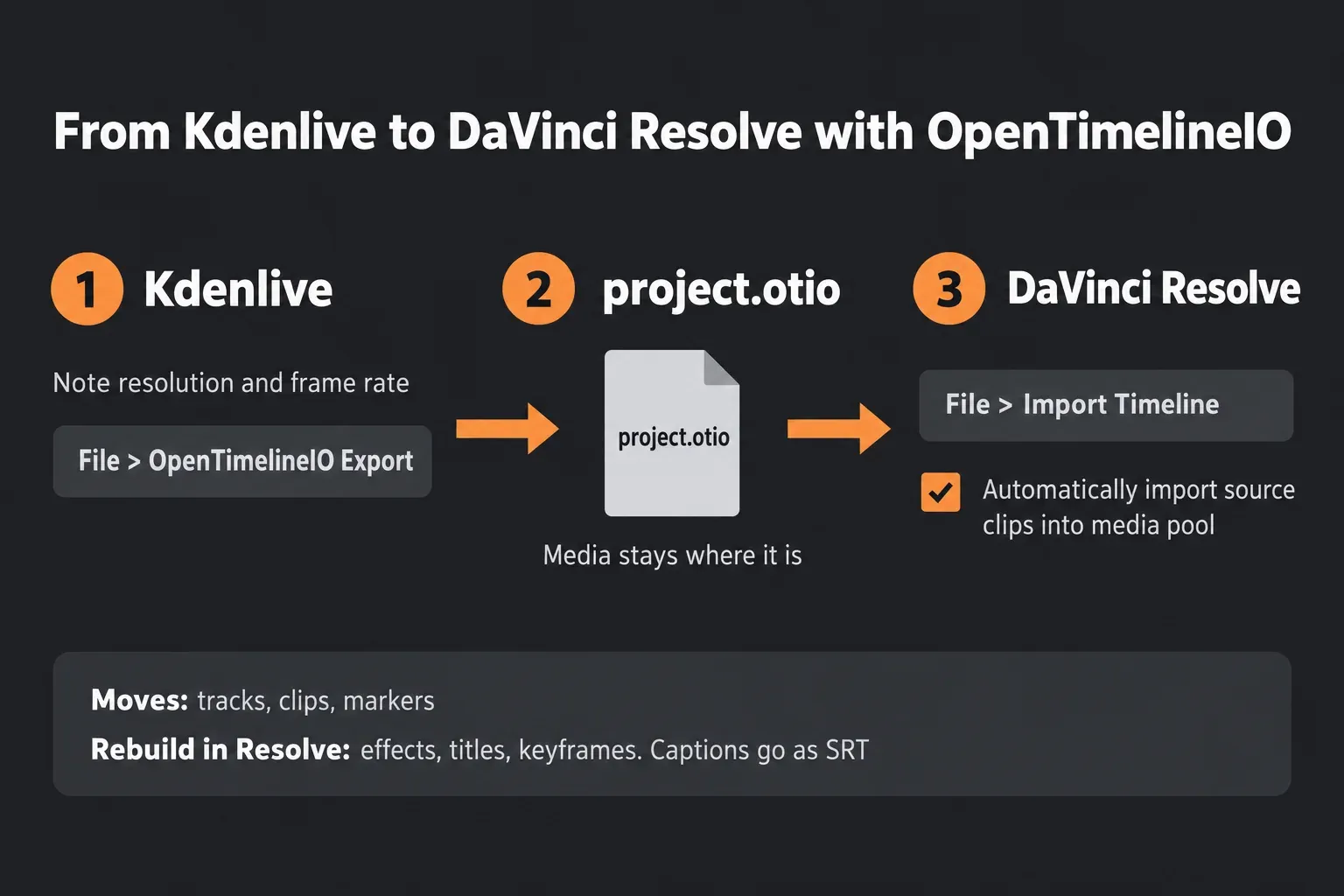
OpenTimelineIO is the bridge. Kdenlive's File menu imports and exports OTIO files, and some comparisons still suggest FCP XML or AAF, which that menu doesn't offer. Resolve's Reference Manual presents OTIO as an interchange format "with more compatibility than AAF or XML" and reads both plain .otio files and .otioz bundles that carry the media. Kdenlive rewrote its OTIO import and export on the C++ library during 2025, and 26.04 recommends at least OTIO 0.18.0.
What travels is the edit itself: tracks, clips and markers, with Kdenlive's marker types stored under a "kdenlive" metadata key. The File menu guide notes that "OTIO files do not contain information about rendering", so record the resolution and frame rate before you export and check them on the other side. Effects, titles and keyframes stay behind and need rebuilding in Resolve.
- In Kdenlive, note the project's resolution and frame rate, then choose File > OpenTimelineIO Export.
- Keep the media where Resolve can reach it, because an .otio file only references the clips.
- In Resolve, choose File > Import Timeline (Shift-Command-I on a Mac), or right-click in the Media Pool and choose Timelines > Import.
- In the Load OTIO options, keep Automatically set project settings and Automatically import source clips into media pool checked.
- If Resolve can't find a clip, it asks where the media is, and red thumbnails in the Media Pool mark anything still offline.
- Play the timeline next to a Kdenlive render of the same cut, then rebuild effects, titles and keyframes.
- Bring captions over separately as an SRT file from Sequence > Subtitles > Export Subtitle File.
The reverse trip works too. In Resolve, File > Export > Timeline (Shift-Command-O) writes .otio or .otioz, and the .otioz bundle copies the media in, which takes time on a long project. The manual's fallback to XML or AAF won't help on this route, since Kdenlive's File menu imports neither.
Which editor should you use?
Pick Kdenlive if
- You edit on an Intel Mac with macOS 13 or later, a PC with less than 16 GB of memory or no 4 GB graphics card, or a PC where you can't install software as an administrator.
- Your Linux machine has to open phone or camera footage in H.264 or H.265 with AAC audio.
- You want free captions, cutting by transcript or background removal.
- Your videos are mostly cuts, titles, basic color and music, with few effects stacked on each clip.
- The footage needs video noise reduction and Studio isn't in the budget.
Pick DaVinci Resolve if
- Shots from different cameras need to match, or a look has to be built from separate corrections in 32-bit float.
- Dialogue needs EQ, dynamics, noise reduction and de-essing on a proper mixer.
- The project needs compositing or motion graphics in Fusion.
- Exports with effects take several times the timeline length in Kdenlive.
- A later move to Studio for HDR, output above Ultra HD or the AI tools is likely.
Use both if
- Resolve's free edition is your editor and captions have to cost nothing, with Kdenlive writing the SRT.
- The cut happens on Linux and the grade on a Mac or Windows PC, with OpenTimelineIO carrying the edit.
- A Resolve Free project needs the background removed from a few shots.
Questions about DaVinci Resolve and Kdenlive
Is Kdenlive completely free?
Yes. Kdenlive is Free Software under the GNU GPL, with no license fees, registrations, subscriptions or paid features. Resolve's free edition costs nothing either, and Studio is a $295 one-time license.
Does Kdenlive or DaVinci Resolve add a watermark?
Neither does on ordinary exports. Kdenlive has no watermark at all. Resolve's free edition adds one only when a Studio-only effect stays on the timeline, and the free version features guide lists what the free edition includes.
Can an old PC or Intel Mac run DaVinci Resolve?
Only if it meets Resolve's minimum. Resolve 21.1.2 needs 16 GB of memory and a graphics card with at least 4 GB on Windows, and Intel Macs stop at version 20.3.2, which needs macOS 14 Sonoma. Kdenlive 26.08.2 runs on Windows 10 (1809 or later) with 8 GB for HD and on Intel Macs with macOS 13, and its attic keeps older versions for Windows 7 and earlier macOS releases. The requirements guide shows how to check a machine.
Does Kdenlive have AI features?
Yes, and they're free. Speech to Text writes subtitles and transcripts with Whisper or VOSK models, Whisper can translate into English, and Object Mask removes backgrounds with Meta's SAM2 model. In Resolve, automatic subtitles, transcription and Magic Mask v2 need Studio.
Does Kdenlive use the GPU?
Partly. Hardware-accelerated presets encode on the GPU through NVENC, VAAPI, VideoToolbox or AMF, but effects, transitions and compositing run on the CPU, and so does timeline playback. That's why projects with effects export much more slowly than plain cuts.
Which is better on Linux?
Kdenlive, for most footage. It ships as an AppImage or Flatpak, runs on 64-bit Linux with or without a KDE desktop, and handles H.264, H.265 and AAC through FFmpeg. Resolve's Linux build is aimed at Rocky Linux 8.6 with 32 GB of memory and a 4 GB GPU, needs Studio to decode H.264 or H.265, and handles AAC in neither edition. Blackmagic's build is covered in the Resolve for Linux guide.
Can I move a Kdenlive project to DaVinci Resolve?
Yes, as OpenTimelineIO. File > OpenTimelineIO Export in Kdenlive writes the cut, and File > Import Timeline in Resolve reads it. Tracks, clips and markers come across, effects, titles and keyframes need rebuilding, and captions travel as SRT.
Is DaVinci Resolve harder to learn than Kdenlive?
Yes, at first. Kdenlive keeps the whole job in one window and swaps panel layouts for each task, while Resolve moves between pages for editing, color, effects, audio and export. For a first project the Edit page is enough, and the beginner tutorial walks through a short video from import to export.
Verdict: which free editor to keep
Kdenlive wins on machines Resolve 21 no longer supports, on Linux with phone footage, and for free AI captions and background removal. Resolve wins once the hardware is there, for grading, dialogue repair, compositing and exports with effects. Both are free, and OpenTimelineIO carries a cut from one to the other, so keeping both costs only disk space. If Shotcut or CapCut is also on your list, the Resolve vs Shotcut and Resolve vs CapCut comparisons cover them, and the comparisons hub has the other head-to-heads.