Quick answer: DaVinci Resolve has an official native Linux build. Download the Free or Studio Linux ZIP from Blackmagic Design, extract it and follow the installer instructions inside. Check your distro and GPU first, though. The Resolve 21.1.1 readmes, posted October 2, 2026 and still current on October 5, name Rocky Linux 8.6, 32GB of RAM and a discrete GPU with at least 4GB of VRAM. Ubuntu and other distributions need a separately maintained compatibility route; they aren't the baseline those readmes name.
Getting the installer to open proves very little. Before you move a working project to Linux, check the camera codec, audio codec, GPU driver and delivery format you rely on. A system that reaches the Project Manager can still refuse a phone clip, drop its audio or fail to render the format your client asked for. Keep the old setup running until a small test project gets through all of those jobs.
Need another platform or edition? The Download & Install hub has them all, and the Resolve system requirements page compares whole workstations. This one sticks to the Linux package, the installation choices and what to check before you move real work across.
Download the Linux Package From Blackmagic
Start with Blackmagic's own Linux ZIP. Not a mirror, and not a prebuilt .deb nobody can explain. Community packaging has its place when your distro doesn't match, but it should start from the official package. Keep that original archive too; it's the only clean record of exactly what you installed.
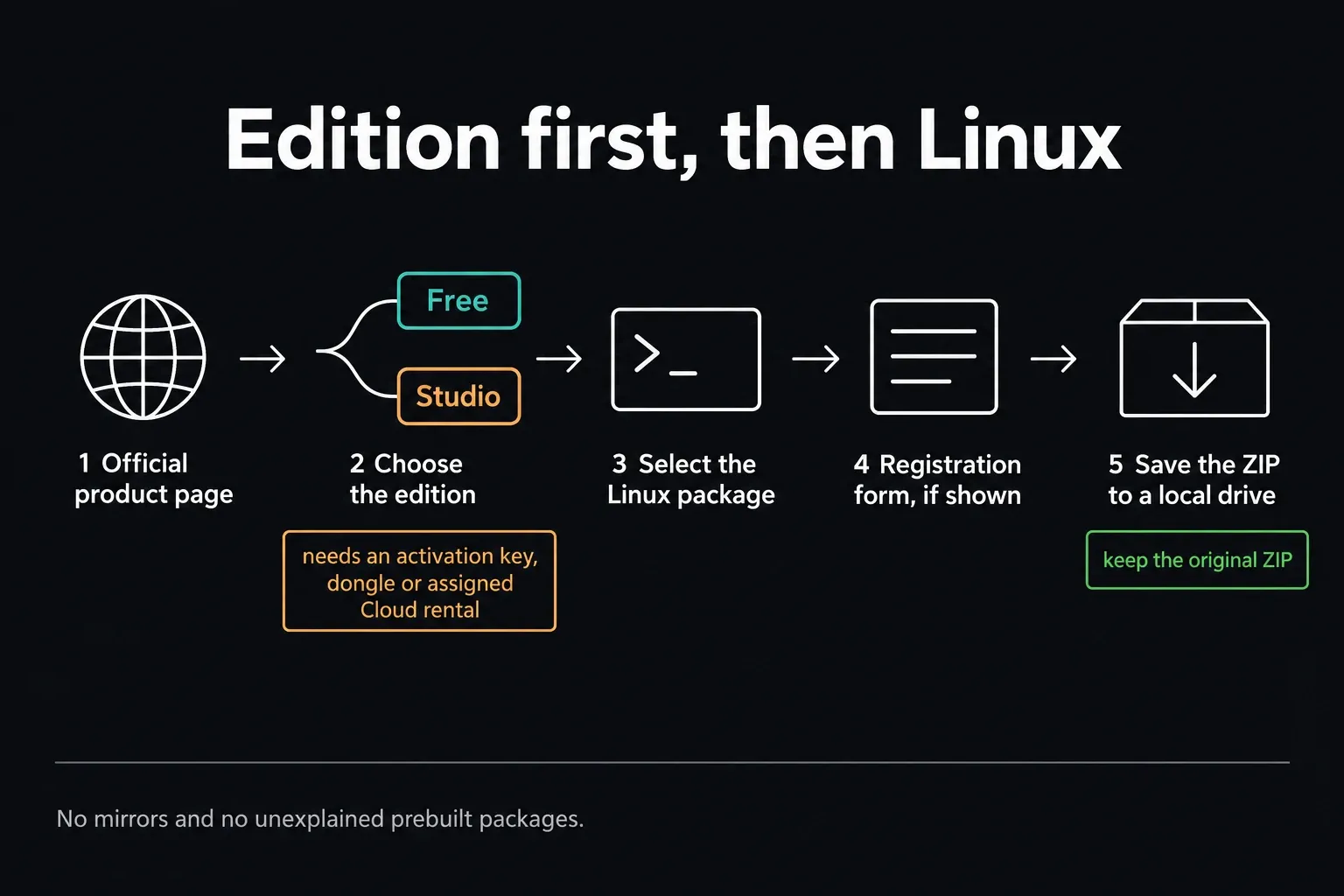
- Open the official DaVinci Resolve product page.
- Pick the Free edition if you want the no-cost application. If you have a Studio activation key, a dongle or an assigned Cloud rental, grab the separate Studio Linux download instead; our Studio installer and licence guide walks through the licence routes.
- Select the Linux package.
- Complete Blackmagic's registration form if it appears.
- Save the ZIP to a local drive with room for both the archive and its extracted contents.
Rechecked October 5, 2026: Blackmagic's catalog lists the Free and Studio 21.1.1 Linux packages, posted October 2, as the newest builds. Their readmes repeat the 21.1 Linux requirements unchanged, so the figures below still apply. Look at the live release card again before you download. A newer package can move the requirements, and an old tutorial's version number is never a good reason to grab an old installer.
Decide Whether You Want a Supported or Compatibility Install
Rocky Linux 8.6 is the operating system both 21.1 readmes name. Read that as a vendor baseline. It doesn't prove every other distro fails, and it isn't a reason to downgrade a working workstation to match a number. If you need Ubuntu, Debian, Fedora or Arch, budget time to check the exact distro release, GPU driver and installer method together, since a mismatch in any one of them can stop the install. A Chromebook’s Linux environment does not inherit that native Linux support.
| Path | What it means | Who should choose it |
|---|---|---|
| Rocky Linux 8.6 | Matches the operating system named in the current Blackmagic readme | A facility or editor who values a reproducible, supportable workstation |
| Ubuntu or Pop!_OS | Popular compatibility path, often using extra libraries or third-party repackaging | An experienced Linux user willing to own updates and rollback |
| Debian, Fedora, Arch or derivatives | Community-maintained route whose working steps can change with the distro | A user comfortable reading scripts, logs and package dependencies |
| Wine, Proton or a container as the main plan | Adds another unsupported layer around a GPU-heavy native application | Experimentation, not a deadline-critical workstation |
System76's Pop!_OS and Ubuntu installation guide describes an NVIDIA-specific route that uses MakeResolveDeb. Keep its driver advice away from an AMD machine. It's a compatibility install, and it doesn't stretch Blackmagic's Rocky Linux support baseline.
Run the Resolve 21 Linux Preflight
The Free 21.1 readme lists these Linux minimums. Treat them as the floor, not a promise of smooth 4K noise reduction, big Fusion compositions or multicam playback:
- Rocky Linux 8.6
- 32GB of system memory
- A discrete GPU with at least 4GB of VRAM
- A GPU supporting OpenCL 1.2 or CUDA 12.8
- Official AMD drivers from the GPU manufacturer, or NVIDIA Studio driver 580.119.02 or newer
- Blackmagic Desktop Video 12.9 or later when using supported Blackmagic monitoring hardware
The Studio 21.1 requirements add workload-specific figures: at least 16GB of VRAM for advanced AI tools, and 32GB of RAM plus 12GB of VRAM for background rendering. A 4GB card clears the baseline. It won't cover every Studio feature, so don't buy one hoping it will.
Check the driver version and the GPU's compute support before you start troubleshooting Resolve itself. A working desktop proves nothing about whether the OpenCL or CUDA path the application needs is available. Follow the GPU vendor's and distro's instructions for that exact machine, and skip driver versions copied from an unrelated tutorial.
Our Resolve PC checker helps you organize the CPU, memory, GPU and storage questions, but it can't see your Linux machine or validate a driver. Use it as a pre-purchase checklist. It isn't a hardware scanner.
Check Your Media Before You Change Operating Systems
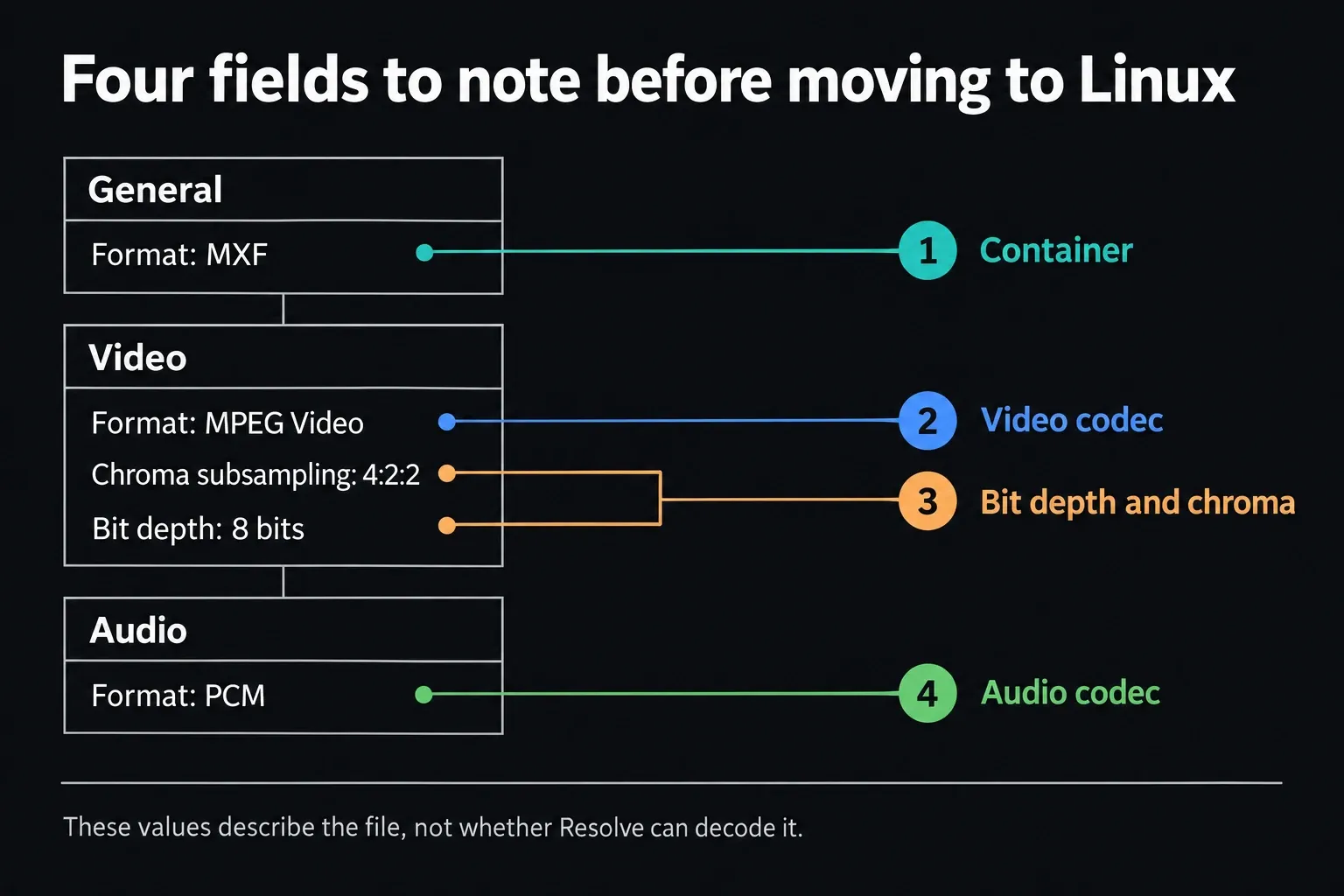
A filename won't tell you which codecs are inside, because MP4 and MOV containers can carry different video and audio formats. Blackmagic's Resolve 21.1 codec list, dated September 2026, lists H.264/H.265 decoding as Studio-only in its Rocky Linux 8.6 (CUDA) table, accelerated on NVIDIA graphics, while encoding needs Studio plus NVIDIA graphics. Its audio table shows no AAC decode or encode support. Those rules carry over unchanged from the Resolve 20 list. That makes an ordinary phone clip, H.264 or HEVC with AAC audio, exactly the file that trips up the Free build, so test it before you migrate anything.
Open a representative clip in MediaInfo and read the General, Video and Audio sections one at a time. Write down the container, video codec, profile, bit depth, chroma subsampling and audio codec. The example below uses MXF, MPEG Video and PCM; yours may look nothing like it. Those values describe the file. They don't tell you whether Resolve on your machine can decode it.
Before you install anything, collect three small files:
- A representative camera or phone clip with its original audio.
- A clip from the heaviest production format you expect to grade.
- A short delivery reference matching the format your client or platform requires.
Those three files beat any synthetic sample. If your normal work is 10-bit HEVC with AAC audio, a friendly DNxHR clip landing in the Media Pool tells you almost nothing about the real migration.
Extract and Run the Official Linux Installer
The official Linux ZIP holds the installer and its instructions. Extract the whole archive into its own folder first instead of launching a file from inside the archive viewer, and read the instructions that shipped with your release before you change anything on the system.
- Extract the whole downloaded ZIP into a new folder.
- Open the included Linux installation instructions and read the notes that came with that exact release.
- If you need to, give the exact
.runinstaller executable permission. In GNOME Files, file permissions live under Properties → Permissions, where the control is called Executable as Program. Other desktops may label it differently. - Launch the installer the way its instructions say and answer its authentication prompt. Leave the rest of your Downloads folder and your project folders alone; they don't need new permissions.
- Copy commands from an old tutorial only after you've confirmed that its distro and Resolve release match yours.
- Reboot when the GPU driver or workstation policy requires it, then launch Resolve normally.
On a Debian-based setup, read the current MakeResolveDeb maintainer instructions first. The tool repackages your official installer; Blackmagic doesn't make it. The maintainer documents two generated packages for Resolve 21, both required, since Resolve 21 outgrew the 10GB limit of a single .deb file. Version 1.10.1, released September 10, 2026, is the current one. Use the filenames your machine generates, not versioned examples from another release. We haven't verified a 21.1 installation with this tool, so keep a rollback path and test before production use.
Free or Studio on Linux
The Free Linux build is a separate no-cost application. Its 21.1 readme caps mastering and output at Ultra HD and allows one processing GPU on Windows and Linux. 21.1 also moved Python scripting to Studio, which matters if you automate renders on a Linux box. Downloading the Studio package doesn't give you a license. An assigned Cloud rental is one supported Studio activation route; an ordinary Cloud account by itself isn't.
For the purchase decision, use our Free versus Studio comparison and current cost guide. On Linux, put the codec list into that decision too. A Studio license lifts the big H.264/H.265 limitation, but it doesn't make every audio codec, container and GPU combination behave the way it does on Windows.
Run a First-Project Acceptance Test
Run this before you copy a project library or call the migration finished. You're testing the whole path, and the Project Manager appearing is only one checkpoint.
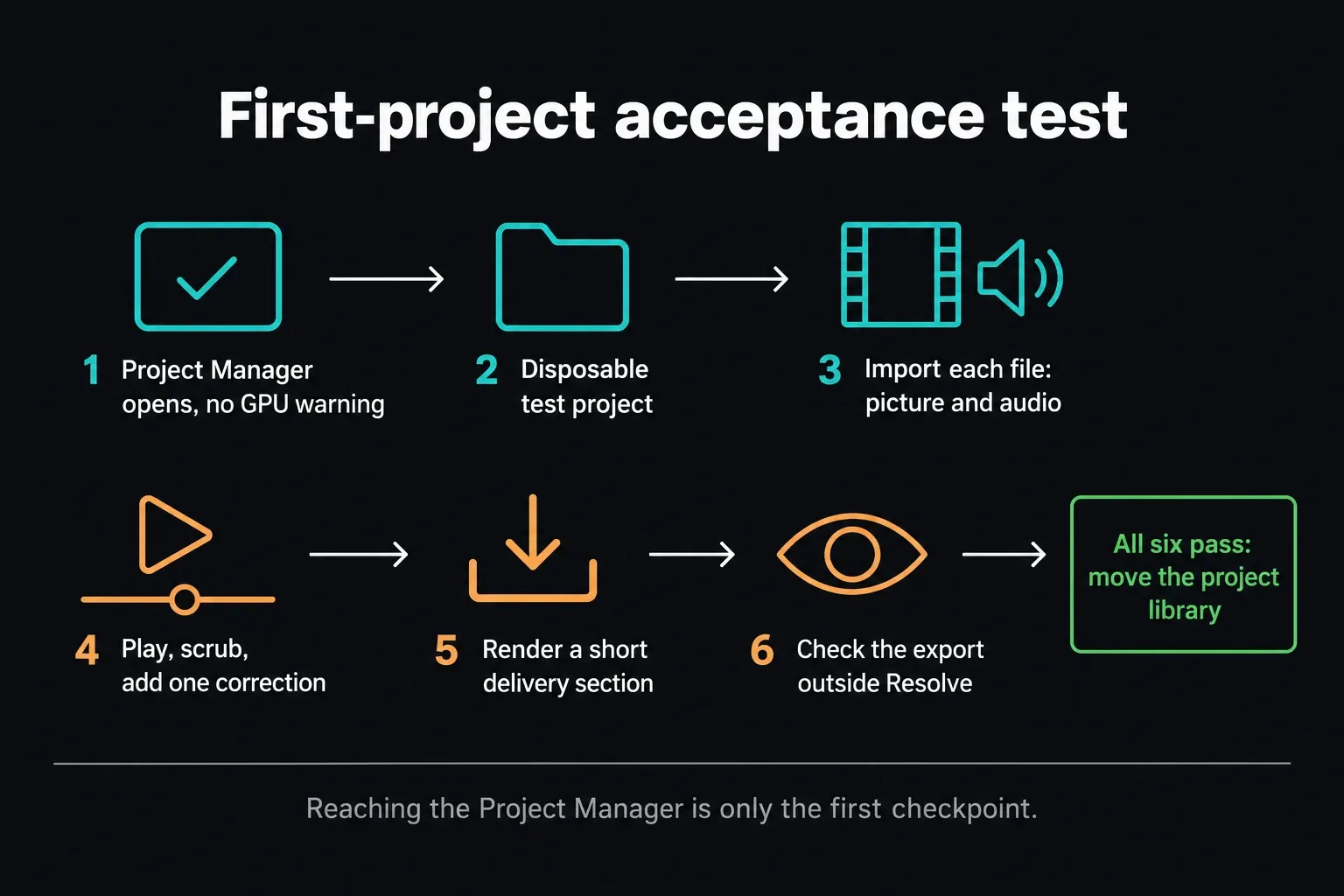
- Confirm Resolve reaches the Project Manager without an unsupported GPU message.
- Create a throwaway test project instead of opening the only copy of active work.
- Import each representative file and check picture plus audio.
- Play and scrub the clip, add one basic color correction and confirm that GPU processing stays stable.
- Render a short section to the delivery format you actually use.
- Play the exported file outside Resolve and verify audio, color and duration.
Before any update, back up the project library and export critical projects separately. Keep the source media safe too, because a plain project export doesn't back up footage. Both 21.1 readmes warn that projects created or opened in 21.1 can't be opened in 20.3.2, even though the library itself can stay accessible. Our safe update workflow explains why reinstalling an older application isn't the same as restoring a compatible project.
Fix Linux Install and Launch Problems by Symptom
| Symptom | First useful check |
|---|---|
The .run file does nothing | Confirm the full ZIP was extracted and the installer has executable permission. |
| The installer reports missing packages | Check whether the instructions target your distro; do not assume a Rocky package name maps directly to Ubuntu or Arch. |
| Resolve shows “Unsupported GPU Processing Mode” | Verify the discrete GPU, vendor driver, OpenCL/CUDA support and current driver floor outside Resolve first. |
| An MP4 is invisible or imports without usable audio | Identify the video and audio codecs, then compare them with Blackmagic's Linux codec table and your Free/Studio edition. |
| The app opens only from a terminal | Read the terminal error before changing libraries; it often names the missing dependency or driver component. |
| An update breaks a working compatibility install | Restore the recorded package/driver state and follow the current maintainer instructions for that distro rather than repeating old commands. |
Change one reversible layer at a time. Swapping system libraries wholesale can turn one missing dependency into a broken desktop. Write down the downloaded installer, the exact Resolve version, the GPU driver version and any community script revision you used. With those four details, a failure becomes reproducible.
How to Uninstall DaVinci Resolve on Linux
For a native Blackmagic installation, the 21.1 readme says to run the installer and pick its uninstall option. For a MakeResolveDeb installation, use the package-manager removal its maintainer describes. Keep the two removal methods separate, and don't swap either one for commands that delete directories.
Uninstalling the application isn't permission to delete project libraries, source media, cache or gallery stills. Back up the project library first, find each storage location, remove the application the same way you installed it, and clean the cache only once you're sure the source media is safe.
Frequently Asked Questions
Is DaVinci Resolve available for Linux?
Yes. Blackmagic ships official native Linux installers for Free and Studio. The 21.1.1 readmes, posted October 2, 2026 and still current on October 5, name Rocky Linux 8.6 as the operating-system baseline.
Does DaVinci Resolve work on Ubuntu?
It can, through community compatibility methods, but Ubuntu isn't the baseline Blackmagic's 21.1 readmes name. Check the exact distro release and the GPU route. System76's documented Pop!_OS/Ubuntu method is NVIDIA-specific, so it isn't a general recipe for AMD cards.
How much RAM does DaVinci Resolve need on Linux?
Both Resolve 21.1 readmes list 32GB of system memory for Linux. Studio also lists 16GB of VRAM for advanced AI tools, plus 32GB of RAM and 12GB of VRAM for background rendering. Those are stated requirements, not measured performance.
Why does DaVinci Resolve say unsupported GPU processing mode on Linux?
Treat it as a GPU-compute configuration problem to investigate rather than proof of one specific fault. Check the discrete GPU, the driver version and the required OpenCL or CUDA support, then read the actual error and logs before you touch libraries or application preferences.
Does DaVinci Resolve Free on Linux support H.264 and H.265?
Not in the Free version. Blackmagic's Resolve 21.1 codec list, dated September 2026, gives H.264/H.265 decoding on Rocky Linux as Studio-only with NVIDIA acceleration, and encoding as Studio plus NVIDIA graphics. It lists no AAC decode or encode support either, so the Windows and macOS rules don't carry over. Test your exact video and audio before you move work.
Should I use MakeResolveDeb to install Resolve?
It's a reasonable option for a deliberately chosen Debian-based compatibility install, but it isn't an official Blackmagic installer. Read the maintainer instructions, keep the original ZIP and note the tool version. The documented Resolve 21 conversion produces two packages and needs both. We haven't certified a tested 21.1 setup with it.
Where should I download DaVinci Resolve for Linux?
Get it from Blackmagic Design's official DaVinci Resolve product or support page. Skip mirrors, repackaged installers and search ads that borrow the product name. This site links to the vendor package and doesn't host the installer.
