
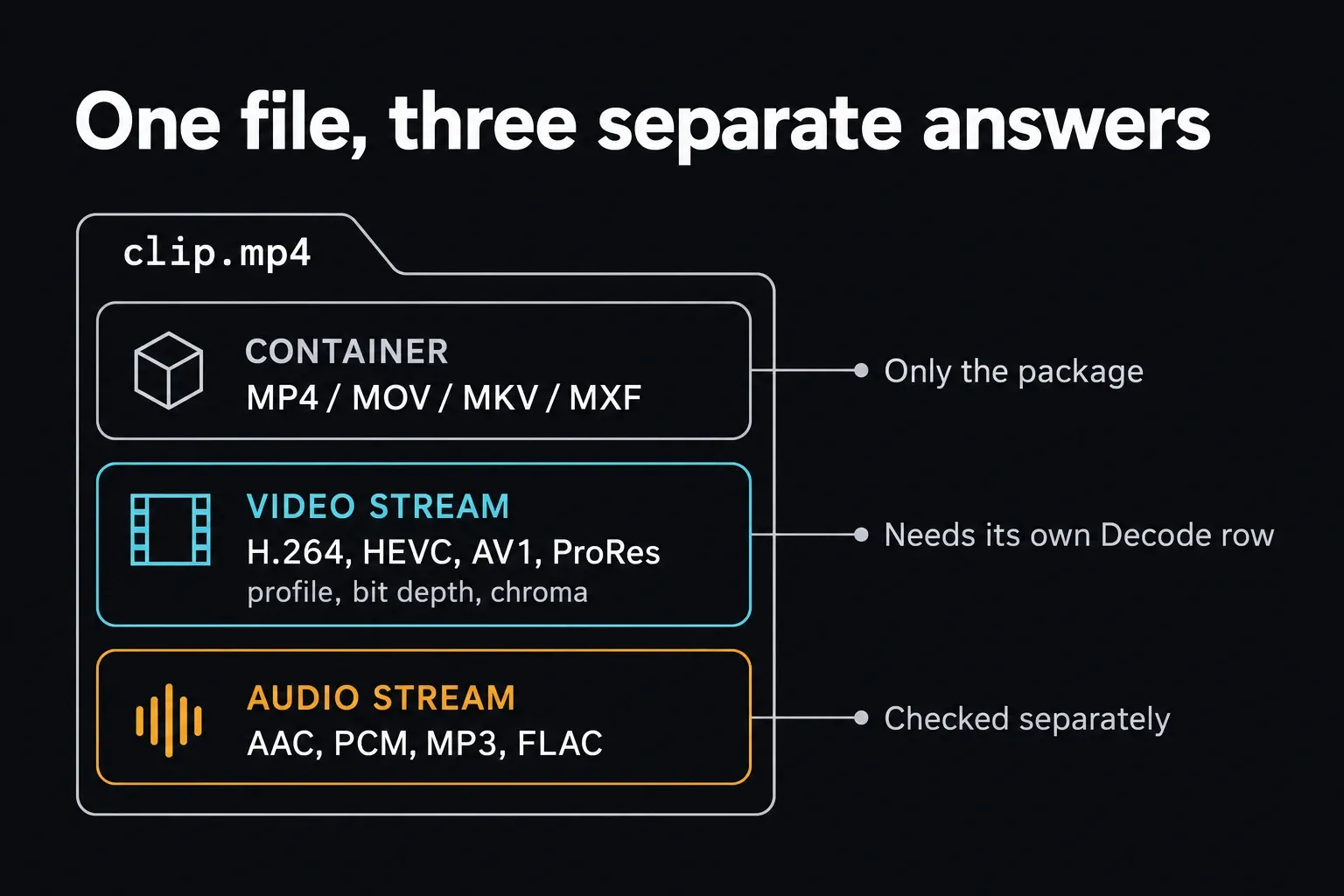
Quick answer: DaVinci Resolve supports a long list of codecs, but the file extension alone won't tell you whether your clip is on it. Find out what's inside first: the container, the video and audio codecs, the profile and the bit depth. Then check the row for your operating system, your Free or Studio edition and your hardware. Decode is the import side and Encode is the export side. MP4 is just the container, not the video stored in it.
If you want a real compatibility check, read the file with MediaInfo and compare what it reports with the official matrix. I wouldn't lean on the extension, the camera brand, or any list that squeezes macOS, Windows and Linux into one yes/no answer.
Checked October 1, 2026: Blackmagic's current codec matrix is DaVinci Resolve 21.1 Supported Formats and Codecs, dated September 2026, and the platform table below summarizes it. Older builds can behave differently, so if you're on one, or you're dealing with a brand-new camera profile or GPU, check your installed build and a representative file before you trust a single row.
Already stuck with an MP4 that won't come in? The MP4 import repair guide deals with that exact problem. For everything around importing and editing, the Resolve workflow hub collects the media, proxy and playback guides in one place.
The six checks behind “supported”
| Check | Example | Why it changes the answer |
|---|---|---|
| Container | MP4, MOV, MKV, MXF | Defines the package, not every stream it may contain |
| Video codec | H.264, H.265/HEVC, AV1, ProRes, DNxHR | Resolve must be able to decode or encode that stream |
| Profile and bit depth | Main 10, 10-bit, 4:2:2 | Support can differ inside one codec family |
| Audio codec | AAC, PCM, MP3, FLAC | Video and audio support are independent |
| Platform and edition | Windows Free, macOS Studio, Rocky Linux | The official rows differ by OS and license |
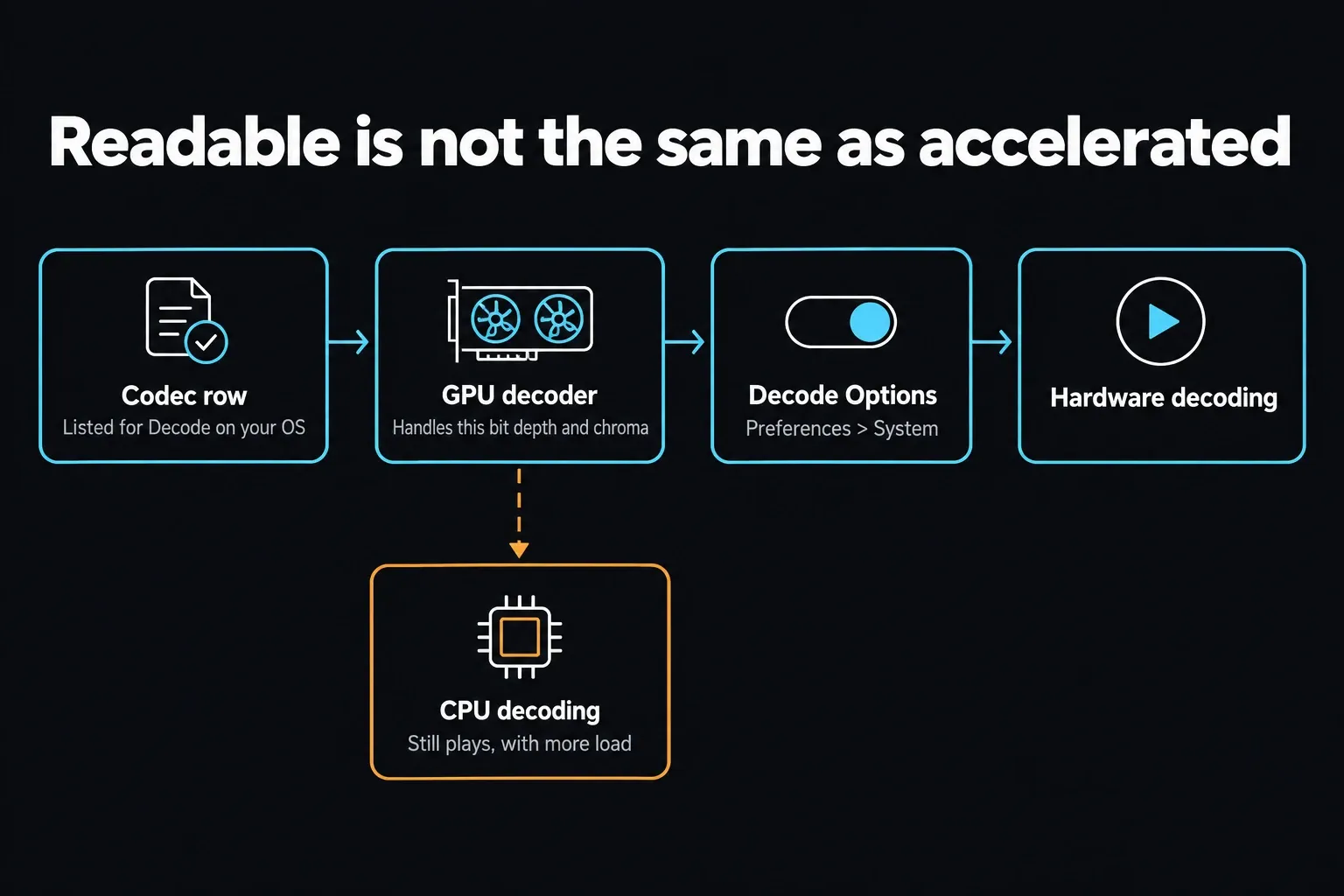
| Hardware | Supported GPU decoder/encoder | GPU-accelerated rows still depend on the actual device and driver |
The official matrix adds two more distinctions: alpha export and codec passthrough. They matter for transparency and finishing, but they don't replace Decode and Encode. A codec can be perfectly readable and still not show up as a Deliver output.
Read the actual streams with MediaInfo
Open the source file in MediaInfo and choose Tree or Text view. Note these fields before changing anything in Resolve:
- General Format: the container, such as MPEG-4.
- Video Format: the codec, such as AVC/H.264 or HEVC/H.265.
- Format profile and Bit depth: record both; support can differ within one codec family.
- Chroma subsampling: commonly 4:2:0 or 4:2:2, another profile detail worth recording.
- Frame rate mode: Constant or Variable. If a phone or screen recording imports fine but drifts out of sync, variable frame rate is worth a look; it doesn't automatically make the codec unsupported.
- Audio Format: AAC, PCM, MP3, FLAC or another independent stream.
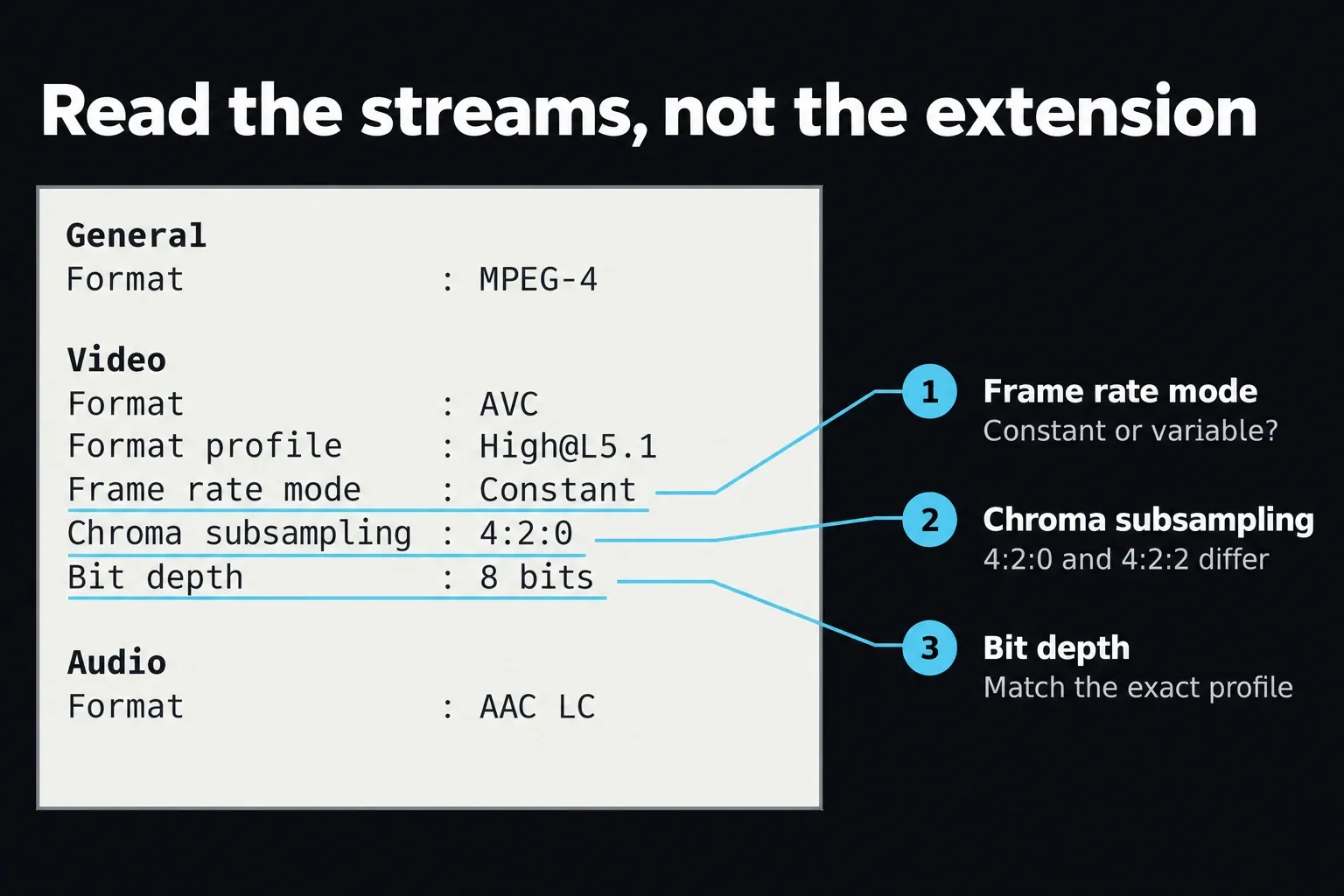
The example above is 8-bit, 4:2:0 video at a constant frame rate. Yours may report different values even with the same extension. Renaming clip.mkv to clip.mp4 doesn't touch those streams. Remuxing moves compatible streams into a different container without re-encoding them; transcoding creates new encoded streams.
With an OBS recording, a remux helps when the container is the obstacle and the streams inside are already compatible. It can't turn an unsupported AV1, HEVC or audio stream into a supported one. The OBS formats guide explains the difference. After remuxing, check both video and audio instead of assuming the new extension fixed them.
Common codec support by desktop platform
This is a quick reference to the September 2026 Resolve 21.1 matrix, using its exact platform headings. It isn't a complete format list or a promise for every current computer. Camera RAW variants, image sequences, IMF/DCP, alpha and professional profiles still need their own rows. The 21.1 edition also adds a few rows worth knowing about: Samsung APV decode with 10-bit 4:2:2 encode, ARRICORE decode, and H.264/H.265 inside MXF Op1A.
| Platform | H.264 / H.265 | AV1 | AAC audio |
|---|---|---|---|
| macOS | Decode and encode listed as GPU accelerated for MOV, MKV, MP4 and MXF Op1A | Decode Yes; Encode not listed | Decode and encode listed |
| Windows 10 | H.264: 8-bit OS-supported profiles. H.265: 8/10-bit OS-supported profiles. Studio adds more profiles and GPU acceleration | Decode and encode listed as GPU accelerated | Decode and encode listed |
| Rocky Linux 8.6 CUDA | Decode: Studio-only; Nvidia GPU acceleration is noted separately. Encode: Studio and Nvidia graphics | Decode and encode listed with Nvidia GPU acceleration | Not listed for decode or encode |
On Windows, the matrix lists 8-bit OS-supported H.264 profiles and 8/10-bit OS-supported H.265 profiles, and Studio adds more profiles and GPU acceleration. That's not the same as saying every 10-bit HEVC file needs Studio. Check the exact profile and chroma subsampling, because two 10-bit camera files don't always take the same decoding path.
On Linux, keep two conditions apart: H.264/H.265 decode is marked Studio-only, with Nvidia acceleration noted in parentheses, and encode explicitly calls for Studio and Nvidia graphics. The decode note doesn't prove that all software decoding needs Nvidia. These are Rocky Linux 8.6 CUDA rows, not a promise for every distribution or GPU. If you're still choosing an installation, the Resolve 21 system requirements are a separate check.
Audio, alpha and passthrough need their own checks
Audio gets its own row, too. The macOS and Windows sections list AAC, constant-bit-rate MP3, FLAC and OPUS decode, with encoding shown separately. The Linux section lists MP3, FLAC and OPUS but leaves AAC decode and encode blank. So a container can hold perfectly usable video next to audio Resolve can't read, and a Studio license on its own won't fix Linux AAC.
When a destination asks for a specific audio format, read the Audio row and the container note together. Embedded audio choices, for example, depend on what the selected video container allows. An audio codec you can export as a standalone file isn't automatically available inside every MOV, MP4 or MXF output.
Alpha is its own capability as well. The matrix has an Alpha Exports column because a codec that carries ordinary RGB/YUV video may not keep transparency. Match the exact codec profile and container the receiving application wants. The file extension can't prove that an export has an alpha channel.
Codec Passthrough means Resolve may reuse the source video instead of encoding it again. The Resolve 21 Deliver documentation also requires matching Format, Codec and Type before it'll reuse the source, and grades, effects, resizing and other changes can rule that out. It isn't a universal lossless-export switch, and a Yes in the passthrough column doesn't override the output format you need or its limits.
ProRes, DNxHR, BRAW and editing intermediates
The matrix lists Apple ProRes 422/4444-family and DNxHR decode and encode across macOS, Windows and Rocky Linux, subject to the container and profile rows. If you've read that Resolve can't export ProRes on Windows, that advice is outdated: Blackmagic added Windows and Linux ProRes encoding in Resolve 19.1.4. ProRes RAW is a different case: ProRes 422/4444 support doesn't imply ProRes RAW support. The 21.1 matrix gives it its own row, with decode on all three platforms and no encode. Blackmagic RAW is a separate codec family again, listed for decode across the three desktop sections.
ProRes or DNxHR make good working formats, but the profile matters. Pick one that keeps the source bit depth and the quality you're after, convert a short representative section, and look at it before you process a whole card. Intermediate files are often much larger than H.264 or H.265, so keep the camera originals and treat the transcode as a working copy.
A supported codec can still be a pain to edit. Long-GOP H.264/H.265 may play fine on its own and then stutter in multicam, high-frame-rate or effects-heavy timelines. That doesn't mean the format is unsupported. The slow-playback guide helps you separate decoding pressure from cache, GPU and timeline problems.
Hardware acceleration is a different question from whether a codec is readable. In Preferences > System > Decode Options, look at the H.264/HEVC hardware-decoding controls you actually have; the devices listed depend on your installation. Puget's profile-by-profile testing also splits results by bit depth and chroma subsampling, which is why the name H.265 alone won't tell you which GPU can accelerate a clip.
Decode and Encode are different promises
Decode means reading a source stream for import and playback. Encode means creating an output stream. If video comes in as audio only, look at the video Decode row. If a codec is missing from Deliver, look at Encode instead. The list of outputs isn't a list of everything Resolve can read.
The extension doesn't make both sides equal. You might import an AV1 file on a platform where AV1 encoding isn't available, or decode a professional camera format that Resolve doesn't offer as the same Deliver output. Open the Resolve export workflow only after you've picked a format and codec that suit the destination, not by mirroring the source automatically.
Free versus Studio without the usual oversimplification
Blackmagic's Resolve Studio 21 page describes expanded professional format support, advanced H.264 camera profiles, 10-bit encoding, IMF and DCP capabilities. For any individual row, though, the detailed matrix is the better source, because the Free/Studio answer shifts with OS, codec, profile and hardware.
A few examples show why one rule doesn't cover it:
- Windows Free has listed OS-supported H.264 and H.265 profiles; Studio adds more profiles and GPU acceleration.
- Rocky Linux H.264/H.265 decode is marked Studio-only; its encode rows explicitly require Studio and Nvidia graphics.
- macOS H.264 and H.265 rows are listed as GPU accelerated without the same Linux Studio-only label.
- Free can finish up to 60 fps at UHD 3840×2160, which covers what YouTube calls 4K. Don't confuse it with a wider DCI 4K frame such as 4096×2160; that exceeds the Free UHD limit.
Match the codec row to your platform before deciding an upgrade will solve the problem. A license upgrade won't add a missing hardware decoder to your GPU or make every recording profile behave the same.
The five-step codec diagnostic
- Read the streams. Record container, video codec, profile, bit depth, chroma, frame-rate mode and audio codec.
- Choose the correct OS section. Don't use a Windows row to diagnose Linux or macOS.
- Choose Decode or Encode. Import and export are separate tests.
- Apply edition and hardware conditions. Preserve every Studio, OS-supported profile, GPU and driver qualification.
- Test a short copy. If the stream is unsupported, convert a representative sample to a listed intermediate and check it. If the source should be supported, look at the file path and integrity, storage access and app build. If the clip stutters rather than failing to import, look into decoding load and cache separately.
If a clip that used to link turns red after you move a drive, start with the Media Offline relink workflow. Transcoding won't repair a missing path, and relinking won't add a missing decoder.
DaVinci Resolve supported codecs FAQ
Does DaVinci Resolve support MP4?
Resolve supports many streams inside MP4, but MP4 by itself doesn't settle compatibility. Check the video codec, audio codec, profile, bit depth, operating system, edition and the Decode or Encode column.
Does DaVinci Resolve Free support H.264?
It depends on the platform and profile. The September 2026 (21.1) matrix lists 8-bit OS-supported H.264 profiles on Windows and GPU-accelerated support on macOS. On Rocky Linux, decode is marked Studio-only, with Nvidia acceleration noted separately.
Does DaVinci Resolve Free support 10-bit H.265?
The 21.1 Windows matrix lists 8/10-bit OS-supported H.265 profiles and says Studio adds more profiles and GPU acceleration. That doesn't guarantee every 10-bit or 4:2:2 file will work. Check the exact MediaInfo profile and the row for your platform.
Why does an MP4 import as audio only?
The container and audio stream may be readable while the video codec or profile isn't. Read the file in MediaInfo, then compare the video stream with the Decode row for your OS and edition.
Does DaVinci Resolve support AV1?
The 21.1 matrix lists AV1 decode on macOS with no encode entry. Windows lists GPU-accelerated decode and encode; Rocky Linux 8.6 CUDA lists Nvidia-accelerated decode and encode. Your GPU still decides what's available, so confirm the options on your installed build.
What codecs should I transcode to for editing?
DNxHR and ProRes are the usual intermediate candidates, and both are listed across the desktop platform sections. Match profile and bit depth to the source, test a short sample, and expect bigger files than H.264 or H.265.
Why can Resolve import a codec but not export it?
Decode and Encode are separate capabilities. A codec can sit in the Decode column without a matching Encode option for that platform, edition or hardware.
