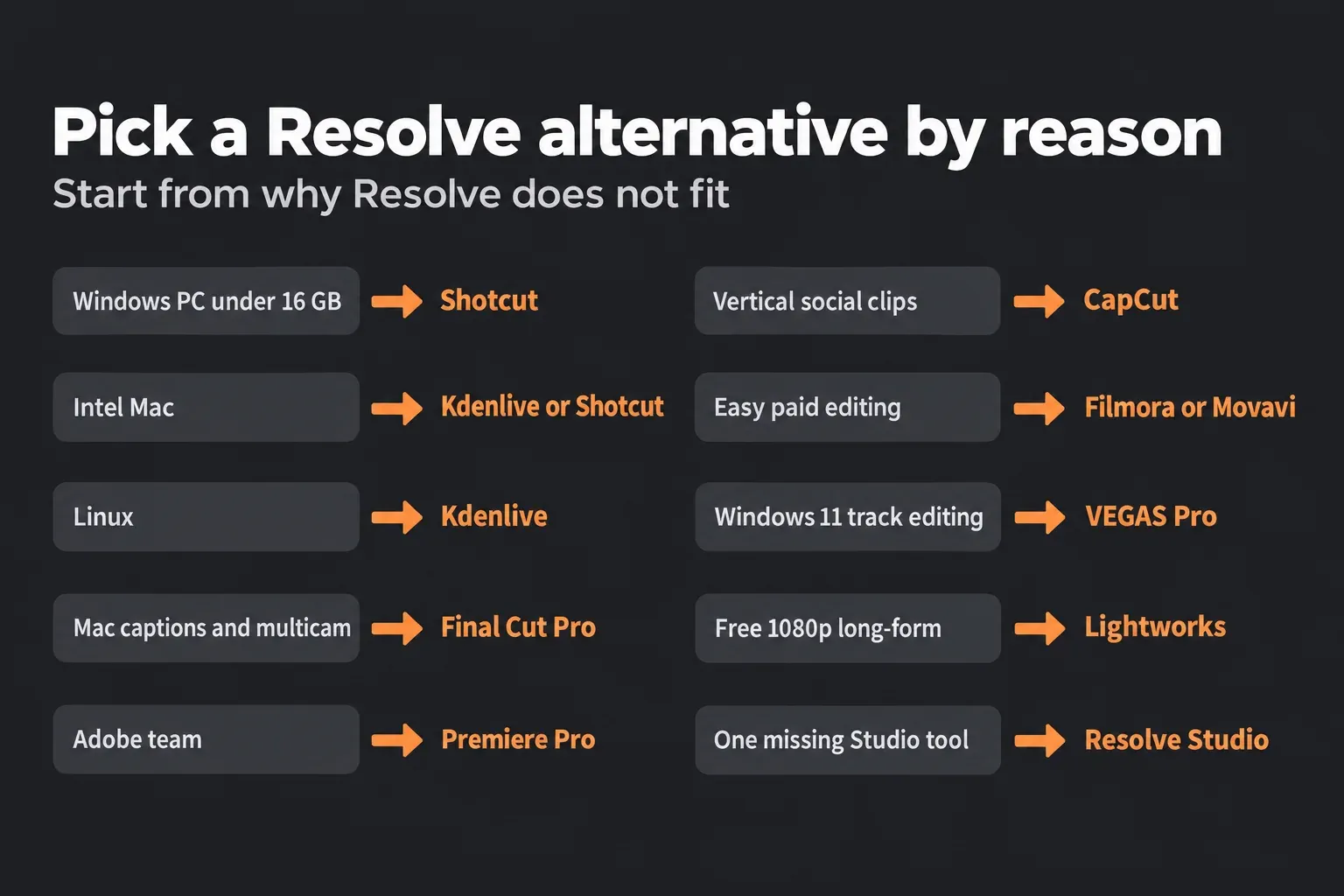
The right DaVinci Resolve alternative depends on why Resolve doesn't fit. On a Windows PC with less than 16 GB of memory or a graphics card under 4 GB, pick Shotcut: it's free, edits HD on 8 GB and lists no video memory minimum. On Linux or an Intel Mac, pick Kdenlive, and on an Apple silicon Mac where automatic captions and multicam speed matter more than grading, pick Final Cut Pro. Premiere Pro fits teams that already work in Adobe, and CapCut fits short vertical clips for social media.
The rest of the field covers narrower cases. Filmora and Movavi sell one-click tools that run on older hardware, VEGAS Pro suits Windows 11 editors who like a track-based timeline, and Lightworks has a free tier with no time limit that exports up to 1080p. Resolve itself needs an Apple silicon Mac on macOS 15 or later, or a Windows PC with 16 GB of memory and a GPU with 4 GB of video memory, so the hardware row of the table below settles most decisions.
If Resolve installs and runs but stutters, I'd fix its proxy and cache settings before switching, because no other free download gives you node grading, the Fairlight audio mixer and Fusion compositing in one program.
Pick a DaVinci Resolve alternative by reason
Start from the reason you're leaving. Each row names the editor that solves that problem and the fact that makes it fit, with versions current in October 2026: Resolve 21.1.2, Shotcut 26.9.27, Kdenlive 26.08.2, Final Cut Pro 12.4, Lightworks 2026.1, Movavi Video Editor 2027, CapCut desktop 9.7 and VEGAS Pro 2026.
| Why Resolve doesn't fit | Pick | Why it fits |
|---|---|---|
| Windows PC with under 16 GB of memory or a GPU under 4 GB | Shotcut | Free and open source; asks for 8 GB for HD and Direct3D 11, with Preview Scaling and proxies for slow machines |
| Intel Mac | Kdenlive or Shotcut | Kdenlive runs on macOS 13 or later and Shotcut on macOS 12 or later; Final Cut Pro also runs on Intel Macs with macOS 15.6 |
| Linux | Kdenlive | Free Linux packages and OpenTimelineIO import and export; Resolve on Linux wants Rocky Linux 8.6, 32 GB and a discrete GPU |
| Apple silicon Mac, captions and multicam come first | Final Cut Pro | Resolve took a median 7.5 times as long to transcribe and caption in published tests; $299.99 once |
| Your team works in Adobe | Premiere Pro | $22.99 a month on the annual plan; version 26.0 imports OpenTimelineIO and Premiere reads FCP XML |
| Short vertical clips for social media | CapCut | Free on Windows, Mac, the web and phones; 4K and 60 fps export need CapCut Pro |
| Easy paid editing on an older computer | Filmora or Movavi | Movavi needs 4 GB of memory; Filmora needs 8 GB and runs back to macOS 10.15 |
| Windows 11 PC, track-based editing | VEGAS Pro | Windows 11 only, 16 GB of memory and 8 GB of video memory; 15-day trial without a card |
| Free long-form editing at 1080p | Lightworks | Free tier with no time limit, export up to 1080p and proxies up to 720p |
| One Studio-only tool is missing | Resolve Studio | $295 once; a $22.99 monthly plan passes that in its 13th month |
| Chromebook or phone | CapCut web or mobile, or DaVinci Resolve for iPad | Resolve has no ChromeOS, Android or iPhone editor |
Two cases have their own guides. Resolve doesn't install on ChromeOS, so the Chromebook guide covers remote and browser options, and the Android and iPhone page covers what Blackmagic offers on phones, starting with Blackmagic Camera. On an iPad, DaVinci Resolve for iPad is free, with Studio at $94.99, and the iPad guide lists what it can and can't do.
When fixing Resolve beats switching
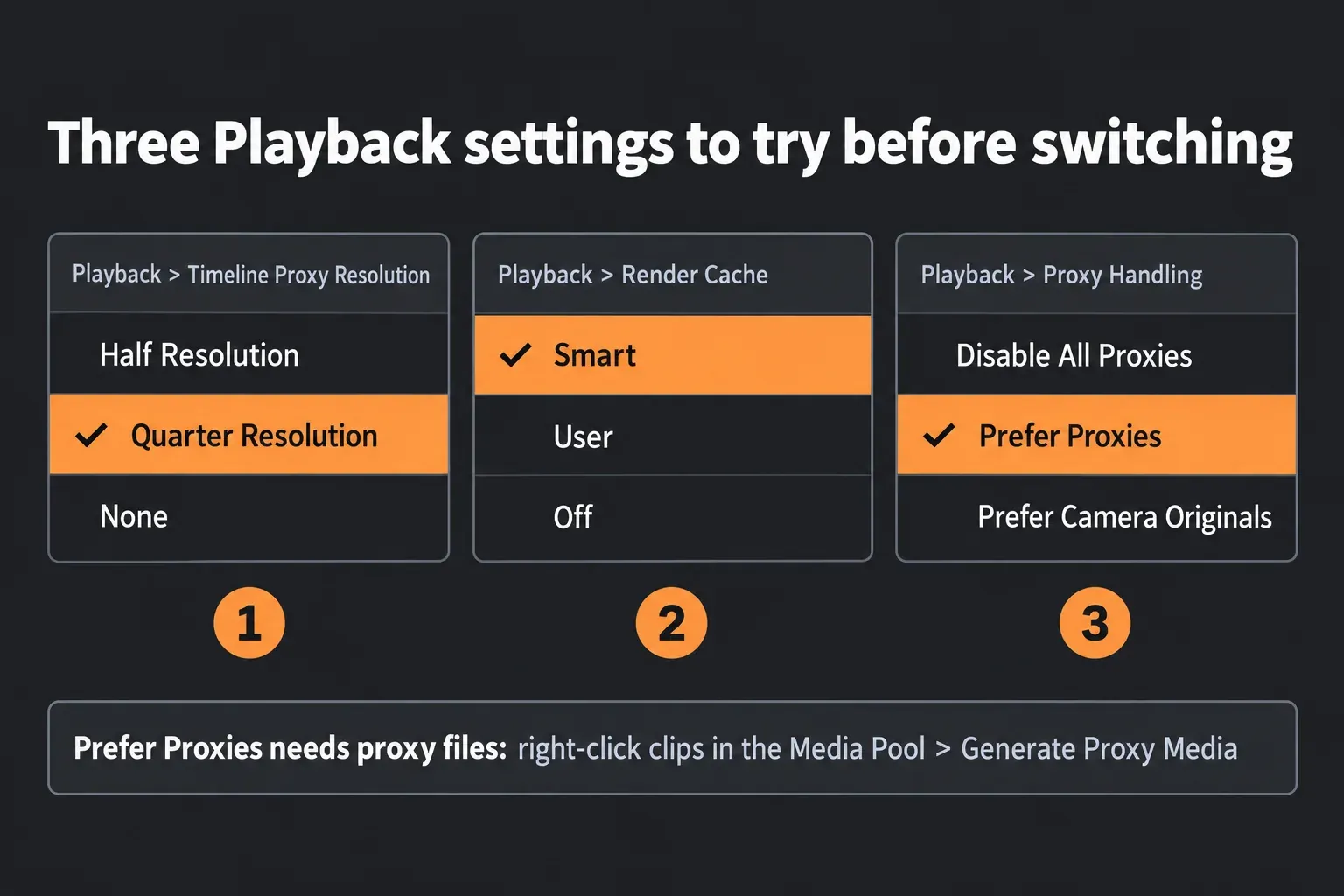
Switching costs you the grade, the Fairlight mix and every Fusion composition, because none of them travel to another editor as editable effects. If your computer clears the DaVinci Resolve system requirements and the problem is choppy playback, three Playback menu settings and one Media Pool command target exactly that:
- Choose Playback > Timeline Proxy Resolution > Half Resolution or Quarter Resolution. The viewer plays a lighter image, and renders still come out at full resolution.
- Choose Playback > Render Cache > Smart, so Resolve caches effects-heavy sections in the background.
- Select clips in the Media Pool, right-click and choose Generate Proxy Media.
- Choose Playback > Proxy Handling > Prefer Proxies. Generating proxies alone doesn't switch the timeline to them, and this is the step most people miss.
The slow playback guide walks through each setting in order, the proxy workflow covers formats and storage, and the render cache guide explains when Smart isn't enough. A GPU memory full error and crashes have their own fixes, and the GPU guide covers what to buy when the card itself is the limit.
On an Intel Mac, Resolve 21 won't install, but Resolve 20.3.2 from February 12, 2026, still runs on macOS 14 Sonoma with a Metal GPU. The old versions page and the Mac guide show where to get it. The trap comes later: a project created or opened in 21.1.2 no longer opens in 20.3.2, so keep a copy before trying it on a newer machine.
If the reason is one missing tool, such as automatic subtitles, Magic Mask v2, Smart Reframe or Detect Scene Cuts on the timeline, it sits in DaVinci Resolve Studio for $295 once. I'd buy Studio before learning a new editor when one tool is the whole reason, because the license is a one-time cost and the edit, grade and mix stay where they are. The free version features list and the Free vs Studio comparison show what sits behind the license, and the free subtitles workaround handles captions without paying.
Requirements and price of each alternative
Prices are list prices in US dollars, without sales. Memory is the vendor's stated minimum, with a higher figure where the vendor sets one for HD, 4K or Fusion.
| Editor | Price | Runs on | Memory and graphics | Free version limits |
|---|---|---|---|---|
| DaVinci Resolve 21.1.2 | Free; Studio $295 once | macOS 15 or later on Apple silicon, Windows 10 or later, Rocky Linux 8.6; free iPad app | Mac 8 GB (16 GB with Fusion); Windows 16 GB (32 GB with Fusion) and a GPU with 4 GB; Linux 32 GB | No time limit or watermark; output up to Ultra HD and one GPU on Windows and Linux |
| Shotcut 26.9.27 | Free; $11.49 Microsoft Store build | Windows 10 (1809) to 11, macOS 12 or later, 64-bit Linux; Intel, AMD and Arm | 4 GB for SD, 8 GB for HD, 16 GB for 4K; Direct3D 11 on Windows, OpenGL 2.0 on Linux | None; open source under GPLv3 |
| Kdenlive 26.08.2 | Free | Windows 10 (1809) or later, macOS 13 or later on Intel and Apple silicon, 64-bit Linux | 4 GB for SD, 8 GB for HD, 16 GB for 4K; OpenGL 2.0; effects run on the CPU | None; open source under the GPL |
| Lightworks 2026.1 | Free; Create and Pro plans priced by region | Windows 10 or later, macOS 12 or later on Intel and Apple silicon, Ubuntu 22.04, Fedora 40, Mint 21 or later | 8 GB (16 GB recommended); 2 GB of video memory on Windows and Linux | Export up to 1080p, proxies up to 720p; AAF and XML need Pro; activation online |
| CapCut desktop 9.7 | Free; CapCut Pro subscription | Windows 10 or later on x64 and Arm, Mac, web, iOS and Android | Windows: 8 GB and 2 GB of video memory (16 GB and 6 GB recommended) | 4K, 60 fps and watermark-free export of Pro materials need Pro |
| Movavi Video Editor 2027 | Priced by regional storefront | Windows 10 and 11, macOS 12 or later on Intel and Apple silicon | 4 GB; Intel HD Graphics 2000 or newer | Trial exports carry a watermark and stop at 60 seconds |
| Filmora | $49.99 a year, $59.99 a year Advanced, $79.99 perpetual | Windows 7 to 11 on x64, Windows 10 and 11 on Arm, macOS 10.15 or later | 8 GB and 2 GB of video memory; 16 GB and 4 GB for HD and 4K | Free version watermarks exports |
| VEGAS Pro 2026 | $99.95 a year or $219.95 perpetual at launch | Windows 11 only | 16 GB and 8 GB of video memory; 16 GB of video memory for AI features | No free version; 15-day full trial without a card |
| Premiere Pro | $22.99 a month on the annual plan, billed monthly | Windows and macOS | Adobe publishes them per release | No free version; 25 generative credits a month |
| Final Cut Pro 12.4 | $299.99 once, or Apple Creator Studio at $12.99 a month or $129 a year | macOS 15.6 or later on Apple silicon and Intel with a Metal GPU; iPad app | 8 GB (16 GB recommended) | No free version; Creator Studio starts with a 30-day free trial |
Over time the one-off licenses win. At these list prices, three years of Premiere Pro cost $827.64, against $299.99 for Final Cut Pro and $295 for Resolve Studio, both paid once. Filmora's yearly Basic plan adds up to $149.97 over the same three years, and its $79.99 perpetual license covers updates within Filmora 16 on one operating system.
Apple's bundle changes the math for Mac owners who want more than an editor. Apple Creator Studio puts Final Cut Pro for Mac and iPad, Motion, Compressor, Logic Pro, Pixelmator Pro and MainStage in one subscription, and students pay $2.99 a month or $29.99 a year.
Export speed: what the test results show
On the same Mac, Final Cut Pro and Premiere Pro both beat Resolve at transcription and captions, and Final Cut matches it on exports. Among the free editors, published Resolve exports finish in a median 0.58 times the timeline's running time, while Shotcut and Kdenlive climb to about 4.5 times once a resize or an effect sits on the clips.
Against Premiere, the record splits by task. In earlier builds tested by Simon Says, Larry Jordan on an M1 MacBook Pro and ProVideo Coalition's M4 Mac mini review, Resolve finished ProRes masters in a median 56% of Premiere's time across 8 runs, with a range of 28 to 88%. ProVideo Coalition's Mac Studio M3 Ultra review reversed that for a keyed 36-minute green-screen interview: Resolve needed a median 188% of Premiere's time across five Macs, or 8:51 against 4:16 on the M3 Ultra itself. The same review timed transcription of a 98-minute film, and Premiere was faster on four of the five Macs, with Resolve at a median 148% of its time. A newer 10-minute project in whoismatt's M5 MacBook Air review went back to Resolve, at 4:15 against 8:04 for Premiere.
Final Cut Pro's clear lead is captions. In ProVideo Coalition's 98-minute test, Resolve took between 3 and 11 times as long as Final Cut on each of five Macs, and Larry Jordan's captioning comparison measured Resolve Studio 20 at 5.2 times Final Cut Pro 11. Across six caption results the median is 7.5 times, and the Resolve tool in those tests is Studio-only. Larry Jordan's multicam test had Final Cut playing 40 UHD ProRes streams on 2.2 GB of memory against 30 for Resolve on just over 7 GB. Exports land close to a tie: across 21 results from five publishers, the median Resolve-to-Final Cut time ratio is 1.0.
No review times all the free and budget editors on one computer, so the table pools published exports as a multiple of each timeline's running time. Every row comes from different machines, which makes it a guide to how each editor behaves under load, and the Kdenlive timings come from threads where users asked about slow renders, so they lean slow.
| Editor | Export time vs running time | Published runs and conditions |
|---|---|---|
| DaVinci Resolve | Median 0.58x, range 0.41 to 0.71x | 6 runs from 3 sources, Free in 5: a 2-minute 4K timeline in 69 to 71 seconds on four NVIDIA cards in a GPU encoding benchmark, and 29:42 of 1080p with LUTs, three audio plug-ins and titles in 732 seconds on an M1 MacBook Air in one editor's write-up |
| Shotcut, no filters | Median 1.10x, range 0.47 to 1.33x | 5 runs on 2 machines in a Shotcut forum comparison with CapCut |
| Shotcut, one resize filter | About 4.5x (per-machine medians 3.5, 4.5 and 12.8x) | A 3:06 film with clips at 110% took 840 seconds on an i5 with 16 GB; CapCut exported the same project in 45 seconds |
| Kdenlive, no effects | Median 0.8x, range 0.25 to 1.88x | 7 runs on 5 machines from KDE Discuss threads about render speed |
| Kdenlive, with effects | About 4.5x, range 0.85 to 13.35x | 7 runs on 4 machines with saturation, zoom, crops or overlays; 17 minutes of 4K took 3 hours 47 minutes on an i9 laptop with an RTX 2080 Super Max-Q |
| Movavi Video Editor | About 1.2x, one run | 10 minutes of 1080p in about 12 minutes on a Ryzen 5 3500U laptop with Vega 8 graphics and 12 GB, in one Movavi review; that laptop is below Resolve's Windows minimum |
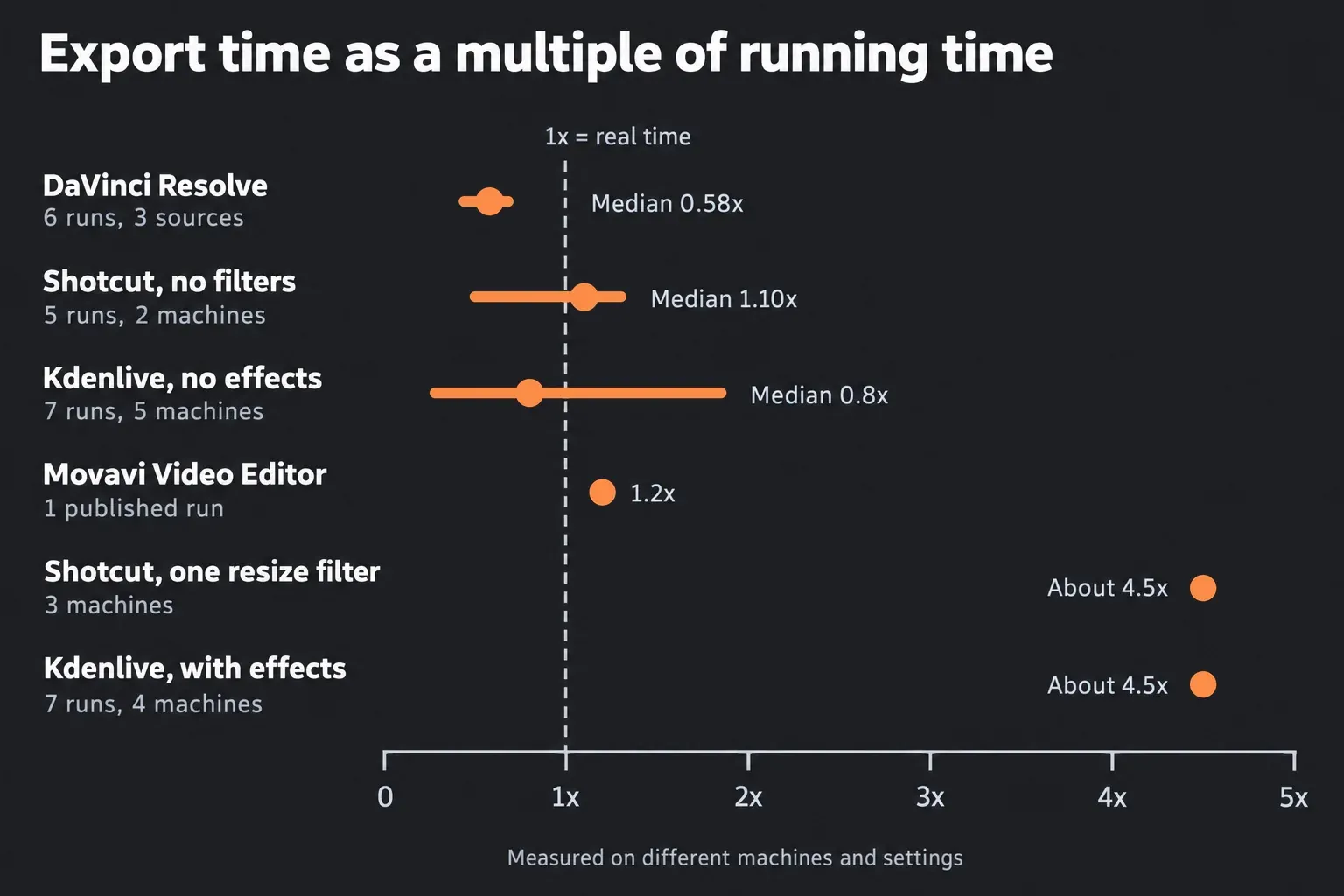
For a free editor on a modest PC, I'd judge Shotcut and Kdenlive by the filtered rows, because almost every real edit has a resize, a crop or a color tweak on it. CapCut is the outlier on speed: in the same Shotcut forum threads it exported each test project in 16 to 45 seconds.
Some of the ranking lists for this search get the basics wrong. One says Resolve runs on iOS and Windows, though it runs on macOS, Windows and Linux, with a separate iPad app. Another still quotes Premiere at $20.99 a month, and a third counts Natron, a compositing program, among the video editors.
Moving a Resolve project to another editor
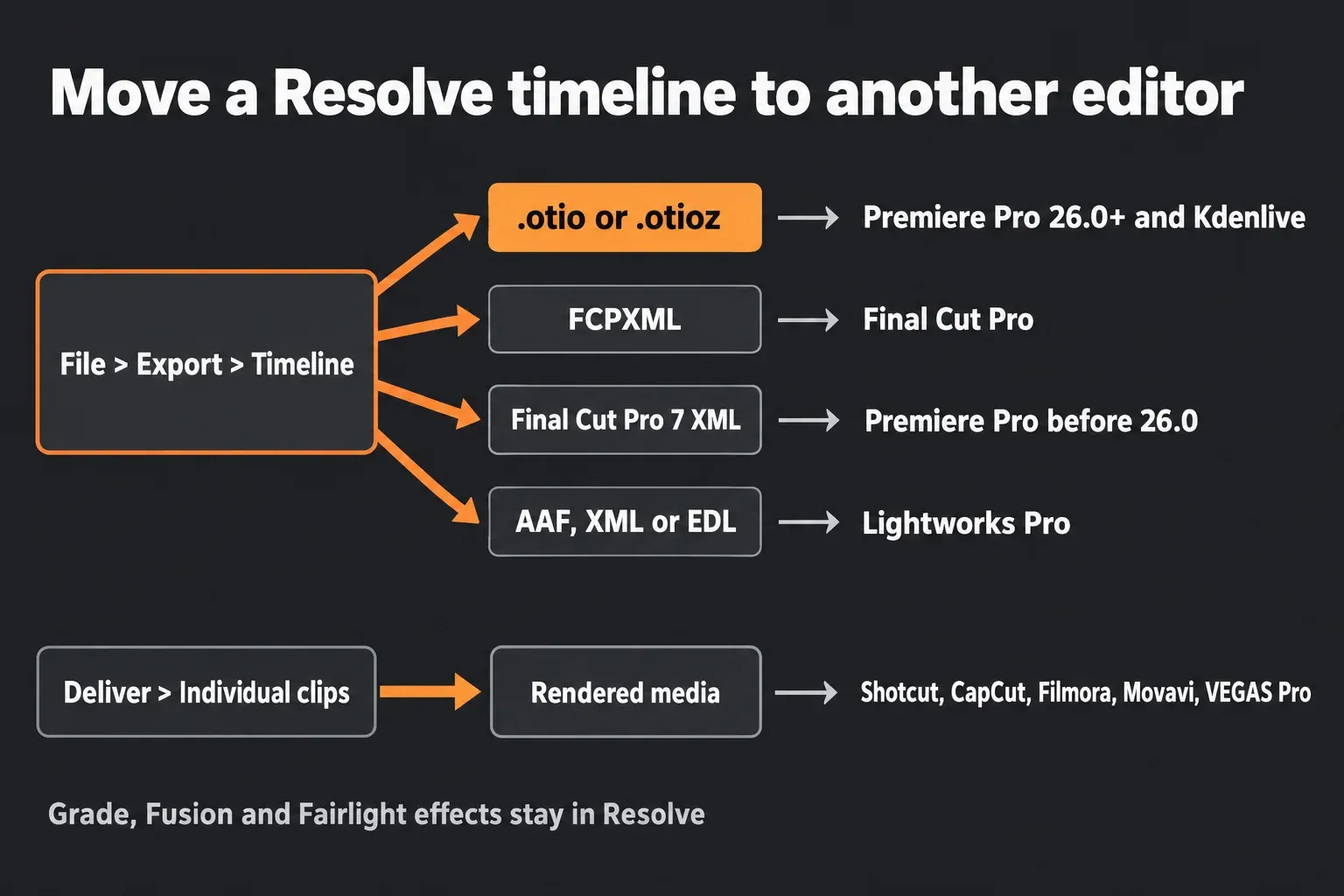
Blackmagic's Reference Manual names OpenTimelineIO as the most reliable route between applications: choose File > Export > Timeline (Shift-Command-O on a Mac), then pick .otio in the format menu, or .otioz to bundle the media with the timeline. If the other editor can't read it, the manual says to fall back to XML or AAF, and Resolve converts between AAF, Final Cut Pro 7 XML and FCPXML.
| Destination | Export from Resolve | What to know |
|---|---|---|
| Premiere Pro | OpenTimelineIO or Final Cut Pro 7 XML | OpenTimelineIO import arrived in Premiere 26.0; earlier versions take the XML |
| Final Cut Pro | FCPXML | Apple's guide to transferring projects with XML covers the import side |
| Kdenlive | OpenTimelineIO | The Kdenlive File menu imports and exports OpenTimelineIO |
| Lightworks | AAF, XML or EDL | Interchange is a Lightworks Pro feature |
| Any editor that reads EDL | EDL | Carries one video track: the track with the destination control enabled |
| Shotcut, CapCut, Filmora, Movavi, VEGAS Pro | Rendered media | None documents a timeline import from Resolve; VEGAS treats its own EDL as not intended as a project interchange |
Whatever the route, the grade, Fusion compositions and Fairlight effects stay in Resolve. For an editor without timeline import, set the Deliver page to Individual clips: each clip renders as its own file with timecode cloned from the source, which the manual describes as "making it easy to reconform media for projects being passed between DaVinci Resolve and NLEs." Check Render Timeline Effects to bake the grade into each clip, or leave it unchecked to hand over clean media. Single clip mode bakes most effects into one file, which works for a finished cut and leaves nothing to re-edit.
Going the other way, the Premiere Pro to Resolve guide covers XML and AAF import, and scene cut detection splits a single flattened export back into shots.
The alternatives one by one
Shotcut
Shotcut is free and open source on Windows, macOS and Linux, and version 26.9.27 is current. Its installer is about 500 MB against almost 5 GB for Resolve, according to XDA, and version 24.10 added Speech to Text with Whisper. The Microsoft Store build costs $11.49 after a one-week trial. The Resolve vs Shotcut comparison goes feature by feature.
Kdenlive
Kdenlive is a free GPL editor, with 26.08.2 as the current release, Intel and Apple silicon builds for macOS 13 or later, and Speech to Text through Whisper or VOSK. Effects, transitions and compositing run on the CPU, which explains the filtered export times above. The Resolve vs Kdenlive comparison covers OpenTimelineIO round trips in detail.
Final Cut Pro
Final Cut Pro costs $299.99 once on the Mac App Store and needs macOS 15.6 or later with 8 GB of memory; some features need Apple silicon. It wins on captions and multicam playback in the tests above, and the Resolve vs Final Cut Pro comparison weighs that against Resolve's color and audio pages.
Premiere Pro
Premiere Pro costs $22.99 a month on the annual plan billed monthly, runs on Windows and macOS, and single-app plans include 25 generative credits a month. It makes sense when clients, editors or After Effects work already live in Adobe. The Resolve vs Premiere Pro comparison covers the rest.
CapCut
CapCut desktop is free on Windows 10 or later, on x64 and Arm, and also runs on Mac, the web, iOS and Android. CapCut Pro is needed for 4K, 60 fps and watermark-free export of Pro materials. The Resolve vs CapCut comparison shows where its templates beat Resolve and where they stop.
Filmora
Filmora costs $49.99 a year, $59.99 a year for Advanced with 1,000 AI credits a month, or $79.99 perpetual, with a 30-day money-back guarantee. It runs on Windows 7 to 11 and macOS 10.15 or later, the widest operating system range here. The Resolve vs Filmora comparison covers its AI tools.
Movavi Video Editor
Movavi Video Editor 2027 asks for 4 GB of memory whatever the project, on Windows 10 or 11 and macOS 12 or later. Its trial adds a watermark and stops exports at 60 seconds. The Resolve vs Movavi comparison has the full picture.
VEGAS Pro
VEGAS Pro 2026 runs only on Windows 11 and wants 16 GB of memory and 8 GB of video memory. It launched at $99.95 a year or $219.95 perpetual, and the 15-day trial needs no card. The Resolve vs VEGAS Pro comparison covers its timeline and plug-ins.
Lightworks
Lightworks Free has no time limit and exports up to 1080p, Create adds 4K and Blackmagic RAW and ProRes decoding, and Pro adds 8K and AAF, XML, OMF and EDL interchange. Its tech specs ask for 8 GB of memory on Windows, macOS 12 or later and Linux, and activation needs an internet connection.
Questions about DaVinci Resolve alternatives
What is the best free alternative to DaVinci Resolve with no watermark?
Shotcut and Kdenlive are both free, open source and watermark-free with no time limit. Shotcut is the lighter pick for Windows, and Kdenlive is the stronger pick for Linux and OpenTimelineIO round trips.
What can I use instead of DaVinci Resolve on an Intel Mac?
Kdenlive runs on macOS 13 or later, Shotcut, Movavi and Lightworks on macOS 12 or later, and Filmora back to macOS 10.15. Final Cut Pro runs on Intel Macs with macOS 15.6 and a Metal GPU, and Resolve 20.3.2 still runs on macOS 14 Sonoma.
Is there a DaVinci Resolve alternative for Linux?
Kdenlive, Shotcut and Lightworks all have Linux versions. Resolve also runs on Linux, though it wants Rocky Linux 8.6, 32 GB of memory and a discrete GPU, as the Linux guide explains.
Can I edit on a Chromebook instead of using DaVinci Resolve?
Resolve has no ChromeOS version. CapCut runs in a browser, and the Chromebook guide covers remote options for running Resolve on another computer.
Is there a DaVinci Resolve app for phones?
There's no Resolve editor for Android or iPhone. CapCut has phone apps, and DaVinci Resolve for iPad is free on supported iPads.
Which video editor runs best on an old computer?
Movavi asks for 4 GB of memory and Intel HD Graphics 2000 for any project. Among free editors, Shotcut handles SD on 4 GB and HD on 8 GB, with Preview Scaling and proxies for slow machines.
Can Premiere Pro or Final Cut Pro open a DaVinci Resolve project?
Neither opens a Resolve project file, but both import its timeline. Export OpenTimelineIO or XML for Premiere and FCPXML for Final Cut Pro; grades, Fusion compositions and Fairlight effects stay behind.
Verdict: which DaVinci Resolve alternative to choose
Choose by the reason you're leaving. Shotcut is the safest free switch on a weak Windows PC, Kdenlive is the pick for Linux and Intel Macs, Final Cut Pro wins on a Mac when captions and multicam matter most, and Premiere Pro belongs with teams already paying for Adobe. CapCut, Filmora, Movavi, VEGAS Pro and Lightworks each fit one narrower job from the table above.
If your computer meets Resolve's requirements, I'd stay with it and fix playback with proxies and the render cache first, then pay $295 for Studio if one tool is missing, because every alternative here gives up the grade, the Fairlight mix or Fusion to gain speed or simplicity. The comparisons hub has every head-to-head, and the download page lists the current installers.