Quick answer: Choose DaVinci Resolve when color, Fusion, Fairlight and delivery should live in one project, or when the Free edition already covers the job. Choose Adobe Premiere when After Effects, Photoshop, Frame.io, shared Adobe assets or an established Premiere team define the recurring workflow. The better editor is the one that leaves your real work with fewer fragile handoffs.
Checked October 5, 2026, when Resolve 21.1.1 build 10 was the current stable release and Premiere 26.5.2 was Adobe's latest stable update. Beta features are labeled as beta. This piece compares workflows; nobody timed either app for it, so you won't find a performance benchmark here.
Ignore the winner badges. Take one representative job with the same source files, edit brief, revision and delivery, then count the relinks, app switches, rebuilt effects and QC failures in each editor. That count catches the cost a feature table almost always misses.
Resolve vs Premiere: The Practical Difference
- Resolve 21 puts Edit, Color, Fusion, Fairlight and Deliver in one project. The Free edition goes a long way, and Studio currently costs $295 in the US as a one-time license.
- Premiere 26.5 is a subscription editor. It pays off directly when Adobe apps, Frame.io, templates and Premiere-based collaborators already surround the project.
- Resolve has the deeper dedicated color-finishing architecture, but deeper tools don't make every grade better by default.
- Premiere has the broader Adobe application path, and those linked apps only earn their keep when the project actually needs them.
- Performance has no universal winner. Codec profile, operating system, CPU, GPU, effects, application version and Resolve edition can each flip the result.
Price and License Cost in 2026
Blackmagic currently lists DaVinci Resolve Studio 21 at $295 in the United States, paid once. Resolve Free covers editing, node-based color, Fusion, Fairlight and output up to Ultra HD 3840 x 2160 at 60 fps within Blackmagic's documented format limits. Studio adds the Neural Engine, the paid AI tools, video noise reduction, more Resolve FX, multiple-GPU support, broader professional format paths and higher delivery ceilings.
Adobe lists the individual Premiere plan at $22.99 per month in the United States on an annual commitment billed monthly, before tax. The listing bundles 100 GB of cloud storage, Frame.io and Adobe Express Premium. After Effects, Photoshop and Audition sit outside it; each needs its own entitlement or a multi-app plan that covers it. Desktop Premiere has no perpetual license.
At that list price, 13 months of Premiere comes to $298.87 before tax, a hair above the $295 Studio license. That's simple arithmetic, and it won't give you a universal break-even point. Promotions, regional checkout, cancellation terms, credit use and how much you value the bundled services can tip it either way. Check whether the advertised rate is a starting or first-year price, then recheck both product pages before you buy.
The license fee is the part you can see. A Premiere subscription earns its money when shared After Effects compositions, Frame.io approvals or Adobe libraries save real work. Resolve can come out cheaper when one editor finishes picture, color and audio without extra applications. If you've already settled on Resolve, the Resolve pricing guide breaks down purchase costs and the Free versus Studio comparison helps you judge whether a paid feature justifies the upgrade.
Editing Workflow, Timelines and Teams
Both applications handle professional track-based editing, multicam, proxies, captions, keyboard trimming and long-form timelines. Whether a trim tool exists is settled. What separates them is how the edit connects to motion graphics, color, audio, review and the final master.
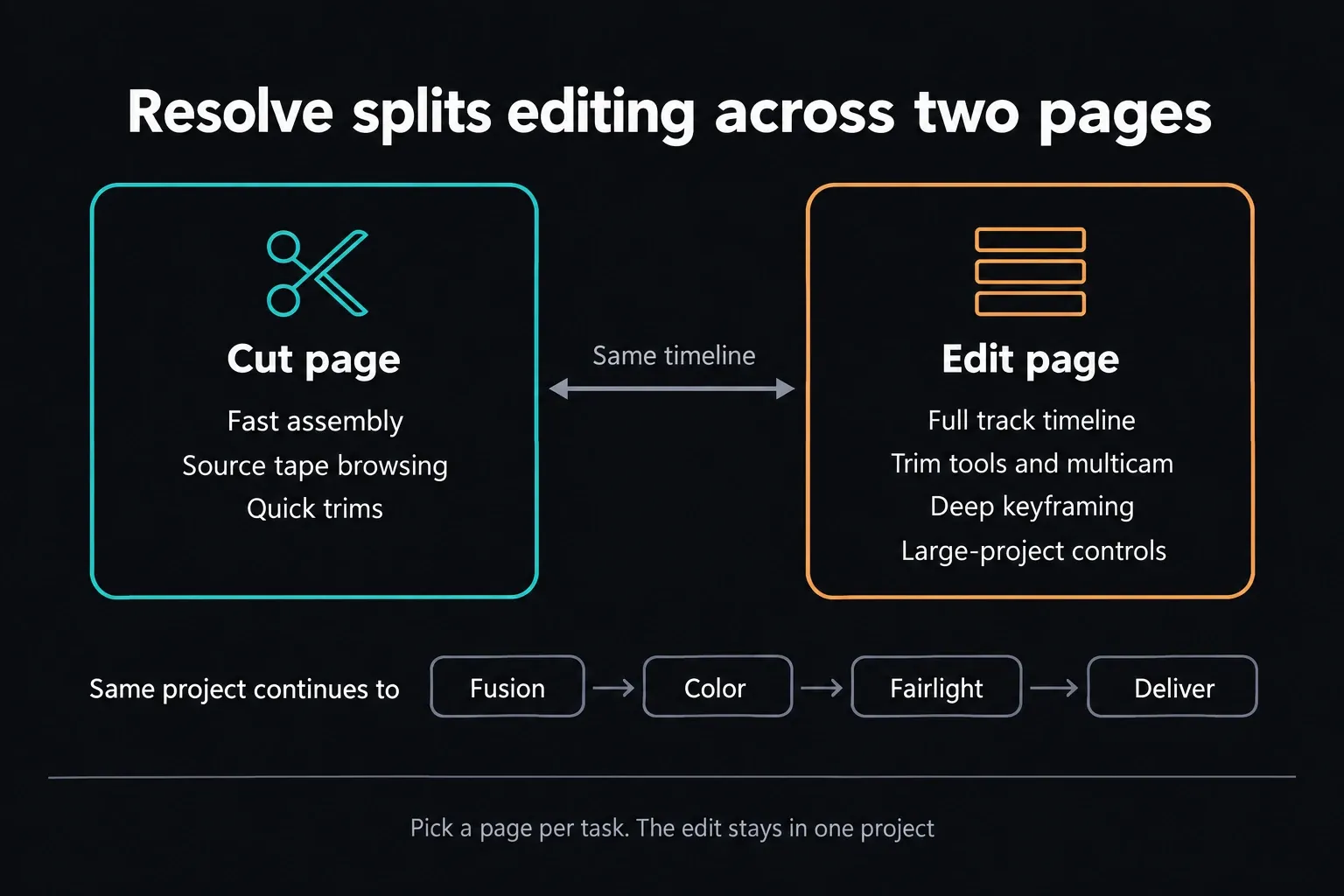
Resolve splits editing between the Cut and Edit pages. Cut is built for fast assembly and source-tape browsing; Edit holds the conventional timeline, trim tools, multicam, deep keyframing and large-project controls. Coming from Premiere, you'll spend a while rebuilding shortcuts and habits. Unfamiliar doesn't mean less capable.
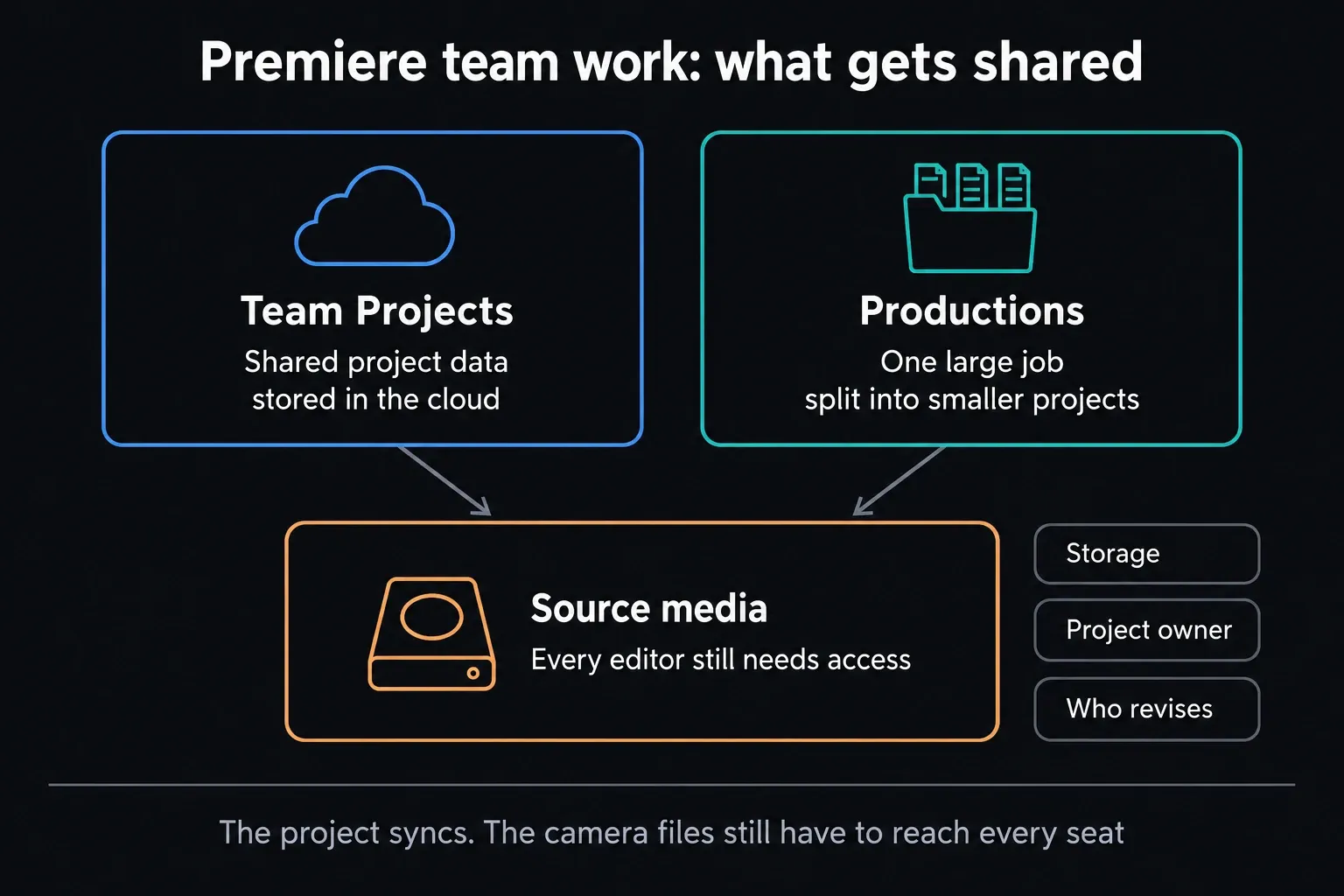
Premiere’s track model, Productions and Team Projects suit teams that already pass Adobe projects back and forth. Stable 26.5 adds Paper Edit, which assembles a sequence from selected transcript lines, and gives Object Mask new Sharp and Smooth edge modes. Adobe’s current release notes also spell out which source formats Generative Extend accepts and what format the generated extension comes out in. Check both before you add it to a delivery workflow.
Team Projects keeps shared project metadata in the cloud, and Productions splits large jobs into smaller project files. Either way, every editor still needs access to the source media. Plan the collaboration setup around storage, project ownership and whoever makes the revisions.
Dynamic Link connects Premiere with After Effects without an intermediate render, but Adobe requires matching major versions. A heavy linked composition can still drag playback down, and Render and Replace is one way out. Fusion keeps compositing inside Resolve. List the motion templates, plug-ins, artists and revision path you really need before assuming either connection is automatically faster.
For difficult camera media, run the same proxy test in both editors; the Resolve proxy workflow covers the Resolve side. Measure reconnection, how portable relinking is, one real revision and how smoothly each app plays the media the first time.
Color, Motion Graphics and Finishing
Resolve's Color page is built around a node graph, qualifiers, tracked Power Windows, grouped grades, versions, galleries, scopes and color-managed finishing. That architecture is a real advantage when the job needs complex secondary work, many grade versions, HDR finishing or a dedicated colorist. The controls won't choose a look for you or repair a wrong color transform. For practical walkthroughs, start at the Resolve color-grading hub.
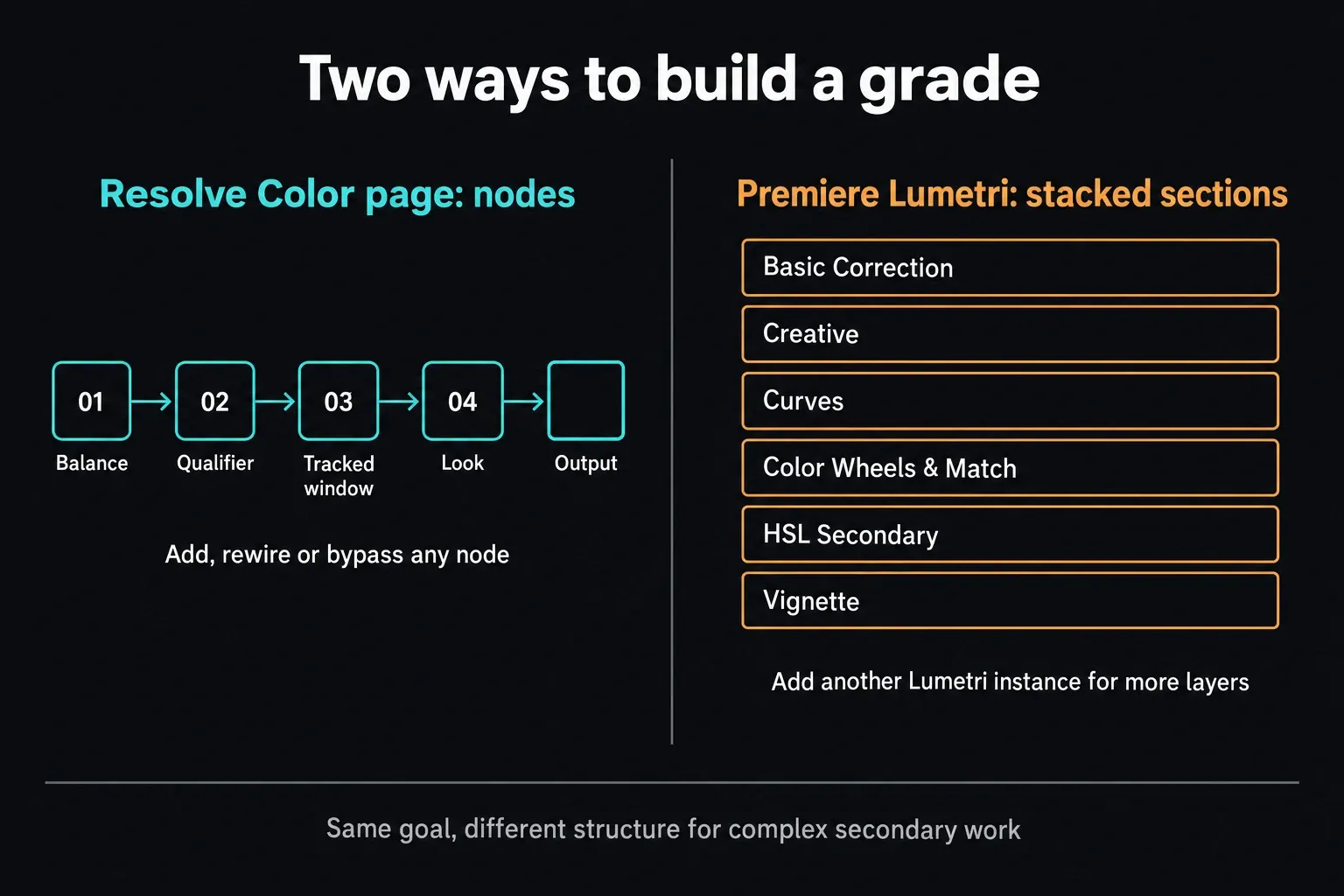
Premiere includes Lumetri controls, curves, masks, scopes and color management for log and wide-gamut media. Adobe’s September update still labels the new Color Mode as beta, so it sits outside the stable 26.5 workflow. That matters when you promise a client a particular workflow. Current Lumetri stays perfectly usable for editorial correction and branded content.
Resolve becomes the clearer pick when finishing is a big part of the job. Premiere can stay the better day-to-day fit when the grade is modest and the edit depends on Adobe graphics, templates and approvals. Test the camera formats, monitoring path, transform order and delivery you actually need before choosing from screenshots.
A Premiere edit with a Resolve grade can work well, but you're signing up for a conform. Simplify or render unsupported effects where needed, keep source timecode and reel metadata, send a reference movie, relink original media and compare the conformed timeline shot by shot. Settle which application owns the final export before the round trip starts.
AI Features: Stable Tools, Credits and Limits
Both editors now lean on AI for search, masking, speech, audio and image work. Counting every feature with an AI label tells you nothing. Compare the exact task, the edition or plan, where the processing runs, the output limits and how long the review takes.
Stable Premiere includes media intelligence, Object Masking and Generative Extend. Adobe documents up to 2 seconds of generated video or 10 seconds of ambient audio. It can't create or extend spoken dialogue, clips that contain music aren't eligible, and availability can depend on region and account type.
Generative Extend consumes credits according to resolution and frame rate. Adobe’s current generative-credit table lists 25 monthly credits for individual single-app subscriptions started on or after June 17, 2025; older eligible subscriptions get a different allocation. A small included balance runs out fast. Check your account, the chosen model and the charge Premiere displays before you rely on AI for recurring work.
The Generative Media Tool is now part of stable Premiere 26.5. It generates video and sound effects from prompts right in the timeline, with Adobe Firefly and partner models to pick from. Model access and credits still apply. Keep it apart from Generative Extend, which fills a short timing gap, and from the beta music, soundscape and audio-cleanup features Adobe announced alongside it.
Resolve 21 adds IntelliSearch, CineFocus, Face Age Transformer, Face Reshaper, Speech Generator and other assisted tools, and Blackmagic's Resolve 21 feature page lists the current set. Many headline tools require Studio, including IntelliSearch, Magic Mask, text-based editing, Voice Isolation and AI Speech Generator.
Premiere's tools fill missing frames, search media and mask objects inside an Adobe edit. Resolve Studio spreads its paid AI across media organization, editing, color and audio. Neither description tells you what will happen to your footage, so count result review, failed attempts and correction time in the test.
Automation can also settle the edition question. Resolve 21.1 moves Python scripting to Studio and requires Studio for advanced scripting; its Studio release adds native MCP integration. The change targets scripting, and Free Fusion macros and title templates are a different mechanism. If you depend on a third-party tool, check how it connects before upgrading an established workflow.
Fairlight vs Premiere Audio
Premiere includes clip and track mixing, effects, automation, speech tools, captions and Essential Sound workflows. Audition is there when a team needs its dedicated restoration or multitrack environment. A straightforward YouTube or corporate mix doesn't have to leave Premiere just because Audition exists.
Fairlight is a dedicated audio-post page inside Resolve, with clip and track EQ, dynamics, buses, automation, ADR, loudness tools and delivery in the same project. Studio adds paid tools such as Voice Isolation, Music Remixer, Dialogue Separator and immersive-audio capabilities, and Free doesn't get all of them.
Resolve can cut out application handoffs when the same editor or team finishes picture and audio in one project. Premiere may fit better when an Audition mixer, shared Adobe assets or an existing Frame.io approval path already shapes the handoff. Measure revision rework and media relinking, because integrated doesn't automatically mean faster.
Performance and System Requirements
Nobody can honestly name a universal performance winner. Playback and export depend on the codec profile, bit depth, chroma sampling, operating system, CPU, GPU or media engine, storage, effects and application version. Resolve Free and Studio can also take different supported hardware-codec paths.
Adobe’s current Premiere requirements cover 26.5, and Blackmagic publishes Resolve minimums in each release note. Read the exact operating-system and hardware row for the build you plan to install; availability on Mac or Windows doesn't mean every older machine is supported. Requirements set a floor. They can't promise smooth playback with your footage and effects.
Heavy Resolve color nodes, Fusion compositions and video noise reduction lean hard on the GPU and memory. Heavy Premiere effects, third-party plugins and linked compositions can shift the bottleneck elsewhere. Compare the Resolve 21 system requirements with Adobe's page, then test one representative source file before you buy hardware.
Head-to-Head Decision Table
| Decision | DaVinci Resolve 21 | Adobe Premiere 26.5 | What to test |
|---|---|---|---|
| License | Free; Studio $295 US list price | $22.99/month US individual annual plan, billed monthly | Region, tax, term, credits and included services |
| Editing | Cut and Edit pages | Track-based edit, Productions and Team Projects | Rough cut, multicam, relink and one revision |
| Color | Dedicated node-based finishing page | Lumetri and current color-management tools | Camera format, shot matching, monitoring and master |
| Motion and VFX | Fusion inside the Resolve project | After Effects connection when required | Templates, plugins, render boundaries and revisions |
| Audio | Fairlight page; some AI tools require Studio | Built-in tools; Audition when required | Cleanup, routing, captions, mix and revision handoff |
| AI | Studio tools across search, edit, color and audio | Object Masking, media intelligence and Firefly tools | Plan, region, credits, output limits and review |
| Collaboration | Blackmagic Cloud and multi-user projects | Productions, Team Projects and Frame.io | Existing users, storage, ownership and approval path |
| Performance | Codec-, GPU-, effect- and edition-dependent | Codec-, hardware-, effect- and version-dependent | Same source media, timeline, effects and export preset |
Run One Controlled Project Test
A choice you can defend needs one finished job in each editor. Use identical inputs, and write the delivery specification before you open either application.
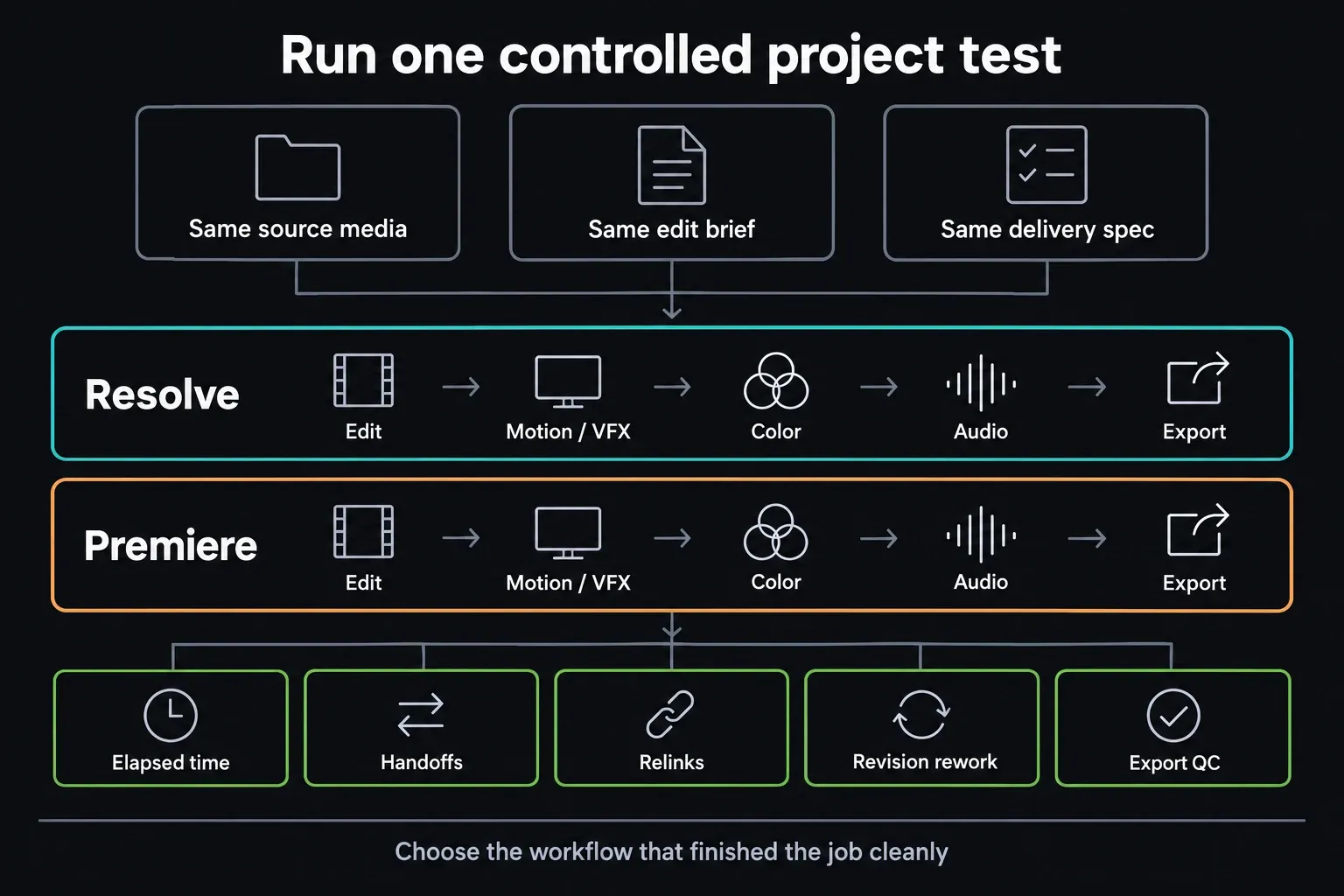
- Use the same camera originals, including the long-GOP or high-bit-depth clip that worries you most.
- Build the same rough cut, a multicam or caption task if it applies, one motion/VFX task, one grade and one audio cleanup.
- Send the same review, apply one realistic revision and export the same master.
- Record elapsed time, manual handoffs, relinks, revision rework and whether the exported file passes QC.
- Don't count learning time as a permanent product defect, but do write down the training and shortcut migration the switch will take.
For a beginner or a YouTube channel, this test tells you more than any generic score. The Resolve beginner learning path gives you the Resolve route; use Adobe’s current training for the matching Premiere run. If what you really want is a template-led social edit, the Resolve versus CapCut comparison covers that different choice.
Which Editor Should You Choose?
Choose Resolve when one project should carry editing, grading, Fusion, Fairlight and delivery, when the Free edition already meets the brief, or when a substantial finishing pass sits at the center of the work. Confirm the exact Free boundary in the Resolve 21 Free feature guide before you assume a codec or AI feature is included.
Choose Premiere when your recurring work depends on After Effects compositions, Photoshop or Libraries assets, Frame.io review, Adobe templates, or collaborators who swap Premiere projects. Generative Extend can solve a narrow timing problem, as long as its duration, credit, media and regional limits fit the deliverable.
Choose a hybrid workflow when Premiere stays the editorial center and Resolve's color finish is worth a conform. Keep the untouched Premiere project, agree on handles and source metadata, export a reference movie and name the application that will create the final master.
Don't switch just to escape a monthly fee if the move breaks client templates, plugins or team exchange. And don't keep paying out of habit if Resolve Free finishes the same recurring work with fewer handoffs. If neither editor fits, browse the other DaVinci Resolve comparisons.
Moving a Premiere Project to Resolve Safely
Premiere 26.0 added OpenTimelineIO import and export. Final Cut Pro XML is the other common interchange route, and Adobe warns that some effects and audio decisions don't transfer accurately. Neither format will turn every title, nest, plug-in or mix into native Resolve data. With XML, read the FCP Translation Results log as well as the imported timeline.
- Duplicate the locked Premiere sequence and leave the original alone.
- Flatten or simplify nests, unsupported transitions and graphics; render anything that can't be rebuilt safely.
- Keep source timecode, file names and reel metadata, then export XML or a supported OTIO interchange plus a reference movie.
- Import into Resolve, relink the original camera media and compare start frame, duration, framing, speed changes and transitions shot by shot.
- Check audio track layout, muted clips and sync, then decide whether Resolve or Premiere owns the final export.
A clean conform is a controlled transfer, and no button converts the project in one click. If repeated round trips eat up the advantage of the color pass, finish the recurring job in one application or redesign the handoff.
Before updating Resolve for a conform, back up the Project Library and the individual projects. Blackmagic warns that a project created or opened in 21.1 can't be reopened in 20.3.2, even though the library itself stays compatible. Keep the old installer and untouched project backups until the new workflow checks out.
Resolve vs Premiere FAQ
Is DaVinci Resolve really free?
Yes. Resolve 21 Free includes the Cut, Edit, Fusion, Color, Fairlight and Deliver pages, plus collaboration and output up to Ultra HD 3840 x 2160 at 60 fps within Blackmagic's documented format limits. It's a separate edition with no time limit, so don't mistake it for a Studio trial. Work built only with Free-supported tools carries no general application watermark, but a Studio-only Resolve FX can show a DaVinci Resolve Studio watermark until you remove that paid effect or open the project in Studio.
Is DaVinci Resolve better than Premiere for color grading?
Resolve has the deeper dedicated finishing architecture: node graphs, tracked Power Windows, grouped grades, versions, galleries and advanced monitoring workflows. Premiere handles editorial correction and plenty of single-editor grades. A stronger architecture still needs a sound color pipeline and a skilled operator before it produces a better image.
Which is better for beginners, DaVinci Resolve or Premiere?
Resolve is the lower-risk starting point when the Free edition supports your footage and delivery. Premiere can be the faster practical choice when a class, employer, collaborator or template library already runs on Adobe. If you're a beginner, finish the same short project in both before you decide; interface screenshots alone won't tell you enough.
Is DaVinci Resolve or Premiere better for YouTube?
Resolve Free is usually the lower-cost choice for YouTube work up to Ultra HD 60, and it keeps color and Fairlight in one project. Premiere may fit better when After Effects templates, Frame.io review, Adobe assets or Generative Extend are recurring requirements. Test your channel's actual camera format, captions, revision and upload master.
Does Premiere have a one-time purchase option?
No. Adobe's current desktop Premiere FAQ lists it as a membership product. The US individual plan is listed from $22.99 per month on an annual commitment billed monthly, before tax. Promotions, regions, renewal rates, cancellation terms and included generative credits can change, so verify the checkout before you compare totals.
Does DaVinci Resolve work on Windows?
Yes. Resolve runs on Windows, macOS and Linux, while Premiere desktop runs on Windows and macOS. Codec support, GPU acceleration, operating-system minimums and hardware recommendations differ by platform and version, so platform availability alone won't predict equal playback or export performance.
Can I move a Premiere project to DaVinci Resolve?
Yes, but treat it as a conform, since no native project conversion exists. Duplicate and simplify the Premiere sequence, export XML or a supported OTIO interchange plus a reference movie, relink original media in Resolve, then verify framing, retimes, transitions, effects and audio shot by shot. Unsupported effects and plugins may need rendering or rebuilding.