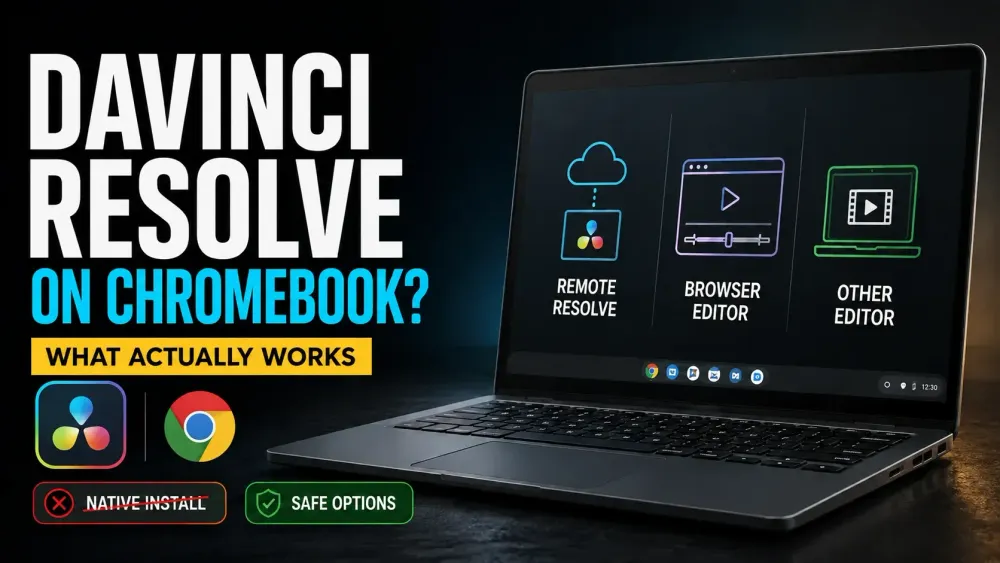
Quick answer: there is still no supported native DaVinci Resolve installation for Chromebook. When I rechecked Blackmagic's download options on October 5, 2026, Resolve 21.1.1 was offered for Mac, Windows (x86 and Arm) and Linux, with no ChromeOS installer, browser-native editor or Chromebook APK. If you want Resolve itself, run it on a suitable remote computer and drive it from the Chromebook. If you want to finish the video locally or in Chrome, use a different editor.
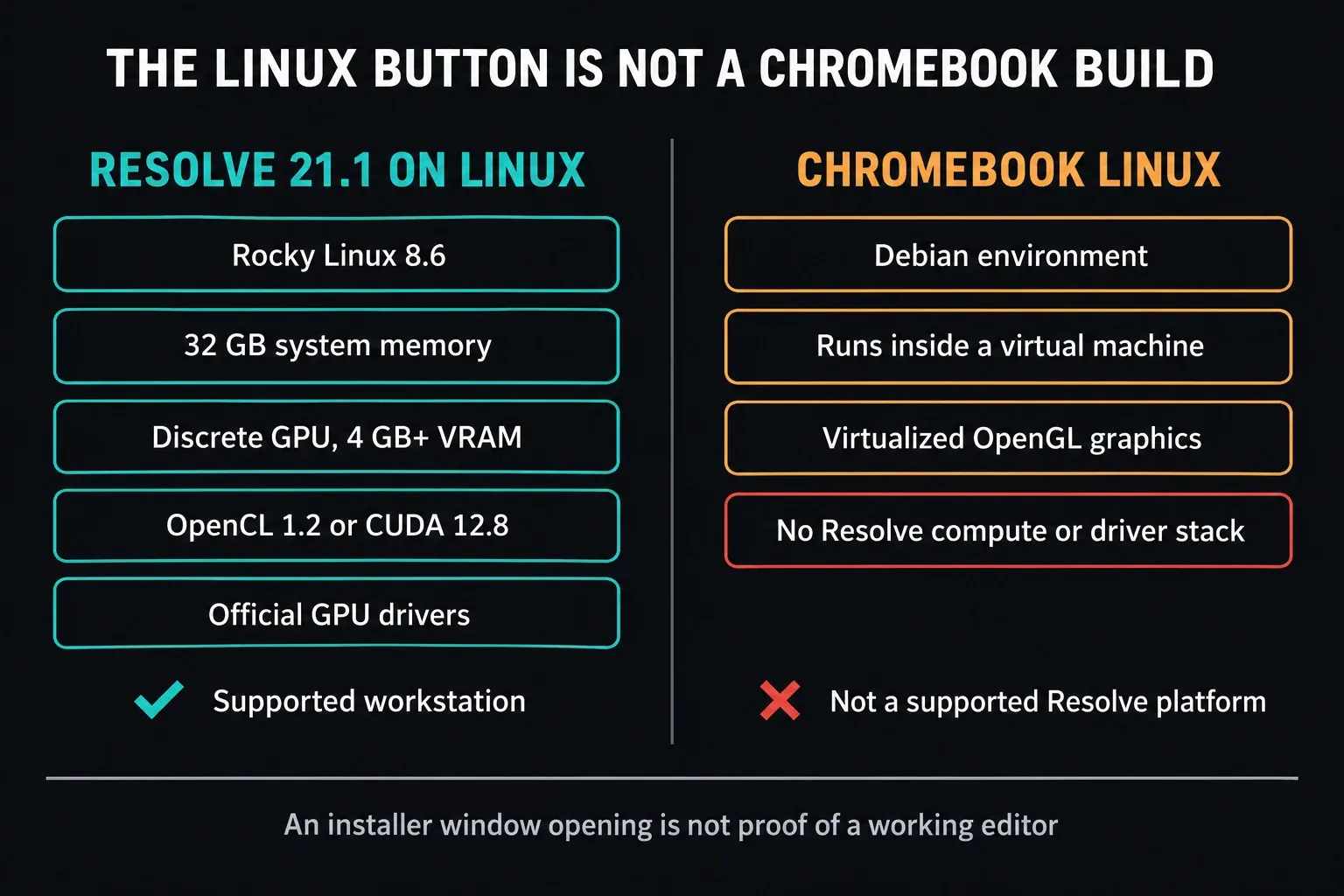
That Linux button isn't a secret ChromeOS edition. Blackmagic's supported Linux setup and the Linux environment inside ChromeOS are different systems, with different operating systems, graphics access and drivers. An installer window that opens tells you nothing about whether the editor can import, play and export your footage.
Need the real installer? Go to the DaVinci Resolve Download & Install hub. This page covers the ChromeOS decision: when a browser editor is enough, when to remote into a computer that runs Resolve, and when the Chromebook simply isn't the right machine for the job.
Choose the Job Before You Choose the Workaround
None of this makes a Chromebook useless for video. I'd just change the question. Instead of “Can I force the Resolve installer to open?”, ask “Which part of this project has to happen on the Chromebook?”
| Your actual need | Best route | What to expect |
|---|---|---|
| Learn Resolve menus and edit a real Resolve project | Remote access to an already working Resolve computer | Test the remote session, including GPU access, picture and sound |
| Cut a short school, social or YouTube video | Use a supported browser editor such as Clipchamp | No native install, but simpler projects can be completed in Chrome |
| Edit locally with multiple tracks and touch controls | Check LumaFusion in Google Play | Paid separate editor; check device compatibility and feature requirements |
| Grade, composite or finish demanding 4K work | Use a supported Resolve computer | A Chromebook is a companion, not the render workstation |
If all you need is a two-minute class video, setting up a remote workstation is probably overkill. If your course requires Resolve or you have to hand in a Resolve project archive, switching to another editor just swaps one problem for another. Work out which constraint is real before you spend money or start changing the Chromebook.
No Resolve computer yet? You can still watch Blackmagic’s training videos on the Chromebook. They teach the terminology and the editing decisions, but the exercises need access to Resolve. Once you have that access, our beginner tutorial picks up from there.
Why the Linux Installer Does Not Make Resolve a Chromebook App
Google's Chromebook Linux setup guide sets up a Debian development environment inside ChromeOS. The Resolve 21.1 readme asks for something else entirely on Linux: Rocky Linux 8.6, 32 GB of RAM, a discrete GPU with at least 4 GB of VRAM, OpenCL 1.2 or CUDA 12.8 support and official drivers. Those requirements belong to the computer that runs Resolve. A Chromebook that only displays a remote session doesn't have to meet them.
Most Chromebook install guides blur one graphics detail:
- Google's general Linux help says hardware acceleration, including GPU and video decode, isn't supported yet. Don't stretch that into “Linux apps on every Chromebook get no graphics acceleration.”
- Google's ChromeOS engineers have described accelerated OpenGL through VirGL for Linux apps running in a virtual machine. That May 2022 article explains graphics architecture. It was never a Resolve compatibility list.
- Virtualized OpenGL is not the OpenCL or CUDA compute and driver stack Resolve needs. Neither a Linux toggle nor a Chromebook Plus badge turns the machine into something Blackmagic supports.
You'll find scripts and videos that get as far as an installer window. I'd treat them as experiments, not a dependable way to finish a project. Before trusting one, you'd need to know the exact device, ChromeOS version, drivers and media formats, and confirm that playback, audio and an export work. If you have a separate supported Linux machine, follow our Linux installation guide there, and don't copy its commands into Crostini.
Don't switch off security features or replace the operating system because an undated tutorial told you to. Back up local files and respect school or employer policies first. A new OS can put your data at risk and still leave the hardware unsuitable for Resolve.
Option 1: Run Resolve on Another Computer and Control It from Chromebook
Of the choices on this page, only remote access keeps the real Resolve project and tools. The host computer runs the editor; the Chromebook sends your keyboard and pointer input and gets a streamed picture back. Start with a host where Resolve already runs well locally, because a remote connection won't fix an unsupported GPU or a broken install.
For a Mac or Windows host you already use, follow Google's Chrome Remote Desktop setup instructions while you're still sitting at that computer. Install the host component, get through the security prompts and set a private PIN. Don't leave the machine unattended until you've run Resolve through the remote session at least once.
Linux host caveat: Google's Linux instructions use a 64-bit Debian package and a virtual desktop session. Don't assume those steps carry over unchanged to Blackmagic's Rocky Linux setup, or that the virtual session can reach the GPU Resolve needs. Pick a remote tool that suits that host, then verify Resolve inside the actual session you'll use.
- On the host, open Chrome Remote Desktop Access and finish Set up remote access. Resolve should already open and play representative media locally.
- Keep the project and camera files where the host can reach them. If the host's own timeline stutters on heavy source footage, set up proxy media on the Resolve host. Proxies cut decoding work, but they do nothing for network delay.
- On the Chromebook, open the same Access page, sign in with the same Google account, pick the computer you set up and enter its PIN. That PIN protects your own remote access; it isn't a support code to hand out.
- Test the actual session: GPU access inside Resolve, picture, audio, keyboard shortcuts, pointer control and a short export. On a managed computer, permission prompts or organization policies may need an administrator.
- Render on the host, then copy the finished file or review version to wherever it needs to go. Play that copy outside Resolve before you deliver it.
A remote session works well for organizing media, rough cuts, review changes and exports. I wouldn't make final color or critical audio calls through a compressed stream, though. Check those on a trusted display and audio path at the workstation itself.
The host has to stay awake, online and connected to its media. Restart it once and see what happens before you rely on unattended access. Renting a cloud computer instead? Check the GPU, remote-session support, Resolve license requirements, storage, transfer costs and data policy before you pay. Paying for a cloud PC doesn't automatically get you a Studio license.
Option 2: Edit in the Browser with Clipchamp
Microsoft documents Clipchamp on Chromebook for both personal and work or school accounts. It runs in Chrome and needs an internet connection, even when your clips are local files. And “browser editor” doesn't mean a remote server takes all the load off your Chromebook.
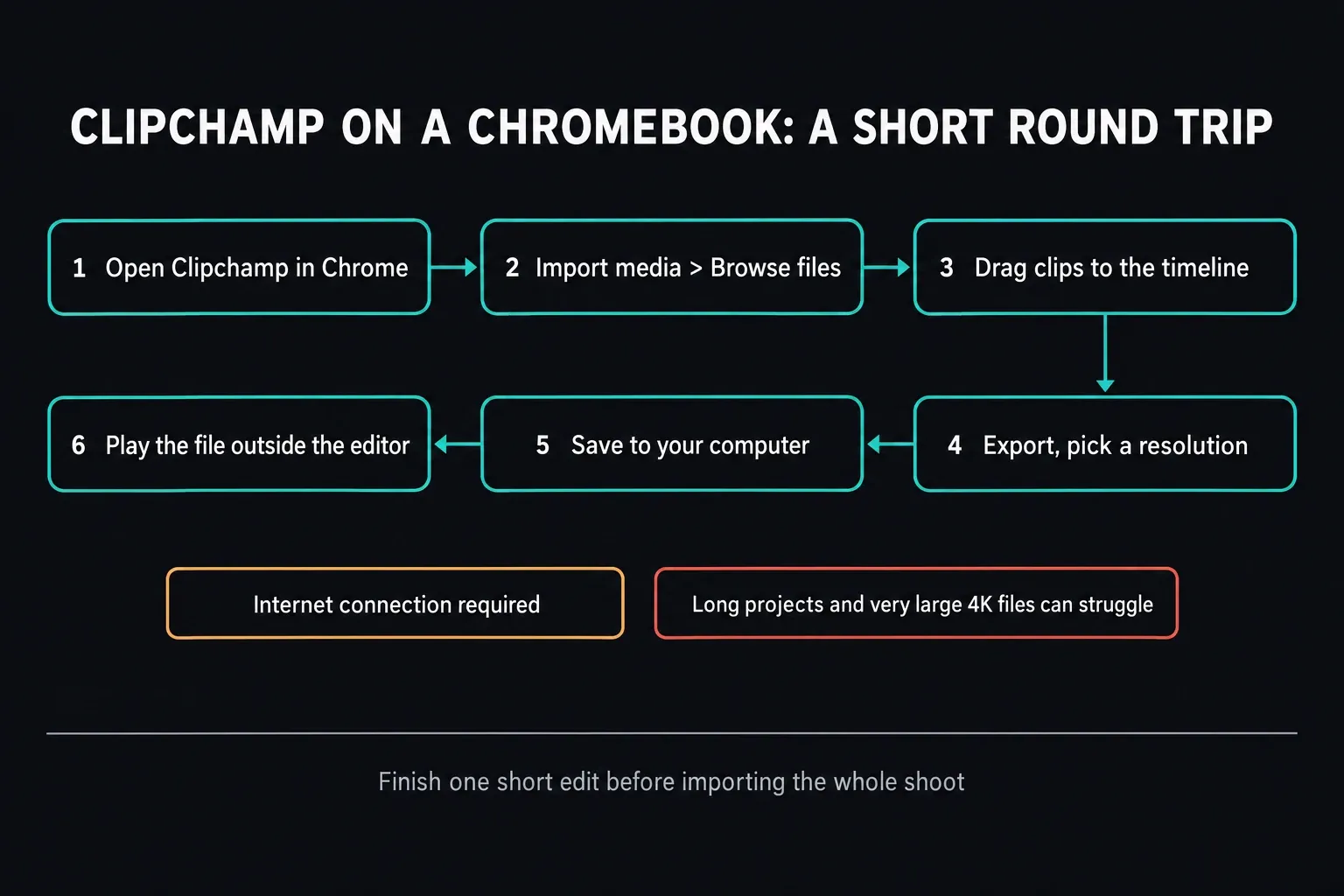
With a personal account, open Clipchamp; work or school accounts start from their organization's OneDrive or SharePoint homepage. Use Import media > Browse files for local clips, drag them onto the timeline and make a short edit. Then click Export, pick a resolution and save the result to your computer. Check the downloaded file's picture and sound. Cloud import options differ by account; the personal version lists Google Drive, OneDrive, Dropbox and Xbox.
Microsoft warns that some Chromebooks can struggle with projects longer than 10 minutes or with very large 4K files. That's a warning, not a hard ten-minute cap. Start with representative footage, finish a short edit and export it before importing a whole shoot. Your hardware, source files and effects decide whether the workflow holds up.
A browser editor isn't “DaVinci Resolve online.” Project files, effects, shortcuts, color tools and collaboration all work differently. Pick a browser editor when the finished video matters more than ending up with a Resolve project.
Option 3: Check a Local ChromeOS or Android Editor
Google supports Android apps on compatible Chromebooks, not every model, and a work or school Chromebook may not be allowed the Play Store at all. Its Play compatibility guidance says an app can be unavailable because of your location, screen size or Android version. Check the listing on your exact Chromebook rather than trusting an editor roundup.
LumaFusion for Android and ChromeOS is a separate paid editor with six video, audio or graphics tracks plus six extra audio tracks. LumaTouch lists Android 10 or later and at least 3 GB of RAM, which is a floor, not a promise of smooth 4K editing. The live Google Play listing I checked showed a US$29.99 purchase with in-app purchases on top; confirm compatibility, the price in your region and any optional paid features there. A school or employer can also block Play Store installs.
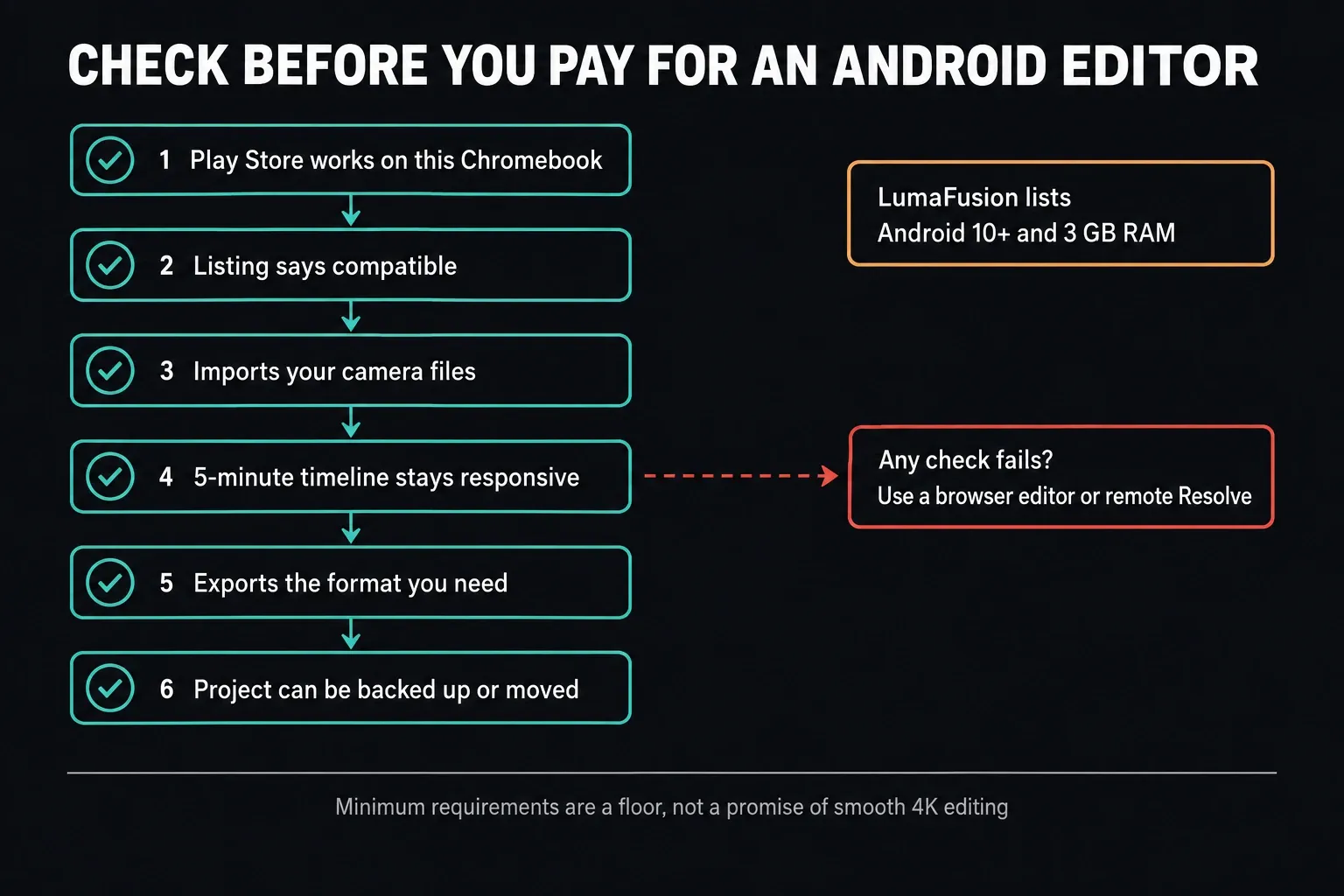
Before you buy, check compatibility, the features you need and the purchase terms. Once you have legitimate access to the editor, test the things that decide whether it can deliver your project:
- Can it import the camera's actual video and audio codecs?
- Does a five-minute timeline remain responsive with your effects?
- Can it export the required resolution, frame rate and file format?
- Is there a watermark, storage cap or paid feature blocking delivery?
- Can you back up or move the project itself, as well as export the video?
What a Chromebook Plus Changes
A faster Chromebook does make browser and compatible Android editors more pleasant to use. The Chromebook Plus label doesn't add a ChromeOS build of Resolve, though. Don't buy one expecting the Linux toggle to turn it into a supported Resolve workstation.
If Resolve is non-negotiable, weigh the cost of access to a suitable host against a computer that runs it directly. Our Resolve system requirements guide helps you judge that machine. A CPU badge alone won't tell you whether the GPU, memory, codec support and storage are enough.
What About ChromeOS Flex?
ChromeOS Flex isn't a supported Resolve platform either. Google's Flex differences page says Linux development support varies by model, and the only Android exception it describes is deploying some VPN apps. That's not ordinary Google Play support, so the LumaFusion route above doesn't carry over to Flex. Use browser editing or a suitable remote host instead.
Avoid Fake Chromebook Downloads
Treat Blackmagic's own Resolve download page as your reference point. Any page offering a ChromeOS installer, a browser extension, a cracked web edition or a “DaVinci Resolve APK for Chromebook” is not an official Resolve distribution.
Blackmagic's genuine phone apps and their limits are covered in our Android and iPhone compatibility guide. A familiar logo on a download page doesn't make an unofficial installer authentic.
Don't enable unknown sources, paste terminal commands you haven't read or upload a project archive just because a site shows the Resolve logo. A converter or remote service can be perfectly legitimate, as long as it describes its own product honestly instead of posing as a Blackmagic installer.
Chromebook Resolve Troubleshooting
| What you see | What it means | Best next move |
|---|---|---|
| No ChromeOS option on Blackmagic's download page | There is no native Chromebook package | Choose remote Resolve or a Chromebook editor |
| The Linux installer extracts but Resolve will not launch | Package extraction did not solve the OS, GPU or driver boundary | Stop treating Crostini as a supported workstation |
| Google Play says an editor is incompatible | The app or device does not meet the current compatibility rules | Use a browser editor or another supported device |
| Remote Resolve feels delayed | The host, network or stream is the bottleneck | Compare local host playback with remote playback; use proxies for host decoding, and troubleshoot the network separately |
| Browser export fails on a long project | A resource, source-media or export problem needs investigation | Keep the error; test representative shorter sections and available storage before retrying the full job |
What counts is a finished round trip. Import representative media, edit long enough to expose performance problems, export the format you need and play the result outside the editor. A timeline that opens hasn't proved the workflow can deliver.
Frequently Asked Questions
Can I download DaVinci Resolve on a Chromebook?
No. When I rechecked on October 5, 2026, Blackmagic offered Resolve 21.1.1 for Mac, Windows (x86 and Arm) and Linux, with no native ChromeOS version. A Chromebook can display and control Resolve running on a suitable remote computer, but that isn't a local installation.
Can I install the Linux version of Resolve on ChromeOS?
Not as a supported setup. Crostini gives you a Debian environment with virtualized graphics, which is not the Rocky Linux and discrete-GPU compute and driver stack listed for Resolve 21.1. Some Linux apps do get accelerated graphics on ChromeOS, but that doesn't make Resolve compatible.
Does DaVinci Resolve work on Chromebook Plus?
No. There's no native Resolve build for Chromebook Plus. Better hardware can make browser and Android editors run better, but it doesn't change which operating systems Blackmagic supports. Use a suitable remote Resolve host or a different editor.
Is there a DaVinci Resolve APK for Chromebook?
No official Resolve APK or ChromeOS installer exists. Get downloads from Blackmagic's website and official app stores only. Blackmagic Camera on a compatible Android device is a capture app, not the Resolve editor.
Can I use DaVinci Resolve through a web browser?
Not directly. Blackmagic doesn't offer a browser-native Resolve editor. A browser can connect to a separate computer running Resolve through a suitable remote-access service. Chrome Remote Desktop is one route for a Mac or Windows host that already works, as long as permissions allow it and an actual session test passes.
What is the best Resolve alternative for Chromebook?
For a short browser edit, Clipchamp has official Chromebook instructions from Microsoft. For a local multitrack editor, check LumaFusion's requirements and its Play compatibility on your device. If you need the Resolve project and tools themselves, use a suitable remote Resolve workstation instead.
Can a Chromebook edit 4K video?
It depends on the editor, the device and the footage. Microsoft specifically warns that some Chromebooks struggle with very large 4K files in Clipchamp. Test representative clips, effects and a full export before you commit. Native Resolve finishing still needs a supported editing computer.
