DaVinci Resolve and Final Cut Pro can both finish professional work on a Mac, but they reward different editing habits. Final Cut Pro is the cleaner choice for a Mac-only editor who values the Magnetic Timeline, fast media organization and a focused editorial workspace.
Resolve is the stronger fit when color, Fusion, Fairlight, cross-platform access or simultaneous collaboration are part of the same job.
Quick verdict: choose Final Cut Pro when cutting speed on a Mac is the main requirement and its library-and-role workflow suits the way you organize work.
Start with Resolve Free when budget matters or you want one application for editing, color, visual effects and audio. Buy neither on reputation alone. Put the same five-minute project through both before moving a real library.
DaVinci Resolve vs Final Cut Pro at a glance
| Decision point | DaVinci Resolve 21 | Final Cut Pro 12.3 |
|---|---|---|
| Desktop platforms | macOS, Windows and Linux | macOS only |
| Entry price in the US | Free; Studio is $295 | $299.99 standalone, or included with Apple Creator Studio |
| Timeline model | Traditional track-based Edit page plus the faster Cut page | Magnetic Timeline with a Primary Storyline, connected clips and roles |
| Color | Dedicated node-based Color page | Color wheels, curves, masks, keying and automatic matching inside the editor |
| Visual effects | Fusion is built into the application | Built-in effects and FxPlug ecosystem; Motion handles deeper template and motion-graphics work |
| Audio | Fairlight page for editing, repair, mixing, buses and delivery | Role-based audio organization, multichannel editing and built-in effects |
| Collaboration | Blackmagic Cloud and Project Server workflows are documented for simultaneous project work | Libraries, XML and third-party ecosystem workflows |
| Best first fit | Cross-platform editors and deeper post-production | Solo or small-team Mac editors focused on fast editorial work |
The table is a filter, not a scorecard. A wedding editor delivering weekly films on one Mac has a different bottleneck from a colorist receiving timelines from three operating systems. The right choice is the one that removes the expensive friction from your actual handoff.
Price now has more than one answer
Resolve still has the simplest entry point. Blackmagic lists DaVinci Resolve 21 as free and Resolve Studio 21 at $295.
The free edition isn't a short trial. It includes the Edit, Cut, Color, Fusion, Fairlight and Deliver pages, with specific Studio features and higher-end limits reserved for the paid version. Our Resolve Free vs Studio comparison is the better place to decide whether any of those limits block your work.
Final Cut Pro now has two legitimate Mac licensing routes. The US Mac App Store lists the standalone application at $299.99.
Apple also includes Final Cut Pro, Motion and Compressor in Apple Creator Studio at $12.99 per month or $129 per year in the US. Education pricing is lower, and prices vary by country and tax. Apple continues to sell the one-time app, although some premium content is reserved for Creator Studio subscribers.
| US licensing path | Up-front cost | Cost after three years | What matters |
|---|---|---|---|
| Resolve Free | $0 | $0 | Stay here until a named Studio limit blocks delivery |
| Resolve Studio | $295 | $295 | One-time desktop license at the currently listed price |
| Final Cut Pro standalone | $299.99 | $299.99 | Mac application only; Motion and Compressor are separate purchases if required |
| Apple Creator Studio annual | $129 per year | $387 | Includes Final Cut Pro, Motion, Compressor and the wider suite while subscribed |
| Apple Creator Studio monthly | $12.99 per month | $467.64 | Flexible, but the most expensive of these three-year examples |
Those totals use US list prices checked on September 5, 2026, before tax. They aren't a promise that future upgrades will always be free.
The practical question is whether you need only an editor or whether Motion, Compressor, Logic Pro and Pixelmator Pro replace other paid tools. If you need the bundle, comparing $295 with $299.99 misses most of the decision.
For the Resolve side alone, the current Resolve pricing guide separates the permanent desktop license from organization-managed rental and hardware bundles.
The timeline is the real dividing line
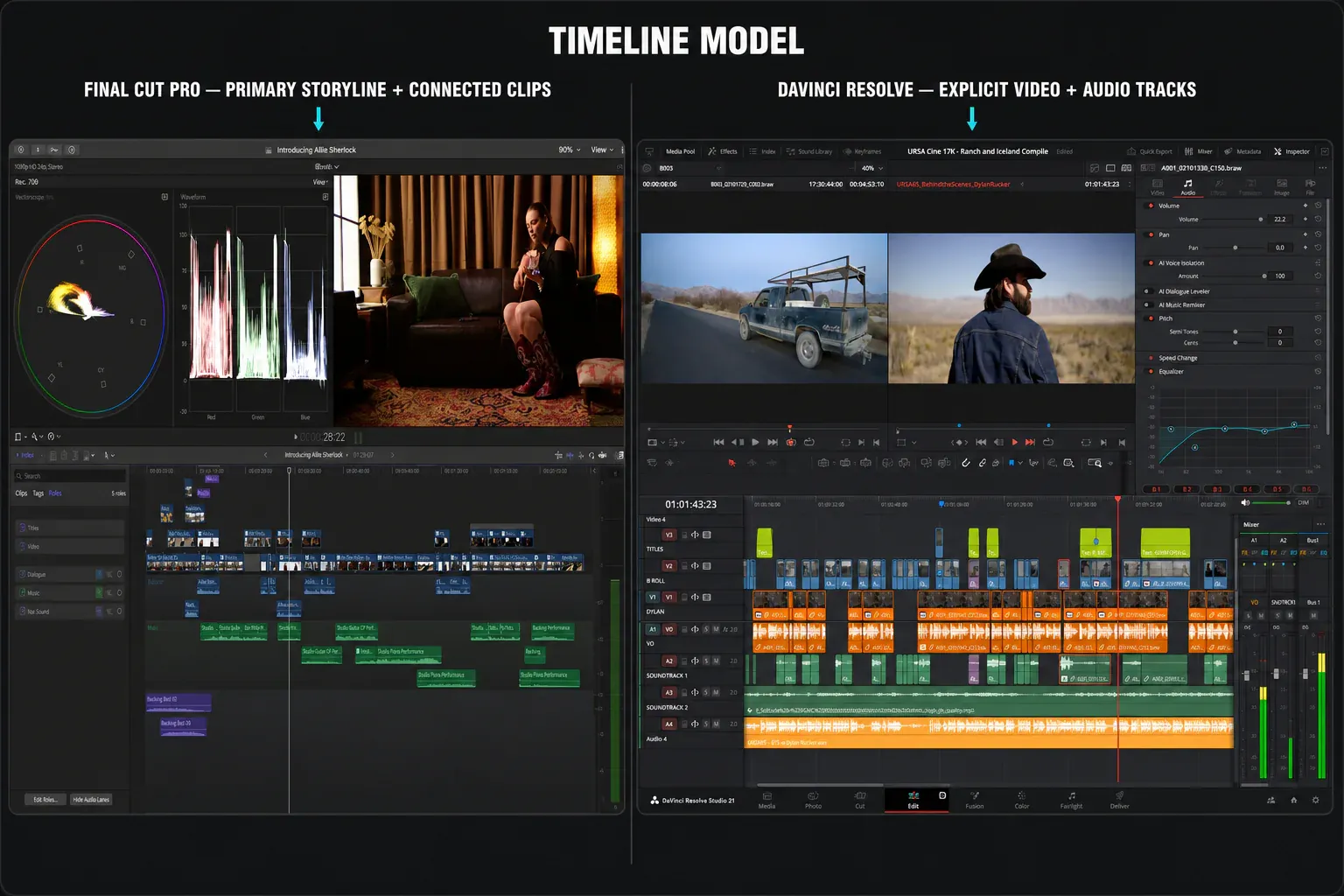
Final Cut Pro isn't a simplified version of a conventional NLE. Its Magnetic Timeline is a different editing model. The Primary Storyline keeps the main sequence together; connected clips stay attached to the moment they belong to; roles organize dialogue, music, effects and other media without forcing every decision into fixed tracks.
Apple says the timeline is designed to keep material in sync, prevent collisions and eliminate accidental gaps.
That design is fast when the story has a clear spine. Interviews, events, courses, YouTube episodes and social cutdowns can move quickly because shifting the main edit carries connected material with it.
The cost is relearning track-based muscle memory. If you spend the first week trying to force every connected clip into the mental model of V1, V2, A1 and A2, Final Cut will feel less predictable than it is.
Resolve gives you two editorial routes. The Edit page uses the familiar track model, while the Cut page removes some interface overhead for fast assembly, source-tape work and multicam.
That makes Resolve easier to place inside teams already exchanging traditional timelines. It also means more controls are visible and more pages are competing for a beginner's attention. The Resolve learning path exists because learning all seven working pages at once is the slow route.
Neither model is universally faster. Final Cut often reduces timeline housekeeping; Resolve reduces the number of application handoffs later in post. Decide which kind of friction costs you more.
Media organization favors different project shapes
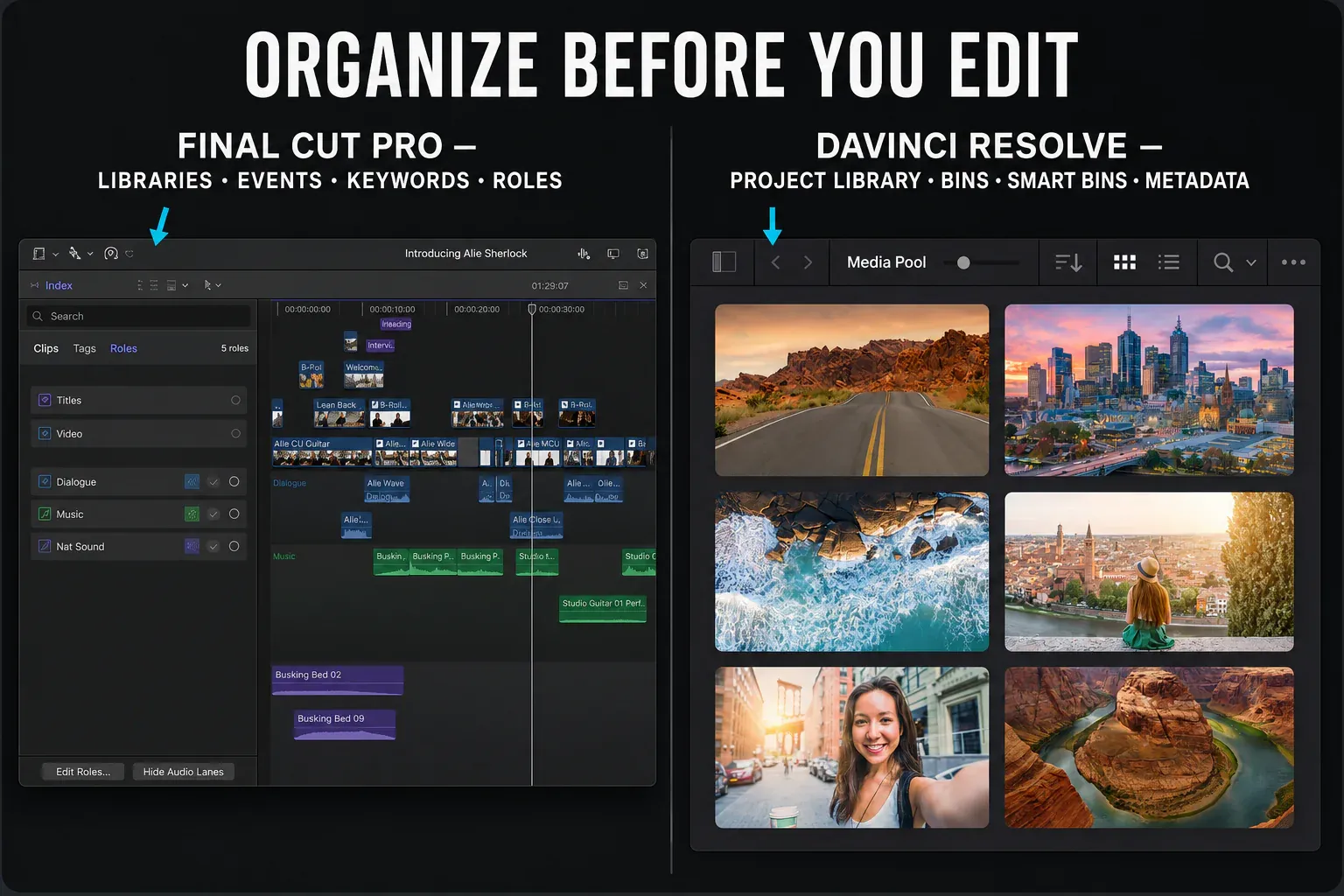
Final Cut Pro's libraries, events, keyword ranges, favorites, Smart Collections and roles are more than browser conveniences. They let an editor describe useful parts of a long clip without duplicating media or cutting everything into selects timelines.
For documentary interviews, event footage and recurring channels, that metadata-first approach can be the feature that saves the most time.
Resolve organizes work with project libraries, bins, smart bins, clip metadata, flags, markers and separate timelines. Its structure is more familiar to editors arriving from Premiere Pro or Avid-style track workflows. It also keeps the same media available to Color, Fusion and Fairlight without exporting a new version for each department.
Test organization before effects. Import one messy card with duplicate takes, camera audio and an external recorder. Find three spoken moments, build selects, replace one shot and prepare audio stems. The application that makes those ordinary actions obvious will save more time than the one with the longer AI feature list.
Color, VFX and audio change the answer
Resolve's clearest advantage isn't that Final Cut lacks professional tools. It's that Resolve gives color, compositing and audio dedicated workspaces inside the same project.
The Color page uses nodes, tracking, qualifiers, windows, color management and scopes as a primary workflow. Fusion adds node-based compositing and motion graphics. Fairlight provides detailed audio editing, repair, routing, buses, automation and delivery. Blackmagic's official training library treats editing, color, Fusion and Fairlight as separate disciplines for a reason.
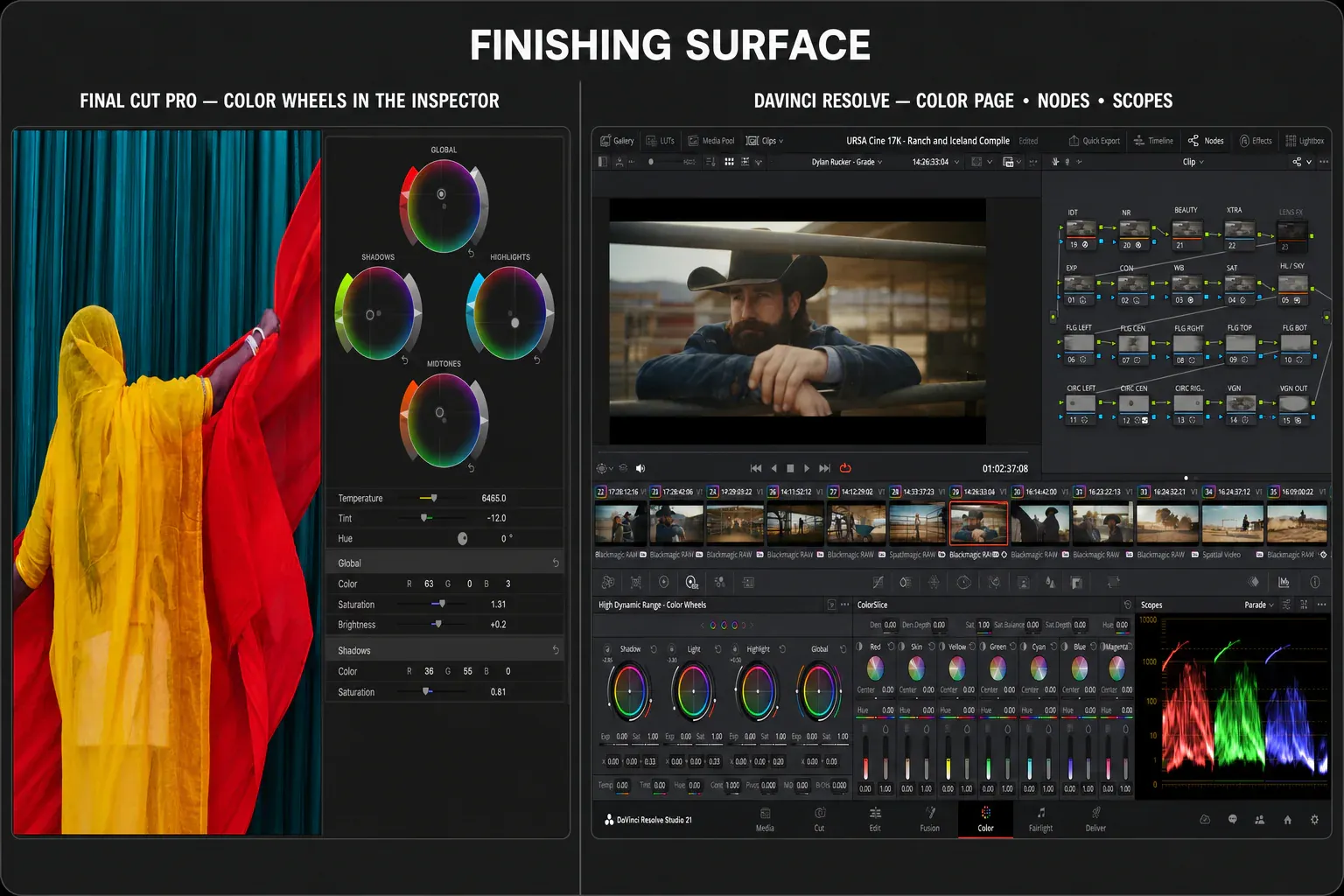
Final Cut Pro 12.3 has capable color wheels, curves, masks, keying, HDR/SDR tone mapping and the current Match Color tool. Its built-in effects and FxPlug ecosystem cover a large amount of editorial finishing.
For custom titles and motion templates, Apple positions Motion as the companion application. Audio roles, multichannel editing and Logic-derived effects are strong for editorial work, but the workspace isn't trying to reproduce a full Fairlight console inside Final Cut.
The 2026 releases also narrow several everyday workflow gaps. Apple's release notes show that Final Cut Pro 12.0 added Transcript Search, Visual Search and Beat Detection. Transcript Search and Visual Search require Apple silicon.
Final Cut Pro 12.3 then added Generate Captions, Auto Mask, Match Color and Edit Detection. Generate Captions requires Apple silicon and is currently limited to U.S. English. These tools can shorten logging, captioning and first-pass masking, but they don't replace a test with your language, footage and delivery requirements.
If 90 percent of the job is selection, pacing, titles and delivery, Final Cut's narrower surface can be an advantage. If the edit regularly turns into tracked cleanup, shot matching, complex keys, dialogue repair or deliverable-specific mixing, Resolve keeps more of the finishing work native.
Use our color grading map, Fusion hub and Fairlight audio hub to judge the depth without turning this comparison into three tutorials.
Performance needs a reproducible test
“Final Cut is faster on every Mac” and “Resolve uses the GPU better” are both too vague to guide a purchase. Apple controls Final Cut, macOS, Apple silicon and the media engines, so its current product page reasonably emphasizes optimization for that hardware, including ProRes workflows.
Resolve also runs well on Apple silicon, but performance changes with edition, codec, debayering, noise reduction, Fusion, memory pressure and export settings.
Don't compare a background-rendered Final Cut timeline with an uncached Resolve timeline and call it a benchmark. Final Cut Pro 12.3 now defaults background rendering to Off, so verify the current setting instead of assuming an older default. Use the same Mac, power mode, external drive, camera originals, timeline resolution and output file. Then record:
- time from application launch to a playable project;
- dropped frames during a one-minute multicam or effects section;
- scrubbing response before and after proxies;
- memory pressure after ten minutes of editing;
- export time, the decoded result and the progress bar;
- time required to change one title, one grade and one audio fix after client notes.
Run the test once with camera originals and once with each application's intended proxy workflow. Resolve's Proxy Media workflow is documented separately. Final Cut Pro 12.3 generates new proxies as HEVC, so record proxy format and resolution too.
On an Intel Mac, decide compatibility before comparing speed: Apple's current requirements still list a Metal-capable Intel graphics card for the base Final Cut Pro app but note that some features require Apple silicon, while the current Resolve system requirements document Resolve 21's Apple-silicon requirement on macOS.
Collaboration and handoffs need a dry run
Resolve 21 has a clear answer for simultaneous project work. Blackmagic lays out Blackmagic Cloud and Project Server collaboration, including multiple people working in the same project and timeline, bin and timeline locking, shared markers, chat and timeline comparison.
Media still needs a deliberate storage or sync plan; a shared project library does not make terabytes of source footage appear on another workstation.
Final Cut Pro centers collaboration around libraries, media management, roles, XML and its third-party ecosystem. Apple documents both import and export of FCPXML for exchanging libraries, events, projects and clips with compatible applications. That's a transfer format, not a promise that every plug-in, title, generator, retime, mask or effect will recreate itself in Resolve.
Before committing to a cross-application workflow, duplicate the project and transfer a one-minute stress section. Include a compound clip, speed change, mixed frame rate, title, connected audio, color adjustment and third-party effect.
Compare timecode, framing, transforms, audio channels and rendered reference. If the handoff fails there, it will fail more expensively at the end of the job.
Which editor fits your work?
Choose Final Cut Pro if
- you edit only on Mac and do not need a Windows or Linux workstation in the same pipeline;
- the Magnetic Timeline and metadata-first browser make sense after a real trial project;
- fast selection, organization and editorial iteration matter more than built-in finishing depth;
- Motion, Compressor and the broader Apple Creator Studio bundle replace tools you would otherwise buy;
- your collaborators already exchange Final Cut libraries, roles and FCPXML reliably.
Choose DaVinci Resolve if
- you want a capable free editor before committing to a paid license;
- projects move between macOS, Windows or Linux;
- color, Fusion compositing or Fairlight mixing are regular parts of the job;
- multiple specialists need to work in the same project through a documented Resolve collaboration workflow;
- a conventional track timeline is easier to exchange with the rest of your team.
Keep both if
A two-application workflow is rational when Final Cut is the fastest place to shape the story but Resolve is the required finishing environment.
The cost is handoff discipline. Lock the edit, simplify unsupported effects, export FCPXML plus a reference movie, confirm source timecode and render back into Final Cut only if the return trip is genuinely necessary. Owning both applications doesn't make an undisciplined round trip safe.
If Final Cut Pro is only one option on your shortlist, the DaVinci Resolve vs Studio breakdown separates edition, pricing and workflow decisions before you test another editor. For the full editor-and-edition map, browse the DaVinci Resolve comparisons hub.
Frequently asked questions
Is DaVinci Resolve better than Final Cut Pro?
Resolve is better for cross-platform work and deeper color, Fusion, Fairlight and simultaneous collaboration workflows. Final Cut Pro can be the better editor for a Mac-only creator who works faster with the Magnetic Timeline, libraries and roles. The project decides the winner.
Is Final Cut Pro easier to learn than DaVinci Resolve?
Final Cut presents a smaller working surface, but its Magnetic Timeline requires unlearning track-based assumptions. Resolve looks familiar on the Edit page but becomes broader once Color, Fusion, Fairlight and delivery enter the job. Test the same short project rather than judging the first hour.
Is Final Cut Pro still a one-time purchase?
Yes. Apple lists the standalone Mac application at $299.99 in the US. Final Cut Pro is also included in Apple Creator Studio, listed at $12.99 per month or $129 per year in the US. Regional pricing and tax vary.
Can Final Cut Pro projects open in DaVinci Resolve?
Final Cut Pro can export FCPXML for compatible third-party workflows, and Resolve can use that interchange route. Treat it as a timeline transfer, not a complete application clone. Validate titles, effects, generators, retimes, audio channels and plug-ins on a copy before moving a live project.
Which is better on Apple silicon?
Final Cut Pro is designed by Apple around macOS and Apple silicon, while Resolve performance depends more visibly on codec, edition and the amount of color, Fusion, AI and noise-reduction processing. A controlled test with your media is more useful than a universal speed claim.
Should a beginner start with Resolve Free or Final Cut Pro?
Start with Resolve Free if cost or cross-platform flexibility matters. Try Final Cut Pro if you already own a suitable Mac and value a focused editorial workflow. Build the same five-minute video in both before paying or moving a real library.
For a Mac-only editor, this is a workflow decision before it is a feature decision. Final Cut Pro removes friction from selecting, organizing and reshaping an edit. Resolve removes friction from moving that edit through color, VFX, audio and delivery. Choose the friction you need gone every week, not the feature you might use once.
