Quick answer: no. There's no official DaVinci Resolve editor for Android phones or iPhone as of October 1, 2026, when I rechecked the store listings and Blackmagic's product pages. Blackmagic makes the desktop editor for Mac, Windows and Linux, plus DaVinci Resolve for iPad. On a compatible phone, the official app is Blackmagic Camera. It records and manages footage. It won't put the Resolve timeline, the Color page, Fusion or Fairlight on your phone.
So if a site offers a "DaVinci Resolve APK," skip it. Google Play has no Blackmagic Resolve package that could back up that claim. The phone workflow that actually works is simple: capture with Blackmagic Camera or another camera app you trust, then edit on an iPad or a supported computer.
Looking for a real installer? Go to the Download & Install hub for Windows, macOS, Linux, Studio and the official iPad route. This page sticks to one question: what runs on a phone, and how to get phone footage into Resolve safely.
What Blackmagic Actually Offers on Each Device
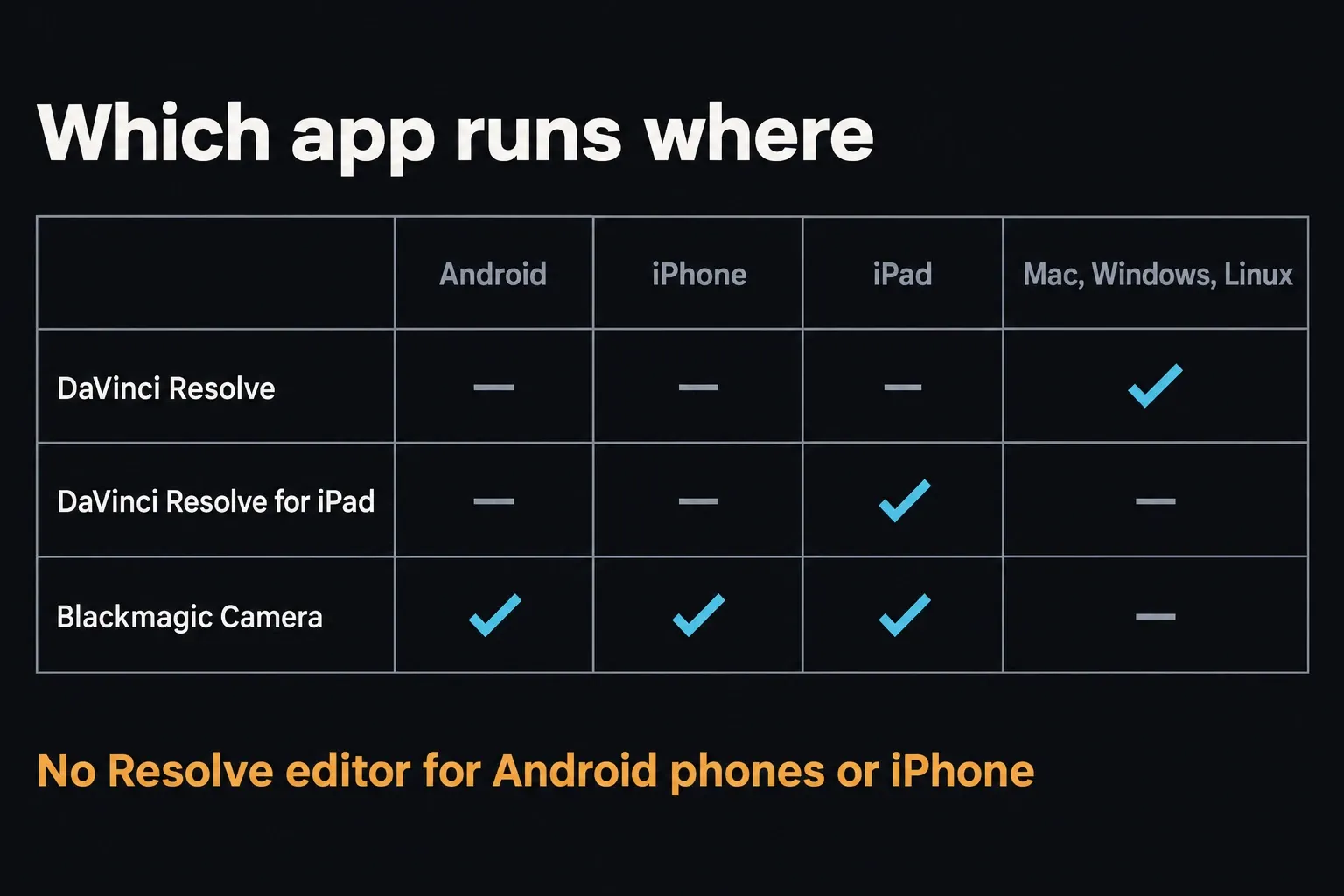
Product names do a lot of work here. Search results tend to call anything from Blackmagic "DaVinci mobile," but these apps do different jobs. Blackmagic's current Resolve product page lists the full editing software for Mac, Windows and Linux. Apple's editor listing is literally named DaVinci Resolve for iPad. Neither source shows a Resolve editor for Android phones or iPhone.
| Device | Official Blackmagic option | What it does |
|---|---|---|
| Android phone or tablet | Blackmagic Camera on supported devices | Capture, monitor, manage and upload footage |
| iPhone | Blackmagic Camera and Remote Monitor | Capture or monitor, not full Resolve editing |
| iPad | DaVinci Resolve for iPad | Dedicated touch editor with hardware-dependent limits |
| Mac, Windows or Linux computer | DaVinci Resolve or Resolve Studio | Full desktop post-production application |
Blackmagic Camera records footage. Blackmagic Remote Monitor receives a viewing stream from supported Blackmagic products, including Resolve Studio. Watching that stream on an iPhone isn't the same as running the editor or controlling its timeline, and neither app is an iPhone version of Resolve.
How to Verify an Official Mobile App
An icon, a few screenshots or the word "DaVinci" prove nothing. Check who published the app before you install it:
- Open Google Play or Apple's App Store yourself. Don't follow an APK button to get there.
- Make sure the developer is Blackmagic Design Inc.
- On the official Android listing, look for the package ID in the page address:
com.blackmagicdesign.android.blackmagiccam. Seeing that name or package string copied onto some other website proves nothing. - Read the store's compatibility result for your exact device.
- Walk away from any page that says DaVinci Resolve needs "unknown sources" turned on.
Anyone can publish an editing guide, a wallpaper app or a basic video maker with a similar name. That doesn't make it a Blackmagic product, and a clean malware scan won't turn the wrong app into Resolve either.
Use Blackmagic Camera on iPhone
To record on an iPhone, get Blackmagic Camera from Apple’s App Store. The US listing I checked on October 17, 2026 names Blackmagic Design Inc, offers the app free and shows version 3.5.2, dated October 8. It requires iOS 18.0 or later and an A12 Bionic chip or newer. Check the compatibility panel on your own device before you plan a shoot around it.
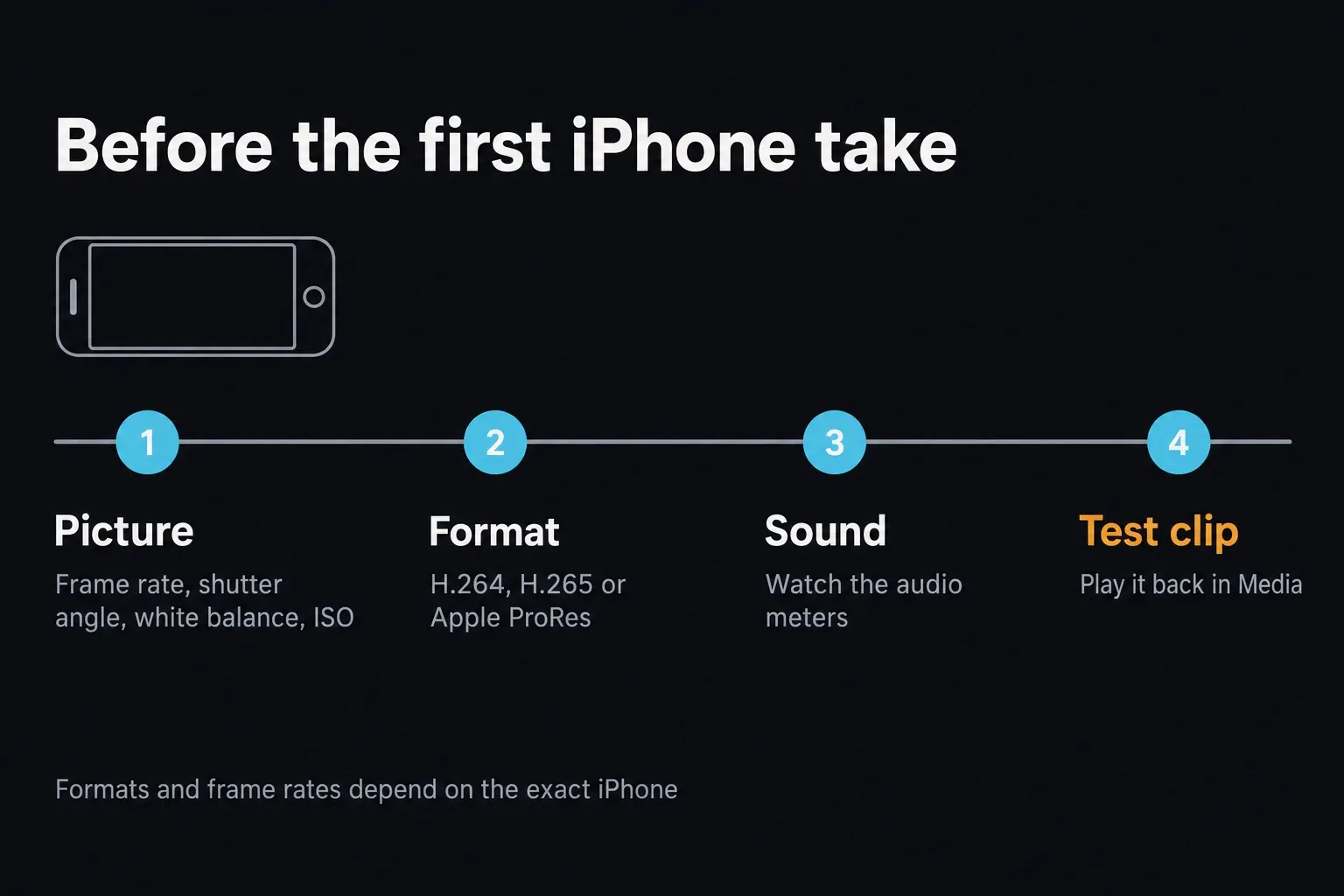
You get real camera controls: frame rate, shutter angle, white balance, ISO, audio meters and monitoring aids. The record tab covers H.264 and H.265, and Blackmagic adds Apple ProRes on iPhone and iPad models that support it. What you can actually pick, from formats and frame rates to lenses, still depends on your iPhone, where you record and the app version.
Shoot a short clip at the resolution and frame rate you plan to use. Record picture and sound, stop, then open the clip in Media. If the file is missing or plays back wrong at this point, fix that first. Don't pile a transfer or Cloud sync on top of the problem.
Use Blackmagic Camera on Android
Open Blackmagic Camera on Google Play. When I checked the listing on October 17, 2026, it named Blackmagic Design Inc, showed an update date of October 8, 2026 and listed 3.5 in What’s new. Trust the live listing on your own device for install eligibility. A version number alone doesn't mean every Android phone gets the same recording features.
Blackmagic's Camera product page talks about compatible Android phones and tablets, and Google Play warns that some features depend on the device. Camera access, codecs, lenses, storage and long recordings can all vary from model to model. If Play says your device is incompatible, grabbing the APK from a mirror won't prove those features will work.
For a long take, it's not enough that the app opens. Test the full duration you need, sound sync and the storage destination on that exact device. Write down the app version and settings that worked in your shoot notes, so you can repeat the setup next time.
Move Phone Footage into Resolve
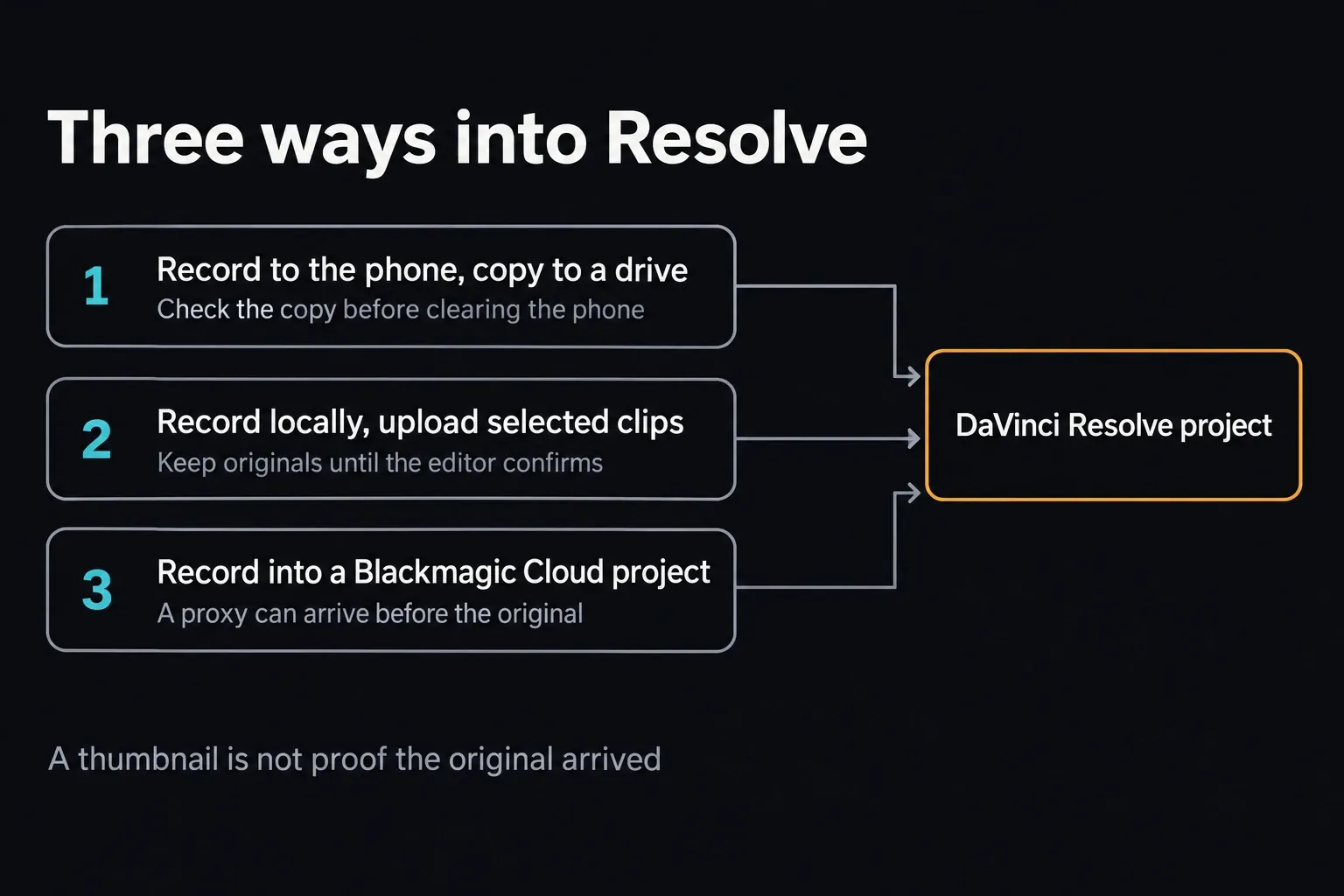
Blackmagic describes three Camera workflows: record locally and move the clips, upload the clips you pick, or record straight into a Blackmagic Cloud project. Choose by connection speed, file size and who needs the footage. Open Media to review your clips and check where they're headed before you upload. A thumbnail on its own doesn't confirm delivery.
Local transfer
Record to device storage or a supported external drive, then copy the files to your computer or project drive. Check the copy before you delete anything from the phone. Going local means you don't sit waiting on a mobile upload when the connection is slow or the originals are huge.
Selected upload
Record locally and upload only the clips the editor needs first. That saves mobile data and keeps rejected takes out of the transfer queue. Hang on to the originals until the editor confirms the files arrived and play back.
Blackmagic Cloud workflow
The official Blackmagic Camera workflow can sync media into a Resolve project, including proxy-first setups where they're supported. A free Blackmagic ID isn't the same thing as unlimited free Cloud Storage. Check your current storage plan, which project the clips go to and the upload status before you count on it.
Whichever route you pick, keep the original filename and stay away from messaging apps that quietly recompress video. In Resolve, check frame rate, color interpretation, audio channels and timecode before you start cutting. On a multicamera job, test sync before the event, not after every phone has recorded hours of footage.
Run one end-to-end test before the real shoot
Use the same phone, recording format, storage destination and transfer method you'll use on the job. Record sound and movement for about as long as the real take. A quick test that works can't tell you an hour-long recording will hold up.
On the editing machine, import the copy into a throwaway Resolve project. Check picture and sound, the frame rate Resolve reports and the color interpretation, then play a short export outside Resolve. If a proxy shows up first, make sure the camera original has arrived too and is linked correctly before you judge final image quality or clear the phone.
When You Need to Edit on the Phone
Need to finish the video on the phone itself? For simple cuts, titles and music on iPhone, Apple’s free iMovie is a genuine mobile editor. On Android, KineMaster is one option with a timeline and layered editing. These are other editors for phone footage, not Resolve downloads. Before you commit, check the current store listing for device support, paid features and watermark rules, then export a short sample. If you're on Android, or the edit is mostly captions for social, CapCut's beginner path is another realistic route on either platform.
If you really want Resolve on something portable, check the iPad app’s requirements and feature limits. For the full desktop application, use a supported Mac, Windows or Linux machine. Even a big Android tablet runs the Camera capture app, not the Resolve editor.
If the Store Says the App Is Incompatible
| Symptom | What to check |
|---|---|
| No DaVinci Resolve result on a phone | That is expected; the official editor is not offered for Android phones or iPhone. |
| Blackmagic Camera cannot be installed | Check the OS version and exact device against the live store compatibility panel. |
| A website offers a Resolve APK | Do not sideload it; no official Resolve Android package exists. |
| The app records but Resolve rejects the clip | Identify the video and audio codec, copy one short original locally and test it before transcoding. |
| Cloud media does not reach the editor | Check the Blackmagic ID, project selection, storage plan, upload status and network. |
| A long recording stops or disappears | Preserve logs and remaining files, then test storage, heat, power and the current app update before recording again. |
Don't delete the only local copy while you're troubleshooting a transfer. Check the received file's size and play it outside the camera app before you clear phone storage.
Frequently Asked Questions
Can I download DaVinci Resolve on Android?
No official DaVinci Resolve editor exists for Android phones or tablets as of October 1, 2026. Blackmagic Camera is available for compatible Android devices, but it captures and uploads footage. It doesn't give you the Resolve editing application.
Is there an official DaVinci Resolve APK?
No. Blackmagic doesn't publish a Resolve APK or a Resolve editor listing on Google Play. Skip any download that borrows the name, asks you to turn on unknown sources or comes from a developer other than Blackmagic Design Inc.
Can I install DaVinci Resolve on an iPhone?
No. There's no official Resolve editor for iPhone. Blackmagic's iPhone apps on the App Store are Blackmagic Camera and Remote Monitor, and the editing app is explicitly DaVinci Resolve for iPad.
Is Blackmagic Camera the same as DaVinci Resolve?
No. Blackmagic Camera records and manages footage. DaVinci Resolve is the editing and post-production application for supported computers, and the dedicated iPad app has its own feature limits. Installing Camera on a phone won't add Resolve's editing pages.
Can Blackmagic Camera send footage to DaVinci Resolve?
Yes. You can copy files over locally, upload selected clips or use supported Blackmagic Cloud workflows. Protect the camera originals, and check picture, audio, frame rate and color in Resolve before you delete anything from the phone.
Why does Google Play say Blackmagic Camera is incompatible?
Android camera access and recording features depend on the phone, its OS and its hardware. Go by the current Google Play compatibility result for your exact device. Sideloading the package won't make unsupported camera, codec or storage functions work.
What is the closest official way to edit Resolve projects on mobile?
Use DaVinci Resolve for iPad on a compatible iPad. For the full desktop application, use macOS, Windows or Linux. An Android phone or iPhone can capture, upload or monitor parts of the workflow, but it can't run the Resolve editor.
