
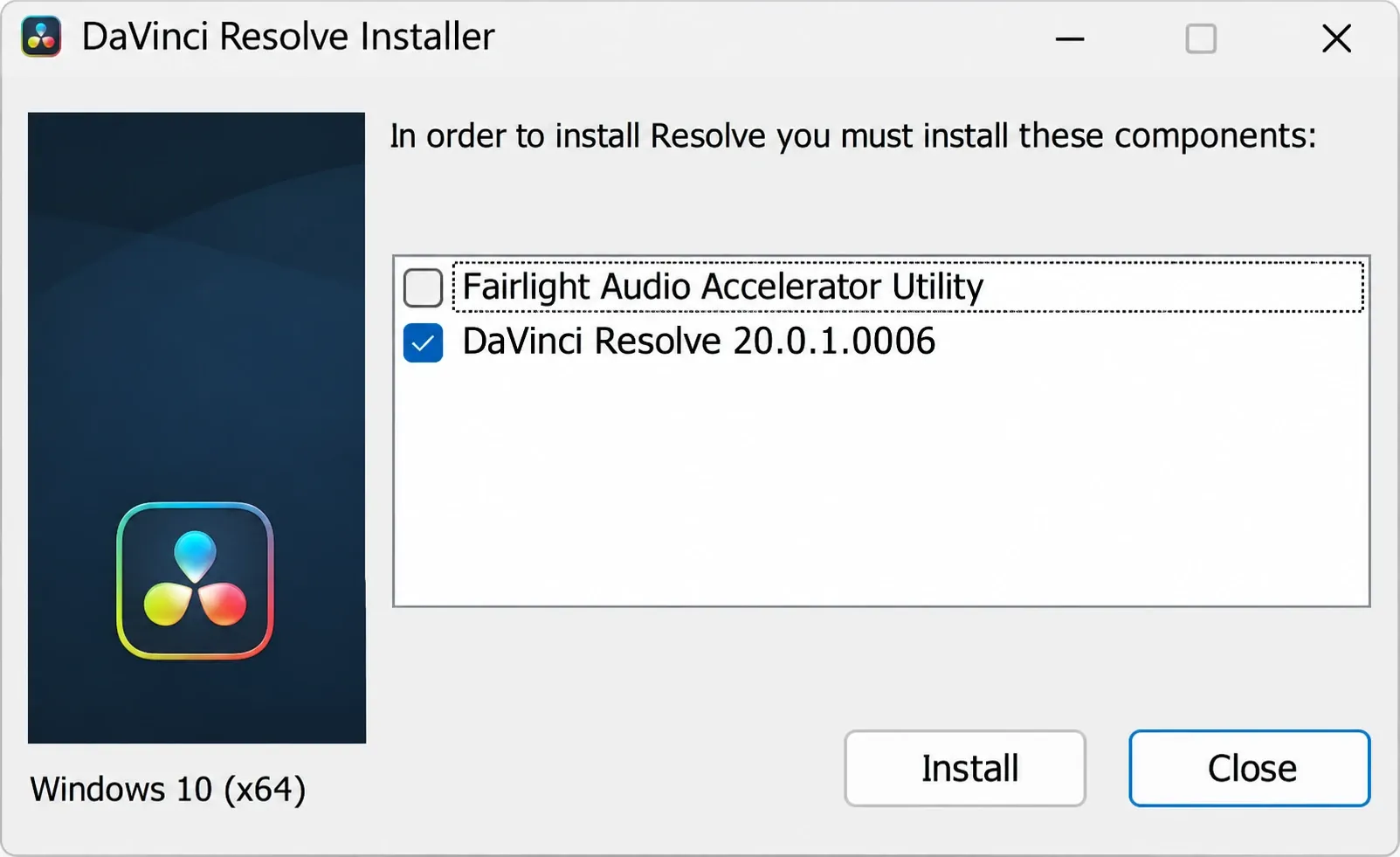
The Fairlight Audio Accelerator Utility is the driver for Blackmagic’s Fairlight Audio Accelerator, a $1,295 PCIe audio card, and is available through the DaVinci Resolve installer. If that card is not in your computer, you do not need the utility. In a July 2019 reply about the installer options, Blackmagic support said: “Unless you’ve added a Fairlight Audio Accelerator card, you don’t need this.”
Leave the box unticked and Resolve still plays, records and mixes audio through your built-in sound, a USB interface or an ASIO driver. The card matters to a small group: Windows audio post rooms that run MADI, lock to house clock and record more channels than a regular interface can take. Mac users on Resolve 21 can't use it at all.
Already installed it, or saw “installation failed” next to it? On a PC without the card, you can usually ignore that utility failure if Resolve itself installs and runs normally. If you own the card, use the card-owner checks before dismissing it.
What the Fairlight Audio Accelerator Utility installs
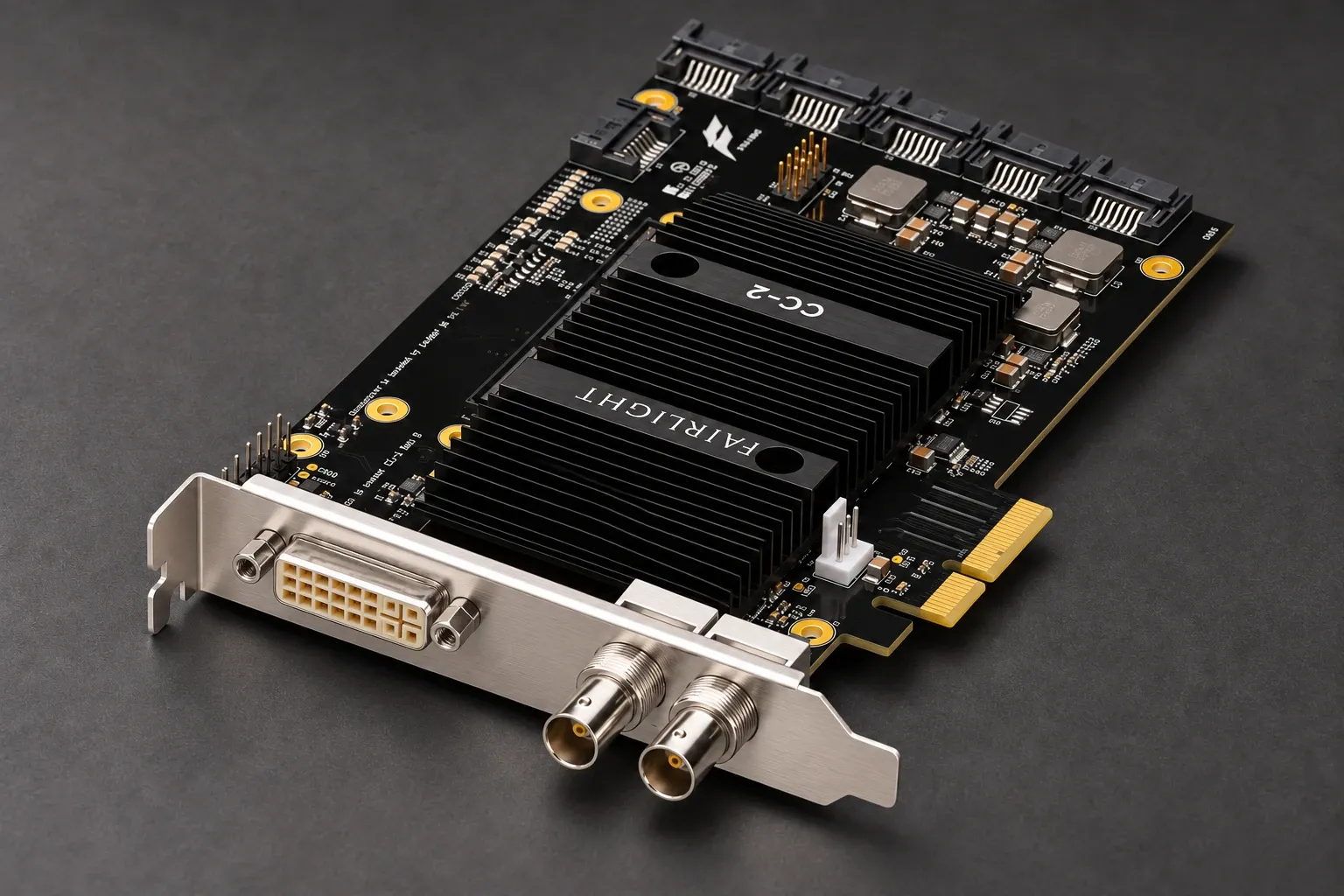
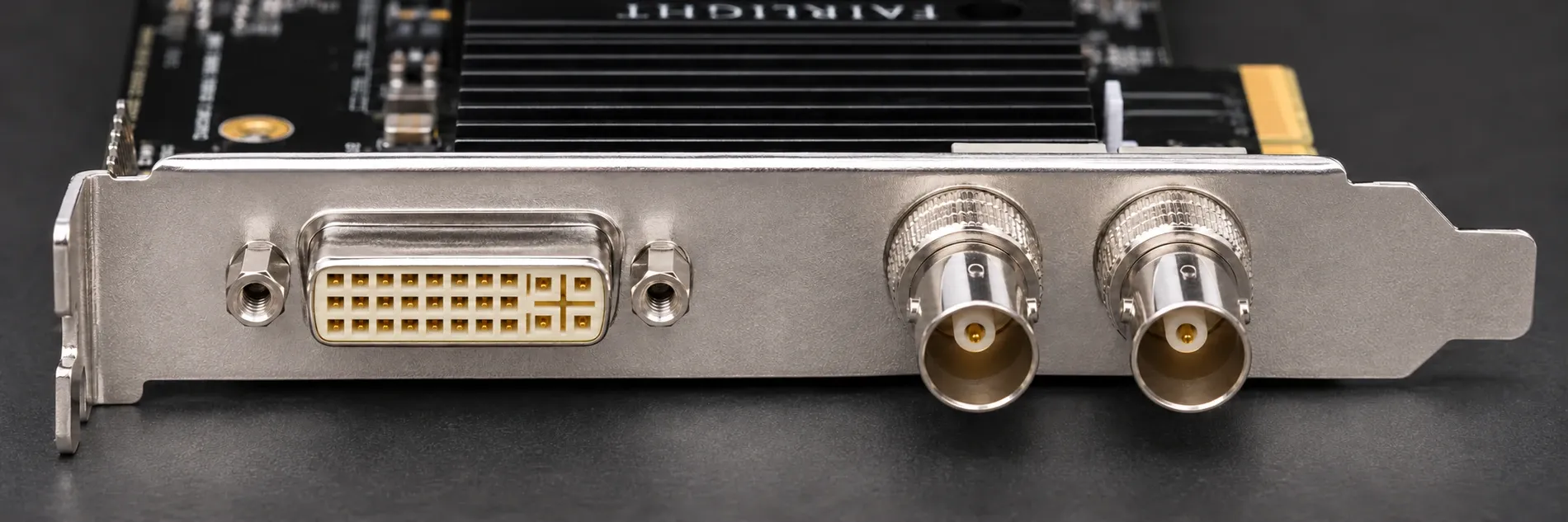
It installs one thing: the driver Resolve uses to talk to the Fairlight Audio Accelerator card. Blackmagic's Fairlight tech specs describe a half-length PCIe x4 card that draws 14 W, with one coax MADI port carrying up to 64 inputs and outputs at 24-bit/48 kHz. It connects to the Fairlight Audio Interface to lock to house reference, and Blackmagic lists it at $1,295.
In a July 2021 reply about using the card with other software, Blackmagic’s product manager said it works only with Resolve, which includes the Windows and Mac drivers. That is a Resolve-specific driver, so do not buy the card as a general-purpose interface for another DAW.
The 21.1 Reference Manual frames it as an alternative to ordinary audio hardware. Resolve monitors and records through a Blackmagic I/O device, the computer's on-board audio or any Core Audio, Windows, ASIO or ALSA interface. "Alternately," the manual's audio monitoring section says, you can use the optional Fairlight Audio Accelerator, a PCI card built for more channels of I/O and faster audio processing. With no card in the slot, the driver has nothing to accelerate.
For the driver, use Blackmagic’s official DaVinci Resolve installer. A download-portal listing with its own utility version number does not establish a separate audio toolkit or an official standalone package. The bundled driver is the relevant component for a card owner.
Every checkbox in the DaVinci Resolve installer
The accelerator item sits in a short list of optional components, and most of them are hardware drivers. The DaVinci Resolve 21.1.2 readme says the installer adds Resolve, "additional utilities for setting up hardware control panels", Blackmagic RAW Player and Blackmagic Proxy Generator. Item names have shifted between versions, so this table uses the names Blackmagic staff and users have posted on the forum from 2019 to 2025.
| Installer item | What it is | Tick it when |
|---|---|---|
| DaVinci Control Panels | Drivers plus the DaVinci Control Panels Setup app, which the manual's Control Panels chapter says connects keyboards, color panels and audio mixing panels and updates their firmware; open it with Help > DaVinci Control Panels Setup | You use a Speed Editor, an Editor Keyboard or a Blackmagic panel |
| Fairlight Studio Utility | Software that configures Fairlight consoles | A Fairlight console is connected |
| Fairlight Audio Accelerator Utility | The driver for the Fairlight Audio Accelerator PCIe card | The card is installed in this computer |
| Pre Installation Cleanup (Windows) | Removes a per-user install of a version older than 20.1, since newer installers install for all users | You are replacing a pre-20.1 per-user Windows installation |
| Microsoft Visual C++ Redistributable (Windows) | Runtime libraries Resolve needs | Leave the required runtime selected when the installer offers it; older screenshots show it locked on |
| Desktop Video | Not part of the Resolve installer: a separate Blackmagic download that drives DeckLink and UltraStudio devices; the 21.1.2 readme asks for version 12.9 or later for monitoring | You monitor through Blackmagic video hardware |
A ticked box can be a default, not a requirement. In February 2021 Windows installer screenshots for Resolve 16/17, DaVinci Control Panels was ticked, the accelerator item was unticked, and required components were greyed out. Those screenshots establish the behavior of those installers. Blackmagic’s product manager explained Pre Installation Cleanup in August 2025: it removes an older per-user installation when moving to the all-users installer introduced in 20.1. A November 2018 support reply advised leaving Fairlight items unticked without the hardware; the restart report in that thread involved Fairlight Panels, not a demonstrated Accelerator Utility fault.
Do you need it? Three quick checks
- Is the card in the machine? It's a PCIe card with a MADI port, so it sits in a desktop tower's slot or in an external PCIe chassis. If you didn't put one there, the answer is no.
- Which computer runs Resolve? The card's tech specs say "Supported on Intel Macs only. Not supported on Apple Silicon." For Windows they list Windows 10 Creators Update and Windows 11. Linux isn't on the list.
- Which Resolve version? The 21.1.2 readme requires macOS 15 Sequoia or later on an Apple Silicon Mac. Put the two together and, with Resolve 21, the card is a Windows option in practice.
Blackmagic staff said in January 2023 that the accelerator wasn't supported on Apple Silicon, and in July 2024 that it still wasn't, while the card stayed in production. If you edit on an M-series Mac, skip the item and use an interface that works through System Audio. The DaVinci Resolve system requirements guide covers the rest of the hardware picture, and the hardware compatibility hub collects the panels and cards that work with Resolve.
Where the checkbox is on Windows and Mac
Windows
The optional components appear as a checklist in the installer. Leave "Fairlight Audio Accelerator Utility" unticked unless the card is installed, and leave the greyed-out items alone. The Windows install guide walks through the rest of the setup.
Mac
The Customize instruction comes from a July 2024 support reply to an Intel Mac Pro owner using Resolve 18.6/19 beta: at Installation Type, choose Customize and select the accelerator driver. That older Intel-Mac route does not make the card compatible with Apple Silicon. With Resolve 21 on a Mac, use System Audio and a compatible interface; the Mac install guide covers the standard install.
The utility failed, or you installed it anyway
On a PC without the card, an Accelerator Utility failure does not mean you need that driver. In an August 2025 Resolve 20 report, a Dell laptop showed failures for both the utility and Pre Installation Cleanup, then offered to continue. The utility was unnecessary without the card, but the separate cleanup failure still needed its own diagnosis. Let installation continue only if the installer offers that choice, then confirm Resolve itself installs and runs normally. If Resolve fails, troubleshoot the installation instead of dismissing the error.
If you ticked the utility on a PC without the card, I’d leave it alone as long as Resolve runs normally; an unused optional driver is not a reason to rebuild a working installation. The 21.1.2 readme describes uninstalling Resolve, but it does not establish that this is necessary or sufficient to remove the accelerator driver. Before a version upgrade or any chosen reinstall, back up the project library and individual projects. The safe update guide shows the backup steps. If the whole installer fails, use the installation errors guide.
Check which audio engine Resolve uses
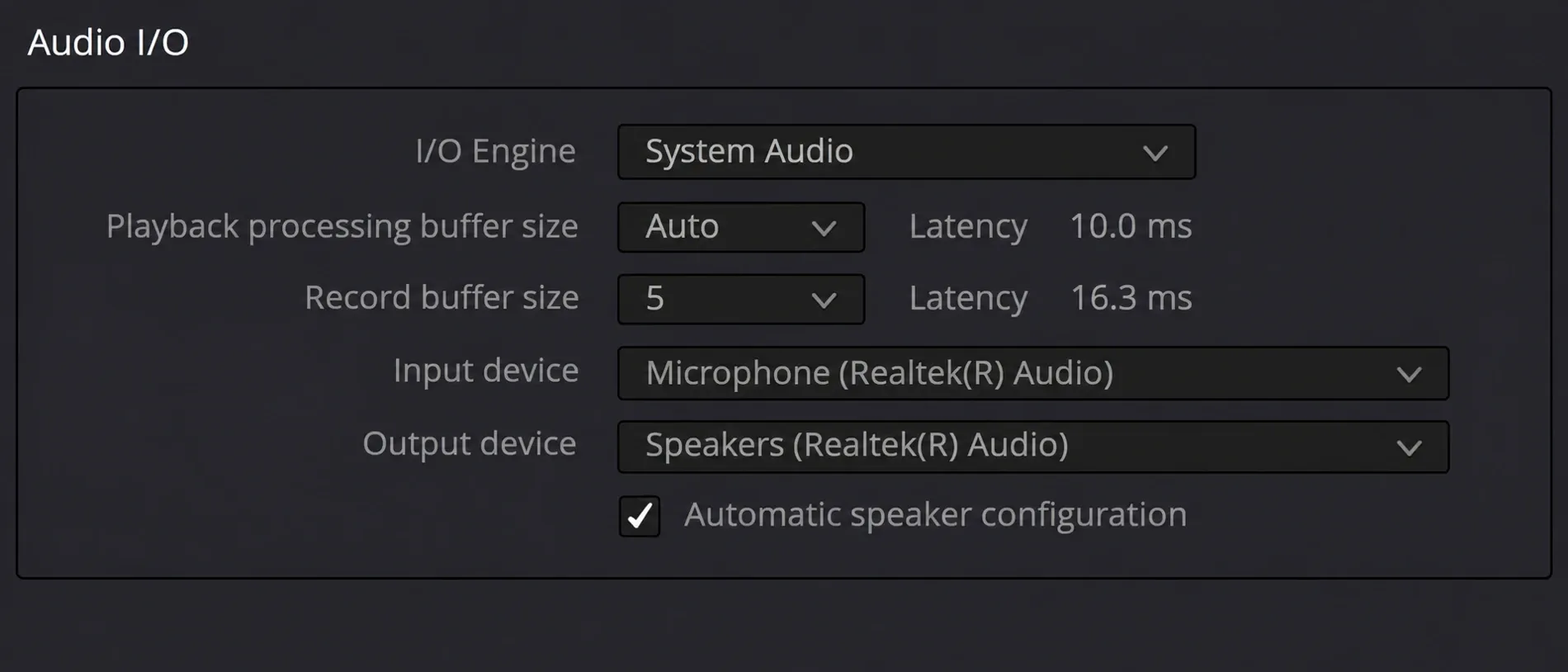
The installer box only adds a driver. The setting that decides which hardware handles your audio lives inside Resolve, under DaVinci Resolve > Preferences > System > Video and Audio I/O > I/O Engine. The 21.1 manual's Audio I/O section lists four choices:
- System Audio: the audio devices your operating system sees, from built-in speakers to a USB interface. It shows playback and record buffer sizes, Input Device and Output Device.
- Desktop Video: audio through a Blackmagic DeckLink or UltraStudio device.
- Fairlight Audio Accelerator: the PCIe card, and only useful with the card installed.
- ASIO (Windows only): an audio interface's ASIO driver.
Without the card, pick System Audio, or ASIO if your Windows interface ships an ASIO driver. If you monitor video through a DeckLink, the Video I/O option "Mirror audio I/O engine output" makes audio follow the device set as the I/O Engine. Buffer sizes are the place to look for crackles, and the audio clicks and pops guide explains how to set them. If Resolve plays nothing at all, start with the no audio fix.
What the card adds
For a Windows audio post room, the card earns its slot with I/O and sync rather than raw track count. Keep the Intel-Mac channel figures separate from the physical MADI connections. These are the lines from Blackmagic's Fairlight tech specs that matter for the decision:
| Item | Published details | What it means for you |
|---|---|---|
| Record channels | Under Channel Structure verified on an Intel Mac Pro 7,1: Record Channels 128 / 64 / 32 at 48 / 96 / 192 kHz; Additional Record Channels with Core Audio plus Fairlight Accelerator 256 / 128 / 64 | Published Core Audio figures, not a Windows benchmark or proof of a twofold gain on your PC |
| Tracks | Up to 2,000 / 1,000 / 500 mono tracks at 48 / 96 / 192 kHz, verified on an Intel Mac Pro 7,1 | The 21.1 manual gives the same 2,000 tracks for the Fairlight Audio Core engine, so session size alone isn't a reason to buy the card |
| MADI | One MADI input/output pair with 64 channels each at 24-bit/48 kHz; the $235 MADI Upgrade adds three pairs, for four pairs and 256 inputs/outputs | Worth it only if your room already runs MADI |
| Fairlight Audio Interface | $2,795 breakout with mic preamps, AES, MADI and word clock or reference sync; requires the accelerator | One way to supply house sync; the card can also receive clock from a valid MADI input |
| Platforms | Windows 10 Creators Update and Windows 11; Intel Macs only | Resolve 21 on Mac requires Apple Silicon, so there is no supported Mac combination with this card |
| Driver source | July 2021 product-manager reply: Windows/Mac drivers included with Resolve | Resolve-specific support; not a general DAW audio interface |
Blackmagic's Fairlight product page explains how the engine splits the work. Fairlight Audio Core spreads processing across CPU cores, threads and audio cards, and "it might use the accelerator card for mixing and the CPU for plug-in processing." Without the card, the same engine runs on your CPU.
I’d only buy the card for a Windows room that already runs MADI or has to lock to house sync. For a voiceover booth or a YouTube mix, a USB or Thunderbolt interface with drivers for the operating system and audio applications in use is a closer fit. Use System Audio, or ASIO on Windows when the interface supplies that driver. The voiceover recording guide shows the recording workflow, and the Fairlight guide hub collects the rest of the audio setup.
Card owners: "failed to initialize" and a transport that won't play
The historical support reports suggest four useful checks. Start with compatibility, then check the driver, the selected audio engine and clock.
- Check the platform. A January 2023 Apple Silicon Mac Studio report described an initialization failure with the card in a PCIe chassis; the same owner reported it working in a 2018 Intel Mac mini. The card’s official platform list excludes Apple Silicon. Use System Audio and a supported interface on an M-series Mac.
- Check the driver. In the July 2024 Intel Mac Pro case, Blackmagic support directed the owner to Customize in the older Resolve installer. For a supported Windows system with the card installed, include the accelerator utility in the installer. The Intel-Mac instructions do not apply to Resolve 21 on Mac.
- Select it. Set Preferences > System > Video and Audio I/O > I/O Engine to Fairlight Audio Accelerator.
- Give it a clock. In the July 2024 Intel Mac Pro thread, support explained that the card needs a valid clock. The Fairlight Audio Interface can supply it, or a valid MADI source can feed the card’s MADI input. A follow-up reply explained that Resolve can launch with the driver installed but needs valid clock before the transport will run.
An August 2024 post in the same thread reports a clock symptom on Windows 11 with legacy hardware. With an older Fairlight CC-2 card and an SX-20 interface, True Rate read 45600 and playback didn't start. The reply: the Fairlight transport needs a valid clock, and System Sync should read Locked.
What the historical support cases show
These five selected support cases come from four Blackmagic forum threads dated 2018–2025. Two describe PCs without the card. Of the three hardware-owner reports, one concerns a legacy CC-2 card and SX-20 interface; two reports share the same thread. The table keeps each configuration and reply separate.
| When | System | Card | What happened | Reply or reported result |
|---|---|---|---|---|
| Nov 2018 | Windows, Resolve 15.2 | No | Restart after Fairlight items were selected; the log named Fairlight Panels | Support advised leaving Fairlight items unticked without the hardware; no Accelerator Utility cause established |
| Jan 2023 | Mac Studio (Apple Silicon), card in a PCIe chassis | Yes | Driver blocked, then "failed to initialize" | Not supported on Apple Silicon; the card worked in an Intel Mac mini |
| Jul 2024 | Mac Pro 2019 (Intel), Resolve 18.6 and 19 beta | Yes | "Failed to be initiated" | Driver via Customize, then a clock source |
| Aug 2024 | Windows 11, Resolve 19 beta | CC-2 with SX-20 interface | True Rate 45600, no playback | Valid clock required; System Sync should read Locked |
| Aug 2025 | Windows laptop, Resolve 20 | No | Utility and Pre Installation Cleanup both reported installation failed | Utility unnecessary without the card; installer offered to continue. The cleanup failure was a separate issue |
The reports point to specific checks: platform support, driver selection, I/O Engine and clock. They do not measure a performance gain or a success rate. For capacity, use the published specification: the base card supplies 64 MADI inputs and outputs at 24-bit/48 kHz, or 256 each with the upgrade. The separate Core Audio record-channel figures were verified on an Intel Mac Pro; they do not establish a twofold Windows improvement. Fairlight Audio Core’s up-to-2,000-track limit also cannot promise that count at any plugin load on any computer.
My verdict: leave the utility unticked unless the card is installed. Without the card, continue past an optional utility failure only when the installer permits it and Resolve itself installs and runs normally. Resolve 21 on an Apple Silicon Mac cannot use the card. For ordinary voiceover or small mixes, I’d choose an interface supported by the operating system and the audio apps in use, because that matches the job without the card’s MADI and clock requirements.
Fairlight Audio Accelerator Utility FAQ
Is the Fairlight Audio Accelerator Utility safe?
Use Blackmagic’s official Resolve installer for the driver. A utility listing on another site is not evidence of an official standalone package. The driver is needed only for compatible accelerator hardware; its presence does not make every installation error harmless.
Does it speed up audio without the card?
No. It's a driver for the card. Without the card, Fairlight Audio Core does its work on your CPU whether the utility is installed or not.
Can I download the utility on its own?
Use the utility bundled with the official Resolve installer and select it only for a compatible card. A separate package is not needed for that installation.
Does the card work with Pro Tools, Logic or other DAWs?
Blackmagic’s product manager said in a July 2021 forum reply that the card works only with DaVinci Resolve, which includes its Windows and Mac drivers. Choose an interface with explicit support for the other DAWs you use.
Should I install Fairlight Studio Utility?
Only for compatible Fairlight console hardware. A November 2018 Blackmagic support reply advised leaving Fairlight checkboxes unticked without that hardware. It is separate from the accelerator-card driver.
Do I need DaVinci Control Panels for the Speed Editor?
Install it if you own a Speed Editor, an Editor Keyboard or a Blackmagic panel. The manual describes DaVinci Control Panels Setup as the app that connects and configures those devices and updates their firmware.
Final verdict: skip it unless the card is in your PC
The Fairlight Audio Accelerator Utility is the driver for Blackmagic’s PCIe card. Without the card, leave the utility unticked and choose System Audio, or ASIO on Windows with a compatible interface driver. An optional utility failure can be set aside only if Resolve installs and runs normally; a cleanup or Resolve installation failure needs investigation. The card fits a supported Windows room that needs MADI channels and sync, with its driver installed, the matching I/O Engine selected and a valid clock source.