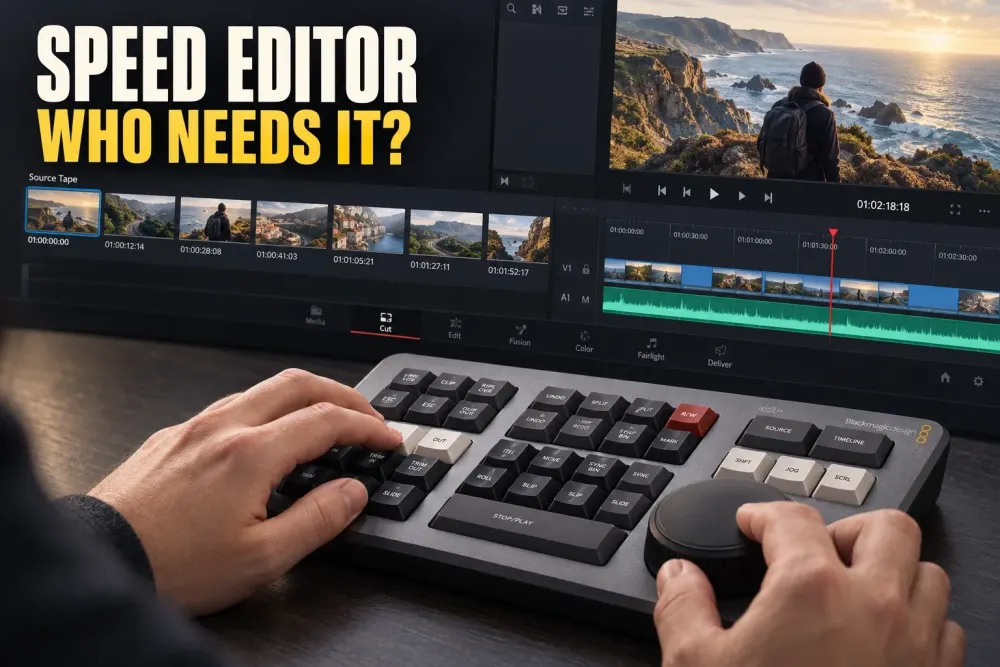
The DaVinci Resolve Speed Editor is worth $435 when you are willing to edit the way it was designed: on the Cut page, with Source Tape, one hand on the search dial, and the other choosing edit or trim operations. It is a compact Resolve controller, not a universal shortcut pad that makes every timeline faster.
The current package is easier to justify if you still need Resolve Studio. Blackmagic’s Speed Editor specifications list a Studio activation key in the box, while Resolve Studio costs $295 separately. For that buyer, the implied controller portion is $140. If you already own Studio, the decision is simply whether the hardware is worth the full $435 to you.
My recommendation: buy the Speed Editor if Resolve is your main NLE and you want to learn a faster Cut page workflow. Skip it if you live on the Edit page, switch between editing apps, or expect the hardware to improve a mouse-first routine without changing your habits.
Who should buy the DaVinci Resolve Speed Editor?
The best buyer is not merely someone who edits video. It is an editor whose work already fits, or could fit, the Cut page model. Several of these should sound familiar:
- Resolve is your main editing app. The special controls have little value when you move to Premiere Pro, Final Cut Pro, or another NLE.
- You review a lot of source footage. Source Tape and the search dial are built for scanning clips without opening them one by one.
- You are willing to learn the Cut page. Smart Insert, Append, Source Overwrite, and live trimming make more sense there than in a familiar mouse-first Edit page routine.
- You want a separate controller. Speed Editor sits beside an ordinary keyboard instead of replacing it.
- You need wireless placement. Bluetooth lets the controller move away from the computer while the main keyboard stays put.
- You still need Studio. The included activation key changes the value calculation substantially.
If the software bundle is driving the decision, compare the paid features in our DaVinci Resolve Free vs Studio guide before treating the key as $295 of value. Studio is useful only when its extra tools matter to your work.
Who should skip it?
Skip the Speed Editor if you are happy building edits on the Edit page with a mouse and normal shortcuts. The controller can still navigate and trigger commands, but most of its distinctive value comes from a workflow you are choosing not to use.
It is also a poor fit for editors who move between NLEs all week. The device is tightly tied to Resolve, so a standard keyboard and a consistent Resolve shortcut layout are usually easier to carry between applications and workstations.
Finally, do not buy it just because the bundled Studio key makes the package look cheap. If you already own Studio, dislike dedicated hardware, or do not want to retrain your hands, the $435 controller may spend most of its time beside the keyboard rather than under your hands.
What the Speed Editor actually changes
Blackmagic’s keyboard overview describes a compact control surface centered on a large search dial and groups of source, edit, trim, transition, audio, multicam, and transport keys. It connects over USB-C or Bluetooth and is designed to work beside a normal computer keyboard.
The change is physical: you stop hunting for a clip, moving to the mouse, dragging an edit, then returning to transport controls. One hand stays on the dial while the other chooses what the dial should do. That is why the device can feel coherent for repeated source review and trimming even though it has far fewer keys than a normal keyboard.
The hardware does not decide where an edit belongs. It reduces the distance between finding a moment, marking it, placing it, and adjusting the result. Editors who already know what they want can benefit from that compression. Editors who are still learning basic edit types may find the labeled controls useful, but the device does not replace understanding the commands.
Why the Cut page and Source Tape matter
Source Tape is the feature that explains the product. Instead of treating a bin as separate clips, Resolve presents the source footage as a continuous strip. You can move through that strip with the dial, mark a usable section, and send it to the timeline without opening every source individually.
This is especially useful for interviews, events, travel footage, multicam material, and any job where the first pass involves finding short usable moments inside many files. The Speed Editor has a dedicated Source key because the product is built around moving between source review and timeline work quickly.
The Cut page also uses context-aware edits such as Smart Insert and Source Overwrite. They reduce the amount of precise mouse positioning required before an edit can happen. If that sounds unfamiliar, learn the Cut page before buying. If it sounds like the way you already want to assemble footage, the controller has a clear job.
The search dial: Shuttle, Jog, and Scroll
The large dial has three modes:
- Jog gives direct frame-by-frame movement as the dial turns.
- Shuttle controls playback direction and speed, so the footage continues moving after the dial is released.
- Scroll moves rapidly through long source material or a timeline.
The dial becomes more valuable during live trimming. Hold or select a trim function, then use the dial to change the edit while watching the result. The right hand can remain on the dial while the left chooses the trim type, transition, source operation, or timeline action.
This is the habit that separates a useful controller from an expensive transport wheel. If you reach for the mouse after every command, the physical advantage disappears. Expect an adjustment period while your hands learn where the commands live.
The controls that earn their space
The most useful keys are the ones that shorten a repeated sequence rather than duplicate a single shortcut. The documented control set includes:
- Source Tape, In, and Out for finding and marking material;
- Smart Insert, Append, and Ripple Overwrite for placing clips without precise timeline targeting;
- Close Up, Place on Top, and Source Overwrite for common Cut page constructions;
- Roll, Trim In, Trim Out, Slip Source, and Slip Destination for live trimming with the dial;
- Cut, Dissolve, Smooth Cut, and transition duration controls for fast transition decisions;
- Sync Bin and multicam camera keys for synchronized and multicamera edits;
- audio level and full-view controls for quick corrections without leaving the controller.
Not every key will matter on every project. Source Tape, Append, trim controls, and the dial form the core. Multicam and Sync Bin can be decisive for some editors and irrelevant for others. Judge the device by the operations you repeat each week, not by the total number of labels.
What works outside the Cut page?
The search dial, transport controls, and a number of editing commands remain useful beyond the Cut page, so the controller does not become inert when you move elsewhere in Resolve. The problem is value, not basic function. The farther your routine moves from Cut page source review and context-aware editing, the more the hardware behaves like a specialized transport controller.
That can still be enough if you want a tactile dial for navigation and trimming on the Edit page. It is not enough if you are buying the device because the word “Speed” promises a general performance upgrade. Resolve will not render faster, the timeline will not play more smoothly, and your keyboard shortcuts will not become obsolete.
Before ordering, spend time with the Cut page using only a normal keyboard and mouse. If Source Tape and the edit model solve a real problem, the hardware can make that model easier to repeat. If you immediately return to the Edit page, you have learned something valuable without spending $435.
Speed Editor vs Editor Keyboard
The two Blackmagic keyboards share a search-dial idea but solve different desk problems. Speed Editor is a compact companion controller. The DaVinci Resolve Editor Keyboard is meant to become the main full-size keyboard on a permanent workstation.
| Decision point | Speed Editor | Editor Keyboard |
|---|---|---|
| Current list price | $435 | $669 |
| Desk role | Compact controller beside an existing keyboard | Full-size QWERTY keyboard and Resolve controller in one |
| Connection | USB-C or Bluetooth BLE | Wired USB-C |
| Portability | Internal battery and compact body | Large fixed-desk design |
| Search dial | Large dial built around Cut page source and trim controls | Metal dial with electronic clutch in a full keyboard |
| Studio activation key | Included in the current official package | Included in the current official package |
| Best fit | Cut page, Source Tape, travel, or a desk with a preferred keyboard | Permanent Resolve-first desk that needs one main keyboard |
The price gap is $234. That extra money buys the Editor Keyboard’s full QWERTY layout, metal chassis, timecode keypad, USB hub ports, and console-mounting option. It does not buy Bluetooth. Blackmagic also notes that some enhanced Speed Editor functions are not included on the larger keyboard, so the Editor Keyboard is not simply the same controller with more keys.
Price, Studio key, and package checks
At the current official prices, Speed Editor costs $435 and Resolve Studio costs $295. Subtracting the software price leaves an implied $140 for the controller only when the buyer genuinely needs a new Studio license. Our DaVinci Resolve pricing guide explains the wider software cost structure.
Do not use that calculation for every listing. Used, open-box, marketplace, and old-stock packages may have a missing or redeemed activation key. A reseller can also describe the hardware correctly while offering different box contents. Confirm the exact package in writing before paying.
The current official specification lists USB-C, Bluetooth BLE, an internal battery, maximum power consumption of 4 W, and a one-year warranty. USB-C charges the battery and is required for setup and updates. That makes wireless operation convenient, but a cable still belongs in the kit.
Limitations to accept before buying
You have to change your editing habit
The controller rewards a two-handed Cut page workflow. A week of using it like a large playhead wheel will not reveal the full value. The purchase includes a learning commitment.
It does not replace a normal keyboard
You still need QWERTY keys for text, search, naming, shortcuts, and general computer work. Reserve enough desk space for both devices and decide where the controller will sit before ordering.
It is tied to Resolve
The specialized controls do not follow you into another NLE. Editors who split time evenly between applications should price the device against hardware that works across the whole workstation.
The bundle can distort the decision
The Studio key is meaningful for a first-time Studio buyer. It is worth nothing extra if you already have a license you can use, so do the hardware-only decision separately.
What to check before you order
- Try the Cut page first: use Source Tape and context-aware edits with your current mouse and keyboard.
- List your repeated actions: identify whether source review, trimming, multicam, Sync Bin, and fast assembly are common enough to justify dedicated controls.
- Confirm the Studio key: verify that it is included and unused in the exact package you are buying.
- Plan the desk: leave space for both Speed Editor and a normal keyboard without pushing the mouse or tablet out of reach.
- Check connectivity: keep a USB-C cable available for charging, setup, and firmware updates even if you plan to edit over Bluetooth.
- Check system support: compare your workstation with the current Blackmagic OS list and our DaVinci Resolve hardware and compatibility guide.
- Check return terms: the control layout and learning curve are personal enough that a useful return window matters.
Final verdict: who is the Speed Editor for?
Buy it if Resolve is your main NLE and the Cut page already makes sense to you. Source Tape, the search dial, live trimming, and direct edit keys can turn source review and rough assembly into one continuous physical workflow. Bluetooth and the compact body also make it easier to place than the full Editor Keyboard.
Skip it if you want to keep editing exactly as you do now. A normal keyboard, a clean shortcut map, and a mouse remain the better value for an Edit page routine or a mixed-NLE workstation. The device earns its name only when you adopt the workflow around it.
The most useful pre-purchase test costs nothing: edit a real project on the Cut page for a few sessions. If Source Tape and two-handed trimming solve a real problem, Speed Editor has a reason to be on your desk. If they do not, the hardware will not create that reason for you.
