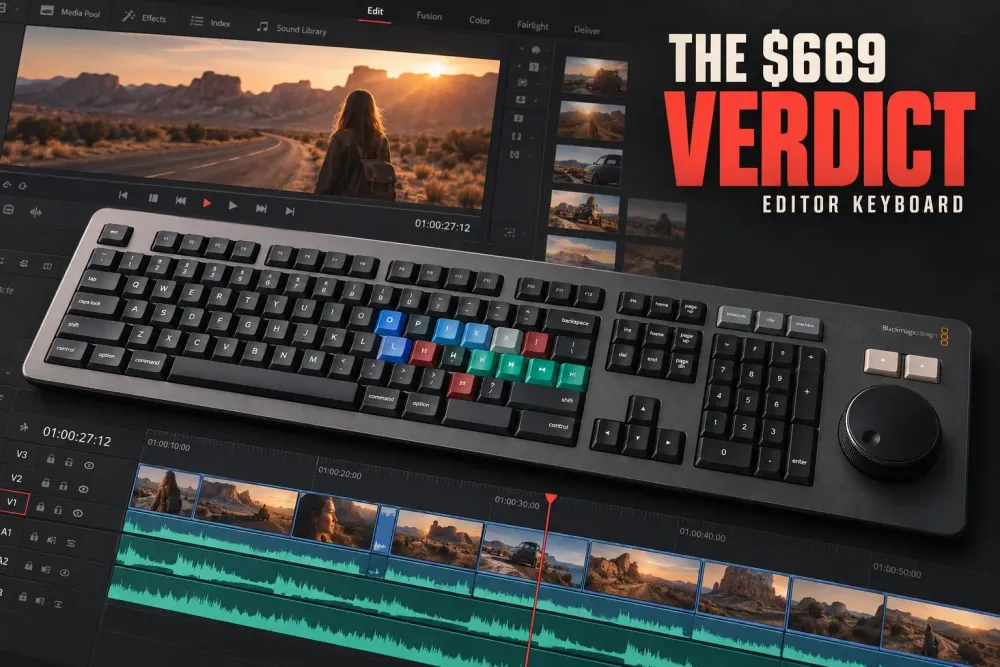
The DaVinci Resolve Editor Keyboard is worth $669 only for a fairly narrow buyer: an editor who works mainly in Resolve, wants a single full-size desk keyboard, and will actually use the search dial and dedicated trim controls. If you move between editing apps, rely on a heavily customized shortcut map, need wireless portability, or mostly edit with a mouse, it is difficult to justify.
The current price looks less severe if you still need Resolve Studio. Blackmagic’s Editor Keyboard specifications list a Studio activation key in the box, while Resolve Studio costs $295 on its own. That makes the implied hardware portion $374 for that buyer. It is not a discount for someone who already owns Studio.
My verdict: buy it when Resolve is your main editing room and this will replace your everyday keyboard. Choose the Speed Editor when you want the dial and core Cut page controls beside an existing keyboard. Skip both when you are not ready to build a two-handed editing habit.
Who should buy the DaVinci Resolve Editor Keyboard?
The strongest case is not “I edit video.” It is “I spend most of my editing day in Resolve and want the keyboard to become part of the way I trim.” The hardware makes sense when several of these describe you:
- Resolve is your primary NLE. The expensive controls are built around Resolve, not general computer use.
- You want one device for typing and editing. The full QWERTY section means you do not need a second keyboard in front of the controller.
- You use the Cut page or Source Tape. The search dial and dedicated edit keys have a clearer role there than in a mouse-first timeline routine.
- You use the standard Resolve shortcut map. The printed legends remain useful instead of becoming decoration.
- You still need a Studio license. The current package includes a Studio activation key, which changes the value calculation.
- You have a permanent edit desk. This is wired equipment intended to stay put.
If you are still deciding whether the paid software matters for your work, read our DaVinci Resolve Free vs Studio comparison before using the bundled key to rationalize the purchase.
Who should skip it?
Skip the Editor Keyboard if the main attraction is simply having Resolve labels on the keys. A standard keyboard and a careful DaVinci Resolve shortcut setup can solve that problem for far less money.
It is also a weak fit when you edit in Premiere Pro, Final Cut Pro, Avid, or several NLEs during the same week. The QWERTY keys still work as a normal USB keyboard, but the dial and specialized controls earn their keep inside Resolve. A long-term ProVideo Coalition review also flags the practical cost of a custom shortcut map: once your assignments move, the printed legends no longer describe what many keys do.
Small desks, mobile kits, and cable-free setups are other clear reasons to pass. The Editor Keyboard connects by USB-C and has no Bluetooth mode. If you need the controller to travel with a laptop, the compact Speed Editor is the more natural Blackmagic option.
What the $669 hardware actually adds
Blackmagic describes the Editor Keyboard as a full-size QWERTY board in a machined metal body with a metal search dial, electronic clutch, dedicated edit and trim controls, and a separate timecode keypad. It works with both the Cut and Edit pages. The chassis can sit on a desk or be mounted into a console so the top surface sits flush.
The current technical specification lists a wired USB-C computer connection, two USB-A hub ports for a mouse or other USB devices, and maximum power use of 8 W through USB-C. Supported systems include macOS 13 Ventura, macOS 14 Sonoma or later, Windows 10 Creators Update, Windows 11, Windows 11 for ARM, and Rocky Linux 8.6.
That list matters because the Editor Keyboard is not a generic mechanical keyboard with colored keycaps. The purchase is really a combination of four things:
- a full everyday keyboard;
- a Resolve-specific control surface;
- a weighted timeline search dial;
- a Resolve Studio activation key.
If you already own good versions of the first and fourth items, the decision rests almost entirely on the control surface.
The search dial is the reason to buy it
The metal dial has three modes, and each changes how it relates to the timeline:
- Jog gives direct, precise movement around the playhead.
- Shuttle uses the electronic clutch to control playback direction and speed.
- Scroll moves quickly through a long edit.
The useful part is not just transport. When a compatible trim key is active, the dial becomes a large adjustment control. One hand selects the edit or trim operation while the other moves the dial. This is the two-handed workflow Blackmagic designed the hardware around.
Do not assume the dial automatically makes every editor faster. There is a learning period, and you have to stop reaching for the mouse for every trim. The ProVideo Coalition reviewer found Jog and Scroll more useful than Shuttle over a long edit. That is a sensible expectation: precise positioning and fast timeline movement are easier to adopt than an entirely different playback habit.
Dedicated edit, trim, and timecode keys
The board places common edit operations around the dial instead of hiding them behind modifier combinations. It also has direct timecode entry, frame/timecode switching, plus and minus offsets, and a double-zero key for longer values. These controls are useful when exact durations and edit-point offsets are part of the job rather than an occasional correction.
The dedicated keys are most convincing when you already understand the underlying Resolve commands. Hardware cannot fix an unclear trim decision. It can remove finger travel and make a known action easier to repeat. If terms such as ripple, roll, slip, slide, insert, overwrite, and append are still unfamiliar, learn those operations first and treat the keyboard as a later workflow upgrade.
Editor Keyboard vs Speed Editor
These products overlap, but they solve different desk problems. The Editor Keyboard is meant to become your main keyboard. The Speed Editor is a compact Resolve controller that sits beside one.
| Decision point | Editor Keyboard | Speed Editor |
|---|---|---|
| Current list price | $669 | $435 |
| Form | Full-size QWERTY keyboard and Resolve controller | Compact Resolve controller for use beside another keyboard |
| Connection | Wired USB-C | USB-C or Bluetooth |
| Search dial | Metal dial with electronic clutch | Large search dial in a portable body |
| Studio activation key | Included in the current official package | Included in the current official package |
| Best fit | Permanent Resolve-first edit desk | Portable setup or a desk with an existing keyboard |
The current official difference is $234. That extra money buys the full keyboard, wider set of dedicated controls, USB hub ports, metal chassis, timecode keypad, and the option to mount it into a console. It does not buy wireless use.
The Speed Editor is not merely the cheaper model. Blackmagic’s keyboard overview notes that some enhanced Speed Editor functions are not present on the full-size board. Choose by workflow and desk role, not by assuming the larger model contains every function of the smaller one.
Price and bundled Resolve Studio license
At the current official prices, the Editor Keyboard costs $669, the Speed Editor costs $435, and Resolve Studio costs $295. Both current keyboard specification pages list a Studio activation key in the package.
That creates two useful comparisons:
- You do not own Studio and need it: the Editor Keyboard’s implied hardware premium is $374 after accounting for the $295 software price.
- You are choosing between the two keyboard packages: the Editor Keyboard costs $234 more than the Speed Editor, and both include Studio.
Do not apply that math blindly to a used, open-box, marketplace, or old-stock listing. Activation keys can be missing, previously redeemed, or excluded from a reseller bundle. Confirm the exact contents in writing before paying.
Five limitations to accept before buying
1. It is large and permanent
This is a full editing keyboard with a substantial control area. Measure the actual usable desk width, including the mouse, tablet, audio controls, and any other panel that must remain within reach.
2. It is wired
The Editor Keyboard uses USB-C and does not offer the Speed Editor’s Bluetooth option. The two USB-A hub ports can simplify a desk, but they do not make the board portable.
3. Custom mappings weaken the labels
A personalized shortcut map can still work, but the key legends stay fixed. The more you depart from the default Resolve map, the less guidance the board provides.
4. The dial has little value outside Resolve
The QWERTY section remains a normal keyboard, but the premium control surface is Resolve-specific. Mixed-NLE editors pay for hardware that sits underused in other apps.
5. It rewards a different editing habit
The value appears only when you keep one hand near the edit keys and the other on the dial. If you continue doing every operation with the mouse, the keyboard becomes an expensive shortcut chart.
What to check before you order
- Package contents: confirm that the Studio activation key is present and unused, especially for open-box or second-hand stock.
- Desk fit: mark the keyboard footprint on the desk and test where the mouse or tablet will sit.
- Shortcut map: compare your current custom assignments with the printed Resolve layout.
- Connection: reserve a suitable USB-C path and account for a hub or adapter if your computer has limited ports.
- System support: compare the current Blackmagic OS list with your workstation. Our DaVinci Resolve system requirements guide covers the rest of the computer.
- Return terms: the feel, key placement, and desk scale are personal enough that a usable return window matters.
Final choice: is it worth $669?
Yes, for a Resolve-first editor who wants one permanent keyboard and will train around the dial. The Studio key makes the first purchase easier to justify, while the full QWERTY section makes the Editor Keyboard more coherent than a separate controller for a clean, fixed desk.
No, for most occasional Resolve users. If you already own Studio, prefer custom shortcuts, work across several NLEs, or need a mobile setup, the $669 price exposes how specialized this product is. In that case, use a standard keyboard or choose the Speed Editor for the smaller, wireless-capable control surface.
The decision is simple once you stop treating it as a normal keyboard: buy it for a daily two-handed Resolve workflow, not for the key labels.
