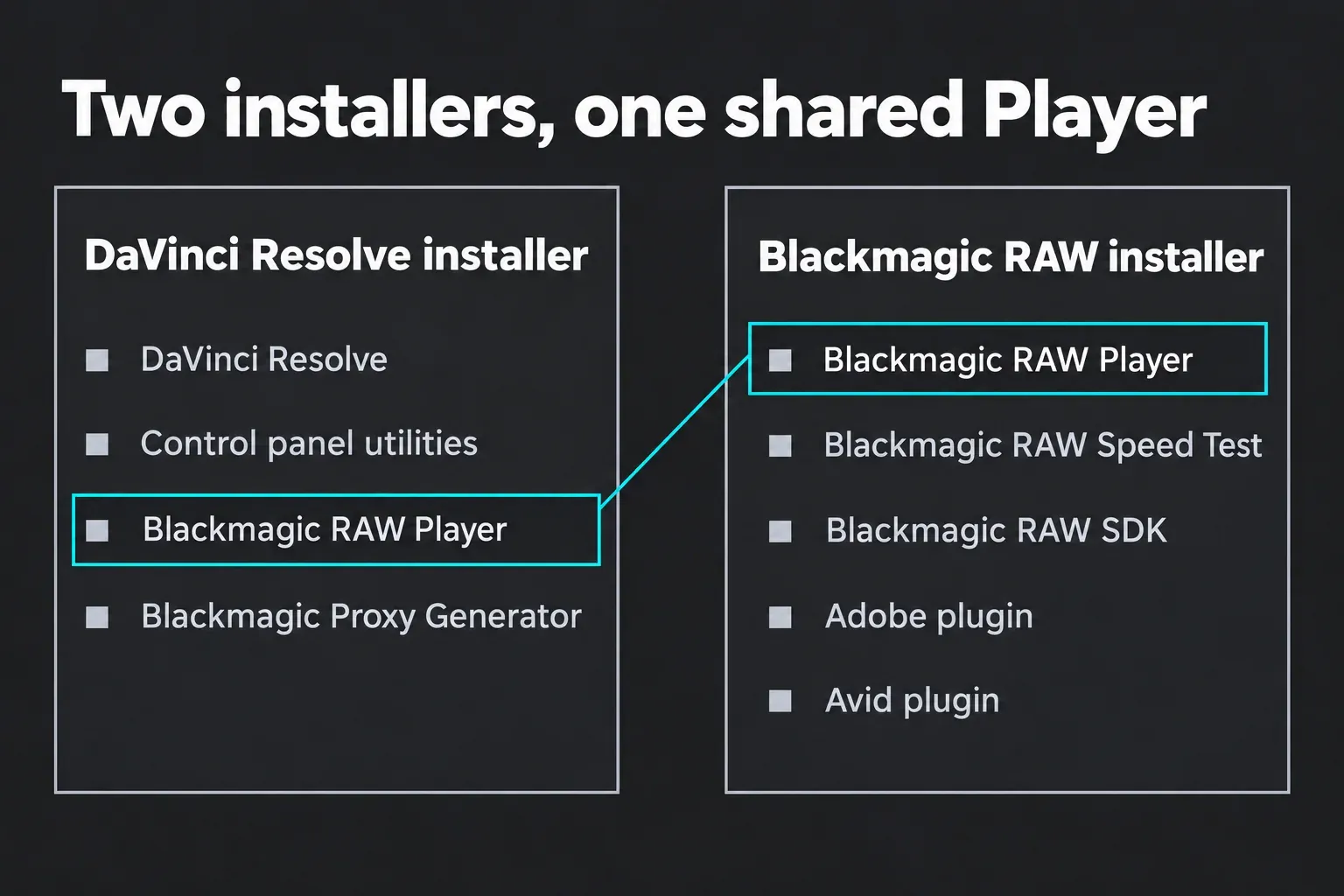
Blackmagic RAW Common Components is the Windows entry for Blackmagic Design's Blackmagic RAW package, the free codec software that opens .braw files from Blackmagic cameras and carries Blackmagic RAW Player, Speed Test, the developer SDK and the Adobe and Avid plugins. It's safe and comes from Blackmagic Design itself: DaVinci Resolve's installer adds Blackmagic RAW Player, and Blackmagic's standalone Blackmagic RAW installer adds the whole package. You can uninstall it from Settings > Apps > Installed apps like any other program, but on a machine that edits or plays .braw footage I'd leave it where it is.
My reason is simple: this package is how the Player, Speed Test and the Premiere Pro and Avid plugins reach your computer, and the DaVinci Resolve installer adds Blackmagic RAW Player again on the next install anyway, so removing it buys you very little. Below you'll find where the entry comes from, how to check it's genuine, a keep-or-remove table by situation, removal on Windows 11, Windows 10, Mac and Linux, what removal leaves alone, and how to repair or reinstall it when .braw clips stop opening or the Player reports damage.
What Blackmagic RAW Common Components is
Blackmagic RAW (.braw) is the camera RAW format recorded by Blackmagic cameras. The Blackmagic RAW product page describes it as cross platform and freely available with a developer SDK, and says Blackmagic RAW Player shows clips with consistent color because the SDK manages it. Any program that plays or edits those files needs the decoder, and this package is how Blackmagic delivers it.
The Blackmagic RAW 6.0 readme sums the package up in two sentences: "This software package installs the latest Blackmagic RAW software to your computer. This installer also includes Blackmagic RAW Speed Test, Blackmagic RAW SDK and third party editing plug-ins." The Blackmagic RAW installer page spells out the contents: Blackmagic RAW Player, the Speed Test app and its manual, an Adobe plugin, an Avid plugin, and the SDK with its manual, changelog and code samples.
Blackmagic's readme, SDK manual and installer page never use the words "Common Components". The match comes from the entry itself: download trackers file it under Blackmagic Design with Blackmagic RAW version numbers from 2.8 to 5.1, and a Blackmagic forum poster looking for the Player and Speed Test in the Windows program list found this entry instead. Underneath sits the runtime that applications load. Developer notes for the MDK media SDK, built on Blackmagic RAW SDK 6.0, name those files: BlackmagicRawAPI.dll on Windows, BlackmagicRawAPI.framework on Mac and libBlackmagicRawAPI.so on Linux, plus separate decoder components for CUDA, OpenCL and Metal.
Why it's on your PC
Two Blackmagic installers put Blackmagic RAW software on a computer. The first is DaVinci Resolve. The DaVinci Resolve 21.1.2 readme says the installer adds Resolve "as well as additional utilities for setting up hardware control panels. It also installs Blackmagic RAW Player and Blackmagic Proxy Generator into the applications folder." That's why a fresh Resolve install leaves several new icons. The panel utility is the subject of our No panels found guide, and Proxy Generator, which the DaVinci Resolve 21.1 manual calls "a separate program" that turns files dropped into a watch folder into proxy media, belongs to the proxy workflow. Our DaVinci Resolve for Windows guide walks through that install.
The second is the standalone Blackmagic RAW installer, now at version 6.0. Blackmagic's support center files it as a developer SDK download behind a short registration form, and it's the one that brings Speed Test, the SDK and the Adobe and Avid plugins. If you shoot on a Blackmagic camera and cut in Premiere Pro or Avid Media Composer, this is the package that adds .braw support to them. Blackmagic's installer page also lists more than a dozen other applications that read .braw through the SDK, among them Lightworks, Vegas Pro 19 or later, Edius, Nuke Studio, Gyroflow, EditReady, Kyno and Silverstack.
Is Blackmagic RAW Common Components safe?
Yes. It's Blackmagic Design's own software, and the codec is free: the installer page says it's "supported via the free SDK on Mac OS, Windows and Linux systems" with "no hidden licenses or ongoing fees". Blackmagic Design is the publisher to expect next to the entry. None of the eight public threads in the results reports malware; every one asks what the entry is, how to remove it or how to repair it.
Get it only from Blackmagic. The support center has the current package, while the download mirrors in the results offer older builds, one of them still on 5.1. One explainer ranking for the name calls it photo compression software and tells readers to delete it if they don't use Resolve or Fusion. It handles video camera RAW, and the Premiere Pro and Avid plugins inside it have nothing to do with Resolve or Fusion.
Do you need it? Keep, remove or repair
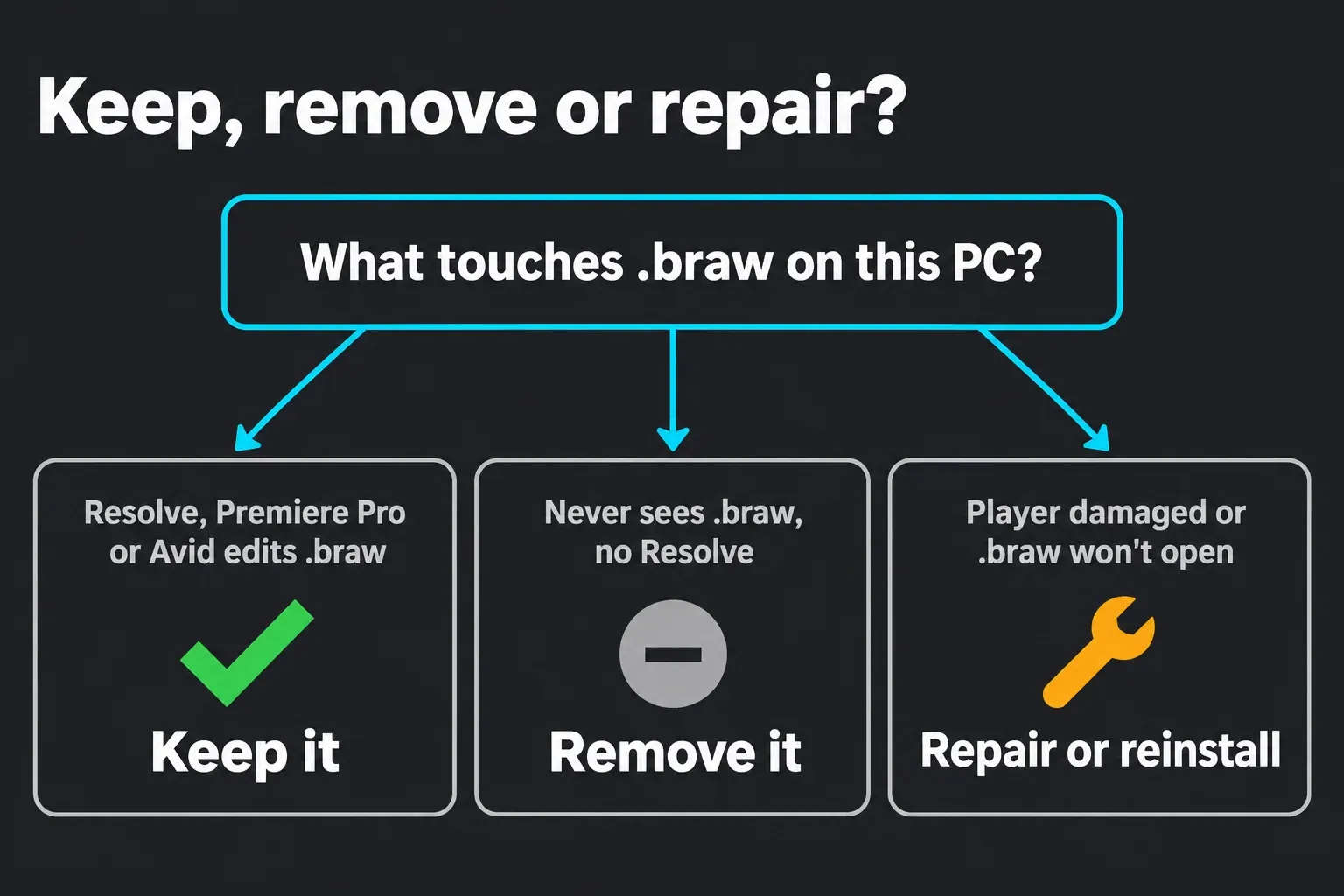
The answer depends on what touches .braw files on that computer. Find your situation:
| Your situation | What to do | Why |
|---|---|---|
| You edit .braw clips in DaVinci Resolve | Keep it | The Resolve installer adds Blackmagic RAW Player again with every install, so removal gains nothing on an edit machine. |
| You open .braw in Premiere Pro or Avid Media Composer | Keep it | The Adobe and Avid plugins ship in this package. |
| You use Lightworks, Vegas Pro, Gyroflow or another app on Blackmagic's SDK list | Keep it | Blackmagic lists these apps as reading .braw through the same SDK. |
| You never use Blackmagic camera files and don't run Resolve | Removing is fine | Without .braw files there's nothing for it to decode. |
| You uninstalled DaVinci Resolve and want a clean slate | Remove it too, unless a plugin row above applies | It's a separate entry with its own Uninstall. |
| A Resolve install fails and an older standalone Blackmagic RAW package is installed | Remove it, then rerun the Resolve installer | The Resolve installer adds Blackmagic RAW Player back. |
| Blackmagic RAW Player says it's damaged, or .braw clips stop opening | Repair or reinstall | Run the current Blackmagic RAW installer, or uninstall and install it fresh. |
I treat removal as a cleanup or repair step and nothing more, because the package does no harm sitting there and the next Resolve install brings part of it back. A Reddit thread asking whether it's fine to remove Blackmagic RAW Player landed in the same place: fine if you're critically low on space, otherwise leave it.
How to uninstall it on Windows 11 and Windows 10
It uninstalls like any other desktop program. Microsoft's guide to uninstalling apps and programs in Windows gives the Settings route on Windows 11:
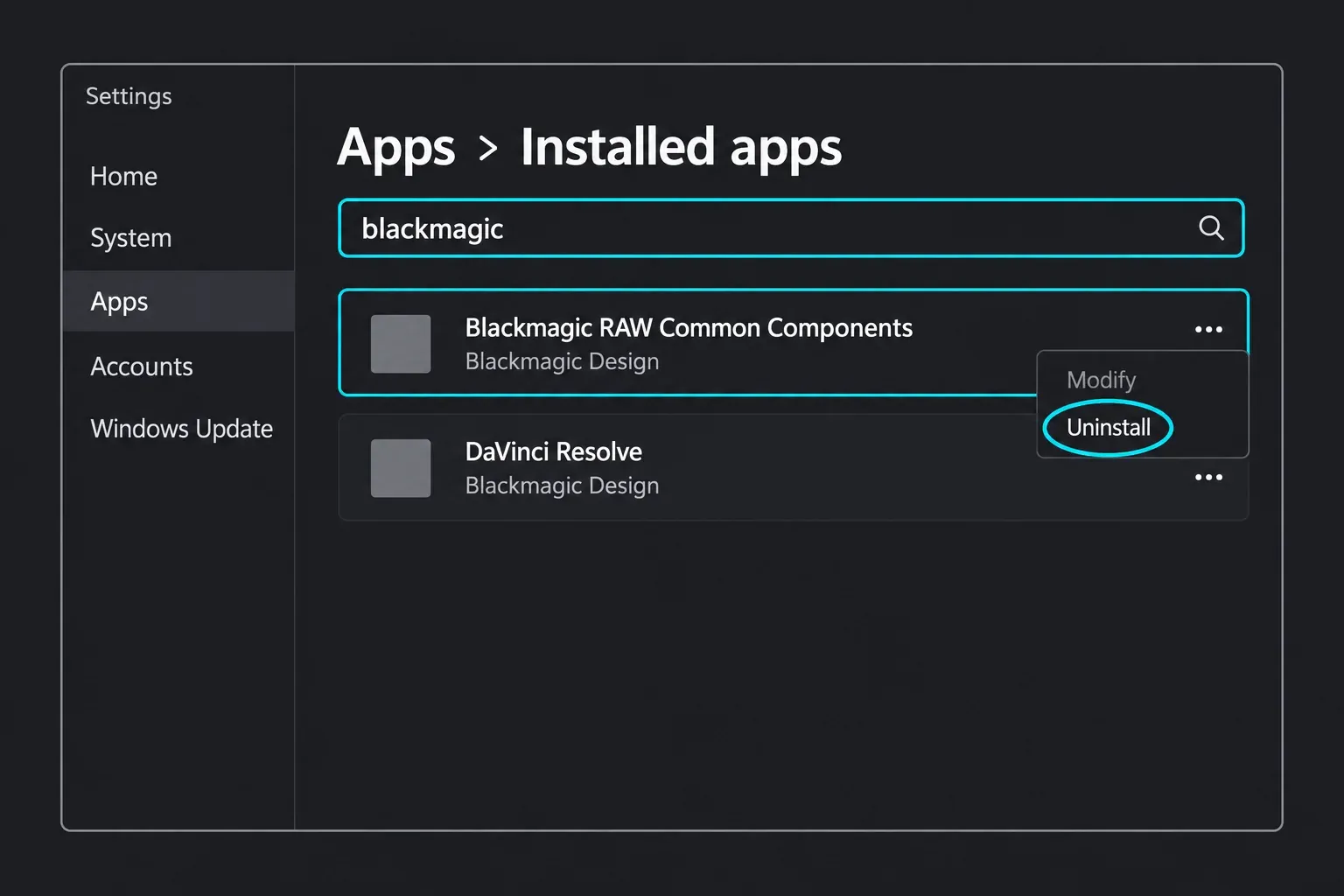
- Select Start > Settings > Apps > Installed apps.
- Type "blackmagic" in the search box to filter the list.
- Select More (the three dots) next to Blackmagic RAW Common Components, choose Uninstall and confirm.
The Control Panel route works on Windows 10 and 11, and it's the one to use when Settings won't remove the entry; Microsoft notes that some apps can't be uninstalled from the Settings app. Open Control Panel > Programs > Programs and Features, right-click Blackmagic RAW Common Components and choose Uninstall or Uninstall/Change. The Resolve readme uses the same Programs and Features list for removing DaVinci Resolve itself, and two of the forum threads give that answer too.
A third route is the Blackmagic RAW installer. Run it again and it offers to repair or remove the package, which is the route a forum answer on a broken install describes. Use it when the entry is missing from the list or the uninstall fails. Removing DaVinci Resolve is a separate job with its own entry, and our installation errors guide covers what to clear when an install keeps failing.
Removing Blackmagic RAW on a Mac
Macs don't show a "Common Components" entry. The package installs to /Applications/Blackmagic RAW, and a Blackmagic forum answer points to the uninstaller it puts there: /Applications/Blackmagic RAW/Uninstall Blackmagic RAW.app. I'd use it over dragging the folder to the Trash for one reason: an uninstaller knows every file its installer placed, and you don't.
DaVinci Resolve has an uninstaller of its own; the readme says to double-click the Uninstall Resolve icon. Our DaVinci Resolve for Mac guide covers the install side.
Linux has no app list entry either. Blackmagic RAW 6.0 supports CentOS 7.9 or later alongside macOS 12 Monterey and Windows 10, and the Resolve readme says to remove Resolve by running its installer and choosing the uninstall option. Our DaVinci Resolve for Linux guide covers the Resolve side.
What uninstalling leaves alone
Your footage stays put. Clips live wherever you recorded or copied them, and the Resolve manual's section on BRAW sidecar files says their metadata is embedded in each clip and also kept in .sidecar files "saved alongside the media". Resolve projects live in Resolve's project library, which the package doesn't touch.
Leave the .sidecar files alone during any cleanup. The Blackmagic RAW SDK manual explains that a sidecar stores metadata changed after recording, such as white balance, so the original .braw is never modified, and that deleting the sidecar restores the clip's original metadata. Delete one and the clip opens with its camera settings instead of your adjustments. In Resolve, the Camera Raw palette's Update Sidecar button writes changes back to that file, and our BRAW settings guide covers those controls.
Repair or reinstall Blackmagic RAW
Reinstall it when Blackmagic RAW Player won't open, .braw clips stop opening in Premiere Pro or Media Composer, or a Mac reports that Blackmagic RAW Player is damaged. That last message has its own Blackmagic forum thread, and the answer there points at the package's uninstaller, so the clean order is uninstall first, then install the current version.
- Open Blackmagic's support center, search for Blackmagic RAW and download the latest version for your system. The download asks for a short registration form.
- Close DaVinci Resolve, Premiere Pro, Media Composer and Blackmagic RAW Player.
- Run the installer. When it finds an existing install it offers repair or removal. Try repair first, and if the problem stays, remove the package and run the installer again for a fresh copy.
- Open a .braw clip in Blackmagic RAW Player to confirm it plays.
A failed DaVinci Resolve install is the other case. One fix in the results for that failure is to remove a standalone Blackmagic RAW Common Components entry before running the Resolve installer again. It's a safe step because the Resolve installer adds Blackmagic RAW Player back; if you also use the Premiere Pro or Avid plugins, run the standalone Blackmagic RAW installer again afterwards. Get Resolve itself from our DaVinci Resolve download page, and protect your projects first with the steps in updating DaVinci Resolve safely.
Version 6.0 brought Generation 6 color science, native Windows ARM64 and ARM64EC support, lens correction for supported clips and support for the Blackmagic Cinema Camera 6K L mount, according to its readme. On a Windows on Arm laptop, DaVinci Resolve itself needs Windows 11 for ARM on a Snapdragon X Elite or NVIDIA RTX Spark machine, per the 21.1.2 readme, and the DaVinci Resolve system requirements guide covers the rest of the hardware.
Premiere Pro, Avid and BRAW Studio
The Adobe and Avid plugins in the package are how Premiere Pro and Media Composer open .braw. Uninstall the package and those plugins go with it, so a Premiere Pro editor on a Blackmagic camera should keep it even with no Resolve on the machine. If you're moving that footage over to Resolve, our Premiere Pro to DaVinci Resolve guide covers the handoff.
BRAW Studio is a different product. It's a third-party plugin from Autokroma that Blackmagic's installer page lists among the applications built on the SDK, and it installs into its own folder under Adobe's MediaCore plug-ins, with its own uninstall steps. Removing Blackmagic RAW Common Components isn't the way to remove BRAW Studio.
Speed Test, GPU decoding and the decode setting in Resolve
Speed Test is the package's benchmark. Blackmagic describes it as a CPU and GPU benchmarking tool that decodes full-resolution Blackmagic RAW frames, detects multiple CPU cores and GPUs automatically, and lets you pick a resolution and a constant bitrate of 3:1, 5:1, 8:1 or 12:1; a selected test can run continuously as a stress test. I'd run it before blaming Resolve for choppy .braw playback, because it shows what the machine can decode with Resolve out of the picture.
Decoding follows the SDK. The SDK manual says the CPU decoder uses SSE, AVX and AVX2 when available, and the Metal, CUDA and OpenCL GPU decoders "are dynamically loaded, meaning they will require the system to have the relevant APIs installed in order to function." An outdated or broken GPU driver therefore takes GPU decoding with it, which points at the driver rather than the package. Our CUDA error guide covers the NVIDIA side, and our guide to the best GPU for DaVinci Resolve covers upgrades.
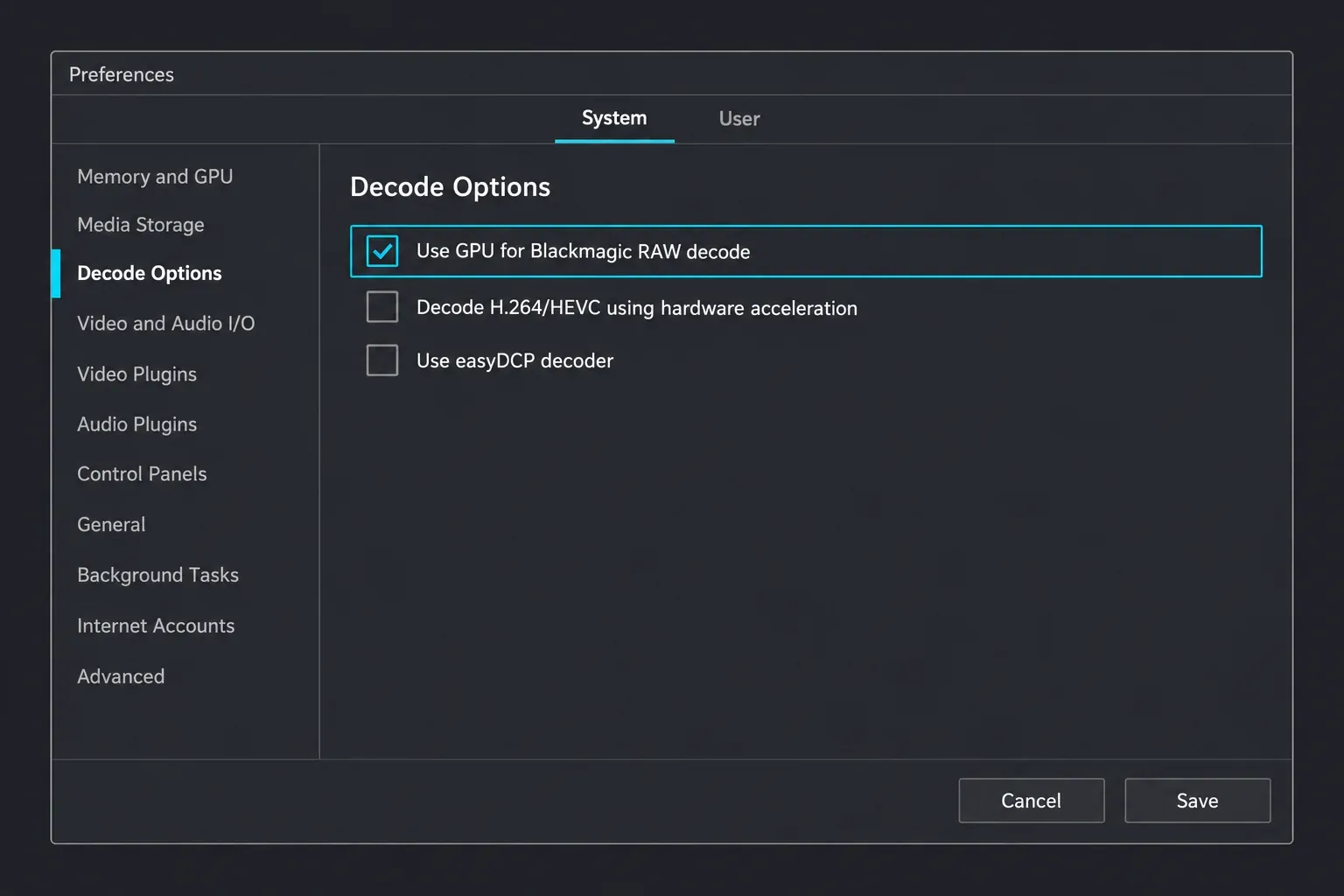
Resolve has its own switch for this. Under DaVinci Resolve > Preferences > System > Decode Options, the manual lists "Use GPU for Blackmagic RAW decode", which "lets you use your GPU to accelerate the decoding of Blackmagic RAW (BRAW) media." The manual lists it first, ahead of the H.264/HEVC hardware acceleration option. Keep it ticked unless you're ruling out the GPU during a crash hunt. For everything else Resolve reads, see our guide to supported codecs and formats.
What 8 public threads show
I sorted the eight forum and Reddit threads on the first results pages for four searches readers use, from "blackmagic raw common components" to how to uninstall it, by the question each one asks. Most bodies were only visible as search snippets, so the groups rest on titles and visible answers, and the counts are threads rather than users.
| What the thread asks | Threads | Where | Visible answer |
|---|---|---|---|
| What is it, and do I need it? | 3 | Blackmagic forum (1), Reddit (2) | Leave it unless you're critically low on space |
| How do I uninstall it? | 3 | Blackmagic forum (3) | Programs and Features (two threads); a Mac clean-install folder list (one) |
| How do I repair or reinstall the Player? | 2 | Blackmagic forum (2) | The Mac uninstaller app; rerunning the installer to repair or uninstall the package |
No visible answer reports malware or lost footage. The visible answers line up with Blackmagic's own documentation: remove it through Programs and Features or the uninstaller, leave it if you work with .braw, and reinstall the current package when the Player breaks. That's the basis for the keep-by-default advice above.
Questions about Blackmagic RAW Common Components
Is Blackmagic RAW Common Components a virus?
No. It's Blackmagic Design's package for the Blackmagic RAW camera format, carrying the Player, Speed Test, the SDK and the Adobe and Avid plugins. Download it only from Blackmagic's support center.
Can I uninstall Blackmagic RAW Common Components?
Yes. Use Settings > Apps > Installed apps > More > Uninstall, or Programs and Features in Control Panel. Keep it if you play or edit .braw files, open them in Premiere Pro or Avid, or run DaVinci Resolve.
Does DaVinci Resolve need Blackmagic RAW Common Components?
Blackmagic says DaVinci Resolve includes full support for Blackmagic RAW, and Resolve's installer adds Blackmagic RAW Player on its own. Blackmagic doesn't document Resolve depending on the separate entry, so keep it on any machine that edits .braw: removing it brings no benefit there, and the Player returns with the next update.
Why is it on the PC if I never installed it?
Blackmagic RAW software comes with two Blackmagic installers: DaVinci Resolve's adds Blackmagic RAW Player, and the standalone Blackmagic RAW package adds the full set with the plugins. If the entry's install date in Installed apps matches a DaVinci Resolve install or update, that installer is the likely source.
Does uninstalling it delete my .braw files?
No. Clips and their .sidecar files stay where they are, and Resolve projects stay in the project library.
Where do I download Blackmagic RAW again?
From Blackmagic's support center, under Blackmagic RAW. The current version is 6.0, and the download asks for a short registration form.
Is Blackmagic RAW free?
Yes. Blackmagic's installer page says the SDK is free on Mac, Windows and Linux with "no hidden licenses or ongoing fees".
Verdict: keep it on any machine that touches .braw
Blackmagic RAW Common Components is Blackmagic's free codec package behind a vague name. Keep it on any computer that runs DaVinci Resolve, Premiere Pro or Avid with .braw footage. Remove it from Installed apps when the PC never sees Blackmagic camera files, when you're clearing out after uninstalling Resolve, or when an older standalone copy blocks a Resolve install, and then rerun the Resolve installer. When the Player or the plugins break, reinstall the current package from Blackmagic instead of hunting for mirrors. Your clips, sidecars and projects come through all of it untouched.