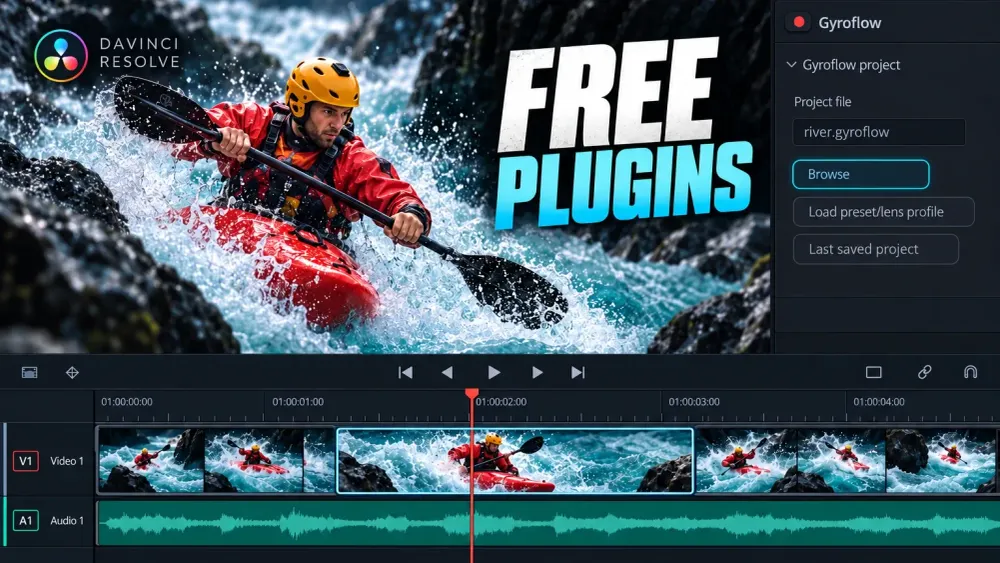
Useful free DaVinci Resolve plugins include MagicAnimate Free for quick motion, Gyroflow for footage with gyro data, TDR Nova for dynamic EQ, and ReaPlugs for older Windows audio workflows. Reactor helps you find and manage Fusion tools; spektrafilm adds film emulation, but its documented Resolve requirement is Studio. Choose by the job you need done, then check the edition and platform. “Free download” tells you very little on its own.
I’d start with one tool that fills a real gap in the edit. A folder full of effects brings dependencies, updates and project-sharing problems along with the extra controls. Resolve already has a substantial set of tools, and a plugin earns its place when it gives you something specific.
Which free plugin fits your task?
- Animate a logo, title or picture-in-picture: MagicAnimate Free. The current OFX needs Resolve 21 or later on Windows or macOS and supports Free and Studio.
- Find Fusion Fuses, macros and scripts: Reactor. It manages packages; the requirements and licence of each package still matter.
- Stabilize action-camera or other gyro-recorded footage: Gyroflow OFX. It runs on Windows, macOS and Linux. Resolve Free can load a prepared project with Browse.
- Control a harsh frequency only when it gets loud: TDR Nova. Use its free standard edition for dynamic EQ in Resolve on Windows or macOS.
- Use a noise-profile subtraction effect on Windows: ReaFIR, part of the free ReaPlugs suite. It is an older VST package, so compatibility deserves attention.
- Explore negative, print and scan stages for a film look: spektrafilm OFX. The plugin is free, currently beta, and its install notes require Resolve Studio.
The details below explain what each option gives you and where the catch is. These are different kinds of add-on, so they don’t all belong in the same plugin folder.
OFX, Fusion tools and audio plugins are different installs
OFX effects extend image processing, and MagicAnimate, Gyroflow and spektrafilm belong to this group. Follow the vendor’s installer instructions. The OpenFX folder guide covers the system locations and missing-plugin checks.
Fusion macros, Fuses and scripts work inside the compositing environment. A macro may combine existing nodes instead of adding a new compiled effect. Reactor distributes several types of Fusion package. Our Fusion macros and templates guide explains their installation and dependencies, while the Fusion learning hub gives you the node basics.
VST and Audio Unit effects process sound, and they belong to the audio plugin system, not the OFX folder. The Resolve 21.1 manual’s Audio Effects chapter documents VST effects on Windows and macOS, including VST3 support, and Audio Units on macOS. The same chapter explicitly excludes Linux from native VST support. A developer’s Linux audio-plugin binary doesn’t remove that host limitation.
Six useful free tools and their limits
| Tool | Task | Type | Platform | Edition / free limit |
|---|---|---|---|---|
| MagicAnimate Free | Entrance, hold and exit motion | OFX | Windows / macOS | Resolve 21+; Free or Studio. Permanent free tier; paid extras are separate. |
| Reactor | Find and manage Fusion packages | Package manager | Check each atom’s Status | Version, edition, dependencies and licence belong to each package. |
| Gyroflow | Stabilize footage with suitable gyro data | OFX | Windows / macOS / Linux | Free: Browse or Last saved project. Load for current file requires Studio. |
| TDR Nova | Frequency-selective dynamics | Audio VST / AU | Resolve host: Windows / macOS | Choose free standard Nova. Linux plugin binaries do not add native Resolve VST hosting. |
| ReaPlugs / ReaFIR | Legacy EQ, dynamics and noise-profile subtraction | Audio VST | Windows standalone archive | ReaPlugs 2.36 is a legacy download; check current host/build compatibility. No native Mac installer there. |
| spektrafilm | Negative, print and scan film stages | OFX | Windows / macOS / Linux developer builds | Free beta; documented requirement is Studio. LUT resale has separate terms. |
MagicAnimate Free: quicker entrance and exit animation
Look at MagicAnimate when a logo, webcam layer or title needs an entrance, movement while it stays on screen, and an exit. The current MagicAnimate free version includes In, Mid and Out animation with the same motion engine as the full version. The free tier has no account requirement or time limit.
That page has two different free offers: the permanent free version and a seven-day trial of the paid package. If you want the permanent option, choose Download free in the free-version section. The full package’s large preset library, extra positions, face detection, MagicMove and MagicKeyframe are listed separately, so don’t assume they come with the free tier.
The developer’s current platform requirements are Resolve 21 or later, Free or Studio, on Windows and Mac. This is the current OFX product, so an older tutorial about MagicAnimate V3 as a Fusion template may describe a different installation and interface.
For one simple move, native keyframes may be enough. Choose an animation add-on when you want reusable motion behavior, and skip it if it’s only another way to make the same two-keyframe move.
Reactor: a package manager for Fusion
Reactor is useful when the tool you want is distributed as a Fusion package. It is a free package manager, not one effect and not an installer for every Resolve plugin. Its catalogue can contain macros, Fuses, scripts, example compositions and compiled plugins.
The Reactor documentation explains the important checks. The Status column shows version and operating-system compatibility, and the package description tells you what will be installed and any dependencies. Read that description before you choose an atom.
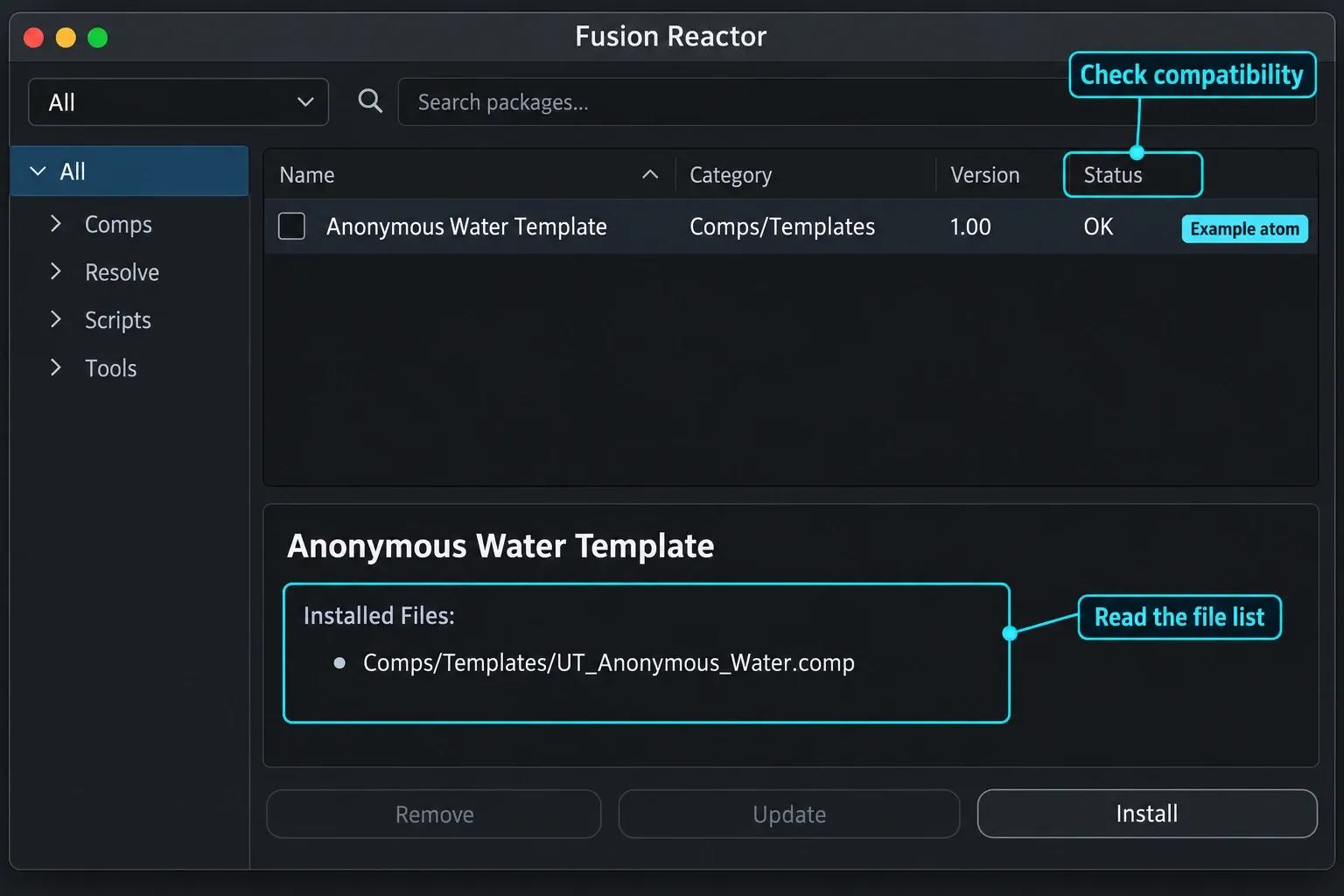
A free manager doesn’t give every package the same license or requirements. Some atoms include donation prompts, depend on another tool, or have restrictions of their own. Check each package’s terms and whether its nodes are available in your Resolve edition. If you’ll hand the project to someone else, note the exact atoms and versions it needs.
Gyroflow OFX: stabilization from recorded motion data
Gyroflow is worth considering when the camera records useful gyro data and you have a matching lens profile. It uses that motion information for stabilization, so it isn’t a promise to fix any shaky video file. The official Resolve plugin documentation supports Windows, macOS and Linux and explains the edition split.
Resolve Free can use Browse or Last saved project. The convenience button Load for current file relies on external scripting and requires Studio. If that button isn’t available in Free, you haven’t hit a paywall for the whole plugin. Load the prepared Gyroflow project manually.
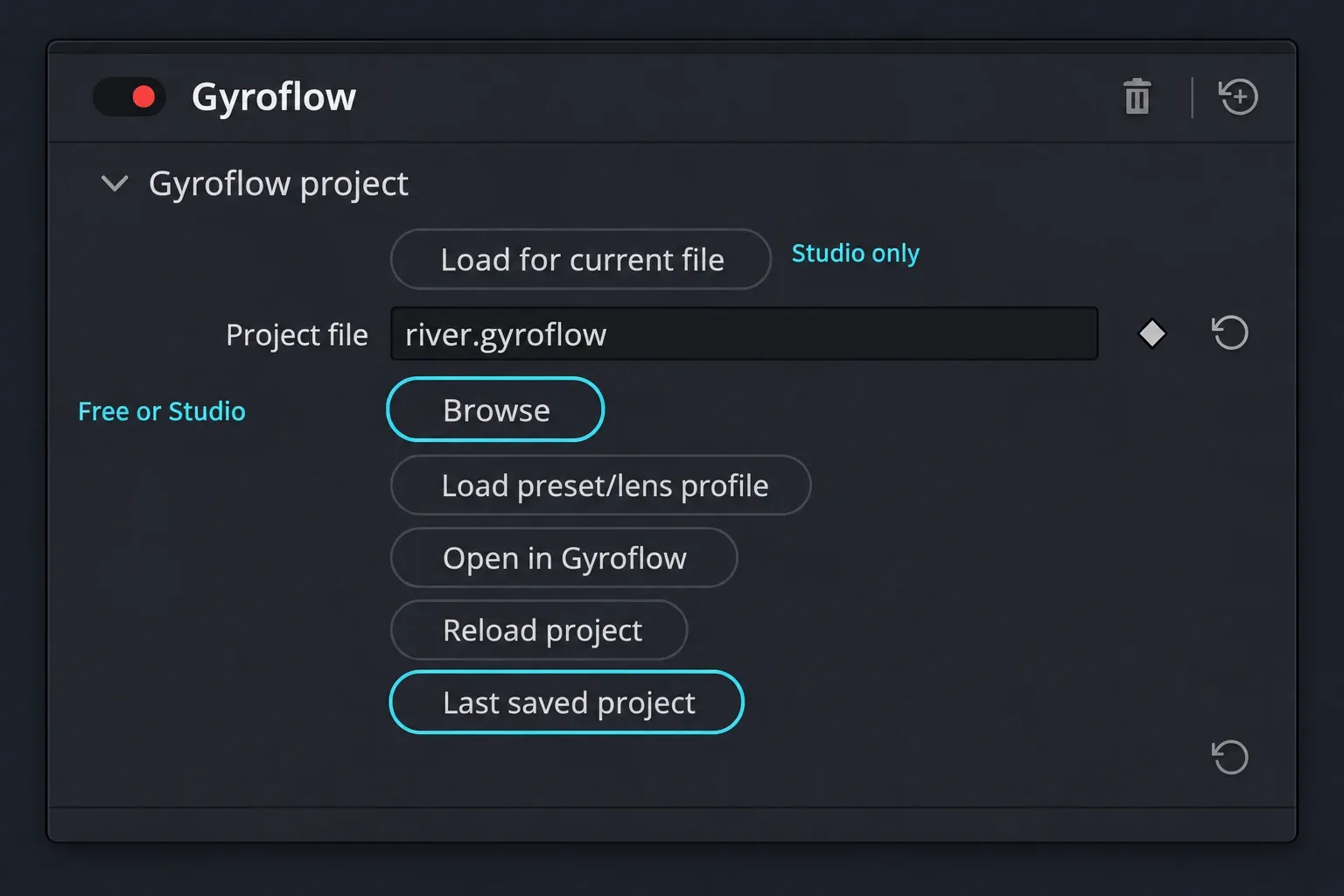
For footage that needs synchronization, the developer’s plugin workflow starts with lens and gyro setup in the Gyroflow application. Then you save a project with gyro data and load it in the editor. There’s no need to render an intermediate stabilized video just to use the plugin.
When stabilization behaves unexpectedly, check source and timeline frame rates, rotation and aspect ratio. The documentation covers those cases. If your clip has no suitable motion data, start with Resolve’s native stabilization options instead.
TDR Nova: dynamic EQ for dialogue and music
A static EQ cut reduces a frequency all the time, while a dynamic EQ can reduce it when the signal crosses a threshold. That makes TDR Nova’s free standard edition a useful choice for a harsh band that becomes a problem only during louder words or passages. Nova provides four dynamic EQ bands plus high-pass and low-pass filters.
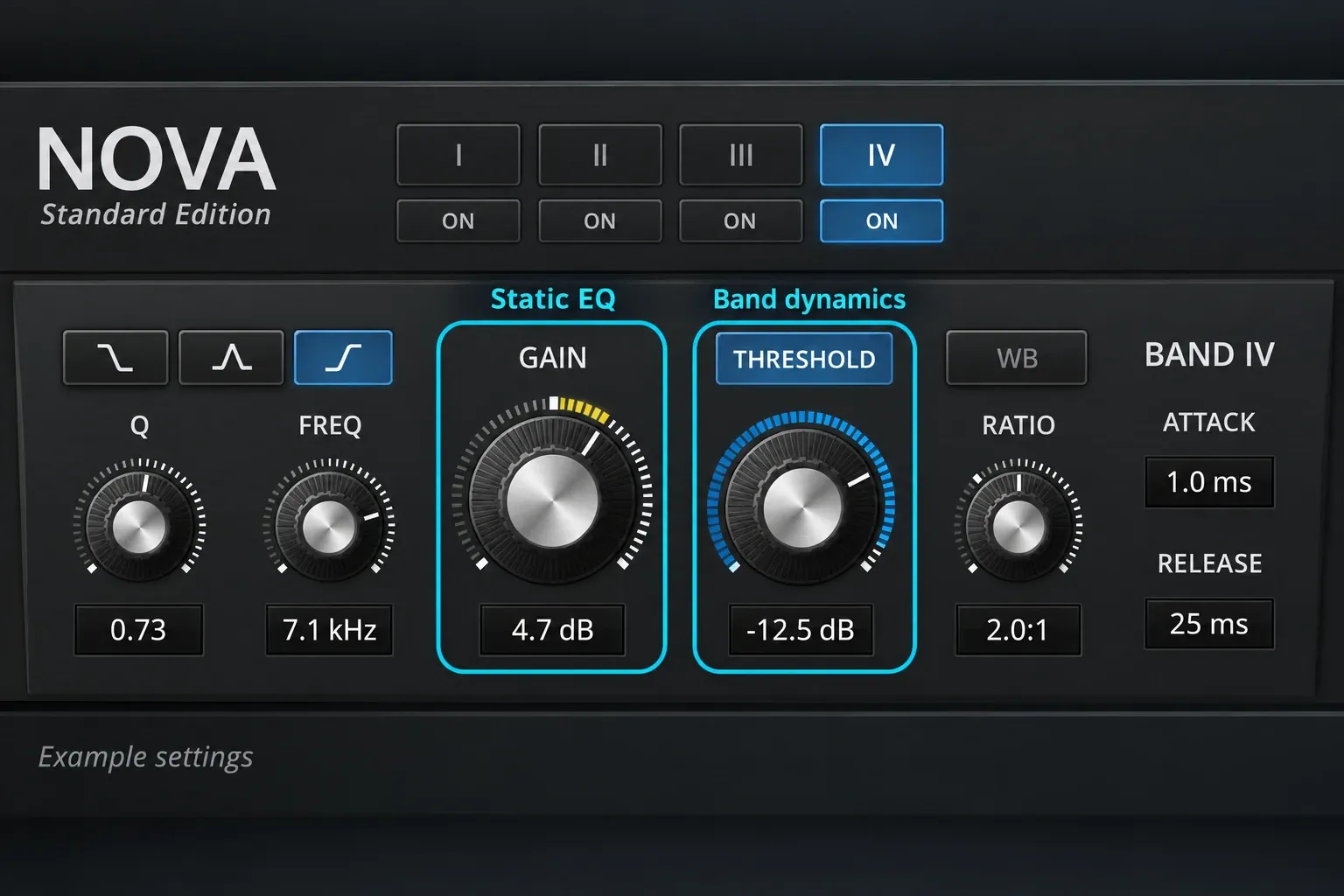
Use a suitable VST build on Windows, or VST/AU on macOS. The developer lists native Apple Silicon support and a Resolve-specific mouse-behavior fix in version 2.2.3. Nova GE is the separate paid edition; the standard download is the free one.
Nova now also has a Linux build, but Resolve’s native Linux audio host still lacks the VST support described above. Don’t pick that download expecting it to appear in the ordinary Resolve Linux Audio FX list.
Dynamic EQ isn’t voice isolation or a general background-noise remover. If the problem is a steady tonal imbalance, try the built-in Fairlight EQ for dialogue first. Add Nova when you need frequency-selective dynamics.
ReaPlugs and ReaFIR: a legacy Windows audio option
The standalone ReaPlugs VST suite is free and includes ReaEQ, ReaComp, ReaGate and ReaFIR, among other processors. ReaFIR’s Subtract mode can build a noise profile and subtract it from the signal.
Mind the age of the download. The standalone archive is ReaPlugs 2.36, dated January 2, 2016, with separate Windows 32-bit and 64-bit packages. The current REAPER version in the site header belongs to a different product. It isn’t an update number for this suite. That download page has no native macOS ReaPlugs installer.
It’s an older Windows option, so check the build and host compatibility before you depend on it. A free archive isn’t evidence of certification for every current Resolve release or processor architecture. Unless a ReaPlugs tool is specifically needed, I’d start with Fairlight’s included processors.
spektrafilm OFX: free film emulation, with a Studio requirement
spektrafilm OFX models film through negative, print and scan stages. It’s a free beta for Windows and macOS. On Linux, the install notes list developer builds without a packaged installer, so you copy the .ofx.bundle into /usr/OFX/Plugins/ yourself. For Studio users, it’s a film pipeline that goes beyond a single LUT.
The edition limit matters: the developer’s installation notes explicitly require Resolve Studio. They mention unexplained cases where it may work in Free on macOS. I wouldn’t build a Resolve Free workflow around that exception or count the plugin as reliably Free-compatible.
Its official binary licence allows personal and commercial projects, with unrestricted rendered output. Exported LUTs have separate terms, including restrictions on selling or packaging them as paid LUT products. Using the plugin in a client video is one permission, and reselling a LUT pack is another.
The code repository’s GPL license and the bundled resources in the official binary package also have different terms. Keep the license that comes with the download. Because it’s beta software, check the release notes and protect the project before you make the plugin a dependency of a long-running job.
Before you add a plugin to a real project
- Choose the permanent free tier. Look for the actual free-version download and its limits. A trial, sample asset pack or manager can sit beside paid products on the same page.
- Match your Resolve edition, version and computer. Verify the plugin’s OS, processor architecture and minimum Resolve release. A tool being free does not make it compatible with Resolve Free.
- Check the right plugin list. Video effects use Preferences > System > Video Plugins; audio effects use Audio Plugins. A Fusion package or DCTL has its own route. For the latter, use the DCTL missing-file and controls checks.
- Keep the exact version and dependencies. Record what a project needs before handing it off. The other editor needs compatible tools too; sharing the Resolve project alone does not install them.
In Audio Plugins, Resolve lists available effects and lets you enable or disable them. The manual’s Audio Plugins preferences explain that plugins that crash during startup can be disabled automatically. If a new audio effect disappears after a crash, check that list and the vendor’s compatibility notes before you turn it back on. Copying it into the OFX folder won’t solve an audio-host problem.
My starting choice is straightforward: MagicAnimate Free for reusable motion, Gyroflow for suitable gyro-recorded footage, or Nova for dynamic EQ. Add Reactor when you need a particular Fusion package. Pick the older Windows suite and the Studio-only film beta deliberately, for the specific jobs they do. That way each installation has a reason to be in the project.
