
Quick answer: DaVinci Resolve loads third-party OpenFX plugins from the shared OFX folder that every OFX host on the computer reads: /Library/OFX/Plugins on a Mac, C:\Program Files\Common Files\OFX\Plugins on Windows and /usr/OFX/Plugins on Linux. Each plugin sits there as one folder whose name ends in .ofx.bundle. Resolve has no plugin folder of its own and no setting to add one. Once a plugin loads, you'll find it under its vendor's name in the Open FX section of the Effects panel, and you can switch it on or off in Preferences > System > Video Plugins.
The built-in Resolve FX don't live in that folder. They come with Resolve, share the same Open FX category in the Effects panel and never appear in the Video Plugins list. Everything below is about the plugins you add yourself: where they go, where they show up, and what to check when one is missing, won't leave the list or takes Resolve down at launch.
Where Is the OpenFX Folder on Mac, Windows and Linux?
The Open FX chapter of the Resolve 21.1 Reference Manual gives the three folders and explains why they are fixed: under the OFX standard, every OFX plugin on a workstation goes in one place, so one install can serve every application on the machine that supports the standard. Next to each folder I've put the location of the file Resolve uses to remember which plugins it found, because you'll need it when that list goes stale.
| System | OpenFX plugins folder | Plugin list file (OFXPluginCacheV2.xml) is in |
|---|---|---|
| macOS | /Library/OFX/Plugins | /Users/<name>/Library/Application Support/Blackmagic Design/DaVinci Resolve |
| Windows | C:\Program Files\Common Files\OFX\Plugins | C:\Users\<name>\AppData\Roaming\Blackmagic Design\DaVinci Resolve\Support |
| Linux | /usr/OFX/Plugins | Not documented by Blackmagic |
The plugin list paths come from Blackmagic's Dwaine Maggart on the official forum. Replace <name> with your user account name. Blackmagic hasn't said where the file lives on Linux.
On a Mac, the trap is the word Library. The plugins folder sits in the Library at the top level of your startup disk, not the Library inside your home folder. Gyroflow's install notes warn about exactly this and create the folder with an admin password when it doesn't exist yet (sudo mkdir -p /Library/OFX/Plugins). To open it in Finder, press Shift+Cmd+G, paste /Library/OFX/Plugins and press Return.
On Windows, the folder sits under Program Files, so copying into it needs administrator rights, which is why vendor installers ask for them. If a plugin shows up in Resolve but nothing is in that folder, the OpenFX packaging spec lets hosts read extra folders from an OFX_PLUGIN_PATH environment variable before the default one. Blackmagic doesn't document whether Resolve does that, but a forum regular suggested checking the variable in a 2025 thread from a user whose Topaz plugins were listed but missing from that folder. You'll find it in the Environment Variables dialog of Windows' advanced system settings. In that thread the real culprit turned out to be a stale plugin list, which is covered further down.
How to Install an OpenFX Plugin in DaVinci Resolve
The manual leaves installation and licensing to the plugin vendor, so their installer is the route to take when there is one. When a plugin ships as a bare bundle, the steps are the same either way:
- Quit DaVinci Resolve. It loads plugins when it starts, so one added while it's running won't appear until the next launch.
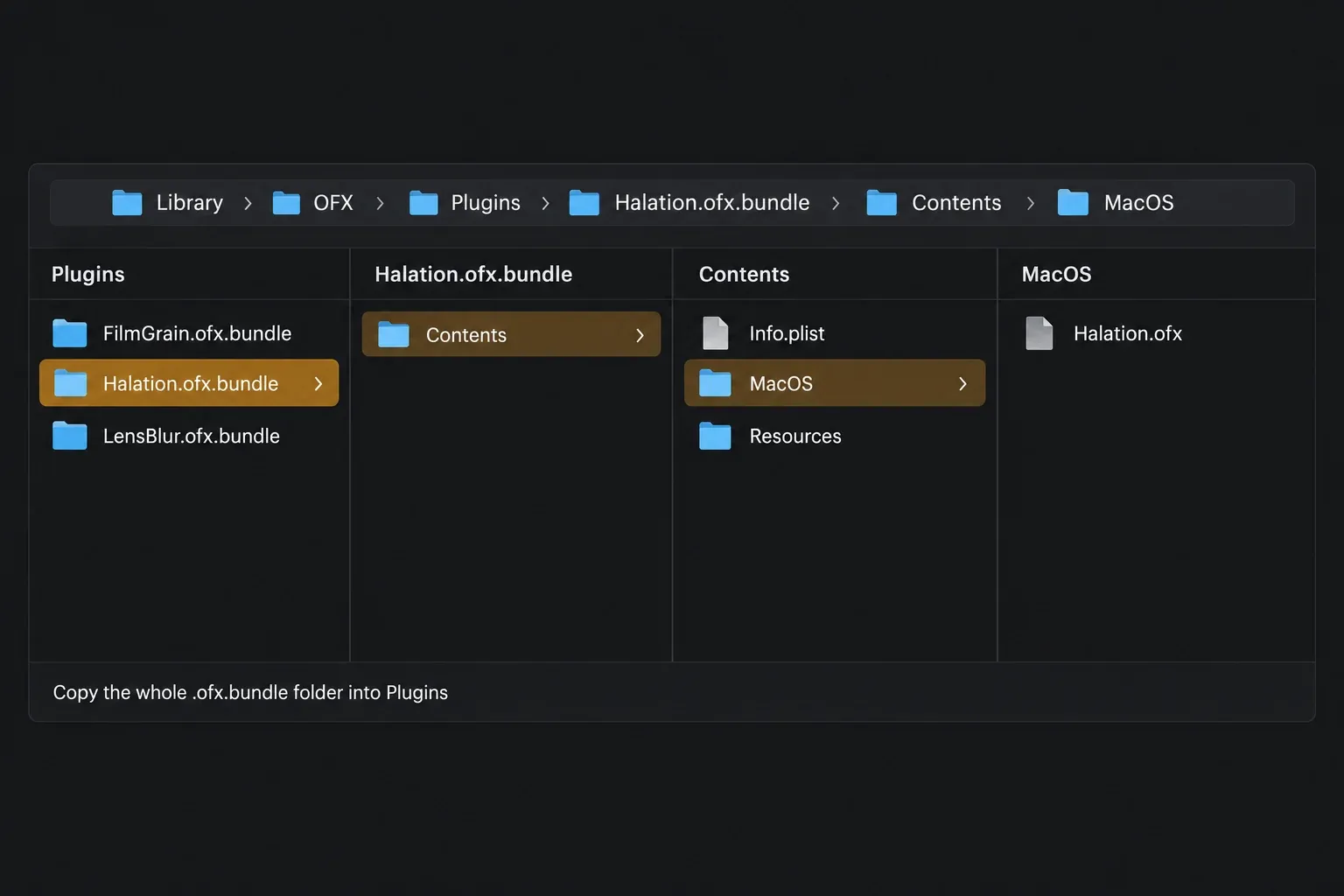
- Run the vendor's installer. If you only have a .ofx.bundle folder, copy the whole folder into the OFX Plugins folder for your system and enter your administrator password when asked.
- Start Resolve, open DaVinci Resolve > Preferences > System > Video Plugins and look for the bundle with its box ticked and the status Loaded Successfully.
- Open the Effects panel on the Edit, Color or Fusion page and look under Open FX for the vendor's name.
The bundle is a folder with a fixed layout, set out in the OpenFX packaging rules: NAME.ofx.bundle holds a Contents folder, and inside that sits one folder per platform, such as MacOS, Win64, Win-arm64ec or Linux-x86-64, each with the actual NAME.ofx file. Hosts look for that structure, so a loose .ofx file or a bundle's unpacked contents won't match it. The ntsc.rs install guide puts it bluntly: copy the folder itself, not its contents.
Where Installed OpenFX Plugins Show Up in DaVinci Resolve
The same plugin can turn up on three pages, and each page files it a little differently:
- Edit page: Effects > Open FX holds Filters (Resolve FX plus any third-party filters), Transitions and Generators, organized by type and group from the metadata inside each plugin. Drag a filter onto a clip and adjust it in the Open FX panel of the Inspector.
- Color page: open Effects at the top right of the toolbar. Each vendor's plugins appear under a header named for the collection, and the Library has a search field for big packs. Drag a plugin onto a node. A node holds one plugin, so dropping a second one replaces the first, and right-click > Remove OFX Plugin takes it off again.
- Fusion page: the Effects Library's Open FX category lists Resolve FX and installed third-party plugins next to Fusion's own tools. The Fusion page guide covers how those nodes fit into a comp.
Why an OpenFX Plugin Isn't Showing Up in DaVinci Resolve
Start with the first two. They're the quickest to rule out, and the rest take a little digging:
- Resolve skipped it. At startup Resolve checks how each plugin loaded last time and skips any plugin that caused a crash or hang. Open Preferences > System > Video Plugins, tick the plugin, click Save and restart. If it crashes again, send the vendor your exact Resolve version.
- It's in the wrong place. On a Mac, check that the bundle is in
/Library/OFX/Pluginsat the top of the disk, not in your home folder's Library, and that you copied the .ofx.bundle folder rather than what's inside it. - It's built for another processor. Resolve 21 on a Mac needs Apple silicon and macOS 15 or later, and macOS won't let one process mix arm64 and Intel code, so a plugin with only an Intel binary can't load. On Windows on Arm, the packaging spec names Resolve as an Arm64EC host, which can load a plugin's x64 build or an Arm64EC build from a Win-arm64ec folder, but not a native Arm64 build. The Windows Arm guide covers checking the rest of your plugin chain before you move a project.
- The plugin list is stale. Resolve keeps what it found in OFXPluginCacheV2.xml (locations in the table above) and builds a new one when the file is gone. Quit Resolve, rename it to
OFXPluginCacheV2.xml.oldand start Resolve again. Older fixes tell you to delete a file called OFXPluginCache.xml, but Blackmagic says that file has been deprecated. That came up in a forum thread about plugins listed in Video Plugins that were missing from the Color page Effects panel. - Your Resolve version isn't supported yet. Plugins come from their vendors, so whether one works with a given Resolve release is the vendor's call. Check their supported versions for your exact Resolve release and edition, ideally before you update. The safe update checklist has plugins on its list for that reason.
- It's a DCTL. DCTL files aren't OpenFX plugins and use their own folder. If that's what went missing, the DCTL guide covers where they go.
An empty Video Plugins table on its own isn't a fault. It only lists OpenFX plugins you've installed from other companies, and a reply on the Blackmagic forum in June 2026 made that point to a user who thought a fresh install was broken. Resolve's own effects stay in the Effects panel.
How to Disable or Remove an OpenFX Plugin
To stop a plugin loading without uninstalling it, untick it in Video Plugins and click Save. The manual pitches this panel as a way to keep the Open FX list down to what you use, or to shut out a plugin that makes the system unstable. Enable All and Disable All flip the whole list at once.
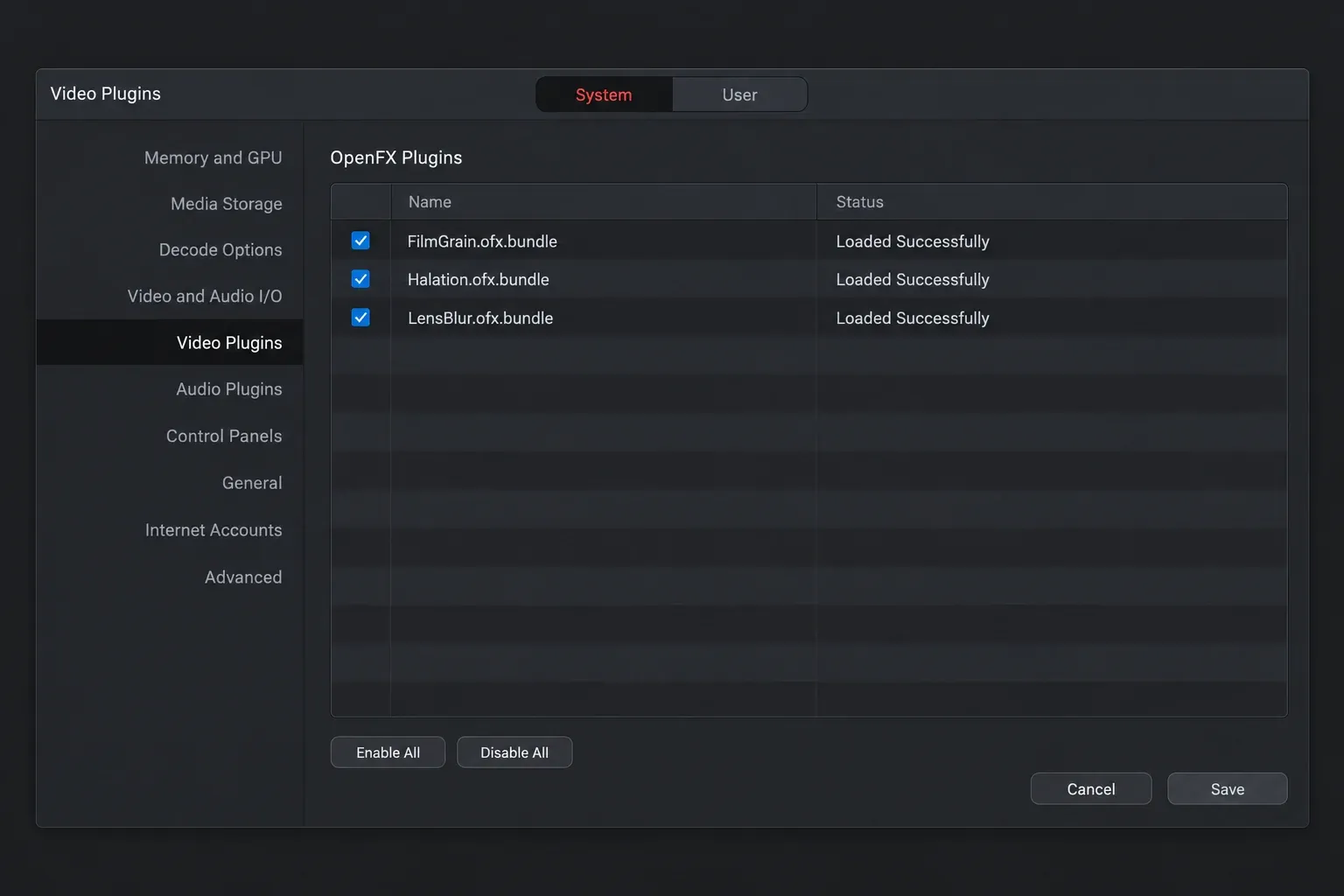
To remove one for good, use the vendor's uninstaller if there is one. Otherwise quit Resolve and move the .ofx.bundle out of the Plugins folder. I'd move it to a backup folder instead of deleting it, so you can put it back if an old project needs it. If its name still shows in Video Plugins afterwards, rebuild the list with the rename above. Dwaine Maggart explained in 2025 that a removed plugin can stay in the list until you do, and the user who asked confirmed the rename cleared it.
When an OpenFX Plugin Crashes DaVinci Resolve
Resolve's own safety net is that startup check: a plugin that crashed or hung last time is skipped on the next launch. When crashes keep coming anyway, take third-party plugins out of the picture before you reinstall anything. The plugin section of the crash guide sets that up as a controlled test. In the same forum thread about Topaz plugins, Dwaine Maggart noted that in Topaz forum cases where the Topaz plugin was crashing Resolve, removing the Topaz files from the Plugins folder or renaming the folder stopped the crashes.
Heavy plugins can also drag playback down. The manual warns that some third-party plugins are extremely processor intensive, more so when several sit in one grade, and points to Smart Cache for clips that carry them. The render cache guide explains how to set that up, and GPU memory full errors have their own fixes.
What Is the DaVinci Resolve Open FX Renderer?
The DaVinci Resolve Studio installer has a Custom Install checkbox called DaVinci Resolve Open FX Renderer. You don't need it to use plugins inside Resolve. It installs a plugin for standalone Fusion Studio that applies a Resolve grade you exported as a .DRX file. The Fusion chapter of the manual lists what carries over: the native color and sizing palettes, most Resolve FX and most third-party Open FX, but not temporal effects or Magic Mask. I'd leave it unticked unless you grade in Resolve and finish shots in Fusion Studio.
Frequently Asked Questions
Where is the OpenFX plugins folder on a Mac?
It is /Library/OFX/Plugins, in the Library folder at the top level of your startup disk, not the Library inside your home folder. In Finder, press Shift+Cmd+G, paste the path and press Return to open it.
Where does DaVinci Resolve install OpenFX plugins on Windows?
Third-party OFX plugins go in C:\Program Files\Common Files\OFX\Plugins, the shared folder every OFX host reads. Resolve's built-in Resolve FX aren't in it. They come with Resolve and appear in Effects > Open FX.
Why isn't my OpenFX plugin showing up in DaVinci Resolve?
Check Preferences > System > Video Plugins first, because Resolve skips plugins that crashed or hung on the last launch. Then check that the bundle is in the right folder, built for your processor and supported by your Resolve version. If the list still looks wrong, quit Resolve and rename OFXPluginCacheV2.xml so it rebuilds.
Why is the Video Plugins list empty in DaVinci Resolve?
Because no third-party OpenFX plugins are installed yet. The list only shows plugins you've added from other companies. Resolve's own effects are in the Effects panel.
Can I change the OpenFX plugins folder in DaVinci Resolve?
Resolve has no setting for it. Audio Plugins has a folder list for VST effects, but Video Plugins only lists what is installed, so put OFX plugins in the standard folder for your system.
How do I reset the OpenFX plugin list in DaVinci Resolve?
Quit Resolve, find OFXPluginCacheV2.xml (AppData\Roaming\Blackmagic Design\DaVinci Resolve\Support on Windows, Library/Application Support/Blackmagic Design/DaVinci Resolve in your user folder on a Mac) and rename it, for example to OFXPluginCacheV2.xml.old. Resolve builds a new list at the next launch.
Should I install the DaVinci Resolve Open FX Renderer?
Only if you use Fusion Studio. It is a Custom Install option in the Resolve Studio installer that lets Fusion Studio apply a grade exported from Resolve as a .DRX file. You don't need it to use OpenFX plugins in Resolve.
