Quick answer: get DaVinci Resolve Studio from Blackmagic Design's official Resolve and Fusion support page. Under Latest Downloads, pick the card titled DaVinci Resolve Studio, not the Free card beside it, then choose Mac OS, Linux, Windows x86 or Windows ARM, whichever the release offers.
Anyone can download the installer, but Studio isn't free to use. The current Studio 21.1.1 card asks for a licence dongle, a Blackmagic Cloud licence or a software activation code. If you already own a valid key or dongle, take the support-page download; you don't have to buy the same licence again just to get the installer. If you don't own one, start with Resolve Free or buy Studio through an official channel.
Checked October 5, 2026: Blackmagic's catalogue lists DaVinci Resolve Studio 21.1.1, posted October 2, 2026, a maintenance update to the 21.1 release from September 8. Look at the live release card before you download, because the version, platforms and requirements can change.
Download the Correct Studio Package
On the support page, Free and Studio show up as separate software updates. The Free card just says DaVinci Resolve. The paid one carries the word Studio in both its heading and the name of the downloaded package.
Still deciding between editions or operating systems? Go to the Resolve download hub first. This page picks up once Studio is the edition you've settled on.
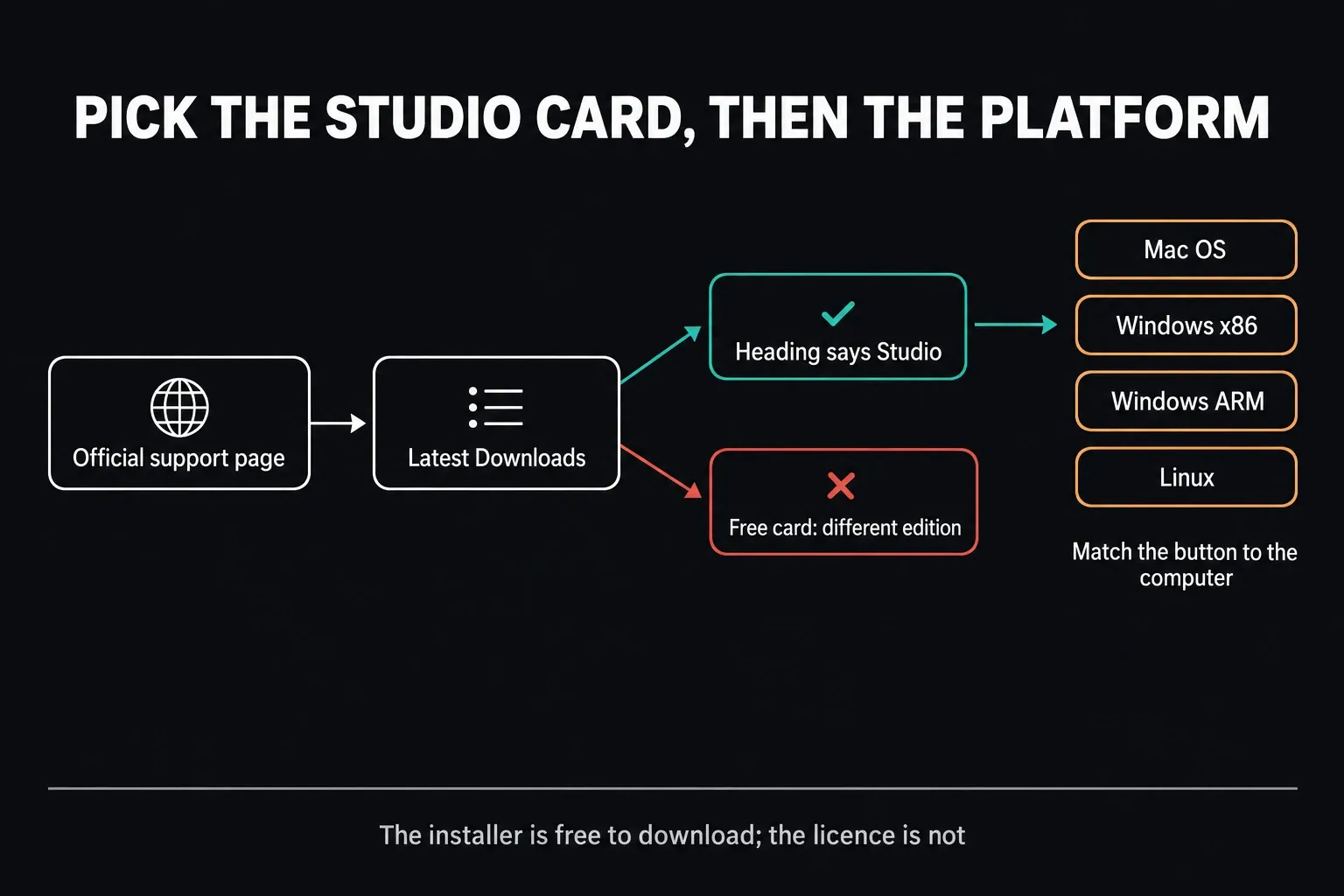
- Open the official Blackmagic Resolve and Fusion support family page.
- Wait for the Latest Downloads column to load.
- Find DaVinci Resolve Studio 21.1.1 Update, or a newer current Studio card if Blackmagic has released one since.
- Open the release note and check that the heading includes Studio.
- Pick the platform that matches the computer.
- Fill in the requested download details, or use the download-only route if the dialog offers one.
- Save the official package and let it finish before you open or extract it.
We don't host the installer here. Skip torrents, “pre-activated” copies, key generators and repacks. A modified Studio package can compromise the workstation, and it doesn't give you a legitimate licence either.
Choose Mac, Linux, Windows x86 or Windows ARM
| Platform button | Choose it for |
|---|---|
| Mac OS | A Mac that meets the current Studio release requirements. Resolve 21.1.1 currently names macOS 15 Sequoia or later and Apple silicon. |
| Windows x86 | A normal Intel or AMD 64-bit Windows PC. Blackmagic uses x86 as the family label for this current 64-bit package. |
| Windows ARM | A supported Windows-on-ARM computer. The current 21.1.1 baseline names Windows 11 for ARM with a Qualcomm Snapdragon X Elite or NVIDIA RTX Spark processor. |
| Linux | A Linux workstation that matches Blackmagic's current distribution, memory and GPU requirements. |
Architecture and licence are two separate questions. A Studio activation code won't make the Windows x86 installer right for an ARM machine, and a dongle won't make an unsupported Mac compatible. Check the current Resolve system requirements before pulling down a large package for an old or unusual system.
On an ordinary Intel or AMD PC, the Windows installation guide covers the platform steps. On a Mac, follow the Mac download guide. If Windows reports an ARM-based processor, read the Windows x86 versus ARM guide before choosing a package.
The Download Does Not Create a Studio Licence
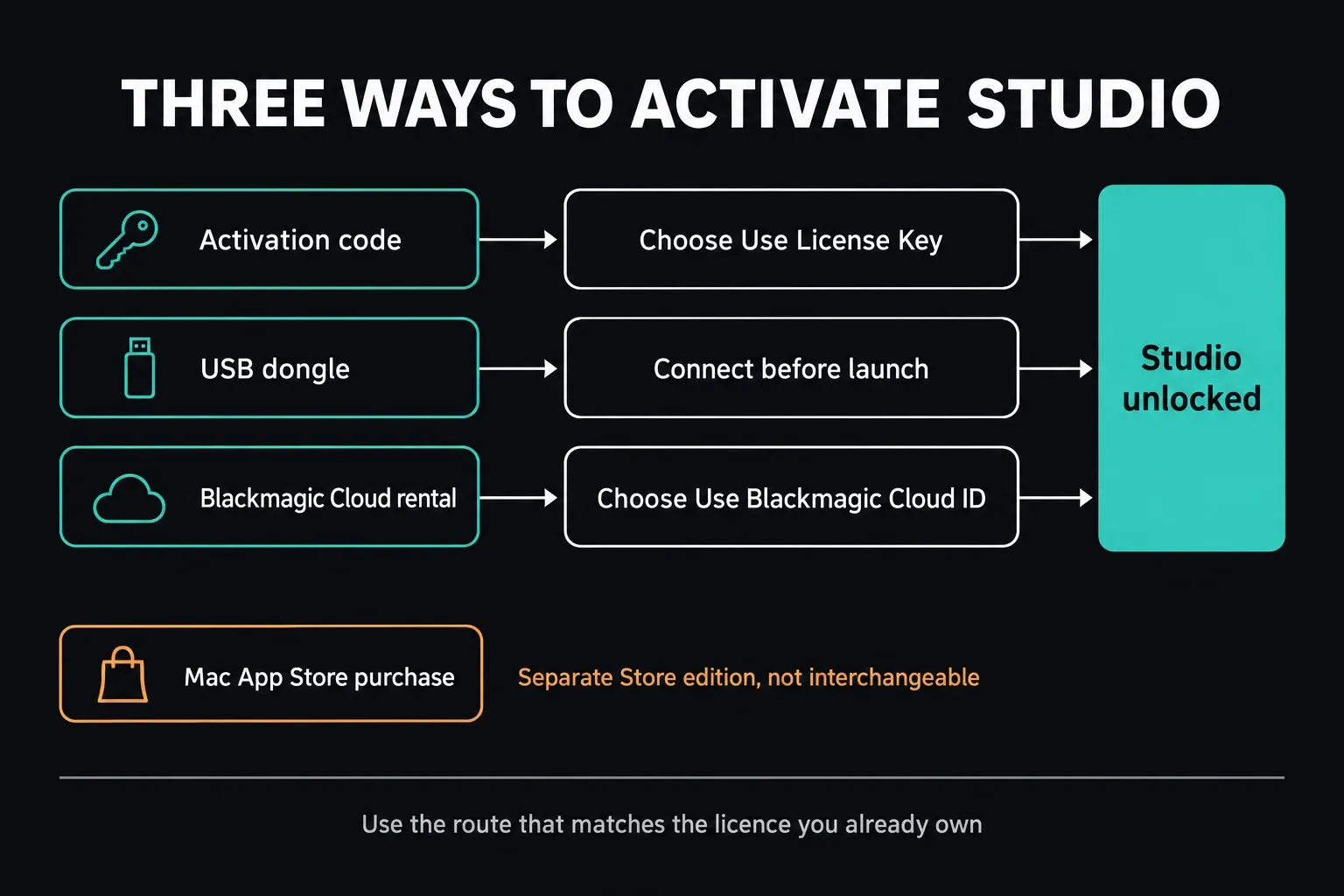
For the installer you download from Blackmagic, there are three licence routes:
- Software activation code: choose Use License Key and type your Studio key when asked. Registering on the download page isn't this activation step.
- USB licence dongle: plug in the legitimate Studio dongle before launch and leave it connected while you use Studio.
- Blackmagic Cloud rental: choose Use Blackmagic Cloud ID and sign in to the profile that has a Studio licence assigned to it. Just having a Cloud account isn't enough.
Blackmagic's Studio Cloud sign-in guide walks through the activation screen. Choose Use Blackmagic Cloud ID, click Continue and sign in. Next, pick Personal for your own rental, or the organization that assigned your licence. Click Log In and confirm the activation. Those profiles are alternatives, so select the one that owns the licence, not every profile in the list.
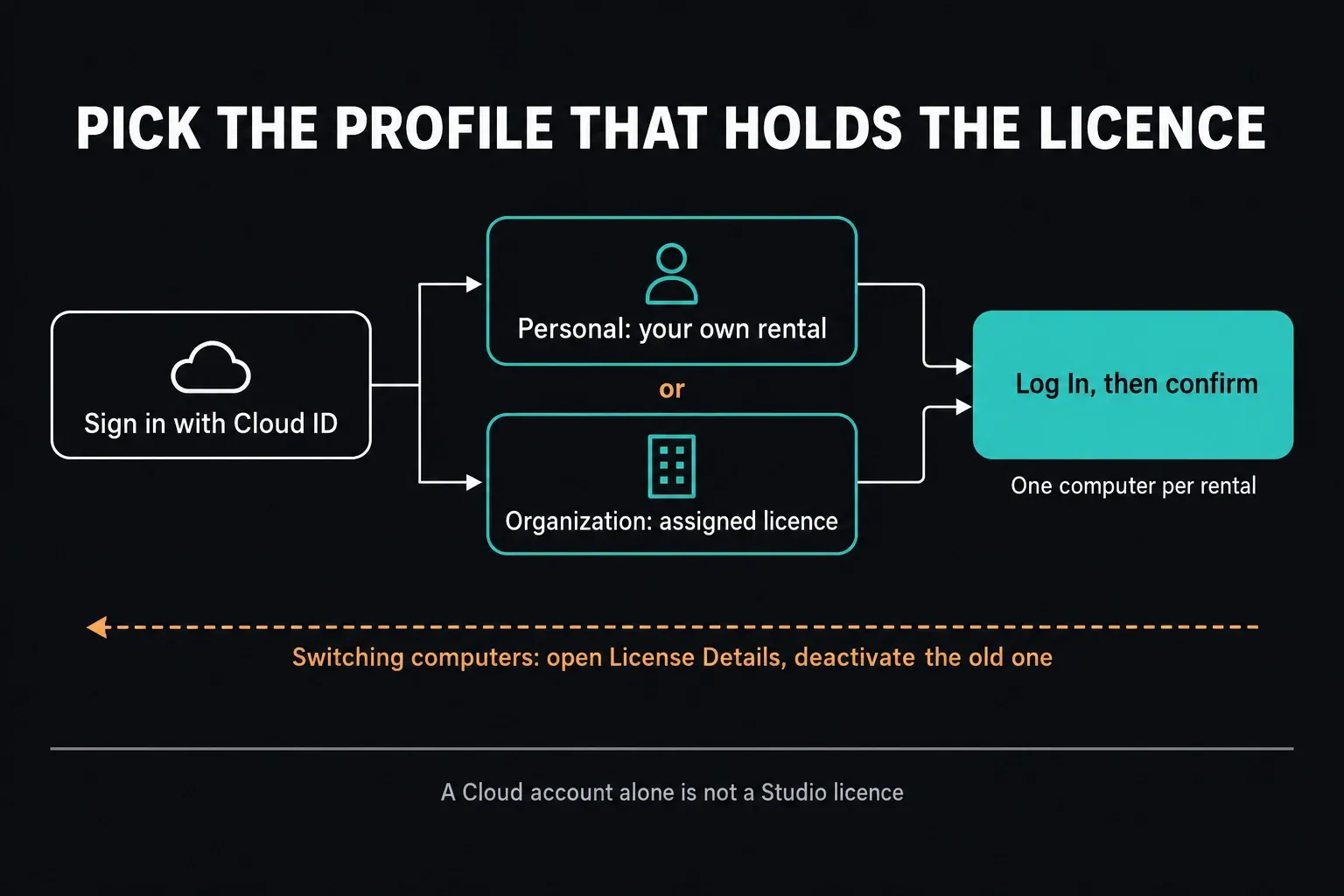
A Cloud rental activates Studio on one computer at a time. To move it, open License Details in the Cloud License Manager and deactivate the old computer, then sign in on the new one. Blackmagic's rental-licence management instructions keep this separate from unassigning the licence from a person, so you don't need to unassign it from yourself just to switch computers.
Keep activation codes private. Don't show them in public screenshots, send them to strangers or type them into unofficial activators.
Bought Studio in the Mac App Store?
Bought Studio in the Mac App Store? Download that Store edition with the Apple Account you paid with; the US listing checked on October 17, 2026 showed version 21.1.1, dated October 6, at US$299.99. It won't give you a key for Blackmagic's direct installer, and a direct key, dongle or Cloud rental won't activate the Store edition either. Blackmagic's explanation of the separate licence channels covers the split. Check which edition you already own before you buy again.
Is DaVinci Resolve Studio Free or a Trial?
DaVinci Resolve Free is its own edition; Studio is the paid one. On October 1, 2026, Blackmagic’s US Studio page listed Studio 21 at $295. That's the direct purchase price, not a Cloud rental or a Mac App Store quote. Regional prices, tax and bundles vary, so read the Resolve price and licence guide before you buy.
When I checked the official product and support pages on October 1, neither offered a time-limited Studio trial, only Resolve Free and paid Studio. Free is fine for learning and a first compatibility check, but it can't prove a Studio-only effect or codec works for you before you pay. Downloading Studio on its own doesn't switch those features on.
If the open question is features, use our Free versus Studio comparison. Since 21.1, Blackmagic has also moved advanced scripting, Python included, into Studio. Buy Studio for a specific capability or workflow, not because an unofficial page calls it the “full version.”
Back Up Before Moving From Free or Updating Studio
Free and Studio share the same Resolve project ecosystem, but changing the application version can still change a project. Protect your way back before you install:
- Back up the project library with the controls for its type: local, network or Cloud.
- Export active or irreplaceable projects separately as .drp snapshots, and keep the source media and anything else they depend on. A plain project export isn't a footage backup.
- Write down the current Resolve edition and the full build number.
- Note the OpenFX, VST, GPU driver, panel and media dependencies you can't work without.
- Keep the backup off the cache and working-media drive.
- Close Resolve before you run the Studio installer.
The Studio 21.1.1 readme is precise about compatibility: Blackmagic has kept the project libraries accessible to 20.3.2, but individual projects created or opened in 21.1.1 can't be opened in 20.3.2 afterwards. Reinstalling an older Studio app isn't a full downgrade plan, so keep a compatible pre-update backup.
Run through the safe Resolve update workflow before you move a production library to a newer Studio build.
Install Studio on the Computer
Once the official package has finished downloading:
- Check that the filename and package say Studio, not Free.
- Extract the archive if your platform's download is compressed.
- Run the installer inside and read each component choice.
- If the installer offers to replace or remove the Free application, only continue once the project backups are done.
- Go by the component information in the Studio readme. Desktop Video is for Blackmagic monitoring hardware; you don't need it for an ordinary computer display.
- Restart only if the installer or the operating system asks you to.
- Launch DaVinci Resolve Studio and choose the licence path that matches what you own.
To remove an existing direct installation, follow Blackmagic's platform instructions: Uninstall Resolve on Mac, Programs and Features on Windows, or the installer's uninstall option on Linux. Don't delete a project-library folder by hand while you're removing the app. If the installer itself fails, work through the Resolve installation-error guide before you try a second package.
Prove the First Studio Launch
Activation working doesn't mean the installation is finished. Open a duplicate project and check the workflow you bought Studio for:
- confirm that the title bar or About screen says Studio;
- check that the expected project library and storage locations are there;
- import a clip from the camera, phone or screen recorder you really use;
- try the Studio-only effect, codec or output that justified the licence;
- check audio, OpenFX, VST, LUTs, fonts and any external panels;
- export a short, typical section and play it outside Resolve.
A light H.264 sample can't vouch for a job built on RAW, 10-bit HEVC, noise reduction, multicam, Fusion or immersive audio. The acceptance test should look like the production timeline.
Update an Existing Studio Installation
Move to the newest current Studio card only when the project and its dependencies are ready for that version. Owning an older activation key or dongle is no reason to download from an unknown mirror. Blackmagic's official archive keeps previous Studio packages next to the current one, and the old versions and rollback guide explains how to pick one without putting the working project at risk.
Before updating, note the build you're on, back up projects and check plugin, operating-system and GPU-driver compatibility. After updating, open a duplicate project first. If a regression shows up, leave the newer setup as it is and restore a tested pre-update backup with the matching official old version, rather than trying to force a newer project backward.
If Studio Will Not Activate or Projects Are Missing
| Symptom | First check |
|---|---|
| Resolve asks for a key unexpectedly | Identify the licence you intend to use. Choose the key or Cloud route, or check that the dongle is connected. A Cloud login does not replace an activation key you already own. |
| Activation key is rejected | Check exact characters, internet access and purchase source. Unofficial activation tools are not a recovery path. |
| Dongle is not detected | Connect the legitimate dongle before launch, test a direct USB port and confirm that the Studio build is installed. |
| Cloud ID has no licence | Check that a rental has been assigned and select the correct Personal or organization profile. If it is active on another computer, deactivate that computer through License Details first. |
| Resolve launches but says Free | Check the downloaded package and application name. The Free and Studio installers are separate. |
| Project Manager looks empty | Leave the old path untouched. Identify the original local, network or Cloud library and reconnect it through the documented workflow. |
If licensing is still blocked, contact Blackmagic or the authorised seller with the purchase channel, your order details, the exact Studio version, the platform and the full error text. Never post the full activation code in a public forum.
Frequently Asked Questions
Where is the official DaVinci Resolve Studio download?
Use Blackmagic Design's Resolve and Fusion support page. Under Latest Downloads, choose the DaVinci Resolve Studio card, check the current version and select the Mac, Linux, Windows x86 or Windows ARM button shown for that release.
Can I download DaVinci Resolve Studio for free?
You can get the installer from Blackmagic, but downloading it doesn't give you a Studio entitlement. Studio needs a supported licence dongle, a Blackmagic Cloud licence or a software activation code. DaVinci Resolve Free is the separate no-cost edition.
Does DaVinci Resolve Studio have a free trial?
When I checked the official product and support pages on October 1, 2026, they didn't offer a time-limited Studio trial. Resolve Free is a separate no-cost edition, but it can't test every Studio-only capability, and downloading the Studio installer doesn't start a trial.
Do I need an activation key for DaVinci Resolve Studio?
Not always. The direct Blackmagic installer works with an activation key, a licence dongle or an assigned Cloud rental. The Mac App Store edition runs on its own Store purchase, not on those direct-install licences.
Can I install Studio after using DaVinci Resolve Free?
Yes. Back up the library with the controls for its local, network or Cloud type, export critical projects separately and keep the media safe. Download the separate Studio installer, close Resolve, follow the platform instructions and check that the expected projects are there before production work.
Which Studio download should an Intel or AMD Windows PC use?
Choose Windows x86. That's Blackmagic's label for the current 64-bit Intel and AMD package. Choose Windows ARM only for a supported Windows-on-ARM computer that meets the current processor and operating-system requirements; for 21.1.1 that means a Qualcomm Snapdragon X Elite or NVIDIA RTX Spark processor.
Can I download an older DaVinci Resolve Studio version?
Yes. Blackmagic's official support archive includes previous Studio releases. Match the exact edition, platform and project backup, and remember that a project opened in a newer Resolve version may not open in the older build.
