Quick answer: Put dialogue and music on separate tracks, select the music track, enable Ducker, and choose the dialogue track as Source. Start with a modest Duck Level in the Inspector, then tune Lookahead, Rise Time, Hold and Recovery until speech stays clear without obvious pumping.
Use the current Fairlight Dynamics sidechain when a track or bus should control another track or bus; use manual keyframes for editorial exceptions.
Audio ducking has one job: clear space for the words while keeping the music emotionally present. The technical setup takes minutes. The difficult part is making the movement quiet enough that viewers hear the dialogue, not the mixer working.
DaVinci Resolve 21 offers three routes that are often described as the same feature. Ducker Track FX is the fastest direct method. Fairlight sidechain compression provides routing and compressor control for tracks or busses. Studio's AI Audio Assistant can apply ducking during a much broader automatic mix. Choose deliberately instead of stacking all three.
Pick the Right Ducking Method
| Situation | Best route | Why |
|---|---|---|
| One or more dialogue tracks should lower a music track | Ducker Track FX | Fast setup, purpose-built timing controls and clear source selection. |
| A dialogue bus should control a music bus | Fairlight compressor sidechain | The Dynamics sidechain can use a track or bus as its detector source. |
| Only a few phrases need a carefully shaped dip | Volume keyframes or fader automation | You decide exactly where and how far every move happens. |
| The entire unmixed timeline needs a first-pass mix | AI Audio Assistant in Studio | It categorizes and balances the larger mix, with ducking as only one operation. |
Ducker Track FX is available in the free version as well as Studio. The official Fairlight Audio Post guide explicitly says the free Resolve 20 build shows two Track FX, Dialogue Leveler and Ducker.
On September 5, 2026, the current Resolve 21 Reference Manual still documented Ducker without a Studio-only label. AI Audio Assistant is different: its manual heading is explicitly Studio Version Only.
Prepare Dialogue and Music Before Ducking
Automation can't fix a timeline whose categories are mixed together. Keep dialogue on dialogue tracks and music on music tracks. Don't place a voiceover clip between music clips on the same track and expect a track-level Ducker to understand the editorial meaning.
- Move speech to clearly named tracks such as Dialogue or VO.
- Keep the bed on a separate Music track.
- Set a sensible static balance first. The music should already be close to its non-dialogue level.
- Clean obvious bumps, clothing noise and long empty regions from the dialogue source.
- Listen once without ducking and mark the places where the voice is actually masked.
Ducking reacts to signal level, not meaning. A breath, mic bump or loud room tone can trigger it just like a word. Basic clip cleanup from the mute and split audio workflow often prevents more false triggers than another round of control tweaking.
Set Up Ducker Track FX
- Open the Edit or Fairlight page and expose the audio mixer.
- Select the music track. This is the target whose level will be reduced.
- Open Track FX from the track's Inspector or mixer channel and enable Ducker.
- In Source, choose the dialogue or voiceover track that should trigger the reduction.
- Add more dialogue sources with the plus control when several speakers live on separate tracks.
- Loop a section containing speech, silence and another speech phrase while you tune the controls.
Put the Ducker on the music, not the voice. The source is only the detector. The target is the signal that changes. This source-versus-target reversal is the most common setup mistake.
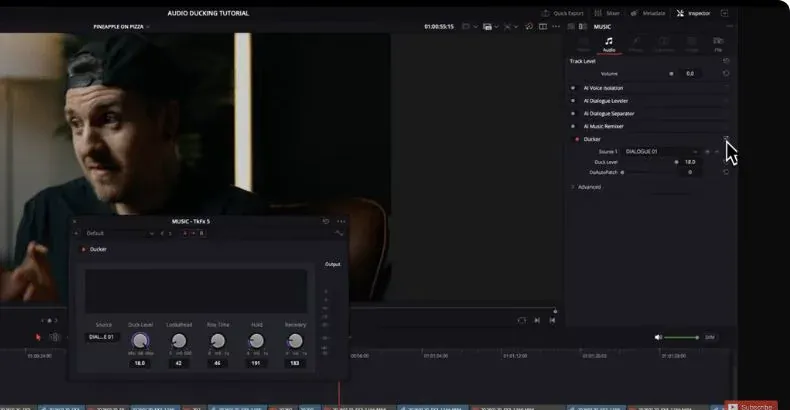
Blackmagic's latest Fairlight overview describes the same flow: open Ducker on the target track, choose one or more dialogue sources, then adjust depth and recovery. In the full Ducker window, Command-click on macOS or Ctrl-click on Windows to add tracks; in the Inspector, use the plus control to create Source 2 and Source 3.
The real interface frames below come from Dunna Did It's January 2026 ducking walkthrough in Resolve Studio 20; the controls and paths were checked against the current Resolve 21 manual.
Understand the Ducker Controls
- Duck Amount / Duck Level: how far the target track is reduced while a source is active. The full Ducker window says Duck Amount; the Inspector says Duck Level.
- Lookahead: lets reduction begin before the detected speech reaches the output, preventing the first syllable from fighting the music.
- Rise Time: how the Ducker moves into the reduced state.
- Hold: how long it stays reduced through a short pause.
- Recovery: how it returns toward the original music level after speech.
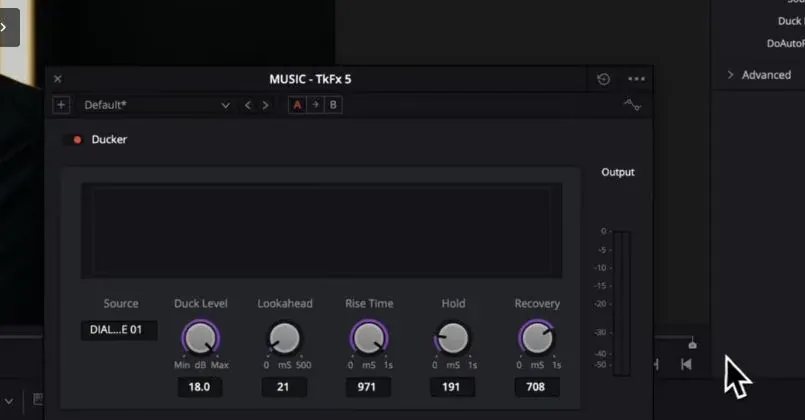
Start with depth, then timing. Lower Duck Amount until the words are clear, but stop before the music appears to fall through a trapdoor. Next, tune the entrance around the first syllable. Finally, set Hold and Recovery so brief pauses inside a sentence don't make the music breathe between every few words.
There's no universal dB preset. The Resolve 21 manual gives 2.7 dB as the default and says 2 to 5 dB works best most of the time, but that's a starting range, not a delivery standard.
A sparse piano bed, dense rock track, quiet narrator and energetic presenter mask one another differently. Use the actual program and monitor at a realistic playback level.
Use Fairlight Sidechain Compression for Tracks or Busses
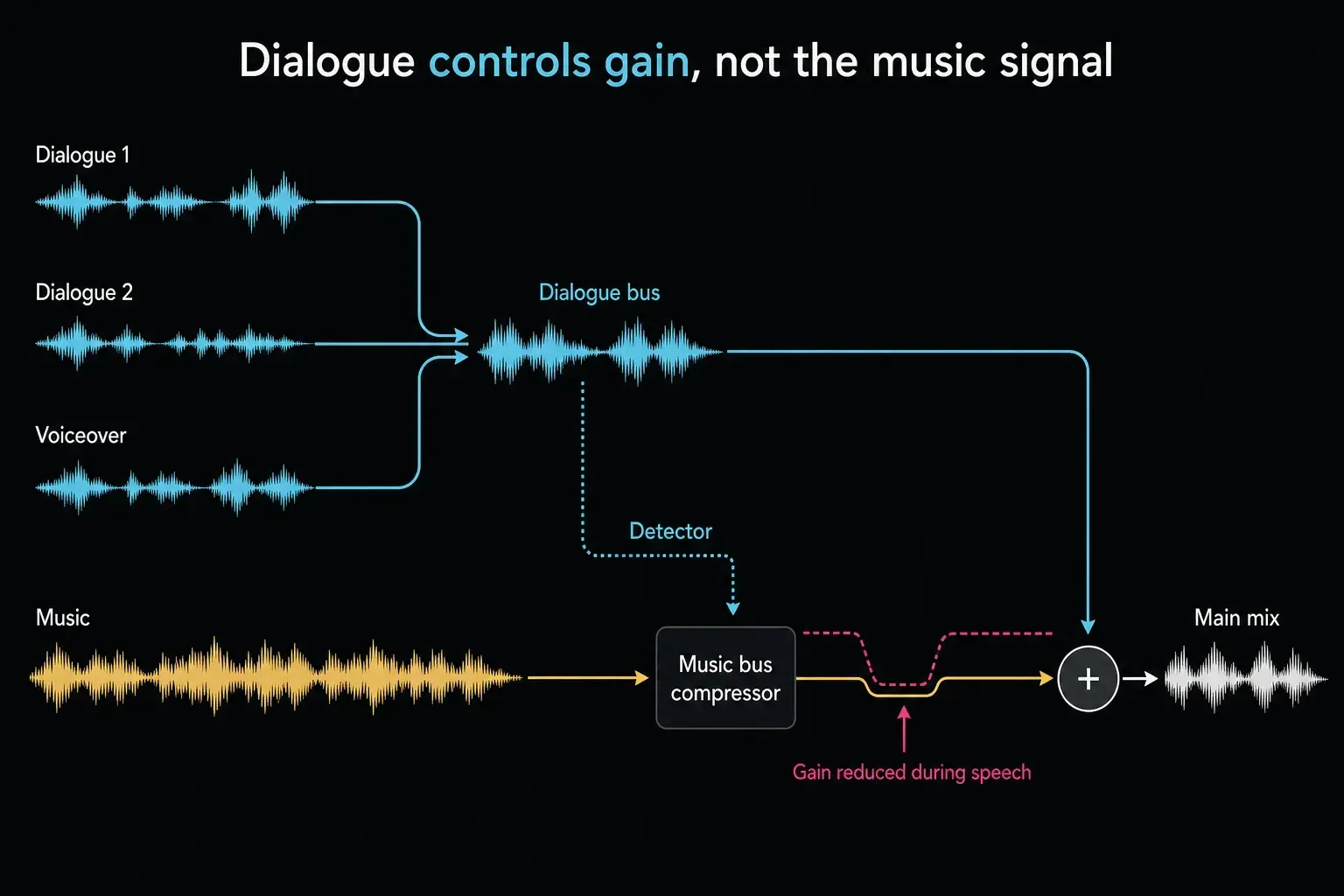
Ducker is Track FX. When several dialogue tracks feed a dialogue bus and music stems feed a music bus, use the Dynamics sidechain on the music bus.
In Resolve 21, choose the source track or bus directly inside the Sidechain module. Tutorials that tell you to enable Send on the dialogue channel and Listen on music are showing the pre-19 routing. The Fairlight bus routing guide explains the submix structure before you choose the detector.
- Route dialogue tracks to a dialogue bus and music tracks to a music bus using the Fairlight bus assignments.
- Open Dynamics on the music bus.
- Enable the Compressor.
- In the compressor's Sidechain area, switch sidechain On.
- Choose the dialogue bus as the sidechain source.
- Use Listen briefly to confirm the detector hears the intended dialogue bus, then turn Listen off.
- Set Threshold and Ratio for gain reduction; shape the move with Attack, Hold and Release.
Threshold determines when the detector causes compression. Ratio controls how strongly the music is reduced after that threshold is crossed. Attack controls entry; Hold keeps the reduction steady; Release controls the return. The Fairlight compressor guide explains the same controls in a dialogue context. Watch the gain-reduction meter, but decide with your ears.
A sidechain isn't an audible cable from dialogue into music. The dialogue bus remains in the normal mix. A detector feed measures it and controls the compressor on the music bus. If Listen remains enabled, you may hear only the detector and think the routing failed.
Where AI Audio Assistant Fits
AI Audio Assistant is a whole-mix starting point in Resolve Studio, not simply a newer Ducker button. The current Resolve 21 Reference Manual says it can organize and color-code tracks, even dialogue levels, adjust mixer faders, clean dialogue, apply music ducking, write automation and add finishing processing for the chosen delivery standard.
Use it only after separating audio elements by track and assigning the correct track categories. Run Timeline > AI Tools > Audio Assistant on an unmixed duplicate timeline, play the entire result, inspect written automation and compare it with the untouched version.
If a track was categorized incorrectly, fix its Track Category and rerun the tool. If all you need is one music bed under one voiceover, Ducker is faster and more transparent.
Don't run Audio Assistant, Ducker and a bus sidechain blindly on the same music path. Their reductions can add together and make the bed collapse. Bypass routes one at a time and keep the system whose result is easiest to control.
Use Keyframes for Editorial Exceptions
Automatic detection can't know that a musical hit should stay loud under a quiet line, or that the music needs to rise before the speaker finishes. Draw clip volume keyframes or record fader automation for those moments.
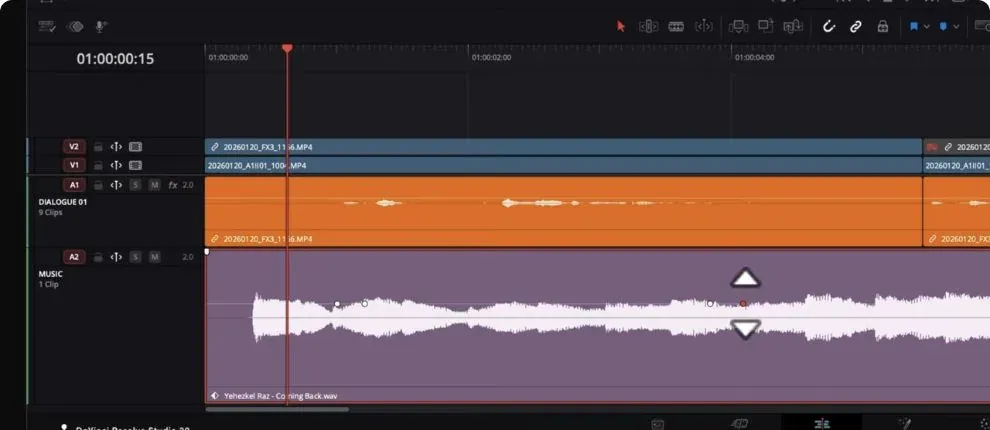
A practical hybrid is:
- Use Ducker or sidechain compression for the consistent baseline.
- Bypass or reduce it for a shot where the music must lead.
- Shape the exception with keyframes that begin before and finish after the words.
- Check the handoff into the next automatic section for a level jump.
Manual moves are slower, but they follow story rather than threshold. Use them where meaning matters more than repeatability.
Fix Pumping, False Triggers and Bad Renders
The music pumps between words
Increase Hold or lengthen Recovery Time/Release so short speech gaps don't restore the full bed. If reduction is deep, make Duck Amount milder or lower the compressor ratio.
The first syllable is masked
Add enough Lookahead in Ducker or shorten compressor Attack. Confirm the trigger track begins with the actual consonant and does not have a late clip fade.
Breaths and room noise trigger the music
Clean or edit the source, then retest. On a compressor sidechain, adjust Threshold so useful speech crosses it but the noise floor doesn't. Don't gate aggressively enough to clip word endings.
The music never returns
Solo or Listen to the detector source. A noisy dialogue track may remain above threshold. Also check Hold/Recovery Time or Release, and make sure another dialogue source isn't continuously active.
The timeline is clean but the render crackles
Render a short problem range, then bypass Ducker or sidechain and render the same range again. This A/B test tells you whether the processor path is involved; it does not prove a general Resolve bug.
If the fault follows the processor, save a duplicate project and rebuild that delivery move with keyframes or recorded automation. Verify both files in an external player before changing the rest of the mix.
Finish the Mix After Ducking
Ducking creates separation; it doesn't set final program loudness. Listen on headphones and small speakers, inspect the loudness meters and check the full mix for peaks after all busses and processing. The Resolve LUFS and audio-level guide handles that delivery pass.
Export a short representative section before the final render. Include a strong music entrance, normal dialogue, a pause and the loudest transition. If that section is clean, render the full program and check the resulting audio outside Resolve. The audio export guide covers stems and audio-only files.
Frequently Asked Questions
Is audio ducking available in DaVinci Resolve Free?
Yes. Ducker Track FX is available in the free edition. AI Audio Assistant is Studio-only. Fairlight's regular mixer and Dynamics tools provide the non-AI route for controlled mixes.
Which track gets the Ducker effect?
Put Ducker on the track you want to lower, usually music. Select dialogue as its source. The source triggers the change; the target receives it.
What is the difference between Ducker and sidechain compression?
Ducker is a purpose-built Track FX with direct depth and timing controls. Sidechain compression uses the Fairlight Dynamics compressor and can use a track or bus as the detector, making it better for bus-based mixes.
Can several voice tracks trigger one music Ducker?
Yes. Current Resolve versions let you add multiple source tracks in the Ducker. This is useful for dialogue split across speakers, microphones or voiceover tracks.
How much should music duck under dialogue?
There's no universal value. Reduce it only until the words remain clear on the intended playback devices. Deep, fast moves sound like pumping; dense music may need more space than a sparse bed.
Should I use AI Audio Assistant instead?
Use AI Audio Assistant in Studio when you want a first-pass mix across categorized dialogue, music and effects tracks. Use Ducker or sidechain when you want predictable control over one specific relationship.
This guide is part of the Fairlight audio hub. Start there for the complete path from track organization and dialogue cleanup through loudness, bus routing and delivery.
